

QUOTE(enduser @ Dec 14 2018, 09:50 PM)
TP-LINK MY pls state ur product policy about it. If true i would not buy ur product anymore.
Thx

Asking about ipv6 here and email to them also never reply..Thx
TP-LINK Malaysia Official Thread, Technical Enquiries and Support
|
|
 Dec 14 2018, 10:09 PM Dec 14 2018, 10:09 PM
Return to original view | Post
#21
|
 
Senior Member
1,138 posts Joined: May 2010 
|
QUOTE(enduser @ Dec 14 2018, 09:50 PM) TP-LINK MY pls state ur product policy about it. If true i would not buy ur product anymore. Asking about ipv6 here and email to them also never reply..Thx |
|
|
|
|
|
Dec 15 2018, 11:28 PM
Return to original view | Post
#22
|
|
Senior Member
1,138 posts Joined: May 2010
|
QUOTE(TP-LINK MY @ Dec 15 2018, 12:35 PM) Hi there, Please provide your ISP and the model of your router. Thanks. You can try the configuration below. 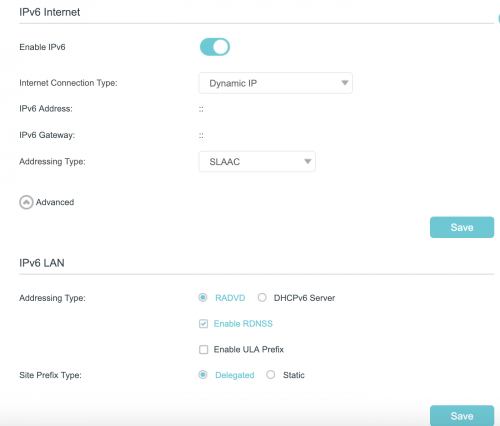 Hi there, C5400X comes with a newer qual-core processor, 1GB of RAM and 8 Gigabit Ethernet LAN ports. We will provide firmware updates when there is an issue discovered with the firmware or when we are adding new features to the router. Thanks. 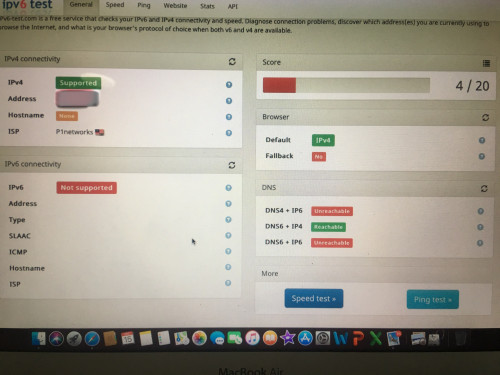 Not working Unifi 500mbps tplink C3150 This post has been edited by Khalid21: Dec 16 2018, 09:20 AM |
|
|
Dec 19 2018, 09:54 AM
Return to original view | IPv6 | Post
#23
|
|
Senior Member
1,138 posts Joined: May 2010
|
QUOTE(blstz @ Dec 19 2018, 09:16 AM) Hi, I just purchased TP Link T4U V3 USB WiFi adapter but facing intermittent internet connection drop outs when using 5Ghz band with my Windows 10 laptop. Drop out occurs mostly when PC is doing downloading/speedtest. When problem occurs, I will get a yellow exclamation (no internet) icon at the wifi icon near the system icons bar. Network signal strength is 4/5 bar connected at 500+ Mbps. try other usb outlet (usb3)Have to unplug and reconnect the Wifi dongle to reconnect to network. Not router issue as my other devices are still able to access the internet when problem occurs. Already updated to latest drivers from TPLink website. Any help? try on PC maybe not enough power |
|
|
Dec 20 2018, 06:39 AM
Return to original view | Post
#24
|
|
Senior Member
1,138 posts Joined: May 2010
|
QUOTE(Doraku @ Dec 20 2018, 01:48 AM) Change wan connection type to PPPoE then enter your unifi PPPoE username and password, then select SLAAC not working....you using c3150Is there a box named PPPoE in same session with IPv4 check it, then save all of the settings and restart your router, Hope this help  Agree, they still haven't fix the broken and not working UPnP functionality on C1200(For malaysia ver) yet. |
|
|
Dec 20 2018, 01:17 PM
Return to original view | Post
#25
|
|
Senior Member
1,138 posts Joined: May 2010
|
QUOTE(Doraku @ Dec 20 2018, 07:54 AM) What? still not working? can you post a screenshot for your ipv6 settings? now working... thanksneed to reboot after setting..... my bad.. |
|
|
Nov 13 2020, 10:55 AM
Return to original view | Post
#26
|
|
Senior Member
1,138 posts Joined: May 2010
|
QUOTE(blacktubi @ Nov 8 2020, 09:39 AM) Your issue is known as bufferbloat which is typical on a 4G Internet connection. tplink ax 20 already support one meshIt's been there since the 3G era and there's not really a solutuon unless you put a hard cap on the netflix streaming speed. Do you use the right PPPOE username and password from Maxis? |
| Change to: |  0.1198sec 0.1198sec
 0.12 0.12
 7 queries 7 queries
 GZIP Disabled GZIP Disabled
Time is now: 8th December 2025 - 10:08 AM |
 Quote
Quote