Welcome Guest ( Log In | Register )

24 Pages « < 21 22 23 24 >Bottom

Outline · [ Standard ] · Linear+

 TP-LINK Malaysia Official Thread, Technical Enquiries and Support

views
     
blacktubi
post Mar 17 2025, 10:05 PM

-
Group Icon
Elite
8,415 posts

Joined: Jul 2008

QUOTE(TiMMy_Burch @ Mar 17 2025, 11:24 AM)
user posted image
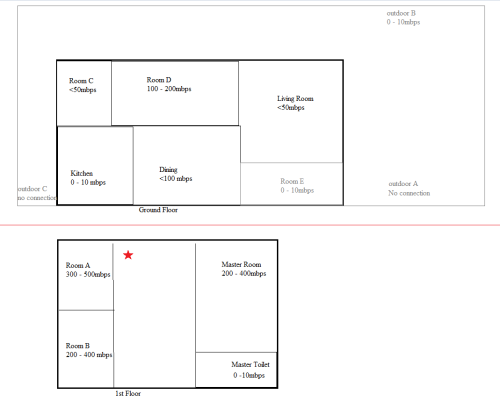
Just to recap, my unifi @ 800mbps and the red star is where i place my current router. However, the outdoor areas and some distant corners of my house currently have very shitty connection.

Just confirming, would the mesh systems XE75/BE65 resolve my issue? I've never experienced mesh WiFi before, so I'm cautious about having high expectations that might lead to disappointment.

My primary need is coverage for outdoor areas A/B/C since I plan to install Xiaomi CCTV cameras there. I'd be satisfied if I could consistently get around 100 Mbps in these locations.
*
Since you mention CCTV now, it's a very different or more challenging scenario now.

I would suggest 3 pack solution. 1 unit at existing spot, 1 unit at living room and 1 unit at room C. Some adjustment / trial and error needed.

BTW, do consider Tapo CCTV. I think they are actually better than Xiaomi. Better app, better stability and better signal reception.

Note, for CCTV the biggest issue is interference. They dont consume a ton of bandwidth but they are very sensitive to latency spike which is common on weak 2.4GHz coverage.

QUOTE(failed.hashcheck @ Mar 17 2025, 05:11 PM)
Yea I have researched around, apparently tplink didn't make any high gain variant router models like Asus did.

Looks like the best (non-ax10) I found is AX23 v1/v1.2, but the info seems conflicted. They claim it got ethernet support via update, but actual firmware download page didn't  mention any version that adds ethernet capability. Maybe different region?
I'm not going to risk it.

So the safest best is AX53 all hardware version. Got firmware update with ethernet capability available for download.
*
Do report back if it works well enough combining BE550 and AX53.


blacktubi
post Apr 10 2025, 10:34 AM

-
Group Icon
Elite
8,415 posts

Joined: Jul 2008

QUOTE(aska123 @ Apr 10 2025, 10:27 AM)
Hi All,

I have a questions. I currently using Maxis wifi 6 easy mesh KAON router. At the same time i have a mercusys Mr30G easy mesh router. Can i link both of it to use the Mercusys MR30G as a satellite mesh unit ?

I have tried to change the Mercusys into satellite mode and link both with WPS but keep fail. Hope someone have idea on this.

Thanks
*
EasyMesh is horrible when crossing brands, too much uncertainty and usually unstable

I don't suggest doing that
blacktubi
post Apr 21 2025, 04:32 PM

-
Group Icon
Elite
8,415 posts

Joined: Jul 2008

QUOTE(sijun @ Apr 21 2025, 04:09 PM)
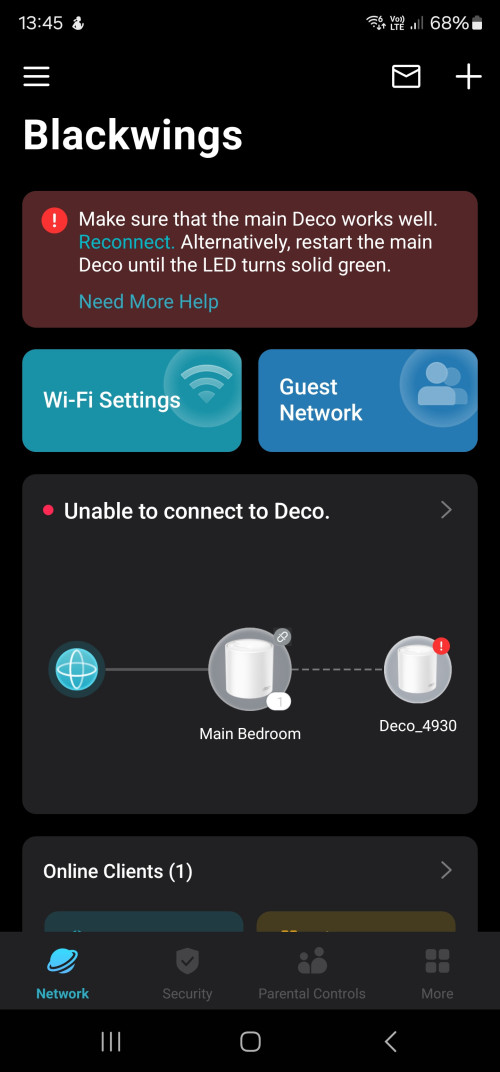
Hi. I am currently having issues with my deco x50

I have done build in lan cat6 cable in mt house. My current scenario is this

Modem > main deco > direct lan to deco. No issues, App working

Scenario 1.
Modem > main deco > lan to build in lan > build in lan to deco. Deco is green, i assume is working, however app failes to detect the whole deco network. But wifi, internet working.

Scenario 2.
Modem > main deco> switch TL SG1008D > lan to build in lan > build in lan to deco. Same deco is green, wifi , internet all working but app cannot detect. This is the same as when i directly plugin switch to deco. App fails to detect.

As of now im not sure how to troubleshoot this. Is there an issue with my build in lan? Is there an issue with the switch also? Or is their app just really bad and i have to live with it?

user posted image
*
Definitely check your build in LAN first. Use a computer to check if the build in LAN is in good condition.
blacktubi
post Apr 21 2025, 05:06 PM

-
Group Icon
Elite
8,415 posts

Joined: Jul 2008

QUOTE(sijun @ Apr 21 2025, 04:41 PM)
However i have the same issue just connecting the switch. Without using build in lan
*
Do you happen to use Unifi or Maxis?

Switch to manual VLAN settings and ensure the LAN ports are not tagged for IPTV purpose.
blacktubi
post Apr 22 2025, 10:06 AM

-
Group Icon
Elite
8,415 posts

Joined: Jul 2008

QUOTE(sijun @ Apr 22 2025, 09:26 AM)
Welp this occurs to be the case. Lan 2 was automatically designated for iptv. Switching to 3 settled my issues.

Is there anyway to totally disable iptv port? The app forces me to choose one of the ports of any deco for it
*
Like what I mention

Switch to manual VLAN/IPTV settings

If it's Unifi tag VLAN 500 for Internet then leave all the ports configured for Internet
blacktubi
post May 1 2025, 04:27 PM

-
Group Icon
Elite
8,415 posts

Joined: Jul 2008

QUOTE(failed.hashcheck @ May 1 2025, 03:23 PM)
TP-LINK MY Do I need to set appointment to come to the Jalan Imbi office for RMA?

Bought BE550 before raya.
last week when I wanted to hook up a NAS I realized that my LAN1 is not working at all (confirmed) and few days ago I also suspect LAN2 seems to be unable to operate beyond 100mbps (not confirm yet).

Website directed me to contact them by email, but whoever replying to me was a retard that has no business talking as IT support, keep pusing2 to something unrelated to my query. Or probably just low quality AI with bad English. idk.
At this point I don't see how they can be any help.

Details in the email log:

» Click to show Spoiler - click again to hide... «

*
Just walk in to their Plaza Berjaya service center, no appointment needed. Bring everything including receipt.

BTW it's opposite times square.

Remember don't go during their 2-3pm which is their lunch hour and sometime nobody is there until a bit later. Suggest to go either around 11AM - 1PM.

blacktubi
post May 1 2025, 06:44 PM

-
Group Icon
Elite
8,415 posts

Joined: Jul 2008

QUOTE(failed.hashcheck @ May 1 2025, 06:26 PM)
Ah. Nice.

If buy from their shopee official store still need to print physical receipt?
Because I don't remember receiving one with the shipment.
*
Just print the order screen just in case but I think nowadays they can trace using S/N.

BE550 still newer than 3 years anyways so every unit should be under warranty
blacktubi
post May 2 2025, 10:19 AM

-
Group Icon
Elite
8,415 posts

Joined: Jul 2008

QUOTE(Moogle Stiltzkin @ May 2 2025, 08:07 AM)
did anybody get MLO to work for wifi7?

i couldnt get it to work for my S24 Ultra client device.

wifi7 6ghz 320mhz works though. Just not MLO.

Using a EAP-773 tplink wifi 7 ap.
*
What you mean by couldn't get it to work? Like what's your expectation first?

Your phone is single radio so it only support EMLSR mode. To put it in layman terms, it's like a better version band steering. Imagine auto switch 6GHz and 5GHz that happens in <10ms. Band steering usually 200-500ms.

If you are expecting the bandwidth aggregation then it's the MLO MLMR-STR mode which requires multiple WiFi radio support. Phones and laptops are usually single radio and don't support his tongue.gif

TP-Link EAP773 got WiFi 7 certified for MLO EMLSR and MLMR-STR mode so it is guaranteed to work. tongue.gif
blacktubi
post May 2 2025, 03:14 PM

-
Group Icon
Elite
8,415 posts

Joined: Jul 2008

QUOTE(Moogle Stiltzkin @ May 2 2025, 02:49 PM)
no point mocking me about this cauz im just like most users wouldnt know the exact details. im merely reporting my results  rolleyes.gif

anyway based on ur comment, 773eap has working mlo, just not for smartphones is that right?

meaning for me to test mlo, id have to use a laptop or desktop pc with a wifi 7 card in it? is that right? that i dont have so i cant test, just checking  sweat.gif
one guy claimed mlo worked at some point for his s24 ultra hence why i asked cauz i could not get it to work  sweat.gif
https://www.reddit.com/r/GalaxyS24Ultra/com...fter_61_update/
tplink did post a guide how mlo is supposed to be configured on their ap
https://www.tp-link.com/my/support/faq/4019/
in this guide u had to untick the 6ghz, so i followed along but not work for me. i dont really understand the guide, why cant tick 6ghz, and why not using wpa3 (isnt that a must for wifi 7? isnt that what has mlo?)
I vaguely recall at some point i did have the MLO icon on my smartphone (or maybe i imagined cant remember), but i dont recall how to replicate that. In reddit the user claims an update botch mlo from working. So my guess was maybe something like that happened or my tplink setting was wrong. no idea  sweat.gif
*
Not really mocking you but just curious to find out what do you mean when you said MLO didn't work.

Is it you notice the speed is not stacking or what lead you to think MLO is not working as intended?
blacktubi
post May 2 2025, 03:35 PM

-
Group Icon
Elite
8,415 posts

Joined: Jul 2008

QUOTE(Moogle Stiltzkin @ May 2 2025, 03:21 PM)
oops. i just replied u missed it.
basically thats my situation.
as for why mlo


scroll to 6:40 mlo suppose to be a more stable consistent connection. thats the technical explanation i saw for the tech.
anyway from my wifi usage experience, on 5ghz, it just works i don't notice any issues. but as a techie just curious if it would work. supposedly i had the hardware for it, but couldnt get to work  sweat.gif
*
Are you configuring trh 3 band as 3 different SSID now?

MLO requires same SSID, you can try create another network and tick all 3 bands and make sure MLO is enabled for that network.

Once done, your phone should do the auto switching between 5GHz and 6GHz.

This post has been edited by blacktubi: May 2 2025, 03:36 PM
blacktubi
post May 4 2025, 12:03 PM

-
Group Icon
Elite
8,415 posts

Joined: Jul 2008

Moogle Stiltzkin
When you connect to the 1st SSID with Tri-Band MLO enabled, can you try to do a speedtest on your Samsung phone and see if it switches to 5GHz or 6GHz automatically, might need to check AP logs on ths

That's because on MLO network, the client might prefer 2.4GHz for power saving and only switch to 5/6Ghz when needed

For the first network, make sure PMF is required, and use WPA3 only

Note: IoT devices will break with PMF is set to required
blacktubi
post May 4 2025, 01:35 PM

-
Group Icon
Elite
8,415 posts

Joined: Jul 2008

QUOTE(nrw @ May 4 2025, 01:23 PM)
From my experience using EAP772/773 and EAP783 including 2.4GHz for MLO is counterproductive. It results in lower speeds and higher latencies even for multi radio devices.

The only scenario where including 2.4GHz would be beneficial is for long ranges where it's usually better to just add another AP anyways.
So for my personal preference for MLO I either use 160MHz channels on 5&6GHz or 160MHz on 5GHz and 320MHz width on 6GHz.

WPA3 is forced when selecting MLO by my Omada controller, so you can't select anything else anyways. PMF unlike on Ubiquiti you do not actually have to set it to Required (or Mandatory how TP-Link is calling it), it could be set as Capable.
*
I had a similar experience as well, MLO implementation on a lot of clients are inconsistent. I just disable MLO for now until all OEMs figure out how to do it properly.

The only benefits I see from MLO is using it for consumer mesh wireless backhaul where it performs better at bandwidth aggregation.
blacktubi
post May 11 2025, 05:56 PM

-
Group Icon
Elite
8,415 posts

Joined: Jul 2008

QUOTE(failed.hashcheck @ May 11 2025, 04:49 PM)
When requested via app, it was sent via email but never actually arrive.
So I use desktop and just downloaded the pdf directly from website.

Anyway, I was able to request a replacement easily earlier this week at the office without much questions asked.
*
Is it on the spot replacement and how long is the wait?
blacktubi
post Jun 7 2025, 05:34 PM

-
Group Icon
Elite
8,415 posts

Joined: Jul 2008

QUOTE(QuantumEdge @ Jun 7 2025, 03:39 PM)
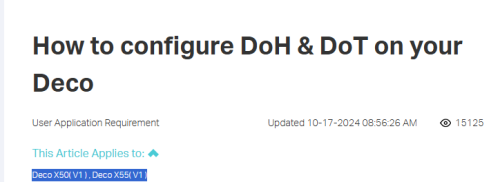
Looking for Deco systems that supports DoT/DoH
At the moment the official website only listed support for X50, X55
Is this legit? Newer Wifi 7 ones doesnt support?

user posted image
*
Performance is bad though, are you okay with it?

DoH / DoT quite taxing on consumer router CPU
blacktubi
post Jun 7 2025, 10:53 PM

-
Group Icon
Elite
8,415 posts

Joined: Jul 2008

QUOTE(QuantumEdge @ Jun 7 2025, 07:31 PM)
doh.gif
How big of a peformance drop?
On 500Mbps connection at the moment
*
The thing that it affects is not the speed, so the speedtest is still fine

It's the time it takes for the router to resolve the DNS is slow due to limited CPU power unless you using those higher end routers with faster CPU

It mainly affect browsing the web, things just feel laggy and not smooth

Suggest to setup on device DoH instead as it is much faster. Natively supported on Android and Windows now
blacktubi
post Jun 8 2025, 12:50 PM

-
Group Icon
Elite
8,415 posts

Joined: Jul 2008

QUOTE(QuantumEdge @ Jun 8 2025, 09:37 AM)
Yikes, I wanna switch my AX88u (Running merlin+DoT) out for a mesh system
Seems like I need to wait for something that's more powerful then
I'm not setting DoH on my phones because PBB app doesnt play well with custom DNS settings doh.gif
*
Since you are already using ASUS, what's stopping you from just buying another router from them and setting it up as node?
blacktubi
post Jun 8 2025, 11:42 PM

-
Group Icon
Elite
8,415 posts

Joined: Jul 2008

QUOTE(QuantumEdge @ Jun 8 2025, 10:44 PM)
A bit skeptical about roaming performance on Asus since it is missing kvr roaming?
*
They added k/v few years back and it's pretty seamless these days

Deco is still slightly more sensitive and will roam slightly more aggressively, could be a pros and cons depending on you

blacktubi
post Jun 22 2025, 11:04 PM

-
Group Icon
Elite
8,415 posts

Joined: Jul 2008

QUOTE(andrekua2 @ Jun 22 2025, 11:00 PM)
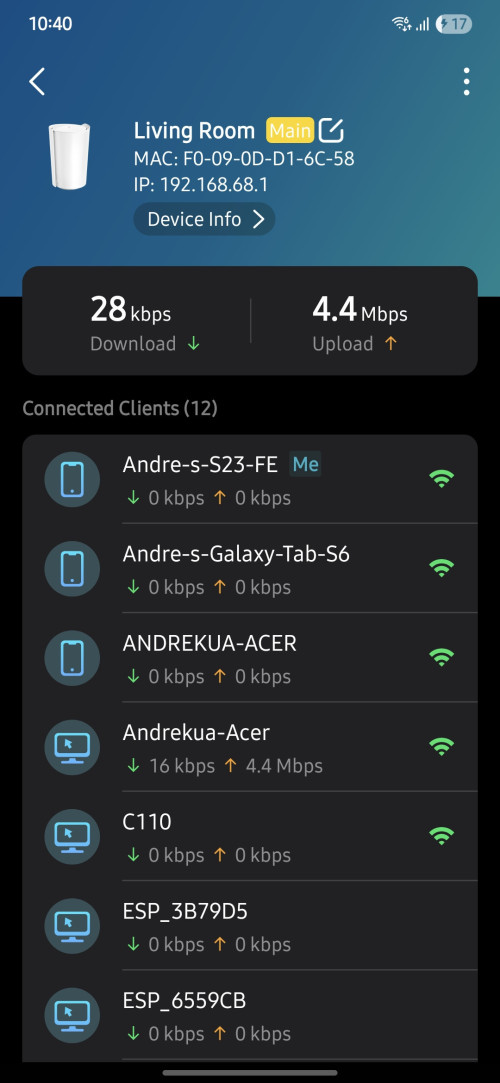
Anyone encounter thing like this? My son laptop seems to have registered 2 different mac address on my x50 5g. I'm wondering how did it get 2 mac address? The one with all caps seems to be connecting and disconnecting all the time.

user posted image
*
Windows random MAC address feature messing around?

Never occured to me before. I would try updating the WiFi driver on the laptop.
blacktubi
post Aug 4 2025, 10:25 AM

-
Group Icon
Elite
8,415 posts

Joined: Jul 2008

QUOTE(HayasakaAi @ Aug 4 2025, 06:34 AM)
anyone know where can i buy power adapter for ax90? the specs is 12v ~ 3.3A but i cannot find it anywhere
*
Walk in to TP-Link service center at Plaza Berjaya
blacktubi
post Aug 22 2025, 11:05 AM

-
Group Icon
Elite
8,415 posts

Joined: Jul 2008

QUOTE(~~5ive~~ @ Aug 22 2025, 02:24 AM)
Hi, need some help on setting up the X50.

I am using Celcomdigi fibre, and trying to replace the free router with x50.
Downloaded the app, and follow through the instruction from app, but was stucked at last step (connect to internet). It failed to connect to internet.

I have selected PPPoE, and fill in the username and password (extracted from the old router configuration). Have also tried enable the IPTV option but it still didnt work.

I am using LAN1 from modem to connect to the X50. If i switch x50 using same cable to my previous router, then the internet is working, so definitely not internet down or issue with modem/cable.

What else am i missing?

Thanks
*
Do you use LAN1 previously as well?

CelcomDigi is tricky, some might be on DiGi VLAN, some might be on Celcom VLAN

It gets even more complicated at Sabah where they have even more backhaul provider

24 Pages « < 21 22 23 24 >Top
 

Change to:
| Lo-Fi Version
0.0682sec    0.54    7 queries    GZIP Disabled
Time is now: 13th December 2025 - 11:15 AM