Welcome Guest ( Log In | Register )

24 Pages « < 20 21 22 23 24 >Bottom

Outline · [ Standard ] · Linear+

 TP-LINK Malaysia Official Thread, Technical Enquiries and Support

views
     
blacktubi
post Aug 10 2024, 11:21 AM

-
Group Icon
Elite
8,415 posts

Joined: Jul 2008

QUOTE(seand19 @ Aug 10 2024, 11:17 AM)
How about the x10 instead of x20? Because on paper the specs seems the same except for the home shield app feature and 100 sqft lesser coverage. Just trying to save money where I can 😅

Oh and how many mesh nodes would I need to cover the areas I need, 2 or 3?
*
The X20 is actually quite a bit faster in reality

I believe 2 units should be sufficient
blacktubi
post Aug 17 2024, 07:55 PM

-
Group Icon
Elite
8,415 posts

Joined: Jul 2008

QUOTE(smallarcana @ Aug 17 2024, 05:34 PM)
Hi, looking for advice on my router configuration. Using EX23v (provided by Maxis), and AX5400 is connected to it using a LAN cable.

My issue is, the connection for AX5400 is horrible. After using it for half an hour or so, it will lose connectivity to the internet. The only way to reset the connection is to change the LAN port it was plugged into. I'm not sure what causes this issue and it has veen happening for months. Appreciate any advice I can get as I cannot use the AX5400 to its full capabilities.
*
Connect it directly to the modem instead of connecting it to the router
blacktubi
post Aug 27 2024, 12:58 PM

-
Group Icon
Elite
8,415 posts

Joined: Jul 2008

QUOTE(BladeRider88 @ Aug 27 2024, 11:49 AM)
whistling.gif  whistling.gif  whistling.gif
TBH i also no idea and i am having the same thought with you, and i do express the same statement to one of my friend and end up he blocked me

p.s he is working for the company that we are talking right now

Besides that you can host your own DNS server if you are lazy to set manually one by one in the computer
*
Actually TP-Link implemented DoT and even DoH on their Wi-Fi 7 routers and they didn't announce it. It's more stable and perform better as well.

user posted image
This is on Archer BE230

But still, even though TP-Link's implementation is excellent, DoH or DoT will make your internet slower, you will definitely feel it.

DNS resolving time is way slower than the plain old DNS.
blacktubi
post Sep 5 2024, 06:11 PM

-
Group Icon
Elite
8,415 posts

Joined: Jul 2008

QUOTE(zellleonhart @ Sep 5 2024, 05:13 PM)
what the actual clusterfuck.. locked out of your local router when it's just internet down.

That's what I thought too, XT8 is 3+ years old. But AX86u pro and AX92u both will use the Wifi 6 for AiMesh backhaul, end up my devices can only connect to it via Wifi 5 or have a performance drop if not dedicated backhaul.

Looks like I just have to bear with the TP-link cons... Really can't find a good alternative yet unless I pay more than 2x more for XT12.
*
XT8 actually received a silent upgrade from ASUS. The version on sale now is the V2 version with upgraded CPU and new Wi-FI chipset.

They dont even use the same firmware as the original XT8.

And yes, XT8 can do 1Gbps over wireless backhaul from main unit to mesh node.
blacktubi
post Sep 5 2024, 11:12 PM

-
Group Icon
Elite
8,415 posts

Joined: Jul 2008

QUOTE(zellleonhart @ Sep 5 2024, 06:23 PM)
Thanks for the info! I read all your reviews and initially decided to get BE65 due to your test that it can sustain 1Gbps at the node even if separated by a wall.

Can the XT8 also achieve 1Gbps if separated by a wall and not in line of sight?
*
Both models can do this but I think the Deco BE65 have a slight edge

But I’m pretty sure the XT8 would deliver at least 800Mbps

It’s up to you to choose what you prefer
blacktubi
post Sep 7 2024, 10:24 PM

-
Group Icon
Elite
8,415 posts

Joined: Jul 2008

QUOTE(smallarcana @ Sep 7 2024, 09:45 PM)
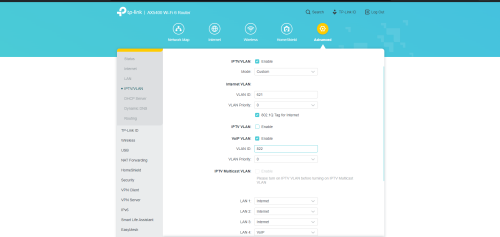
Hi, it's me again. I I changed my Maxis router to AX73, but I cannot get my VoIP to work.

Below is the setting for my AX73.
user posted image

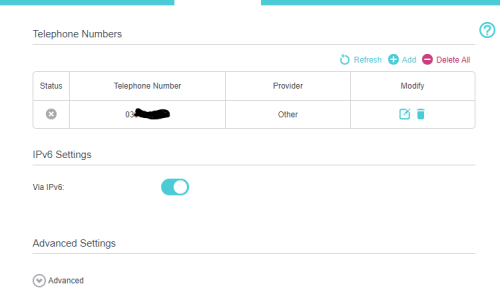
Not sure if I should set this on the Maxis router
user posted image

Hoping someone can help guide me in this matter, thanks!
*
TP-Link does not support Maxis VoIP passthrough
blacktubi
post Sep 8 2024, 12:08 AM

-
Group Icon
Elite
8,415 posts

Joined: Jul 2008

QUOTE(Anime4000 @ Sep 7 2024, 11:53 PM)
BE550 much better LAN performance, 2.5G + PPPoE no issue
*
Strange, GE800 and BE800 is same Qualcomm platform

Checked those gaming QoS settings?

BE805 is Mediatek
blacktubi
post Sep 8 2024, 03:03 PM

-
Group Icon
Elite
8,415 posts

Joined: Jul 2008

QUOTE(james2306 @ Sep 8 2024, 08:48 AM)
Hello!

I currently am renting a 1st Floor (Ground) of a shoplot for an office. My plan is to rent the 3rd Floor and am looking at options to extend the wifi. The 2nd Floor is unavailable.

Will a 2 pack Deco X50 suffice? Is the signal strong enough to penetrate upwards 2 floors?

If the wifi isnt strong enough, can i later on pull an LAN cable from the Deco on the ground floor to the 3rd floor and use it that way to make sure both floors have coverage?

Thanks guys!
*
I dont think any mesh system is robust enough to penetrate through a gap of 1 floor.

Even if it works, it wont be fast or stable.

Suggest to pull LAN cable to third floor and just buy another router and setup as access point mode.

QUOTE(smallarcana @ Sep 8 2024, 03:00 PM)
Ah man, that sucks. Another forumer said it can work. =/
So I guess it's back to stock router then.
*
TP-Link never support VoIP pasthrough for Maxis Fibre since day 1.

You can try to change the Maxis router either KAON or the C5V to bridge mode then you still can PPPOE on your own router.

blacktubi
post Oct 27 2024, 05:20 PM

-
Group Icon
Elite
8,415 posts

Joined: Jul 2008

QUOTE(xHj09 @ Oct 27 2024, 05:11 PM)
Hi guys, I have 2 pcs of x50 for my 2400 sqft house, one upstairs one downstairs, so far it’s good enough. However for my cctv require lan cable and it’s very disgusting to pull cable over, coz the position of my downstairs mesh is near entrance, quite distant from my tv+cctv dvr, about 20-25ft apart.

Should I get another x50 or two? Will having 4 be overkilling or impacting performance? The price for two pack is worth more than single.
*
Get another unit of Deco X50 and connect it to your DVR.

But just bear in mind DVR consumes a ton of bandwidth and might cause congestion to the mesh backhaul.

QUOTE(zuozi @ Oct 27 2024, 05:16 PM)
Do you think tp link in the future going to release the dlink all in one solution fiber+wifi router ?
*
They have it but not for sale direct for consumer

Even that D-Link model is only sold to ISPs

This post has been edited by blacktubi: Oct 27 2024, 05:21 PM
blacktubi
post Oct 27 2024, 06:04 PM

-
Group Icon
Elite
8,415 posts

Joined: Jul 2008

QUOTE(zuozi @ Oct 27 2024, 05:27 PM)
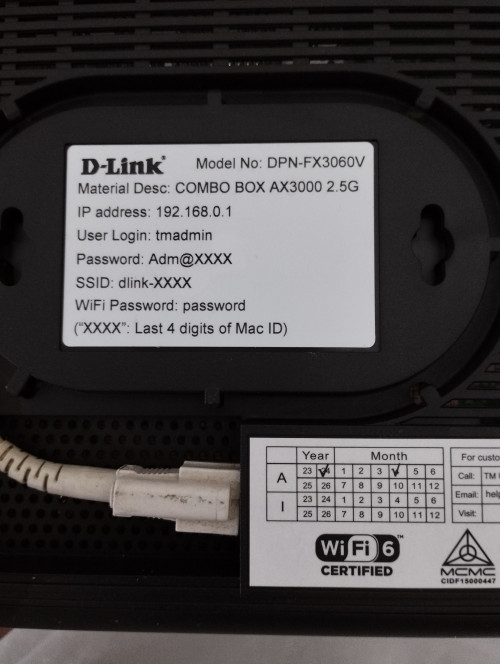
I see , regret TM upgraded my existing btu to this all in one solution Device, possible to set this dlink as standalone btu? Currently my ax3000 in Access point mode so far don't have any issues but just some option no longer accessable in access point mode, i mean i have tapo, tether app installed already biasa with their setting and configuration environment and personal i don't like D-Link products 😂

user posted image
*
You can actually use your old fiber modem. It's still able to function.

QUOTE(xHj09 @ Oct 27 2024, 05:44 PM)
Ok, my thought was using 4th one LAN to my working laptop and gaming pc. But so far using wifi is good enough.

Even if it’s not used, it’ll consume bandwidth? As in, not streaming it, just recording to storage without internet connectivity.
*
You will have to test it. Some CCTV DVRs are known to broadcast non-stop on the network.
blacktubi
post Nov 1 2024, 09:16 AM

-
Group Icon
Elite
8,415 posts

Joined: Jul 2008

QUOTE(eugenecctan @ Nov 1 2024, 09:07 AM)
UNIFI is coming to replace the Modem Router. Currently I am using the White Color Huawei Modem. Should I change?
*
Take the new unit, once they are gone, install back your old unit

Keep the new one as spare
blacktubi
post Nov 5 2024, 11:31 PM

-
Group Icon
Elite
8,415 posts

Joined: Jul 2008

QUOTE(jacktiew @ Nov 5 2024, 09:45 PM)
Confirmed by the staff in the forum 2.4GHz is not supported for MLO.
*
In case you wonder why

The 2.4GHz band on Deco BE65 and Archer BE550 do not support Wi-Fi 7, it's only up to 802.11ax

This means you can't get MLO on with most of the Wi-Fi 7 products out there


blacktubi
post Nov 10 2024, 09:25 AM

-
Group Icon
Elite
8,415 posts

Joined: Jul 2008

QUOTE(eternity4av @ Nov 10 2024, 06:23 AM)
Hi fellow seniors, I currently own AX73 v1, I've updated the latest firmware, but how do I confirm that it really has Easymesh, is it something visible through the Tether app / Web UI? Because I couldn't locate it, my intention is to add another AX53 / AX55 to upper floor.
*
Yes it is suppported on both V1 and V2 on Archer AX73.

BUT, if you intend to add AX55, make sure you buy the V1 or V4 hardware. V2 and V3 does not support EasyMesh.

As for AX53, better to get V2 version.

TP-Link feature release is always tricky as they are not standadized by model.
blacktubi
post Nov 10 2024, 10:32 AM

-
Group Icon
Elite
8,415 posts

Joined: Jul 2008

QUOTE(eternity4av @ Nov 10 2024, 10:13 AM)
was on both TMT & ALL IT yesterday, in their retail boxes, they didnt specify which ver is that, when asking the SA, they also cant verify that, especially the AX73, both AX53 & AX55 has Easymesh on their retail boxes.

For my current AX73 v1 hosted on the ground floor as AP mode to DPN-FX3060V, Upstairs I'm able to get 880mbps on my iPhone 15 Pro, 800Mbps on my S22 Ultra, but I couldn't pass 100Mbps down, but up able to get 200Mbps up on my work laptop that using Intel AX201, and able to secure 500Mbps on my M1 MBA

how can I improve the speed on my work laptop, because its slow speed, causes drop off from Microsoft Teams from time to time. Will be great if you can enlighten me.
*
I dont think you need the mesh node tbh.

I think it's your corporate endpoint security config / VPN setup causing the slow speed.

What's your speed on your work laptop when you are nearer to the router.
blacktubi
post Nov 10 2024, 04:22 PM

-
Group Icon
Elite
8,415 posts

Joined: Jul 2008

QUOTE(eternity4av @ Nov 10 2024, 10:50 AM)
thank you so much! you're live savior, i didnt knew my company had internet security that causes slowdown, and i bought a dlink dir-x3000 yesterday, and didn't work, so if i exchange it for ax55 that is same price and place it upstairs will the speed dropped to 500mbps? i noticed that ax73 that you've recommended , i suspect ax5400 wifi can really hit close to 1gbps on wifi, because when i setup mesh for the dlink dir-x3000 upstairs, while the signal is full, i only can hit 400-500mbps ish.
*
If you can already get 800Mbps upstairs, adding a mesh node will only slow it down unless it's a really good tri-band system
blacktubi
post Nov 13 2024, 01:46 PM

-
Group Icon
Elite
8,415 posts

Joined: Jul 2008

QUOTE(Omochao @ Nov 13 2024, 01:41 PM)
Archer AX55V2 Supports WireGuard VPN, EasyMesh Ethernet Backhaul, IoT Network, Speed Limit,and More

https://community.tp-link.com/en/home/forum/topic/710892

AX55 V1 V2 beta firmware supports the latest function, except DoH DoT.

with this easy mesh function, I believe their archer and deco series can finally be mesh together.
*
Deco series do not support EasyMesh
blacktubi
post Nov 13 2024, 08:41 PM

-
Group Icon
Elite
8,415 posts

Joined: Jul 2008

QUOTE(Mazda9 @ Nov 13 2024, 08:33 PM)
Good day members,

I’m currently using GE800 with 1gbps Unifi connection. Any advise or suggestion to optimise my broadband signal quality and strength as fast speed as I have been experiencing buffering often and also loss of signal
*
Are you facing this issue on your previous router? It could be an issue with the network rather than the router
blacktubi
post Dec 17 2024, 07:38 PM

-
Group Icon
Elite
8,415 posts

Joined: Jul 2008

QUOTE(b0rhui @ Dec 17 2024, 12:59 PM)
Hi all, I got a TP Link AX72 unit from SG, and I would like to flash it to MY firmware prior to setting up with UniFi. Can I confirm that Tink Malaysia uses US firmware?

https://www.tp-link.com/my/support/download...-ax72/#Firmware

Is there special setup I’ll need to do in order for it to work with UniFi?
*
Need to check if it's the consumer or ISP version

There's ISP version of AX72 in Singapore and that model can't be flashed to the consumer firmware
blacktubi
post Mar 10 2025, 10:15 PM

-
Group Icon
Elite
8,415 posts

Joined: Jul 2008

QUOTE(TiMMy_Burch @ Mar 10 2025, 07:26 PM)
Hi. I am currently using c3150 router. Now my unifi is 800mbps. Router is placed upstairs living room. (Middle of the house). However my room downstairs (far end corner) only received Iike 10-20mbps when I do speed test there

Just checking what kind of router or extender would you recommend? Household of 6 person. Mainly streaming 4k movies and ps/pc gaming.
*
I would suggest going the mesh router if it's 800Mbps

Single router cannot provide 800Mbps reliably throughout the coverage area

If you have the budget, definitely Deco BE65 and above

Deco XE75 is a good value choice
blacktubi
post Mar 16 2025, 08:47 PM

-
Group Icon
Elite
8,415 posts

Joined: Jul 2008

QUOTE(failed.hashcheck @ Mar 12 2025, 07:27 PM)
In moving away from Asus ecosystem and changing to  be550 for my main node. Any suggestions for currently cheapest ethernet onemesh node? Preferably one with low power but high gain since I'm only concerned about horizontal coverage.
Got old ax10 router from celcom, but apparently the firmware follows different update branch that didn't include the onemesh update and it would decline mainline firmware flash.
*
Gain on consumer routers are usually 3-5dBi, not much difference.

Not all TP-Link EasyMesh routers support Ethernet backhaul and it's further complicated by inconsistencies between hardware version.

Refer to this link: https://community.tp-link.com/en/home/forum/topic/593722

I highly recommend getting a model that support WPA3 else there might be issues.

The reason being WiFi 7 enforces WPA3 and if your node doesn't support WPA3, certain phones won't roam to it cause it might think it's a rogue AP. iPhone will even show a warning telling you that the network is last joined as WPA3 and ask if you want to proceed.

24 Pages « < 20 21 22 23 24 >Top
 

Change to:
| Lo-Fi Version
0.1214sec    0.52    7 queries    GZIP Disabled
Time is now: 13th December 2025 - 07:36 PM