Outline ·
[ Standard ] ·
Linear+
TP-LINK Malaysia Official Thread, Technical Enquiries and Support
|
soonwai
|
 Mar 22 2018, 06:14 PM Mar 22 2018, 06:14 PM
|

|
QUOTE(enduser @ Mar 22 2018, 06:02 PM) 3rd option is the cheapest n easiest way, , get the rm100 tplink smart switch n ur good to go Can refer here for more info https://www.blacktubi.com/guide/make-any-ro...-work-on-unifi/Yeah, that'll work. Cheap and easy. However, what I'm talking about above is doing the offload to the switch chip on the same router which is doing the routing for the internet. Separate switch not needed. So the switch chip inside the Mikrotik router handles vlan600 and the router's cpu handles vlan500. |
|
|
|
|
|
soonwai
|
Sep 23 2018, 12:31 AM
|
|
|
QUOTE(TiMMy_Burch @ Sep 22 2018, 10:50 PM) around the same speed <200 Mbps with the settings above.  i tot i can get at least 80% of the 500Mbps thru 5ghz / 2.4ghz  Sometimes the device tak ngam with the router. With the Mikrotik hAP AC2, my iPhone 6s gets 343Mbps. With my Aztech, iPhone 6s gets only 304Mbps while my iPad2 gets 518Mbps. I was expecting more from the 6S/Aztech combo. Devices are both 2x2. I have more test results here: https://forum.lowyat.net/index.php?act=ST&f=13&t=4658454This post has been edited by soonwai: Sep 23 2018, 12:32 AM |
|
|
|
|
|
soonwai
|
Nov 8 2022, 01:46 PM
|
|
|
The new cheaper Deco HC4 not bad. Tested with Unifi 500/100. One unit straight to modem. 300+ is directly one floor up. 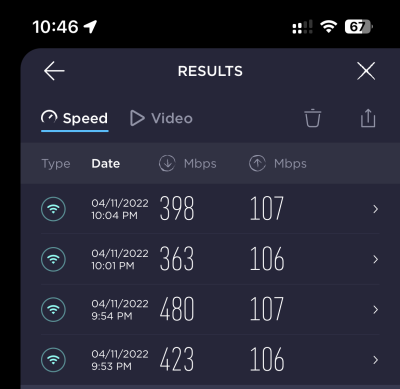 Deco HC4 & iPhone 13 Pro. |
|
|
|
|
|
soonwai
|
Oct 13 2023, 09:47 AM
|
|
|
QUOTE(SwarmTroll @ Oct 13 2023, 04:32 AM) Guys, is this an actual thing? I actually set Cloudfare DNS at the internet settings there lol. No, it's not. Set whatever DNS that you like. I'm using quad9, Google & Cloudflare. |
|
|
|
|
|
soonwai
|
Oct 13 2023, 11:09 AM
|
|
|
QUOTE(Oltromen Ripot @ Oct 13 2023, 10:07 AM) what he was advised; - for PPPoE dial-up, leave to use whatever DNS assigned by upstream. - for local DHCP service, manually set for devices to use your preferred DNS. it makes sense if the router is dependent to resolve hostnames that are only available inside own ISP network, for example, TR-069 hostname, which might not be resolvable if using 3rd-party DNS servers. Thanks for the correction. My router doesn't use TR-069 so I don't use ISP's DNS. |
|
|
|
|



 Quote
Quote
 0.1088sec
 0.63
0.63
 7 queries
 GZIP Disabled