

QUOTE(andrekua2 @ Aug 28 2021, 09:12 AM)
I guess either this... or disable ipv6 or turn off windows firewall
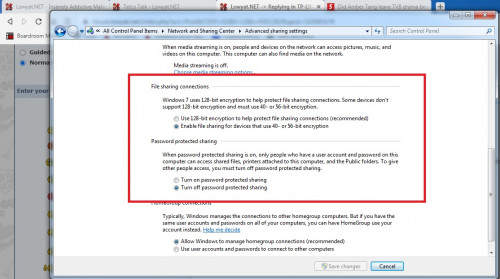

Thanks for the suggestion. I tried it but it didn't solve the problem.TP-LINK Malaysia Official Thread, Technical Enquiries and Support
|
|
 Aug 30 2021, 06:09 PM Aug 30 2021, 06:09 PM
Return to original view | Post
#21
|
 
Senior Member
5,989 posts Joined: Nov 2005 
|
QUOTE(andrekua2 @ Aug 28 2021, 09:12 AM) I guess either this... or disable ipv6 or turn off windows firewall Thanks for the suggestion. I tried it but it didn't solve the problem. |
|
|
|
|
|
Oct 7 2021, 04:17 PM
Return to original view | Post
#22
|
|
Senior Member
5,989 posts Joined: Nov 2005
|
QUOTE(crimv @ Oct 6 2021, 11:47 AM) i manage to claim for my AX50 and bought new AX73 found good price .. mana tahu still same issue .. every 2-3 days Sorry to hear your AX73 got this disconnect issue. Have you updated to latest firmware?I have 2 units of AX73 and both have been quite stable. I also do set it to reboot once a week. |
|
|
Oct 9 2021, 11:58 AM
Return to original view | Post
#23
|
|
Senior Member
5,989 posts Joined: Nov 2005
|
QUOTE(X1X1 @ Oct 9 2021, 01:16 AM) how u set auto restart ???? The auto reboot is a function within the AX73 router.btw my is unifi router, performance really bad for me if no restart ... Don't know if your unifi router got it or not. U have to login to your router and check the menu settings. If don't have this setting then you can buy a power socket timer. |
|
|
Nov 9 2021, 02:38 PM
Return to original view | Post
#24
|
|
Senior Member
5,989 posts Joined: Nov 2005
|
QUOTE(Alpha_Tay @ Nov 8 2021, 01:17 PM) Archer AX20(US)_V1_210902 Good to know got new firmware for the AX20. Just updated.Published Date: 2021-11-04 Language: Multi-language File Size: 33.48 MB ax20v1-up-ver1-3-2-P1[20210902-rel35277]_sign_2021-09-02_09.49.56.bin Hardware Version: Archer AX20 v1.20 Latest Firmware Version: 1.3.2 Build 20210901 rel.69096 Archer AX20(US)_V2_210901 Published Date: 2021-11-04 Language: Multi-language File Size: 33.54 MB ax20v2-US&CA-up-ver2-1-2-P1[20210901-rel75450]_sign_2021-09-01_21.12.25.bin New Features/Enhancement: 1. Improved the wireless performance; 2. Improved the stability of USB sharing feature; 3. Optimized VPN Client and VPN Server feature; 4. Enhanced the security of HTTPS web page; 5. Updated dropbear version and changed the dropbear port; 6. Updated openssl version; 7. Improved the stability of OneMesh feature. Bug Fixed: 1.Fixed the bugs related to IPTV feature; 2.Fixed the bug that static routing can't set gateway as 0.0.0.0; 3.Fixed the bugs related to AP mode; 4.Fixed the bug that the router can't get WAN IP in some cases; 5.Fixed the bug that WAN pc can get access to the Windows shared folder after disabling DMZ in some cases; 6.Fixed the bugs on the Web UI; 7.Fixed the bugs related to Smart Connect; 8.Fixed the bug related to GDRP encryption. Alpha_Tay liked this post
|
|
|
Nov 19 2021, 04:50 PM
Return to original view | Post
#25
|
|
Senior Member
5,989 posts Joined: Nov 2005
|
Say, anybody here used the AX23 router? How is it?
|
|
|
Feb 27 2022, 11:09 AM
Return to original view | Post
#26
|
|
Senior Member
5,989 posts Joined: Nov 2005
|
QUOTE(squall_12 @ Feb 15 2022, 05:49 AM) hi guy, I have 3 units of AX73 at different premises. All are on 24/7, quite stable and no issues so far. 5GHz performance is very good and wide coverage, 2.4GHz is above average.anyone using TPLINK AX73 how the router so far? Thanks |
|
|
|
|
|
May 22 2022, 03:34 PM
Return to original view | Post
#27
|
|
Senior Member
5,989 posts Joined: Nov 2005
|
QUOTE(Momo33 @ May 7 2022, 10:34 AM) 2.4G hard to get 200mbps speed. Agree with this. I'm on 300mbps line.its old tech and most routers only built 2 antenna for 2.4G hence performance cannot be tops. Using 5GHz wifi I can hit the full speed when near the router. But using 2.4Ghz, I only get around 165+ mbps even when right next to router. Tested using iphone and AX73. This post has been edited by jchong: May 22 2022, 03:39 PM Momo33 liked this post
|
|
|
Jun 29 2022, 03:10 PM
Return to original view | Post
#28
|
|
Senior Member
5,989 posts Joined: Nov 2005
|
I have an AX-73 router. But strangely my laptop cannot be detected/seen by other devices on the network.
Maybe it's a security setting on the AX-73? Anyone know what setting to change to make my laptop discoverable on the network? |
|
|
Jul 1 2022, 05:34 PM
Return to original view | Post
#29
|
|
Senior Member
5,989 posts Joined: Nov 2005
|
QUOTE(blacktubi @ Jun 30 2022, 10:14 PM) Thanks for the article. I'll check it out. |
|
|
Jul 7 2022, 09:43 AM
Return to original view | Post
#30
|
|
Senior Member
5,989 posts Joined: Nov 2005
|
QUOTE(blacktubi @ Jun 30 2022, 10:14 PM) Hi blacktubi,I followed that guide and changed the Windows settings. Unfortunately, it did not resolve the problem I had. To be more specific the problem is sending scanned documents from the common photocopier to my laptop. When connected to the AX-73, the photocopier somehow cannot see my laptop and can't send the scanned file. In my office there are other routers also, one of them is an old TP Link TL-WR841HP. Funny thing is when I connect to this router (via 2.4GHz), then there is no problem sending the file to my laptop. Hence, I'm wondering why the AX-73 is giving me this problem. |
| Change to: |  0.0271sec 0.0271sec
 0.75 0.75
 7 queries 7 queries
 GZIP Disabled GZIP Disabled
Time is now: 18th December 2025 - 07:33 PM |
 Quote
Quote