Outline ·
[ Standard ] ·
Linear+
Digi Infinite Fan Club [V2], Infinite 150 and Infinite 80
|
Dozz
|
 May 31 2017, 11:36 AM May 31 2017, 11:36 AM
|

|
QUOTE(pakmulau @ May 31 2017, 01:50 AM) Just placed order Huawei E5186s-22 at Aliexpress for USD136/RM582 with cashback RM100 from Shopback  so this i150 will my main broadband for many years i think last week terminate Unifi after holding for 5 months waiting for relocation hope this router much better than E5776 I got from maxis 4 years back which is always disconnect Which shipping option did you choose?? |
|
|
|
|
|
Dozz
|
May 31 2017, 04:29 PM
|
|
|
QUOTE(mrbs84 @ May 31 2017, 04:23 PM) Just tested my infinite 150 with E5186, quite happy so far. On phone around 48mbps, on mac around 58mbps. Later will test it out on PS4. have you try to connect a cordless phone to the router and make phone call? does it work ? |
|
|
|
|
|
Dozz
|
May 31 2017, 06:05 PM
|
|
|
QUOTE(mrbs84 @ May 31 2017, 04:34 PM) i dont have any phone to test. maybe have some old phone in my store, later i test it out. great! please let us know the outcome. |
|
|
|
|
|
Dozz
|
May 31 2017, 06:22 PM
|
|
|
QUOTE(Atsutane-Shirane @ May 31 2017, 06:07 PM) Phone should be working fine... Mine B310 working perfectly with TM cordless phone... Thats great! Thx |
|
|
|
|
|
Dozz
|
May 31 2017, 11:29 PM
|
|
|
QUOTE(prosibu @ May 31 2017, 07:30 PM) managed to reach 1TB before renew... speed capped at 5mbps both download n upload... not sure if anyone mention about this so i just share [attachmentid=8863066] [attachmentid=8863067] Are you using MyDiGi app to view this? |
|
|
|
|
|
Dozz
|
Jun 1 2017, 11:09 AM
|
|
|
QUOTE(prosibu @ Jun 1 2017, 06:27 AM) I think i via digi.com.my using chrome to view.... weird, i'm using i150 plan too but i unable to view the 1000GB quota counter like you.. not in mydigi app and chrome |
|
|
|
|
|
Dozz
|
Jun 1 2017, 11:34 AM
|
|
|
QUOTE(plateau @ Jun 1 2017, 11:18 AM) Try refreshing the page and see if it works. Also try to see if you're logged into your Connect account. Great! i can view it now... thanks QUOTE(HolySatan @ Jun 1 2017, 11:22 AM) digi website : http://new.digi.com.my/cs/Satellite/Page/myocs/default/Usagemy digi apps also can.. its not 1tb quota.. itu volume used already reach 1tb lah  or use old version mydigi apps  but infinite 150 unlimited internet quota I able to view in on website now but not myDiGi app. Probably latest version doesnt support i assume. |
|
|
|
|
|
Dozz
|
Jun 2 2017, 04:36 PM
|
|
|
QUOTE(damhamaza @ Jun 2 2017, 04:11 PM) Bought infinite 150 yesterday, and today arrived already..so fast It took less than 30 mins from DiGi prepaid to Infinite 150 once i click submit online. No need to change sim card! Amazing!!! |
|
|
|
|
|
Dozz
|
Jun 2 2017, 05:36 PM
|
|
|
QUOTE(fruitie @ Jun 2 2017, 04:37 PM) If already with Digi, then no need to change SIM. I just aware of this! Good |
|
|
|
|
|
Dozz
|
Jun 3 2017, 09:23 PM
|
|
|
QUOTE(blacktubi @ Jun 3 2017, 04:08 PM) My findings on the E5186 firmware Updating the firmware on the E5186 is a very complicated process.  The WebUI and the firmware is 2 different component. If you just want a new WebUI, it is a very easy upgrade. A complete upgrade of the firmware is quite complicated and it involves a bit of luck as well. [attachmentid=8870716] My device comes with 21.306.01.00.00 originally and the 16.100.02.00.03 WebUI. Updating to the new UI display more information such as signal stats, band and CA status. You do not need a third party tool to check signal on the new UI. As for what is the difference in the new firmware? Stability and performance improvements. Edit: I will produce a guide soon when I am free. It is a very complicated process. I should be receiving the same modem by next week. Looking forward for your guide to update and configuration soon. Thank you very much! |
|
|
|
|
|
Dozz
|
Jun 5 2017, 11:54 AM
|
|
|
I have a portable MiFI modem (Huawei E5776s-32) , Anyone know how configure or tweak the band for this modem?
|
|
|
|
|
|
Dozz
|
Jun 5 2017, 12:17 PM
|
|
|
QUOTE(Safar @ Jun 5 2017, 12:16 PM) I don't think this model have any tweak, also it doesn't support LTE-A Alright then, thx |
|
|
|
|
|
Dozz
|
Jun 6 2017, 02:41 PM
|
|
|
|
|
|
|
|
|
Dozz
|
Jun 7 2017, 11:48 AM
|
|
|
I'm using Huawei E5186s-22a, i notice internet stop working when i making and receiving calls. Internet resume once i hang up.
Anyone have facing this problem too?
|
|
|
|
|
|
Dozz
|
Jun 7 2017, 11:56 AM
|
|
|
QUOTE(Neomax3 @ Jun 7 2017, 11:54 AM) your router is switching between 3G and 4G.. a normal thing.. 3G's internet wont work? |
|
|
|
|
|
Dozz
|
Jun 7 2017, 02:52 PM
|
|
|
QUOTE(blacktubi @ Jun 7 2017, 12:38 PM) The router needs a small time to switch from LTE to 3G. And sometime it will got stuck there. Try forcing your router to 3G only and see if the issues persist. What is your firmware version? Yes i tried that but no internet connection as well. i;m using Software version: 21.310.01.20.11 Web UI version: 16.100.02.00.03 QUOTE(alexchew_2020 @ Jun 7 2017, 01:13 PM) when on call, it will switch to 3G. 3G speed nowadays very bad and slow... might get <1mbps or 0.2mbps only But once making call, internet totally stuck.. not moving at all |
|
|
|
|
|
Dozz
|
Jun 7 2017, 04:04 PM
|
|
|
QUOTE(fadzly @ Jun 7 2017, 03:53 PM) its normal even for your smartphone Alright then ! |
|
|
|
|
|
Dozz
|
Jun 8 2017, 10:56 AM
|
|
|
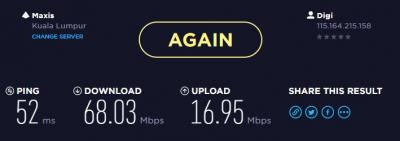
I bought these from taobao. Speed has been improved a lot after using this combo set. External antenna is working and really boost up the speed. Normally i only get 30Mbps (iPhone 7 Plus) but now i got 60Mbps and above! Amazing! 
 This post has been edited by Dozz: Jun 8 2017, 10:58 AM
 |
|
|
|
|
|
Dozz
|
Jun 8 2017, 11:07 AM
|
|
|
QUOTE(KaizokuLuffy @ Jun 8 2017, 10:59 AM) Really? my 5186s indoor signal 3 bar, avr 8-20mbps. Will it boost the speed if i use this antenna ? Two factors to improved the speed 1. put modem and antenna near window or even better put the antenna outside the window if possible 2. speed is depend on location. in case your location is slow, i think it wont improved much. But you can try.. who knows? |
|
|
|
|
|
Dozz
|
Jun 8 2017, 11:08 AM
|
|
|
QUOTE(STEVE75 @ Jun 8 2017, 10:59 AM) pls share the link for Taobao I bought this one https://item.taobao.com/item.htm?spm=a1z09...._u=821ko2qkc22a |
|
|
|
|



 Quote
Quote
 0.0762sec
 0.17
0.17
 7 queries
 GZIP Disabled