Welcome Guest ( Log In | Register )

Bump Topic Topic Closed RSS Feed

Outline · [ Standard ] · Linear+

Unifi Unifi Lite 10Mbps - v2.0 -, TM illegitimate child hidden in basement

views
     
andyng38
post Jul 5 2017, 10:33 PM

Look at all my stars!!
*******
Senior Member
2,400 posts

Joined: Jun 2007
QUOTE(hizad @ Jul 5 2017, 05:21 PM)
Out of the blue TM installer came and upgrade my Streamyx 8Mbps to Unifi Lite. According to them since it is an upgrade I will be able to maintained my HyppTV STB with a new id and password. After they left that I found out the router Netis uses IPv6 hence there goes my subscribe SmartDnsProxy. It is possible to disable IPv6 for IPv4?
*
Do you mean to say that they upgraded you to Unifi Lite without being requested to do so?

Or was an upgrade request submitted, and the installer came unexpectedly without making an appointment?
andyng38
post Jul 6 2017, 02:14 PM

Look at all my stars!!
*******
Senior Member
2,400 posts

Joined: Jun 2007
QUOTE(hizad @ Jul 6 2017, 11:00 AM)
Actually when unifi lite was introduced i went to tm point and they said mine is an upgrade and will proceed once in the system. They called my landline no answer and since they are in the neighbourhood they gave it a try.
*

OK thanks for the clarification.
andyng38
post Jul 7 2017, 04:38 PM

Look at all my stars!!
*******
Senior Member
2,400 posts

Joined: Jun 2007
QUOTE(Xefron @ Jul 5 2017, 01:49 PM)
based on insider, probably next week, all agents can sell UniFi Lite RM129.
*
Hopefully your insider info is correct.

I went to TM Point today to pay my bill, and casually inquired...was told the Unifi Lite promo ended on 30th June.
andyng38
post Jul 7 2017, 09:39 PM

Look at all my stars!!
*******
Senior Member
2,400 posts

Joined: Jun 2007
QUOTE(cho @ Jul 7 2017, 05:48 PM)
just got a call from 0326015400.

as a user of webe, TM offered me unifi lite for RM109 w/o free call
or RM129 with free call...
*
*hoping hard* that I'll get a call soon with a similar offer smile.gif
andyng38
post Jul 9 2017, 10:23 PM

Look at all my stars!!
*******
Senior Member
2,400 posts

Joined: Jun 2007
Hope some Unifi sifu can answer my questions:

1) During a power outage, can the phone be hooked up to a UPS/power bank/some sort of battery so that it still can be used?

2) If I am a Unifi subscriber who has to move to another address (it is in a Unifi-service area), how much will it cost to transfer the subscription to the new address?

Thanks!!
andyng38
post Jul 10 2017, 11:52 AM

Look at all my stars!!
*******
Senior Member
2,400 posts

Joined: Jun 2007
QUOTE(cyaoping @ Jul 10 2017, 12:06 AM)
1) my experience, don't use it while conditions like that. It's dangerous and will deplete the battery life period

2) Will charges by TM RM300
*
Thank you sharing your experience!

QUOTE(cho @ Jul 10 2017, 07:48 AM)
1.  unifi phone need BTU unit to translate digital signal to analog signal. assuming fibre connection is still available during the outage, you need to use UPS to power the phone and the BTU to be able to use the phone

2. Relocation fee is RM300. However, according to their FAQ, first time relocation is free

» Click to show Spoiler - click again to hide... «

*
Thank you for the info!
andyng38
post Jul 13 2017, 02:56 PM

Look at all my stars!!
*******
Senior Member
2,400 posts

Joined: Jun 2007
Am now on Unifi lite RM129+GST/month. It's performing decently. Never had such a high upload speed in my life biggrin.gif

They gave me an ONU-Alcatel-Lucent-I240G and a TP-Link AC1200.
Just picked up the free phone from TM Point...it's an ordinary single line unit, nothing fancy.

Now I'm wondering what to do with the Huawei set-top box I got with the former 8mbps package. I was told that Hypptv Everywhere won't work on it. Anyone installed the Hypptv app on that box b4?


andyng38
post Jul 13 2017, 03:21 PM

Look at all my stars!!
*******
Senior Member
2,400 posts

Joined: Jun 2007
QUOTE(tzh2001 @ Jul 13 2017, 03:07 PM)
install shafa guanjia & u will have everything  rclxms.gif
*
Thank you. I shall look into it! thumbup.gif
andyng38
post Jul 13 2017, 04:14 PM

Look at all my stars!!
*******
Senior Member
2,400 posts

Joined: Jun 2007
QUOTE(elmond @ Jul 13 2017, 03:32 PM)
you still can use the STB according to the TM faq.
can you give a try?
*
I'll mess around with it this weekend and see what happens

QUOTE(zeronehza @ Jul 13 2017, 03:33 PM)
need to revoke the mac address, i've chat with mytm they said cannot use with everywhere ID.. but i assume if u can revoke the mac and rebind with new ID .. walla no problem.. need someone u know internally to do that.. hmm..
*
Interesting! I dunno anyone internally. Maybe it's possible to spoof the stb's mac? hmmmm.....
andyng38
post Jul 13 2017, 04:42 PM

Look at all my stars!!
*******
Senior Member
2,400 posts

Joined: Jun 2007
QUOTE(santeria @ Jul 13 2017, 04:36 PM)
to use your tm stb, make sure you use wifi and download this hypptv everywhere app (for tablet).
https://apkpure.com/hypptv-everywhere-table...m.huawei.pad.tm
100% working for me. just dont connect LAN cable. use wifi only.
*
Thanks for that! Will try it out this weekend thumbup.gif
andyng38
post Jul 14 2017, 05:04 PM

Look at all my stars!!
*******
Senior Member
2,400 posts

Joined: Jun 2007
QUOTE(ssupra @ Jul 14 2017, 12:08 PM)
any way we can know unifi upcoming coverage?
*
You can try this:

1) Go to TM Point, give them your phone number and the address of your land line (or just your address if you haven't got a phone line there yet) and ask them to call the technical department in charge of your area to ask when you'll be covered by unifi. They should know approximately when your area will be covered, or if there are no plans to cover your area at all.

2) If the staff at TM Point is having a bad mood, and you know where the technical department is, go there personally and ask. You may have to register at the guardhouse and leave your IC/driving license there as those places are usually secured locations.

I've done #2 to find out when 4mbps was coming to my area, and #1 to ask when 8mbps would reach me.

Didn't have to do that with unifi's arrival here...saw the yellow/black cables being installed on my street after the copper wires were changed, was bombarded with pamphlets, had a big Unifi banner placed outside my house that partially blocked my view when reversing the car out, and they put a table and an awek wearing TM's corporate blue tudung by the roadside to hand out unifi brochures...I pitied her...she didn't even have an umbrella and was boiling under the sun!

However when I went to TM Point to pay my bill and casually inquired about unifi lite, I was told that the promotion was over! (Post #1575 in this thread), and since then I discovered that there are agents who can hook you up very fast smile.gif
andyng38
post Jul 15 2017, 01:06 PM

Look at all my stars!!
*******
Senior Member
2,400 posts

Joined: Jun 2007
QUOTE(dashisiong @ Jul 15 2017, 12:35 AM)
Hi,

Anyone can suggest a good asus router to replace my Dlink-850L?

This D-link have speed delay problem, i already change to google DNS and also disable Ipv6.

Thanks
*
If your "speed delay" problem pertains to wireless devices, this thread may give you some insight into your router: https://forum.lowyat.net/topic/3857746/all

inSSIDer program to check out yr wifi connect (along with overlapping channels, congestion etc) https://www.techspot.com/downloads/5936-inssider.html

Am using the TP Link router that TM gave me, using Google DNS and no IPV6...whole house (upstairs and downstairs) has full bar wifi and everything's speedy.
andyng38
post Jul 15 2017, 04:13 PM

Look at all my stars!!
*******
Senior Member
2,400 posts

Joined: Jun 2007
TP Link, D'link, ZTE, Netis....does anyone know why TM gives so many different brands of routers??

A very large bulk purchase of 1 brand would certainly get a better price and/or a better model of router, not to mention making it easier for tech support to help users, as well as for subscribers to able to share info and tips.

Or is it a matter of various suppliers with cable or cronies taking turns to supply TM?


andyng38
post Jul 15 2017, 04:56 PM

Look at all my stars!!
*******
Senior Member
2,400 posts

Joined: Jun 2007
QUOTE(zeronehza @ Jul 15 2017, 04:42 PM)
tplink and dlink for HSBB area that configuration need btu+router

zte and netis for subb area, the configuration like a streamyx, (it's actually streamyx with vdsl2 tech)
*
Ah I see....thanks for the info!


andyng38
post Jul 15 2017, 08:08 PM

Look at all my stars!!
*******
Senior Member
2,400 posts

Joined: Jun 2007
QUOTE(birain @ Jul 15 2017, 06:17 PM)
ic, btw, the thumprint, agent come to get or need to go tmpoint?

- how long it takes for the agent to take your application for unifi lite?
- when unifi lite approved, how long it takes the installer to come and installer unifi lite?
*
My experience:
Thumbprint taken by agent in the late afternoon

Day 1: I received 2 emails from TM confirming order submission

Day 2: Received SMS from TM approving my order, along with installer phone number and date of installation. Got a call from TM staff asking me to verbally confirm my order, followed by another SMS confirming my confirmation, and confirming my install appointment. Many confirmations!

Day 3: An installer (different from the phone number given to me by SMS on day 2) phones me in the morning asking if he can come earlier instead of at the afternoon appointed time. I say no problem as I set aside the whole day to wait for the installer. He arrived in 10 minutes and installation took less than 1 hr, everything working fine.

While he was installing, another installer calls my cell asking if I wanted unifi installed today! I told him someone was already installing it and he said goodbye.
In the afternoon, another installer phones me asking if he can come now and install biggrin.gif And about an hour after that, I get an SMS from an unfamiliar number asking if I want unifi!! I dunno what was going on....maybe TM has many installers and they just let them chase for whoever was scheduled for an install that day on a first come first served basis. Pity those guys lah.



andyng38
post Jul 16 2017, 12:52 AM

Look at all my stars!!
*******
Senior Member
2,400 posts

Joined: Jun 2007
QUOTE(nmb3rs @ Jul 16 2017, 12:23 AM)
In terms of parts sourcing, it is never a good idea to source from a single manufacturer/supplier.  If a single sourced manufacturer/supplier is unable to meet TM's demand, then they are screwed which means new customer wont get their equipment. Delayed in installation for new customers means less revenue for TM.

Also with more supplier/manufacturer, it gives TM some negotiating power - in the sense that you can lower the price to be comparable with other supplier/manufacturer. But of course it also depends on how good their procurement team manage the volume that each supplier/manufacturer gets which can get tricky.

I'm not in the supply line background but I've worked with procurement teams to qualify alternative components source in the electronic industry - it is a norm and healthy practice to get supplies from more than 1 source.

Hope this helps  smile.gif
*
A most logical and sensible post indeed. Yes it helps a lot, and I understand now. Thanks for that!! thumbup.gif
andyng38
post Jul 16 2017, 08:19 PM

Look at all my stars!!
*******
Senior Member
2,400 posts

Joined: Jun 2007
QUOTE(Elvin7 @ Jul 16 2017, 05:12 PM)
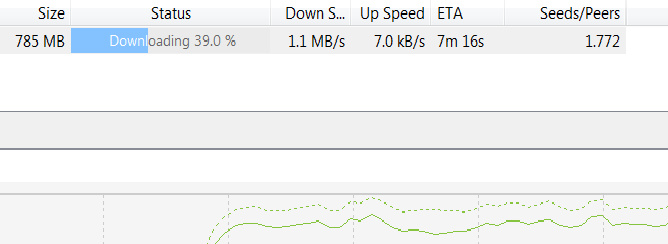
Any1 can share what the average downloads speed for this lite version? Can it up too 1mbps?
*
Sustained dl speeds of 1.1-1.2MB/s regularly.

user posted image
andyng38
post Jul 17 2017, 10:49 PM

Look at all my stars!!
*******
Senior Member
2,400 posts

Joined: Jun 2007
QUOTE(khfoo88 @ Jul 17 2017, 05:56 PM)
Dear all, any one plug the streamyx hppy tv STB to unifi lite? as streamyx STB not required port 4 to obtain IPTV
any sifu test?
*
Didn't get to try it out last weekend...was very preoccupied with other stuff. Hopefully others will chime in and give u feedback.
I'll probably get around to it one of these days...I haven't even tuned my tv to digital channels yet! biggrin.gif
andyng38
post Jul 18 2017, 09:21 PM

Look at all my stars!!
*******
Senior Member
2,400 posts

Joined: Jun 2007
QUOTE(hizad @ Jul 18 2017, 09:14 PM)
He just changed Streamyx to Unifi as per pix and used userid@tvos and password either NA or 123456
*
Wow Thanks! I'll try that one of these days...in the 1 yr I had hypp tv, I think i watched less than 10 hrs biggrin.gif

BTW u have a very nice tv, and stylish tv cabinet thumbup.gif
andyng38
post Jul 19 2017, 12:55 PM

Look at all my stars!!
*******
Senior Member
2,400 posts

Joined: Jun 2007
QUOTE(mistyblu @ Jul 19 2017, 12:13 PM)
Sorry.... I dun know where to ask this... TM have not been very helpful...

Just had UNIFI installed at my triple storey house.  Installers says now TM not supplying the Fibre termination box (external wall) & Fibre wall socket  (internal wall) anymore...

so now I got a very long cable fr the FDP on the outside pole to my room (thru a hole) directly connected to my modem....

Looks quite scary to have one single cable connected like that... 🤤

Anyone can verify this?

Also the installers didn't do a proper job at making it tidy and seal the gapping hole! 😲

[attachmentid=8975790]
*
Mine is the same way....one long cable from the telephone pole to inside the house, and it's plugged in to the optical network unit. But they did a neater job with the cable and also sealed up the hole with white cement. However on the acceptance form, they still differentiated between outside and internal fiber even though it's just one long contiguous cable.

2 Pages  1 2 >Top
Topic ClosedOptions
 

Change to:
| Lo-Fi Version
0.0835sec    0.59    7 queries    GZIP Disabled
Time is now: 4th December 2025 - 09:25 AM