Outline ·
[ Standard ] ·
Linear+
Unifi Official TM UniFi High Speed Broadband Thread V31, Speed Upgrade Coming Slowly
|
cucubud
|
 Jul 14 2017, 10:01 PM Jul 14 2017, 10:01 PM
|

|
QUOTE(fruitie @ Jul 14 2017, 09:52 PM) Change WiFi channel. I used to have that issue too. Problem solved after I changed the channel. Still 52Mbps in my sister's house.  Fruitie, want to find out about the phone number in your Unifi. Since you relocate your Unifi from PJ to your sister's house, can you use back the same number there? This post has been edited by cucubud: Jul 14 2017, 10:02 PM |
|
|
|
|
|
cucubud
|
Jul 14 2017, 11:19 PM
|
|
|
QUOTE(fruitie @ Jul 14 2017, 10:33 PM) Of course no because different state. When I relocated from my old house to my current PJ house, just sebelah taman, I had to change no. too because different exchange area. Thanks for your reply. |
|
|
|
|
|
cucubud
|
Jul 21 2017, 07:50 AM
|
|
|
QUOTE(MX510 @ Jul 21 2017, 05:33 AM) I didn't get the upgrade yet any idea how to speed up things? Read a few previous pages and you'll get the ideas from some subscribers. |
|
|
|
|
|
cucubud
|
Jul 31 2017, 01:12 PM
|
|
|
QUOTE(vez @ Jul 30 2017, 09:20 PM) fiber wall socket last time there are Fiber Termination Box outside landed house, and go into house reach Fiber Wall Socket.... now i believe they save cost, completely remove these two my house still have FWS, but that time they dont install FTB already Now, the installer lagi great. Didn't give the FWS. The outdoor fiber (black colour) straight go into the BTU.  |
|
|
|
|
|
cucubud
|
Jul 31 2017, 04:57 PM
|
|
|
QUOTE(Ckmwpy0370 @ Jul 31 2017, 03:44 PM) any issue if direct to btu? No issue with that. Just cannot move the BTU freely. |
|
|
|
|
|
cucubud
|
Aug 1 2017, 06:40 AM
|
|
|
QUOTE(birain @ Aug 1 2017, 06:31 AM) same here, they says less interference and less speed loss (dunno if they troll me or not), but i think they less work, climb tiang, find empty port, cucuk cable and tarik until the btu port. if needed raceway casing, they will sarung the fibre cable into it and pay on spot.  It is true in a way. Less joints then less point of failure. If dust were trapped between the joints, then signal will be affected. |
|
|
|
|
|
cucubud
|
Aug 8 2017, 05:16 PM
|
|
|
QUOTE(prs516 @ Aug 8 2017, 02:05 PM) Just got free speed upgrade from 50Mbps to 100Mbps. I can get full 100-103Mbps download and 50-52Mbps upload when tested using LAN via my Pc. When i tested using wifi AC from my iphone 7plus i can only get 20 to 30Mbps download only but can get 50-52Mbps upload. I'm using Asus RT-AC55UHP. Any thought? This is strange. I tested iPhone 6S on 5GHz WiFi with D-Link DIR 868L router in Singapore. It can reach to about 300Mbps upload and download speed. 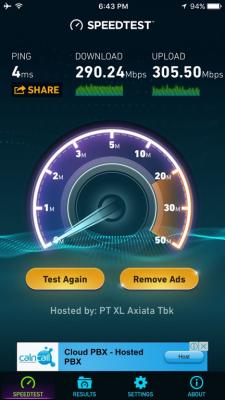
|
|
|
|
|
|
cucubud
|
Aug 8 2017, 06:02 PM
|
|
|
QUOTE(prs516 @ Aug 8 2017, 05:47 PM) Yes it is strange. When i install the router that the installer gave to me(D-Link DIR-850L) and test the 5GHz wifi, i can get full speed 108Mbps download & 51Mbps upload without any problem using the same iphone. If that is the case, check your Asus router settings. |
|
|
|
|



 Quote
Quote
 0.0174sec
 0.78
0.78
 7 queries
 GZIP Disabled