Welcome Guest ( Log In | Register )

Bump Topic Topic Closed RSS Feed
139 Pages « < 12 13 14 15 16 > » Bottom

Outline · [ Standard ] · Linear+

 PlayStation 4™ Community Official Thread | V16, PlayStation 4™ Pro AVAILABLE NOW

views
     
honamd77
post May 19 2017, 02:29 PM

Enjoy Your Life Before You Die
******
Senior Member
1,008 posts

Joined: Oct 2007
From: Capital Square Kuantan


QUOTE(console @ May 18 2017, 07:54 PM)
Bangsawang detected...
ARC la boss...simplify ur bangsawang setup....
*
Adehhh, kantoi plak wub.gif Setup level dayang istana ajer biggrin.gif

QUOTE(SSJBen @ May 19 2017, 12:57 AM)
Consoles > soundbar > TV.

ARC is stupid and doesn't work half the damn time. Also, not all TVs will passthrough DTS/DD through ARC either.
*
TQ for reply rclxms.gif

So, conclusion is..plug in ps4 pro direct at tv (dont used ARC)

Other question, hdmi cable. Some say better used premium level.
Example - Sony Premium High-speed HDMI Cable 4K 60P/4K HDR 18Gbps
I got it from new soundbar.
SSJBen
post May 19 2017, 03:15 PM

Stars deez nuts.
*******
Senior Member
4,523 posts

Joined: Apr 2006


QUOTE(honamd77 @ May 19 2017, 02:29 PM)
Adehhh, kantoi plak  wub.gif  Setup level dayang istana ajer  biggrin.gif
TQ for reply  rclxms.gif

So, conclusion is..plug in ps4 pro direct at tv (dont used ARC)

Other question, hdmi cable. Some say better used premium level.
Example - Sony Premium High-speed HDMI Cable 4K 60P/4K HDR 18Gbps
I got it from new soundbar.
*
There exists only 2 types of specification on the market right now:

- Standard HDMI cable (10.2gbps bandwidth)
- Premium HDMI certified cable (18gbps bandwidth)

Under a length of 10 meters, everything else that states otherwise is pure bullshit. So all those "4k" cables, HDMI 2.0 cables, or UHD HDMI 2.0 Ultra bandwidth blah blah blah cables are basically marketing bullshit.
A standard HDMI cable (10.2gbps) can transmit 4k, but it can only do so at 30hz. So in that sense, the name of the cable doesn't mean a damn thing.

If you are doing a long run of say 15 meters or more, then you will have to buy an active HDMI cable like a RedMere one or a HDMI signal amp/booster. Even longer runs like 25 meters or more, you'll have to buy HDMI cables that are made of fiber optic - these are quite expensive. But if you have a home theater that big, money is probably the least of your concern.


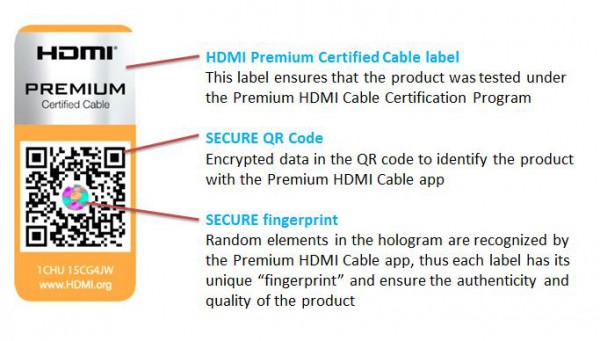
If you want to check if your cable is TRULY certified, you can look for the QC code which cannot be altered on the box/manual:

user posted image

This post has been edited by SSJBen: May 19 2017, 03:15 PM
SSJBen
post May 19 2017, 03:20 PM

Stars deez nuts.
*******
Senior Member
4,523 posts

Joined: Apr 2006


QUOTE(vostroxe @ May 19 2017, 11:35 AM)
i already own a ps4 slim. Now thinking to upgrade to pro and i only have a 1080p tv. Is it worth the upgrade? I am draw towards the boost mode. Perhaps can give cleaner graphics.
*
Boost mode doesn't give "cleaner graphics". As cringey as that sounds ("graphics" isn't even an actual term), boost mode can only improve performance in certain titles. Some are significant, some barely noticeable, some not at all.

The upgrade is not worth it right now because what Sony promised with Pro, they haven't delivered:

1) Downsampling or supersampling, there has been an increasing number of games that simply do not provide this. It's retarded.

2) Better performance for Pro games, in some cases - yes. Nioh and Nier most recently benefits from the Pro's performance significantly. However, in many cases, the performance difference isn't really that significant at all.

3) With the MS scorpio coming out soon, it's pretty much a given Sony will drop the price of the Pro soon after. The scorpio's release is only like 4-5 months away, if you can wait - then wait.
honamd77
post May 19 2017, 03:47 PM

Enjoy Your Life Before You Die
******
Senior Member
1,008 posts

Joined: Oct 2007
From: Capital Square Kuantan


QUOTE(SSJBen @ May 19 2017, 03:15 PM)
There exists only 2 types of specification on the market right now:

- Standard HDMI cable (10.2gbps bandwidth)
- Premium HDMI certified cable (18gbps bandwidth)

Under a length of 10 meters, everything else that states otherwise is pure bullshit. So all those "4k" cables, HDMI 2.0 cables, or UHD HDMI 2.0 Ultra bandwidth blah blah blah cables are basically marketing bullshit.
A standard HDMI cable (10.2gbps) can transmit 4k, but it can only do so at 30hz. So in that sense, the name of the cable doesn't mean a damn thing.

If you are doing a long run of say 15 meters or more, then you will have to buy an active HDMI cable like a RedMere one or a HDMI signal amp/booster. Even longer runs like 25 meters or more, you'll have to buy HDMI cables that are made of fiber optic - these are quite expensive. But if you have a home theater that big, money is probably the least of your concern.
If you want to check if your cable is TRULY certified, you can look for the QC code which cannot be altered on the box/manual:

user posted image
*
Thank you for reply notworthy.gif Learn something today & save my bucks thumbup.gif
vostroxe
post May 19 2017, 06:50 PM

Enthusiast
*****
Senior Member
768 posts

Joined: May 2008


QUOTE(SSJBen @ May 19 2017, 03:20 PM)
Boost mode doesn't give "cleaner graphics". As cringey as that sounds ("graphics" isn't even an actual term), boost mode can only improve performance in certain titles. Some are significant, some barely noticeable, some not at all.

The upgrade is not worth it right now because what Sony promised with Pro, they haven't delivered:

1) Downsampling or supersampling, there has been an increasing number of games that simply do not provide this. It's retarded.

2) Better performance for Pro games, in some cases - yes. Nioh and Nier most recently benefits from the Pro's performance significantly. However, in many cases, the performance difference isn't really that significant at all.

3) With the MS scorpio coming out soon, it's pretty much a given Sony will drop the price of the Pro soon after. The scorpio's release is only like 4-5 months away, if you can wait - then wait.
*
thanks mate. you just saved my money.
silrave
post May 19 2017, 09:36 PM

Look at all my stars!!
*******
Senior Member
5,893 posts

Joined: Jun 2006


QUOTE(vostroxe @ May 19 2017, 11:35 AM)
i already own a ps4 slim. Now thinking to upgrade to pro and i only have a 1080p tv. Is it worth the upgrade? I am draw towards the boost mode. Perhaps can give cleaner graphics.
*
QUOTE(dragon360 @ May 19 2017, 11:52 AM)
me too.. but i think im gonna sell my slim and my dell monitor to upgrade to pro and lg 49" uhd hdr pro
*
haha if let go
can around rm 900 for slim let me know XD
Lord Red
post May 20 2017, 07:36 AM

Getting Started
**
Junior Member
125 posts

Joined: Jul 2011


I have some sort of a problem with my PS4 hoping of any of the sifus here can help. Same setup never happened with PS3 system before this.

I have an Asian PS4 which uses the circle buttons for 'yes/accept' and X buttons for 'no/cancel'. I know the Europe systems use it the other way around. I have a US and Asian ID both setup as primary. I bought some games thru PS Store and downloaded using PSX download helper using PC at ofis.

Now my problem is that some of the games I've bought and installed all have the circle and X buttons inverted and become like the Europe versions. Exiting the menu when I want to proceed, cancelling when I actually mean yes. That sort of thing. It is very annoying as I keep pressing the wrong button all the time. R1 and R3 games also same thing. Supposed to be R3 games in Asian system should follow Asian button setup la.

It is only in the games that the buttons get swapped. The PS4 menu system work just fine. I don't want to change the buttons in the settings since it will change the setup for the while system. I prefer the Asian button setup for circle and X buttons.

Does anyone face this problem before and how do you get rid of it?
GamersFamilia
post May 20 2017, 02:26 PM

Proud to be Malaysian
********
All Stars
17,852 posts

Joined: Dec 2007
From: Bandar Baru Bangi , Malaysia


QUOTE(Lord Red @ May 20 2017, 07:36 AM)
I have some sort of a problem with my PS4 hoping of any of the sifus here can help. Same setup never happened with PS3 system before this.

I have an Asian PS4 which uses the circle buttons for 'yes/accept' and X buttons for 'no/cancel'. I know the Europe systems use it the other way around. I have a US and Asian ID both setup as primary. I bought some games thru PS Store and downloaded using PSX download helper using PC at ofis.

Now my problem is that some of the games I've bought and installed all have the circle and X buttons inverted and become like the Europe versions. Exiting the menu when I want to proceed, cancelling when I actually mean yes. That sort of thing. It is very annoying as I keep pressing the wrong button all the time. R1 and R3 games also same thing. Supposed to be R3 games in Asian system should follow Asian button setup la.

It is only in the games that the buttons get swapped. The PS4 menu system work just fine. I don't want to change the buttons in the settings since it will change the setup for the while system. I prefer the Asian button setup for circle and X buttons.

Does anyone face this problem before and how do you get rid of it?
*
it depends on the software ( games ) region , not the system itself ... if R1 games yes/accept would be X & O would be no/cancel , meanwhile Asia R3 yes/accept would be O & X would be no/cancel ... after sometimes you will get used to it nod.gif
Lord Red
post May 20 2017, 03:35 PM

Getting Started
**
Junior Member
125 posts

Joined: Jul 2011


QUOTE(GamersFamilia @ May 20 2017, 02:26 PM)
it depends on the software ( games ) region , not the system itself ...  if R1 games yes/accept would be X & O would be no/cancel , meanwhile Asia R3 yes/accept would be O & X would be no/cancel ... after sometimes you will get used to it  nod.gif
*
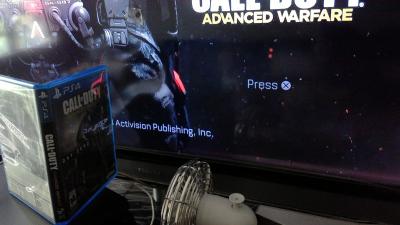
This I understand. But my R3 games also end up with the buttons swapped. Even my disk version COD:AW which is R3 end up with X button to confirm and O to cancel.

Funny thing is that this never happened with my PS3. All games whether R1 or R3 never swapped buttons. Even the ones downloaded using proxy.

This post has been edited by Lord Red: May 20 2017, 04:20 PM


Attached thumbnail(s)
Attached Image Attached Image
jasonffx
post May 20 2017, 06:11 PM

New Member
*
Junior Member
26 posts

Joined: Nov 2008


Hi guys, any of you guys using broadband to play online in ps plus?
If not mistaken I saw someone from the forum mention he is using digi broadband for ps plus with unlimited internet over the weekend. Mind to share the stability of the network when playing ps plus online? I plan to get 1 now as unifi want to charge me 450 for installation fee.

Sorry for a bit off topic here.
sonicbull
post May 20 2017, 06:27 PM

On my way
****
Junior Member
503 posts

Joined: Dec 2011
QUOTE(jasonffx @ May 20 2017, 06:11 PM)
Hi guys, any of you guys using broadband to play online in ps plus?
If not mistaken I saw someone from the forum mention he is using digi broadband for ps plus with unlimited internet over the weekend. Mind to share the stability of the network when playing ps plus online? I plan to get 1 now as unifi want to charge me 450 for installation fee.

Sorry for a bit off topic here.
*
I'm using digi unlimited 150 with hotspot thru iPhone 5s. 3G & 4G network quite similar results in pahang & klang valley. 4G sometimes more lag than 3G probably due to high traffic. Here's my online experience so far:
Fifa17 pro club: 95% ok
Alienation: 98% ok
PVZ GW2, US server: 95% ok. Loading time noticeably longer
Titanfall 2(60fps): SG, AUS, JP, TW server unplayable. US server 90% ok
LBP 3: unable to test due to low players online
SW Battlefront: 95% ok only loading time is longer
PES 17 demo: 95% ok but the online play is not as smooth offline. Not network problem but it's Konamis.

I learnt from this forum, u can buy prepaid card to test the network at your area. Weekday, weekends & even day/night time may give you different results. Hope this helps.
Mgsrulz
post May 20 2017, 08:41 PM

30 years of Metal Gear
********
All Stars
14,258 posts

Joined: Mar 2005


QUOTE(Lord Red @ May 20 2017, 03:35 PM)
This I understand. But my R3 games also end up with the buttons swapped. Even my disk version COD:AW which is R3 end up with X button to confirm and O to cancel.

Funny thing is that this never happened with my PS3. All games whether R1 or R3 never swapped buttons. Even the ones downloaded using proxy.
*
some R3 games are simply R1 games re-labelled.

QUOTE(jasonffx @ May 20 2017, 06:11 PM)
Hi guys, any of you guys using broadband to play online in ps plus?
If not mistaken I saw someone from the forum mention he is using digi broadband for ps plus with unlimited internet over the weekend. Mind to share the stability of the network when playing ps plus online? I plan to get 1 now as unifi want to charge me 450 for installation fee.

Sorry for a bit off topic here.
*
get unifi. don't trust mobile broadband as your main source for online gaming
Rei7
post May 21 2017, 07:25 AM

Game, anime and headphones ❤️
******
Senior Member
1,669 posts

Joined: Apr 2011


That rated M and stuff is usually R1 box. Never seen that on R3, maybe because I buy R1 games most of the time.

This post has been edited by Rei7: May 21 2017, 07:25 AM
funnyTONE
post May 21 2017, 11:06 AM

certified /k/ oldfag
*******
Senior Member
2,949 posts

Joined: Apr 2006


QUOTE(jasonffx @ May 20 2017, 06:11 PM)
Hi guys, any of you guys using broadband to play online in ps plus?
If not mistaken I saw someone from the forum mention he is using digi broadband for ps plus with unlimited internet over the weekend. Mind to share the stability of the network when playing ps plus online? I plan to get 1 now as unifi want to charge me 450 for installation fee.

Sorry for a bit off topic here.
*
The thing with mobile broadband is its dependent on your location. Digi is very different from one region to another, so its best to try out first.
Good thing is the infinite plan is not contract-based, although you will be required to pay $300 upfront for 2 months advance fee. Plus, you need a different modem that supports 3g/4g network, which normally cost substantially more than the normal streamyx/unifi modem.
Lord Red
post May 21 2017, 01:54 PM

Getting Started
**
Junior Member
125 posts

Joined: Jul 2011


QUOTE(funnyTONE @ May 21 2017, 11:06 AM)
The thing with mobile broadband is its dependent on your location. Digi is very different from one region to another, so its best to try out first.
Good thing is the infinite plan is not contract-based, although you will be required to pay $300 upfront for 2 months advance fee. Plus, you need a different modem that supports 3g/4g network, which normally cost substantially more than the normal streamyx/unifi modem.
*
U Mobile also just upgrade their RM70 plan to RM78 unlimited. Might be worth a look as an alternative.
Zaryl
post May 21 2017, 08:50 PM

Hardcore Casual Gamer
******
Senior Member
1,709 posts

Joined: Jan 2003
From: Kedah Khap Khoun Khap (4K)


QUOTE(jasonffx @ May 20 2017, 06:11 PM)
Hi guys, any of you guys using broadband to play online in ps plus?
If not mistaken I saw someone from the forum mention he is using digi broadband for ps plus with unlimited internet over the weekend. Mind to share the stability of the network when playing ps plus online? I plan to get 1 now as unifi want to charge me 450 for installation fee.

Sorry for a bit off topic here.
*
i use Digi BB100 and tried playing online PS3 games back in Nov 2016.
So far so good. Almost everynight playing Battlefield 3 no problem.

now i got my PS4 pro in Jan this year, playing Battlefield 1 is smooth. but sometimes i do face some laggy-ness but on rare occasions.
Played Doom online with Europe players, speed not bad but got some lag here and there but it's playable.
MGS5 online (MGO3) no problem with speed.

other games i dunno because i don't have them.

but one thing for sure, having 4G LTE broadband does have it limitation especially when it comes to downloading large games over PSN which can cost around 20-30 GB in size. My digi BB100 only offers total of 40GB of data, if i use it to download games, then i will not be able to use for my daily usage.
For example, the Doom latest update was almost 30GB and i was forced to bring to my office to download the update nearly 2hours. laugh.gif

Digi BB100 = RM100
4G LTE mobile router with sim card enabled = ~RM450

the 4G router is quite expensive but it's a good investment in the long run.
TP Link, Dlink got superb 4G LTE router, just search for them on the net.

i am forced to use mobile broadband as no unifi/streamyx at my taman yet.

as always, try using prepaid at your place first to see how fast is the speed.

ToiletMaster
post May 21 2017, 11:21 PM

Enthusiast
*****
Senior Member
774 posts

Joined: Feb 2010


Hey guys, I'm trying to look for a game called overcooked, it's not available in the Asia region but in US it's available. any chance any stores sells the game?
mytaffeta
post May 22 2017, 10:41 AM

Regular
******
Senior Member
1,327 posts

Joined: Dec 2010


Hi guys, am new to console ps4.. is it ps4 warranty registration is down for the moment?
iguana_dude_619
post May 22 2017, 10:54 AM

Xbox GT, PSN & Steam ID: iguanadude626
******
Senior Member
1,141 posts

Joined: Apr 2010
From: USJ


QUOTE(Zaryl @ May 21 2017, 08:50 PM)
i use Digi BB100 and tried playing online PS3 games back in Nov 2016.
So far so good. Almost everynight playing Battlefield 3 no problem.

now i got my PS4 pro in Jan this year, playing Battlefield 1 is smooth. but sometimes i do face some laggy-ness but on rare occasions.
Played Doom online with Europe players, speed not bad but got some lag here and there but it's playable.
MGS5 online (MGO3) no problem with speed.

other games i dunno because i don't have them.

but one thing for sure, having 4G LTE broadband does have it limitation especially when it comes to downloading large games over PSN which can cost around 20-30 GB in size. My digi BB100 only offers total of 40GB of data, if i use it to download games, then i will not be able to use for my daily usage.
For example, the Doom latest update was almost 30GB and i was forced to bring to my office to download the update nearly 2hours.  laugh.gif

Digi BB100 = RM100
4G LTE mobile router with sim card enabled = ~RM450

the 4G router is quite expensive but it's a good investment in the long run.
TP Link, Dlink got superb 4G LTE router, just search for them on the net.

i am forced to use mobile broadband as no unifi/streamyx at my taman yet.

as always, try using prepaid at your place first to see how fast is the speed.
*
time to change to Digi 150 Infinite. brows.gif laugh.gif
GamersFamilia
post May 22 2017, 11:29 AM

Proud to be Malaysian
********
All Stars
17,852 posts

Joined: Dec 2007
From: Bandar Baru Bangi , Malaysia


QUOTE(mytaffeta @ May 22 2017, 10:41 AM)
Hi guys, am new to console ps4.. is it ps4 warranty registration is down for the moment?
*
at the moment you need to call them 1-800-81-4963 for warranty registration

This post has been edited by GamersFamilia: May 22 2017, 11:34 AM

139 Pages « < 12 13 14 15 16 > » Top
Topic ClosedOptions
 

Change to:
| Lo-Fi Version
0.0424sec    0.66    6 queries    GZIP Disabled
Time is now: 17th December 2025 - 05:50 AM