Welcome Guest ( Log In | Register )

Bump Topic Topic Closed RSS Feed
141 Pages « < 21 22 23 24 25 > » Bottom

Outline · [ Standard ] · Linear+

 Digi Infinite talk, Digi infinite 80 / 150

views
     
No Reason
post Apr 21 2017, 11:47 PM

Getting Started
**
Junior Member
62 posts

Joined: Aug 2011


QUOTE(JayceOoi @ Apr 21 2017, 10:34 PM)
We almost in the same boat. Prepaid tested no issue. But actual testing with Infinite, I am facing YouTube buffering issue since day 1.

For me, phone call is the best method. Email and Facebook PM no response. Live chat is not helping much.
*
so now did your problem solved? What they asked you to do? or they just file a report and never heard from them again ever since?
Ryonegma
post Apr 22 2017, 12:13 AM

New Member
*
Junior Member
28 posts

Joined: Apr 2017
QUOTE(No Reason @ Apr 21 2017, 10:12 PM)
I bought the digi prepaid to test the speed first before buy the infinite. Ran the speed test throughout the house and got a good speed around 15 - 20 mbps. And my thought is, 'nice speed'... so I proceed with the purchase, and the sim card converted to infinite within an hour.

But, little did i know that time also play a major role in speed..........

and now anytime past 8 pm the speed crawling to 1 to 2 mbps, sometimes spike to 5 mpbs, but cant hold consistently. its been 2 nights like this. Cant even streaming properly.. sad.gif

Can complaint solve the issue? what's the most effective channel to complaint?
*
Probably because so many people started to use Infinite (80/150), and Digi had to do something otherwise we'll have network congestion. Imo, they should stop new registration already. Otherwise, we might see silly things like real 500GB/1TB data cap, bandwidth throttling, etc (thanks to the abusers) shakehead.gif

This post has been edited by Ryonegma: Apr 22 2017, 12:15 AM
jiaen0509
post Apr 22 2017, 12:19 AM

Look at all my stars!!
*******
Senior Member
3,305 posts

Joined: Dec 2012
QUOTE(fruitie @ Apr 21 2017, 11:45 PM)
My contact from Digi just called me and Digi is working on this. Apparently it's those apps cannot accept Digi's frequency or something. Rest assured, the Infinite team is working on it.
*
They called me and said problem solved. But still the same... Btw, I request to chg plan to Postpaid 80+5 already.
TSask8900
post Apr 22 2017, 12:22 AM

Casual
***
Junior Member
340 posts

Joined: Sep 2007
From: malacca


QUOTE(theberry @ Apr 21 2017, 11:35 PM)
what brand home router to use this plan?
*
huawei e5180-22
fruitie
post Apr 22 2017, 12:38 AM

Rise and Shine
Group Icon
Staff
72,807 posts

Joined: Sep 2005
From: KUL

QUOTE(jiaen0509 @ Apr 22 2017, 12:19 AM)
They called me and said problem solved. But still the same... Btw, I request to chg plan to Postpaid 80+5 already.
*
I didn't even have a report no., my contact will do the follow ups with other teams and update me. biggrin.gif
I will make sure it's solved though this Wechat thingy is not really a big issue for me.

Just tried no more WeChat videos issue for me. Never faced with YouTube issue as well.

QUOTE(ask8900 @ Apr 22 2017, 12:22 AM)
huawei e5180-22
*
E5186 I supposed.

This post has been edited by fruitie: Apr 22 2017, 12:43 AM
TSask8900
post Apr 22 2017, 12:59 AM

Casual
***
Junior Member
340 posts

Joined: Sep 2007
From: malacca


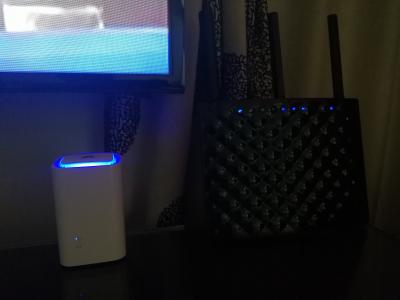
Tenda Ac15 with huawei e5180s-22 an digi infinite 150
Attached Image
zeustronic
post Apr 22 2017, 06:05 AM

Retire OC Into Audiophiles
*******
Senior Member
2,605 posts

Joined: Jan 2006
From: A Place Between Heaven & Hell


I think digi infinite already block torrent download lol.
SUSraynman
post Apr 22 2017, 06:26 AM

Look at all my stars!!
*******
Senior Member
4,333 posts

Joined: Jan 2003


Does the Huawei WS880 (with Xwrt-Vortex firmware) support a 4G LTE USB modem?

I am thinking of subscribing to Digi's Infinite 150 plan.

As I am already subscribed to Unifi, can I utilize the dual WAN feature,
or do I have to switch between Unifi and Infinite 150?
Chrono-Trigger
post Apr 22 2017, 08:04 AM

BY SELF ONE IS DEFILED AND PURIFIED
*******
Senior Member
4,308 posts

Joined: Aug 2013
QUOTE(zeustronic @ Apr 22 2017, 06:05 AM)
I think digi infinite already block torrent download lol.
*
naturally , to preserve bandwidth and user experience at large
Ryonegma
post Apr 22 2017, 09:08 AM

New Member
*
Junior Member
28 posts

Joined: Apr 2017
QUOTE(zeustronic @ Apr 22 2017, 06:05 AM)
I think digi infinite already block torrent download lol.
*
Wait, what? You mean no more 64kbps for torrent? Is it totally blocked?
SUSraynman
post Apr 22 2017, 09:11 AM

Look at all my stars!!
*******
Senior Member
4,333 posts

Joined: Jan 2003


QUOTE(Ryonegma @ Apr 22 2017, 09:08 AM)
Wait, what? You mean no more 64kbps for torrent? Is it totally blocked?
*
64kbps for torrents is as good as being totally blocked. laugh.gif

zeustronic
post Apr 22 2017, 09:40 AM

Retire OC Into Audiophiles
*******
Senior Member
2,605 posts

Joined: Jan 2006
From: A Place Between Heaven & Hell


QUOTE(Chrono-Trigger @ Apr 22 2017, 09:04 AM)
naturally , to preserve bandwidth and user experience at large
*
QUOTE(Ryonegma @ Apr 22 2017, 10:08 AM)
Wait, what? You mean no more 64kbps for torrent? Is it totally blocked?
*
QUOTE(raynman @ Apr 22 2017, 10:11 AM)
64kbps for torrents is as good as being totally blocked. laugh.gif
*
Some torrent site very slow for DIGI but my house steamyx & in office using TIME fast. mega_shok.gif
SUSdenimblue
post Apr 22 2017, 09:40 AM

Regular
******
Senior Member
1,217 posts

Joined: Mar 2016
QUOTE(raynman @ Apr 22 2017, 06:26 AM)
Does the Huawei WS880 (with Xwrt-Vortex firmware) support a 4G LTE USB modem?

I am thinking of subscribing to Digi's Infinite 150 plan.

As I am already subscribed to Unifi, can I utilize the dual WAN feature,
or do I have to switch between Unifi and Infinite 150?
*
Why would you subscribe to Infinite 150 when you already have Unifi?

It makes no sense.

Anyway, according to my WS880 USB Application tab, you can use a 3G/4G USB modem.

You just need to use one that is compatible with Digi network and the WS880.

Click on "Support" to see a list of compatible USB modems.

user posted image

I think you can also use the dual WAN feature under the WAN tab.

BTW, I have not tried out USB tethering on the WS880 before. smile.gif

starz92
post Apr 22 2017, 09:47 AM

Regular
******
Senior Member
1,679 posts

Joined: Jan 2010
From: Penang
QUOTE(No Reason @ Apr 21 2017, 10:12 PM)
I bought the digi prepaid to test the speed first before buy the infinite. Ran the speed test throughout the house and got a good speed around 15 - 20 mbps. And my thought is, 'nice speed'... so I proceed with the purchase, and the sim card converted to infinite within an hour.

But, little did i know that time also play a major role in speed..........

and now anytime past 8 pm the speed crawling to 1 to 2 mbps, sometimes spike to 5 mpbs, but cant hold consistently. its been 2 nights like this. Cant even streaming properly.. sad.gif

Can complaint solve the issue? what's the most effective channel to complaint?
*
Ytd night around 8pm I also faced the speed slow down to 4 to 10mbps...hopefully they are just having some downtime and not every night lols

Jigoku =.=

This post has been edited by starz92: Apr 22 2017, 09:54 AM
SUSAmeiN
post Apr 22 2017, 09:50 AM

★★★★★★★
*******
Senior Member
4,735 posts

Joined: Feb 2010
From: ★~Starlight~★
QUOTE(JayceOoi @ Apr 21 2017, 09:54 PM)
Thanks. This one is working finally. B3 1800 here.
B3 1800.
*
Using network signal guru (rooted phone), try lock ur lte band to B7 (2600) n monitor speed behavior again

QUOTE(No Reason @ Apr 21 2017, 10:12 PM)
I bought the digi prepaid to test the speed first before buy the infinite. Ran the speed test throughout the house and got a good speed around 15 - 20 mbps. And my thought is, 'nice speed'... so I proceed with the purchase, and the sim card converted to infinite within an hour.

But, little did i know that time also play a major role in speed..........

and now anytime past 8 pm the speed crawling to 1 to 2 mbps, sometimes spike to 5 mpbs, but cant hold consistently. its been 2 nights like this. Cant even streaming properly.. sad.gif

Can complaint solve the issue? what's the most effective channel to complaint?
*
which speedtest app/web did u used? should have used fast.com
Ryonegma
post Apr 22 2017, 09:51 AM

New Member
*
Junior Member
28 posts

Joined: Apr 2017
This is average speed inside my house, probably because I live in apartment. I can easily get 30-40Mbps outside.

user posted image
starz92
post Apr 22 2017, 09:52 AM

Regular
******
Senior Member
1,679 posts

Joined: Jan 2010
From: Penang
QUOTE(Ryonegma @ Apr 22 2017, 09:51 AM)
This is average speed inside my house, probably because I live in apartment. I can easily get 30-40Mbps outside.

user posted image
*
inside apartment I sometime get speed like this but it is not stable .. sometime go down to few mbps only...you facing this issue? are you using router btw?
JayceOoi
post Apr 22 2017, 09:57 AM

Pro Blogger
*******
Senior Member
2,741 posts

Joined: Jan 2007
QUOTE(No Reason @ Apr 21 2017, 11:47 PM)
so now did your problem solved? What they asked you to do? or they just file a report and never heard from them again ever since?
*
Nope, just opened report yesterday after called. Need to wait up to 3 days for their network team to look on my youtube buffering and timed out issues.
JayceOoi
post Apr 22 2017, 09:58 AM

Pro Blogger
*******
Senior Member
2,741 posts

Joined: Jan 2007
QUOTE(AmeiN @ Apr 22 2017, 09:50 AM)
Using network signal guru (rooted phone), try lock ur lte band to B7 (2600) n monitor speed behavior again
Tried yesterday night. Don't have B7 (2600) here. B3 only.
SUSAmeiN
post Apr 22 2017, 10:01 AM

★★★★★★★
*******
Senior Member
4,735 posts

Joined: Feb 2010
From: ★~Starlight~★
QUOTE(JayceOoi @ Apr 22 2017, 09:58 AM)
Tried yesterday night. Don't have B7 (2600) here. B3 only.
*
I see.... did u try to restart phone 1st.. just in case because for my phone need to wait 2-4min to fully connected to new band...

else maybe really no b7 then.. sweat.gif

141 Pages « < 21 22 23 24 25 > » Top
Topic ClosedOptions
 

Change to:
| Lo-Fi Version
0.0163sec    0.65    6 queries    GZIP Disabled
Time is now: 6th December 2025 - 04:25 PM