

 Mar 10 2017, 08:13 AM


| Grow your money on Poloniex - How to lend out your coins |
Before we begin the tutorial on lending, the general rule of keeping your coins safe still applies. However, the disadvantage of keeping it in cold storage is that it doesn't generate money besides price appreciation. You can consider another option which is to lend some of your coins to traders on Poloniex WHILE enjoying price appreciation if any. Do note that you need to have the coins on your Poloniex's account to lend them out.
Lending rates
Let's start with this as lending rates are the main factor why one would want to keep their coins on Poloniex and lend them out.
Lending rates depends on supply and demand. It can fluctuate and swing widely. It can be very low but it can also be very high. Even higher than the rates of loan sharks!

Here are some of the spot rates at the moment:
| Coin | Rates |
| Bticoin | 0.1595% |
| BTS | 0.0001% |
| CLAM | 1.2997% |
| DASH | 0.0587% |
| ETH | 0.0029% |
| XRP | 0.0096% |
As you can see from the table above, rates also vary widely between coins. Dash previously had a rate of 0.88% when the demand was high. Clam had low rates previously but because it is in demand now, it is at super loan shark rates!
Huh, the rates are so LOW???!!!??!?
 Before you stomp away upset, do note that the rates are quoted PER DAY (24 hours) and not per year!! For example, if you loan out CLAM for 1%, you will get 1% of clams after 24 hours! In the unlikely event that you can lend out for a whole year, the returns will be 365 days x 1% = 365% return!!!! However, as you will see later, it is almost impossible to loan out for long periods unless you are very very VERY lucky.
The interest generated are the same coins you loaned out. If you loan out CLAMS, you will get CLAMS for interest.
Another thing to know is that the interest starts calculating the moment the loan is taken up. The site updates the active loan every 20-30 seconds and you can see interest being generated. So even if your loan was taken up for only 5 minutes, you will already get some interest although it would be negligible.
Note : I guess it goes without saying that you would need a significant amount of coins and a good lending rate to make lending worthwhile. From observation, it seems bitcoin has a consistent demand with relatively good rates. You just have to calculate the returns for yourself to see whether it is worth your while or not.
Loan duration
Ok, here comes the reason why you won't be getting rich by getting a 365% return.
When you offer your loan, you will need to specify the rate, amount and duration. Default duration is 2 days and the range is 2 - 60 days.
If you lent out for 2 days and the loan is taken up, it doesn't mean that it will be loaned out for 2 days. It can sometimes be returned in a few hours or even a few seconds! This is the main disadvantage of lending, where you need to manually check to see whether your loan is running.
There is a lending bot that can automatically set up loans for you but it is 3rd-party where you would have to give it access to Poloniex to run the loans. I don't recommend it so this guide won't cover lending bots.
Lending risk
As with any loan, there are risk to lending. You can't be going about spraying red paint when your loan is not returned.

I'm not entirely sure what the risks are or how high the risk is. I have asked this in Poloniex and they say that the risk is minimal because they have certain safeguards. For one, the coins you loaned out cannot be transferred out of Poloniex. Even if you loaned out 1 BTC and the price of BTC crashes, it is still one BTC that will be returned to you!
So, lend at your own risk and don't throw red paint at my house if something happens!

Poloniex lending facility
Ok, let's get down to actual lending out your coins. I only have experience with Poloniex so we will only cover Poloniex.
On Poloniex, you'll notice 3 sections/tabs - Exchange, Margin and Lending.

Click on the Lending tab to go to the lending page.
A word of advice : Don't ever go to the margin tab. Very risky to play margin trades.
This is what you will see on the lending page.

1) My Balances
- This is where you can view your balances across all 3 facilities - Exchange, Margin and lending
- It only shows the available amount of coins. If you have open orders or coins under loan, it will not be shown in the total.
- You can also see the type of coins you can loan out. At the moment, only 12 coins can be loaned out.
- From here, you can select the coin you want to loan out.
2) Quick transfer
- This is a quick feature to transfer your coins between the 3 facilities
- In order for you to loan out your coins, you have to first transfer the coins from Exchange (that's where your coins probably are at the start)
- If you don't transfer any coins to lending, you won't be able to loan out anything.
- Likewise, if you finish lending and want to sell off the coins, you would have to transfer them from lending back to exchange
3) Loan
- This is where you offer your loan
- You have to enter the rate, amount and duration of loan
- "Auto-renew" is if you want the loan to be listed again once the loan is given back. It is actually not a useful feature as loan rates seldom stay at the same rate for long.
- Once you have set your loan parameters, you can click the "Offer loan" button and it will be displayed in the "Loan Offers" table.
4) Loan offers
- This is where all loans are being offered
- If you want your loans to be taken up fast, you would have to set a lower rate. Basically competing with each other to loan out the coins.
5) Loan demands
- This is where all loans are requested
- If you don't want to wait, you can just offer at the requested rate and it will straight away match
- Loan demand rates are usually much much lower then ongoing rates
6) My open loan offers
- You can see your open loans here i.e. loans that you have offered by not yet loan out
7) My active loans
- Here's where you can see the loans that are taken up
- If you see the first line, I have loaned out XRP at a rate of 0.0097% with an amount of 2221.2508. Duration is 2 days with auto-renew turned on. Up to that time, the interest is 0.00034912 XRP.
That's it! You are now ready to put up your loan!
Loan history/records
This is how you can see your loan history.
Under "Orders" tab, select "My trade history & Analysis".

This will bring you to the following page.
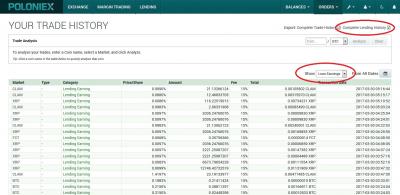
From here, you have two options (as indicated in the picture):
1) Download the excel file containing all your loan records
- easier to use this feature as you can sort out your loans and sum it up in excel
2) Show your "Loan earnings"
- Will show you all your loans in a table
- This is not easy to see as you can't sort it out. I already have 29 pages of loan history!!!
- The easier way is to select the coin you want to analyse then click the analyze button.
Take a look at my analyzed loan earnings of CLAMS. It shows that I have earned 49.7 CLAMS with fees in total. Fees are 15% so you can roughly calculate your net profit by subtracting 15% from the total.

Note : This is the place where you can see your trade history too.
Lastly, do remember that lending is not without risk but I think the risk is negligible. Again, if you lose your money, don't blame me!

Happy lending like the loan shark that you are!!!!

| --------------------------------------------------------------------------- |
| Cryptocurrency market capitalization |
- Good place to see overall cryptocurrency market cap and each individual coin market cap.
| Cryptocurrency news |
1) Coindesk
2) Bitcoin news
3) Cryptocoin news
4) Cryptonews
5) Coin Journal
6) The Merkle - Crypto news
7) Bitcoinist
8) CoinFox
9) Coin News Asia
10) Finance magnates
| Forums |
1) Bitcoin (and altcoin) forum
| Important or potential coins |
Note : My opinion only.
Ethereum
One of the coins that will probably become popular soon
1) Ethereum homepage
- learn all about ethereum and the projects built on the platform
2) /r/Ethereum
- Fundamental news related to Ethereum ecosystem. Core developers conduct meetings on the first and third Fridays of each month so users can view the entire conversation or read the transcripts provided.
3) /r/ethtrader
- Price related discussion and future movements.
there's this weekly newsletter that summarizes all the Ethereum related events for your viewing pleasure.
4) Week in Ethereum
Blockchain-based Decentralized storage
1) https://www.smithandcrown.com/distributed-c...-cloud-storage/
2) https://themerkle.com/maidsafe-vs-sia-vs-storj/
Siacoin
1) http://sia.tech/
2) https://forum.sia.tech/
3) Good news! https://cointelegraph.com/news/sia-integrat...ralized-backend
4) https://nextcloud.com/blog/introducing-clou...-and-nextcloud/
5) MLG capital review : https://capital.mlgblockchain.com/sia-tech-profile.html
6) Host profit maximization thread : http://forum.sia.tech/topic/1037/host-prof...mization-thread
Ripple (XRP)
1) https://ripple.com/
2) https://www.xrpchat.com/
3) Good read on ripple (and bitcoin and ETH) : https://www.linkedin.com/pulse/internationa...nna?published=t
4) https://www.forbes.com/sites/madhvimavadiya...e/#6a35c05a79f1
5) http://www.businesswire.com/news/home/2017...ons-Join-Ripple
6) https://ripple.com/insights/q1-2017-xrp-markets-report/
7) https://www.cryptocoinsnews.com/ripple-targ...market-bitcoin/
8) https://www.cryptocoinsnews.com/ripple-unve...alized-bitcoin/
9) http://bitsonline.com/ripple-india-bank-retail-payments/
10) http://www.newsbtc.com/2017/05/13/ripple-c...ledger-upgrade/
11) https://ripple.com/insights/ripple-to-place...tal-xrp-supply/
12) http://www.huffingtonpost.com/entry/ripple...4b0b28a33f62915
13) Kraken - XRP can convert directly to fiat (USD, CAD, EUR, JPY) : http://blog.kraken.com/post/160806705967/k...-for-ripple-xrp
14) Bitfinex XRP/USD XRP/BTC trading : https://www.bitfinex.com/posts/204
15) Valuation model for XRP : https://www.xrpchat.com/topic/5280-valuatio...le-the-company/
16) Next-generation cross-border payments (presentation) (XRP addressed at 42:10) : https://www.youtube.com/watch?v=PzScsRNsoT0
17) http://www.coindesk.com/interoperability-b...ferent-ledgers/
| Cryptocurrency's progress |
Cryptocurrency market cap:
25/4/2017 - 30 Billion
3/5/2017 - 40 Billion
8/5/2017 - 50 Billion
17/5/2017 - 60 Billion
21/5/2017 - 70 billion
23/5/2017 - 80 billion
25/5/2017 - 90 billion
26/5/2017 - Black Friday - crashed to below 60B market cap
4/6/2017 - 90 billion (Again!)
6/6/2017 - 100 billion
BTC dominance:
16/5/2017 - First time fell below 50%
| Malaysia news |
This post has been edited by kmarc: Jun 7 2017, 07:56 AM
 Quote
Quote

 Anyway, happy that it supports Dash. Maybe I should just buy all the coins that Trezor supports.


 Correction. The rate is quoted for a 24-hour period! Ooohhh, I'm so excited!!!!!


 I did enter the crash in 2008 but sold off very fast as I promised myself not to play stocks when it was high. After that, KLSE just kept on going up and up and up
  .......... Not going to miss this boat this time although the problem is when to get off....

 But then again, I guess if we're expecting most cryptos to increase markedly, I guess playing futures (or shorts) would be a good idea.


 0.1688sec
 0.27
0.27
 7 queries
 GZIP Disabled