Outline ·
[ Standard ] ·
Linear+
Review - Xiaofang 1080p IP Camera
|
PTX
|
 Apr 16 2020, 12:34 PM Apr 16 2020, 12:34 PM
|
Getting Started


|
QUOTE(cheewooi @ Apr 5 2020, 10:44 AM) Anyone having issue with Xiofang disconnected after few weeks of usage? I try to connect to Xiaofang via Mijia and it just don't connect. I ended up need to shut off and restart Xiaofang every months. My XiaoFang also keep disconnected once a while. What I done is that using a timer power plug to connect the XiaoFang so that it can restart by it’s own (once in a day). Now I never need to restart it myself and never have disconnect issues. Hope it help.  This post has been edited by PTX: Apr 16 2020, 12:35 PM This post has been edited by PTX: Apr 16 2020, 12:35 PM |
|
|
|
|
|
freddy manson
|
Apr 20 2020, 12:09 PM
|
|
|
QUOTE(kenlui @ Apr 11 2020, 08:11 PM) Same as yours. In fact I have another one which is on the previous version which I cant access at all now. Im getting the this product can only be used in mainland china. If I remember correctly same version of firmware as yours, never had any update since I purchased from acetera in lazada. me too. geolocked months ago. now it is sitting in my desk ask dummy cctv wana do custom firmware but.. nah, i'll just leave it as it is |
|
|
|
|
|
kenlui
|
Apr 21 2020, 07:02 AM
|
|
|
QUOTE(freddy manson @ Apr 20 2020, 12:09 PM) me too. geolocked months ago. now it is sitting in my desk ask dummy cctv wana do custom firmware but.. nah, i'll just leave it as it is My is now functioning again. Issue was due to VPN on my router, once I turn it off, everything was back to normal. |
|
|
|
|
|
freddy manson
|
Apr 21 2020, 10:33 AM
|
|
|
QUOTE(kenlui @ Apr 21 2020, 07:02 AM) My is now functioning again. Issue was due to VPN on my router, once I turn it off, everything was back to normal. ah, didnt think of that. i'll check my router settings. the DNS i will reset to TM's ones |
|
|
|
|
|
amir.asyraf
|
Aug 20 2020, 03:38 PM
|
|
|
I just bought this camera. How do you record continuously 24/7? As in not record it by motion detection?
I see the Auto Record and recording mode options, and I've set it to uninterrupted video. But how do I initiate the recording? When I click the record on main screen, if I leave the app the camera will stop recording. Am I missing something here?
BTW I disabled motion detection to try make this work, it doesn't. Seems to only record with motion detection?
This post has been edited by amir.asyraf: Aug 20 2020, 03:56 PM
|
|
|
|
|
|
soonwai
|
Aug 20 2020, 05:05 PM
|
|
|
QUOTE(amir.asyraf @ Aug 20 2020, 03:38 PM) I just bought this camera. How do you record continuously 24/7? As in not record it by motion detection? I see the Auto Record and recording mode options, and I've set it to uninterrupted video. But how do I initiate the recording? When I click the record on main screen, if I leave the app the camera will stop recording. Am I missing something here? BTW I disabled motion detection to try make this work, it doesn't. Seems to only record with motion detection? I put an SDCard into my XF then it will record continuously. |
|
|
|
|
|
amir.asyraf
|
Aug 20 2020, 05:16 PM
|
|
|
QUOTE(soonwai @ Aug 20 2020, 05:05 PM) I put an SDCard into my XF then it will record continuously. Hm I've also put in an SD card in, 64 GB. Is there any indicator that it's recording? You disabled motion detection right? Also, where do you view the recorded footage? Is it in Replay? This post has been edited by amir.asyraf: Aug 20 2020, 05:19 PM |
|
|
|
|
|
soonwai
|
Aug 20 2020, 05:23 PM
|
|
|
QUOTE(amir.asyraf @ Aug 20 2020, 05:16 PM) Hm I've also put in an SD card in, 64 GB. Is there any indicator that it's recording? You disabled motion detection right? My motion detection is still on as before the sdcard. In Storage management, I turned on: 1. "Continue recording" 2. "Uninterrupted Recording" I think that's it. There's no indication on-screen that's it's recording. I just go to Playback and I can view the video from few days ago. If you wait an hour or 2, you should the space available on the card going down. This post has been edited by soonwai: Aug 20 2020, 05:24 PM |
|
|
|
|
|
amir.asyraf
|
Aug 20 2020, 05:31 PM
|
|
|
QUOTE(soonwai @ Aug 20 2020, 05:23 PM) My motion detection is still on as before the sdcard. In Storage management, I turned on: 1. "Continue recording" 2. "Uninterrupted Recording" I think that's it. There's no indication on-screen that's it's recording. I just go to Playback and I can view the video from few days ago. If you wait an hour or 2, you should the space available on the card going down. By Playback do you mean this?  Or this? 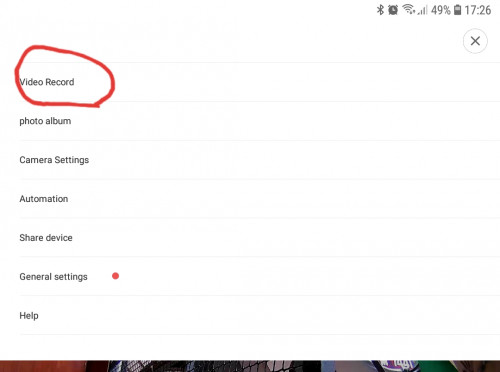 |
|
|
|
|
|
soonwai
|
Aug 20 2020, 05:41 PM
|
|
|
QUOTE(amir.asyraf @ Aug 20 2020, 05:31 PM) By Playback do you mean this? Yes, this one. The labels for my icons are: Speak - Listen - Full Screen - Playback - More I'm using Mi Home on an iPhone. I don't have a Video Record item as in your other screenshot. This post has been edited by soonwai: Aug 20 2020, 05:45 PM |
|
|
|
|
|
amir.asyraf
|
Aug 20 2020, 10:52 PM
|
|
|
QUOTE(soonwai @ Aug 20 2020, 05:41 PM) Yes, this one. The labels for my icons are: Speak - Listen - Full Screen - Playback - More I'm using Mi Home on an iPhone. I don't have a Video Record item as in your other screenshot. Ok now it works. I had to use a different SD card for some reason, reset the camera, and re-update the firmware. Now it's recording  Thanks for your help  |
|
|
|
|
|
sailou
|
Aug 24 2020, 06:18 PM
|
|
|
Guys, I just found my cam is not working and the reason was a faulty microsd.
Can I claim warranty as it is a Samsung Evo 32gb.
If yes, how do I go by it cos there are so many purchase of memory card I have done before.
|
|
|
|
|
|
TSidoblu
|
Aug 24 2020, 07:21 PM
|
|
|
QUOTE(sailou @ Aug 24 2020, 06:18 PM) Guys, I just found my cam is not working and the reason was a faulty microsd. Can I claim warranty as it is a Samsung Evo 32gb. If yes, how do I go by it cos there are so many purchase of memory card I have done before. Rm30 item you want to waste time claim warranty? 😅 |
|
|
|
|
|
sailou
|
Aug 24 2020, 08:15 PM
|
|
|
QUOTE(idoblu @ Aug 24 2020, 07:21 PM) Rm30 item you want to waste time claim warranty? 😅 Why not if it's convenient? I have claimed 2 Sandisk item before and I get a new one on the spot. |
|
|
|
|
|
nxfx
|
Aug 30 2020, 11:01 AM
|
|
|
is there a way to view recording saved in cloud without connecting to the cam?
i notice that if the cam is offline, i cannot view the video recording
|
|
|
|
|
|
Hello030
|
Sep 12 2020, 11:40 AM
|
Getting Started
|
Suddenly some recently purchase xiaofang get geoblocked....
Not sure whether it's due to Yoodo...
This post has been edited by Hello030: Sep 12 2020, 11:41 AM
|
|
|
|
|
|
nxfx
|
Sep 12 2020, 02:27 PM
|
|
|
mine just got geoblock also
any solution here?
|
|
|
|
|
|
n0v1ce
|
Sep 12 2020, 03:50 PM
|
|
|
QUOTE(nxfx @ Sep 12 2020, 02:27 PM) mine just got geoblock also any solution here? according to the yt can send-in request to unblock @ https://youtu.be/r0TIIFLnju8 |
|
|
|
|
|
Hello030
|
Sep 13 2020, 09:18 AM
|
Getting Started
|
QUOTE(n0v1ce @ Sep 12 2020, 03:50 PM) according to the yt can send-in request to unblock @ https://youtu.be/r0TIIFLnju8Anyone have successfully. Unblock their cam using this method? I bought mine from shopee, not from taobao/jd/aliexpress... |
|
|
|
|
|
TSidoblu
|
Sep 13 2020, 06:32 PM
|
|
|
QUOTE(Hello030 @ Sep 13 2020, 09:18 AM) Anyone have successfully. Unblock their cam using this method? I bought mine from shopee, not from taobao/jd/aliexpress... i found this, i dunno if it can work mine is still running with no geoblock, yet https://jsparkes.com/Downgrade_Xiaofang_201...0ixdwyFXNyFVd78 |
|
|
|
|



 Quote
Quote


 0.0415sec
 0.68
0.68
 6 queries
 GZIP Disabled