Welcome Guest ( Log In | Register )

Outline · [ Standard ] · Linear+

 AMD Ryzen, AM4 / AM5 Platform

views
     
Current Events guy
post Jul 8 2019, 08:15 AM

Enthusiast
*****
Junior Member
966 posts

Joined: Nov 2009
QUOTE(pundi @ Jul 8 2019, 06:39 AM)
not sure to upgrade or not to ryzen 3600 or 3300
from my i5 3570...since gaming no issue...
the hype is making me impluse buying ni...help~~~~
IF after upgrade new cpu...what u guys normally do with your older cpu,mb and ram? no fell waster ka? sure very hard to sell 1,or keep as back up?
*
Turn into server at home
Use as htpc
Give to parents or siblings,especially if they got small kid

It's a gaming pc, there's better things to do with it than to just let it dust in a corner of your room
Current Events guy
post Jul 8 2019, 08:32 AM

Enthusiast
*****
Junior Member
966 posts

Joined: Nov 2009
QUOTE(llk @ Jul 7 2019, 10:39 PM)
X570 AORUS XTREME RM 2799
X570 AORUS MASTER RM 1589
X570 AORUS PRO WIFI RM 1289
X570 AORUS ELITE RM 1029
X570 I AORUS PRO WIFI RM 1029
X570 GAMING X RM 859
*
This is from which store?

If it's yours, please provide a link.
Current Events guy
post Oct 2 2020, 11:45 PM

Enthusiast
*****
Junior Member
966 posts

Joined: Nov 2009
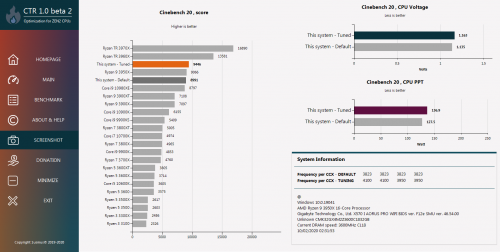
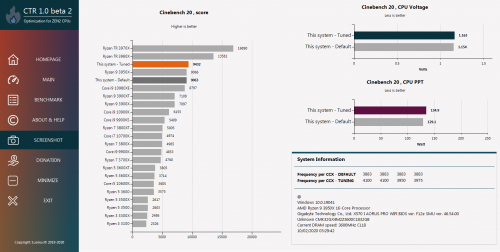
Had some time to try out CTR on a whim.

Found that the undervolt setting they recommended scored lower than the manual undervolt I've been running while the overclock setting wouldnt run due to reaching the temp limit. Perhaps the former is a difference between all-core setting in the BIOS while CTR is CCX based. The latter is due to running this in an ITX build.

I didnt find the CTR mission statement to be true for my build as the PPT and Voltage was higher; maybe those with ATX builds would find it useful, especially the custom loop crowd. I'll be sticking to manually setting the voltage and testing for now.

» Click to show Spoiler - click again to hide... «

Current Events guy
post Nov 3 2020, 06:28 PM

Enthusiast
*****
Junior Member
966 posts

Joined: Nov 2009
QUOTE(donmaikeru @ Nov 3 2020, 03:03 PM)
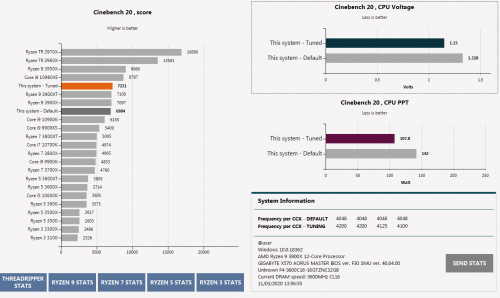
user posted image

Used CTR managed to under volt to 1.15 with pretty good results
*
What's your thermals now?

60 idle sounds high
70 load is normal


Current Events guy
post Nov 4 2020, 09:41 AM

Enthusiast
*****
Junior Member
966 posts

Joined: Nov 2009
QUOTE(Vincent6596 @ Nov 4 2020, 09:09 AM)
Hey guys, need a suggestion for my rig upgrade

» Click to show Spoiler - click again to hide... «

*
3600 is the general recommendation but Id recommend you get this only if it's a good deal. Try used units, RAM has long/liftetime warranty. Else, go with the 3200 mhz since youre only gaming. Do you see yourself ever doing anything more intensive than gaming? If not get the 8GB x2 3200MHz.

Consider the Adata SX8200 NVME SSD lineup.

If it were me with that budget and my priorities were gaming above anything else, I'd get a B450 MSI Tomahawk with a 3700X, RAM & SSD mentioned above, sell off the 1070 and put the money towards a second hand 2070S.

This post has been edited by Current Events guy: Nov 4 2020, 09:41 AM
Current Events guy
post Nov 4 2020, 08:26 PM

Enthusiast
*****
Junior Member
966 posts

Joined: Nov 2009
QUOTE(Rhetoric @ Nov 4 2020, 08:22 PM)
They obviously just want to cover that RM55 voucher. raise price, give voucher. typical.
*
That shop is also known to charge a wee bit more than others so seems par for the course.
Current Events guy
post Nov 5 2020, 01:29 PM

Enthusiast
*****
Junior Member
966 posts

Joined: Nov 2009
QUOTE(goldfries @ Nov 5 2020, 01:23 PM)
I direct contact shop liao, can't allocate stock for me.

I contacted distributor, say have to wait 2nd batch now.

How?
*
If shops arent taking preorders, where did the first batch disappear to?
Reviewers with shop/distro cable?
Current Events guy
post Nov 5 2020, 10:32 PM

Enthusiast
*****
Junior Member
966 posts

Joined: Nov 2009
user posted image

Most impressive.

» Click to show Spoiler - click again to hide... «
Current Events guy
post Nov 7 2020, 04:06 PM

Enthusiast
*****
Junior Member
966 posts

Joined: Nov 2009
QUOTE(blackbox14 @ Nov 7 2020, 04:01 PM)
Sorry to interrupt discussion of the new processors.

I recently got a Ryzen 5 3600 from my friend. Heard about the high/fluctuating temperature thing causing stock CPU cooler to ramp up and down, but I didn't give it much thought at first. Will changing the fan curve and making a custom Ryzen power plan like on those youtube videos help with this?

I don't OC my PCs in any way. My main purpose now is just to have a stable, long-lasting system to WFH with and game a bit while we ride out this pandemic and MCO.
*
Yes.

Get a monitoring software like MSI afterburner to observe the CPU temp peaks then set your fans to only ramp up at a temperature higher than the peaks.

That's one way to deal with the noise from the fan/cooler ramping up/down.

Another way would be to lock in the CPU speed and voltage.


Current Events guy
post Nov 7 2020, 04:22 PM

Enthusiast
*****
Junior Member
966 posts

Joined: Nov 2009
QUOTE(blackbox14 @ Nov 7 2020, 04:14 PM)
Thanks. Is there a noticeable increase in heat when this is done? Our climate isn't like the climate of those US/Euro countries in the videos since we have higher ambient temperature most of the time.
*
If the temps go up then that means you set too low of a lower limit for the fan speed.

I prefer 60% max RPM when idling (<60'C) and 80% when on load (>60'C).

You can tune this accordingly to balance performance, temps and acoustics.
Current Events guy
post Nov 7 2020, 04:24 PM

Enthusiast
*****
Junior Member
966 posts

Joined: Nov 2009
QUOTE(thankyou @ Nov 7 2020, 04:19 PM)
Viewnet - stock in hand, they request bundle at least w/mobo+RAM

Anyway, one guy told me confirm next week more stock coming....
*
Heard that viewnet bundle was + mobo, now they want + RAM? rclxms.gif

Here's to the next week stock not needing bundle.
Current Events guy
post Nov 7 2020, 05:42 PM

Enthusiast
*****
Junior Member
966 posts

Joined: Nov 2009
QUOTE(popadelic @ Nov 7 2020, 05:33 PM)
Gents, quick question im running 5900x with aorus atc800 cpu cooler, on stress test full load temp hitting 79c, is this safe? sorry for noob question, totally new on pc scene..

not planning to do OC or what in the future, just work, gaming and streaming
*
What temps did you expect the CPU to reach during stress tests?
80'C sounds about right.

Worry when it hits the same temp while youre browsing.


Current Events guy
post Nov 23 2020, 01:54 PM

Enthusiast
*****
Junior Member
966 posts

Joined: Nov 2009
Are the 5000 series considered okay to use at this point or are there still some elements of plugging in and praying everything works out?

I've got a giga x570 board.
Current Events guy
post Nov 23 2020, 03:09 PM

Enthusiast
*****
Junior Member
966 posts

Joined: Nov 2009
QUOTE(targon @ Nov 23 2020, 02:49 PM)
It's hit and miss at the moment. Discovered it the hard way.
*
Is there anything else besides the mobo bios updates causing issues at the moment?
Current Events guy
post Nov 23 2020, 05:35 PM

Enthusiast
*****
Junior Member
966 posts

Joined: Nov 2009
QUOTE(nrw @ Nov 23 2020, 03:15 PM)
It's AMD's AGESA making the 99% of the issues.

Most boards are fine if you don't load xmp for ram.
Some are even fine with higher ram frequencies or proper ram oc.

The only board makers mistake is that some (including giga for what I can see, love to apply too much voltage on io die components.
My giga board applied 1.25V soc stock voltage for 3600 memory and as other voltages such as the imc or if are derived from this they end up being too high as well.
*
Sounds like its safe to jump in with some nuances that need to be worked on.

Gotcha.

QUOTE(yimingwuzere @ Nov 23 2020, 03:33 PM)
Gigabyte + MSI: can't use my NH-C14S with these boards well

*
Which case are you thinking of getting? I've seen several builds with giga x570i with the c14s that fit fine but the case is the limitation, can't close top panel in the M1 for example.

I own two of these giga boards and they're alright. Never had to wrestle with it to get anything done. Oc/undervolt/fan/pump settings are straight forward, xmp sticks. Fan headers are limited but each header supports 24W which means you could power a ddc off one vs molex, not a big deal if you're thinking of doing air cooling though. The PCH fan is loud, but there's a BIOS update for that.

I've heard bad things about fusion, so might be best to avoid if you're into syncing rgb. I dont, so I just leave it the default orange.

This is all on ryzen 2 so I'm not sure if there's are issues with using ryzen 3.

This post has been edited by Current Events guy: Nov 23 2020, 05:36 PM

Current Events guy
post Nov 25 2020, 07:46 PM

Enthusiast
*****
Junior Member
966 posts

Joined: Nov 2009
Any giga users on F31J?

That seems to be getting positive feedback in the small community I subscribe to. Was wondering if it's still broken for anyone else.
Current Events guy
post Nov 25 2020, 11:25 PM

Enthusiast
*****
Junior Member
966 posts

Joined: Nov 2009
QUOTE(John Chaser @ Nov 25 2020, 09:13 PM)
Can share community link, please?
I'm planning to put together a x570 Aorus Master with a 5950x.
*
Here's input on the BIOS from one of the more accessible ones:
https://www.reddit.com/r/gigabyte/comments/..._the_f31j_bios/

QUOTE(Vannus @ Nov 25 2020, 10:15 PM)
I updated mine F31J, seems ok, been playing godfall last night and watch netflix and run 3dmark timespy too. No issue so far. Ram able to run xmp profile @ 3600 @ 1.35v. But I don't overclock the proc hahha. Lazy cause I'm old already, last time used to OC the proc every single bit till the point between stable and hang.  bruce.gif

So looks ok and stable on this bios version.
*
Got it, thanks.

I'll probably just undervolt mine anyway.
Hope there's no problems with locking clocks and voltage.

QUOTE(Andrewtst @ Nov 25 2020, 11:02 PM)
Hi all. I not sure where to ask. Tumpang here.

Did anyone facing the CPU fans RGB light not turn off after power off the PC.

I face this issue after upgrade Windows 10 to 20H2. Before this in Windows 10 version 2014 never had this issue.

I am using X570 AORUS PRO WIFI MB.
*
I had the mobo lights stay on for a while, then it somehow resolved itself.
Are your mobo lights on as well or just the CPU fan?
Current Events guy
post Nov 26 2020, 11:41 AM

Enthusiast
*****
Junior Member
966 posts

Joined: Nov 2009
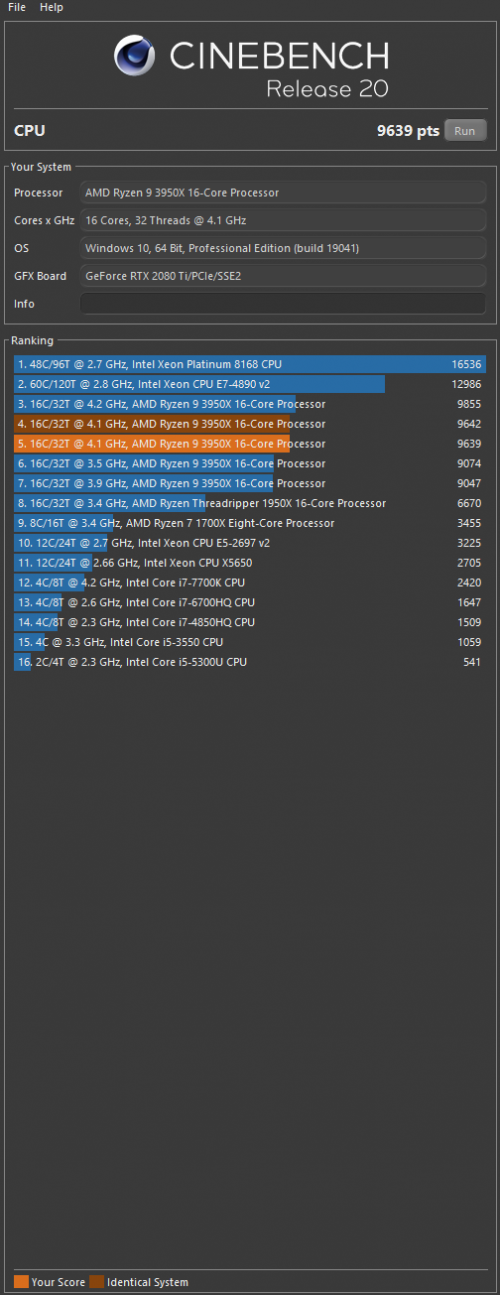
Changed cooling setup in build, wanted to test thermals. Was looking for R20 which I had installed but saw that it was replaced with R23 instead.

Did Maxon push Cinebench upgrades in the back ground or did the windows store update the app? Surprised I didnt have the option of not upgrading.
Current Events guy
post Nov 26 2020, 12:03 PM

Enthusiast
*****
Junior Member
966 posts

Joined: Nov 2009
QUOTE(sonyfanzz @ Nov 26 2020, 11:59 AM)
really? my r20 still stay r20 and I didn't see button to update leh
*
Not sure what happened. I launched the Cinebench app, was greeted by an EULA which I just clicked accept/ok without reading as is tradition and then saw that it was R23.

Now I'm looking changing it back to R20.

EDIT: I think I found out what the issue was, I downloaded mine from the Windows store as an app so it updates whenever a new version on the store is available.

This post has been edited by Current Events guy: Nov 26 2020, 12:24 PM
Current Events guy
post Nov 26 2020, 10:27 PM

Enthusiast
*****
Junior Member
966 posts

Joined: Nov 2009
QUOTE(Skylinestar @ Nov 26 2020, 07:28 PM)
why go back to R20?
*
In the middle of testing cooling setups, would like as many things to be constant and have the setup be the only variable.

2 Pages  1 2 >Top
 

Change to:
| Lo-Fi Version
0.2781sec    1.09    7 queries    GZIP Disabled
Time is now: 14th December 2025 - 08:27 PM