

QUOTE(faidz85 @ Feb 26 2021, 03:17 PM)
5900x + Gigabyte X570 Pro wifi for RM3560 seems like a good deal?

5900x RM2599x570 pro wifi RM1319 (but do is x570 pro wifi or i x570 pro wifi)
consider cheap
AMD Ryzen, AM4 / AM5 Platform
|
|
 Feb 26 2021, 10:11 PM Feb 26 2021, 10:11 PM
Return to original view | IPv6 | Post
#1
|
 
Junior Member
157 posts Joined: Jan 2003 
|
QUOTE(faidz85 @ Feb 26 2021, 03:17 PM) 5900x + Gigabyte X570 Pro wifi for RM3560 seems like a good deal? 5900x RM2599x570 pro wifi RM1319 (but do is x570 pro wifi or i x570 pro wifi) consider cheap |
|
|
|
|
|
Jun 29 2021, 03:55 PM
Return to original view | IPv6 | Post
#2
|
|
Junior Member
157 posts Joined: Jan 2003
|
QUOTE(coolkwc @ Jun 29 2021, 03:51 PM) Guys, i'm going to give up my Intel platform now as shown in my siggy below. The damn motherboard failed me twice and now 3rd time again with 3/4 RAM isn't able to detect my RAM overnight and now i'm stuck with single 16GB stick. asus rog b550 A-gaming more then enough else b550 f-gaming if you hv budgetSo now i make my mind to AMD Ryzen 9 5900x, can you guys recommend me a good motherboard for that? Mobo can stretch until RM2k max, preferred <RM1500. I will only change CPU and Mobo to AMD platform, the rest of the items on my siggy will be reused. Requirement: 1. Good VRM cooling 2. Adequate OC capability (AMD is not OC friendly anyway) 3. Good reliability (not the damn Gigabyte anymore) I have no experience in AMD world, please recommend me. SUPER URGENT. Meanwhile i will do my own research as well, just that your suggestion can help me nail down much quicker. Thanks alot.  |
|
|
Jun 30 2021, 12:16 AM
Return to original view | IPv6 | Post
#3
|
|
Junior Member
157 posts Joined: Jan 2003
|
QUOTE(coolkwc @ Jun 29 2021, 08:04 PM) So you recommend B550 rather than X570. get 2 nvme 2tb and 1 ssd 2tb above is more then enough.Most B550 only have two M.2 slot, just wonder what option i have if i going to add 3rd drive? As for X570, all come with chipset active cooling which is a big concern for me. It seems in AMD camp the CPU is superior but chipset wise, hmm...  for 2tb nvme you better bought from USA is much more cheaper. |
|
|
Jun 30 2021, 12:28 AM
Return to original view | IPv6 | Post
#4
|
|
Junior Member
157 posts Joined: Jan 2003
|
If better you use the Hyper M.2 x16 Gen 4 Card on a b570 board
|
|
|
Jun 30 2021, 09:45 PM
Return to original view | IPv6 | Post
#5
|
|
Junior Member
157 posts Joined: Jan 2003
|
For this temperature for you it is ok?
Attached thumbnail(s) 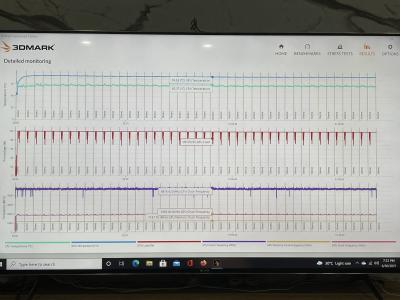

|
|
|
Jul 1 2021, 12:26 AM
Return to original view | IPv6 | Post
#6
|
|
Junior Member
157 posts Joined: Jan 2003
|
PC shop tested for my cpu & gpu stress test is cpu prime95 -72 degree and gpu furmark 65 degree.
The above is turn on turbo mode and the cpu liquid cooling fan speed by turning to 75% is much more cooler. then stock. maybe lower it the GPU to gaming mode should be better. |
|
|
|
|
|
Jul 1 2021, 08:05 PM
Return to original view | IPv6 | Post
#7
|
|
Junior Member
157 posts Joined: Jan 2003
|
QUOTE(Lineage @ Jul 1 2021, 07:16 PM) Upgraded my CPU cooler to Corsair iCUE H150i Elite Capellix.. set the AIO fans speed to 50 - 75% . else do pull and push AIO its help alot.Temp about to settle down at 70'c under Prime95 stress test. However, the clocks speed for the 3700X only at 37xx mhz when im doing stress test. Is this consider normal? |
|
|
Jul 21 2021, 02:28 AM
Return to original view | IPv6 | Post
#8
|
|
Junior Member
157 posts Joined: Jan 2003
|
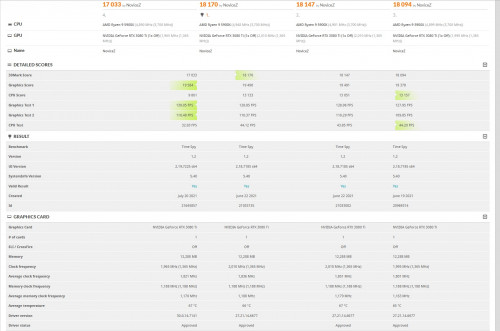 guys how come my timespy 3dmark cpu score so low ? the 4. is lastest bios and lastest gpu driver. im noob here |
|
|
Jul 21 2021, 03:18 PM
Return to original view | IPv6 | Post
#9
|
|
Junior Member
157 posts Joined: Jan 2003
|
QUOTE(TristanX @ Jul 21 2021, 10:52 AM) Close all the apps and any background apps before running it. try d.not much improve cpu score 10xxx only dunnon why.This is mine. https://www.3dmark.com/spy/15912150 My RAM is DDR4-3800 C16 this is my cinebenchR23 score , how abt u? Attached thumbnail(s) 
|
|
|
Aug 2 2021, 12:21 AM
Return to original view | IPv6 | Post
#10
|
|
Junior Member
157 posts Joined: Jan 2003
|
QUOTE(John Chaser @ Aug 1 2021, 12:57 PM) Place your bets people, at what price do you think ROG CROSSHAIR VIII EXTREME will start at: F)RM3299A) RM2699 B) RM2799 C) RM2899 D) RM2999 E) RM4000   John Chaser liked this post
|
|
|
Oct 14 2021, 03:01 AM
Return to original view | IPv6 | Post
#11
|
|
Junior Member
157 posts Joined: Jan 2003
|
QUOTE(llk @ Oct 6 2021, 07:21 PM) Whoever bought Ryzen CPU last year and redeemed game code for Far Cry 6 now you can activate the code. how to get the redeem code?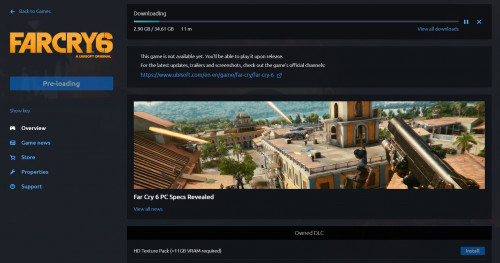 thanks |
|
|
Oct 24 2021, 05:17 PM
Return to original view | Post
#12
|
|
Junior Member
157 posts Joined: Jan 2003
|
QUOTE(iZuDeeN @ Oct 24 2021, 09:30 AM) Lol…AMD fans must support support |
|
|
Dec 1 2021, 05:13 PM
Return to original view | IPv6 | Post
#13
|
|
Junior Member
157 posts Joined: Jan 2003
|
guys and girls you can try this.
https://www.bhphotovideo.com/ been bought nvme ssd and 4k player double box packaging . |
|
|
Apr 20 2022, 05:09 PM
Return to original view | IPv6 | Post
#14
|
|
Junior Member
157 posts Joined: Jan 2003
|
QUOTE(coolkwc @ Apr 20 2022, 04:41 PM) Haiz, I ran into problem again on my system just under a year. update BIOSMy PC shut off and restart randomly during normal operation. The blackout is fast one, just a second before it alive, but it won't boot with Qcode 00 (not used code!!!) and QLED stuck at DRAM, and system not response to power button long press either. Have to kill the AC switch, then it will boot normally. It will even reboot sometimes in BIOS setup page. Try swap my RAM, still happen. PBO disable, not fix. Even run at optimised default also reboot. I suspect now is due to either CPU or mobo, with highest suspicious on CPU. Can you guys suggest a sensible way to further test out whether is CPU or mobo? I'm frustrating now as i just recover from a nightmare failure on my previous system before i switch to AMD platform, and the seemingly HW issue haunt me again. I just want to avoid buy something new just to isolate the factor, but i won't know exactly the issue if i didn't do so, contradict, arggg |
|
|
Apr 20 2022, 05:22 PM
Return to original view | IPv6 | Post
#15
|
|
Junior Member
157 posts Joined: Jan 2003
|
QUOTE(coolkwc @ Apr 20 2022, 05:15 PM) Where's your logic? Restore ur windows to previous month . Just double check this few days what have you doneThe problem isn't occur because of BIOS change previously. It worked fine for last 8 months until recently. So what to do with BIOS? |
| Change to: |  0.0625sec 0.0625sec
 0.24 0.24
 7 queries 7 queries
 GZIP Disabled GZIP Disabled
Time is now: 9th December 2025 - 03:37 AM |
 Quote
Quote
