Welcome Guest ( Log In | Register )

4 Pages < 1 2 3 4 >Bottom

Outline · [ Standard ] · Linear+

 Tutorial on Ubiquiti Edgerouter for unifi/maxis, Edgerouter settings ftw

views
     
TSwanttotree
post Apr 16 2019, 07:13 PM

On my way
****
Junior Member
677 posts

Joined: Apr 2008
I recently found out that some of you have problem with setting up edgerouter-x with my tutorial, specifically with hypptv. Please be informed that it does work perfectly with edgerouter-x. If any of u need a step by step, do reply here to let me know.
TSwanttotree
post Jan 23 2020, 12:29 AM

On my way
****
Junior Member
677 posts

Joined: Apr 2008
QUOTE(immensemorbid @ Jan 23 2020, 12:14 AM)
Hi, I need help. I'm currently using edgerouter X. I cannot get tm hypptv to work. I've tried following your guide. Internet works now.
I have eth0 set for pppoe

eth0 has both vlan 500 and 600
local2 (eth1) set to no address
bridge group br0 added
eth0 vif 600 added bridge group br0
eth1 bridge group br0

hypptv still wont work. am i doing anything wrong?

My plan is to use eth0 for pppoe and eth1 for hypptv
eth234 will be used for other devices (access points etc.)

current firmware version 1.10.3

appreciate your advice. thanks.
*
Remove eth1 from the switch0
TSwanttotree
post Jan 23 2020, 12:16 PM

On my way
****
Junior Member
677 posts

Joined: Apr 2008
QUOTE(immensemorbid @ Jan 23 2020, 09:00 AM)
Should I try to reset the whole thing and reconfigure again?
I've tried the basic setup wizard with either using single Lan option
or having two Lans option.
*
Unnecessary. Just go to config tree interface, then switch0, look for interface eth1 and delete it. That will remove the eth1 from the switch chip.
TSwanttotree
post Jan 23 2020, 10:33 PM

On my way
****
Junior Member
677 posts

Joined: Apr 2008
Cheers
TSwanttotree
post Jan 24 2020, 07:53 AM

On my way
****
Junior Member
677 posts

Joined: Apr 2008
QUOTE(kokhoong0624 @ Jan 23 2020, 11:57 PM)
Hello, good day to you!
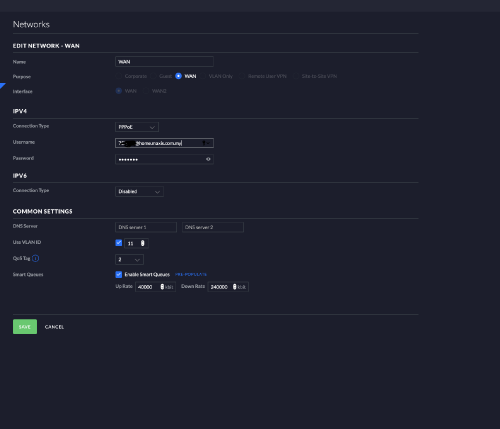
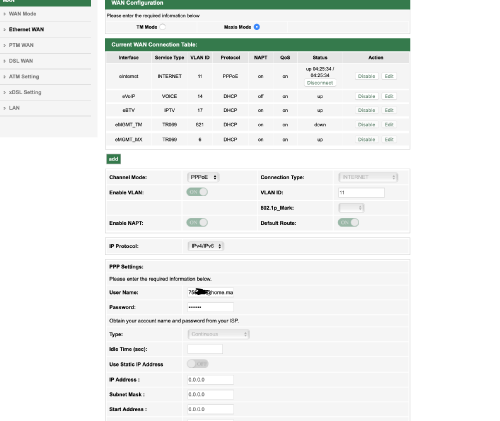
I just got a UDM and tried to set up Maxis fibre with the UDM.. And I tried these settings and it did not work for me. Do you mind giving me some insights?
I tried VLAn 621 and VLAN 11 (as stated in my maxis router profile) and it did not work... And I tried Qos from 1-4 too..

Thanks in advance!

user posted image

user posted image
*
Yours should work with vlan tag 11. The config looks fine to my eyes though. Not sure why that wouldnt work. Have you tried letting it connect for a little while?

This post has been edited by wanttotree: Jan 24 2020, 07:54 AM
TSwanttotree
post Jan 24 2020, 03:49 PM

On my way
****
Junior Member
677 posts

Joined: Apr 2008
QUOTE(kokhoong0624 @ Jan 24 2020, 10:45 AM)
Thanks so much for your reply! May I know if I should leave QoS on? And on what number.. I’ll try again after I get back from my hometown.

Also, happy holidays!
Will update you once I go back and test again
*
Happy holidays to you too. I suggest turning off qos.
TSwanttotree
post Jan 28 2020, 04:19 PM

On my way
****
Junior Member
677 posts

Joined: Apr 2008
QUOTE(iamsobloodysick @ Jan 28 2020, 03:49 PM)
Took the plunge to try out ER-4 before moving to my new house. It actually looks much bigger than what I thought. biggrin.gif
*
Yes it is bigger and wider than most edgerouters. Its is really powerful. Congrats on the purchase. What switch and ap(s) do you pair it with. Curious.
TSwanttotree
post May 19 2020, 05:58 PM

On my way
****
Junior Member
677 posts

Joined: Apr 2008
QUOTE(Geshi @ May 19 2020, 03:25 PM)
Hello wanttotree,
When I came across this thread on ERX, I was so happy.
I’m a total newbie and am basically a plug and play guy.
Recently I bought an ERX SFP for my music (Tidal music) streaming system. Will the set up be similar to your tutorial in your first post here?
My system will basically be as follows:
Modem>ERX SFP >audiophile switch>music server>DAC.
There will be an access point connected to the ERX for WiFi use and a NAS connected to the switch..
Your suggestion on any changes will be appreciated.
Thanks in advance.
*
I wouldnt think it would be any more different. May i know what is audiophile switch though?
TSwanttotree
post May 19 2020, 05:59 PM

On my way
****
Junior Member
677 posts

Joined: Apr 2008
QUOTE(Jjuggler @ May 19 2020, 04:45 PM)
EdgeRouter 6P user reporting in. This is my first Ubiquiti gear and I do like this router for its cool features.
*
Thats a great first device. It will serve u a really long time.
TSwanttotree
post May 19 2020, 08:51 PM

On my way
****
Junior Member
677 posts

Joined: Apr 2008
QUOTE(Geshi @ May 19 2020, 08:21 PM)
It’s the JCAT M12 Gold switch.
*
Wow quick google. Not cheap. Anyways. Enjoy your new setup. Would love to hear about your music server setup. Please tag me if u happen to open a thread about it.
TSwanttotree
post Jun 7 2020, 10:58 PM

On my way
****
Junior Member
677 posts

Joined: Apr 2008
QUOTE(h11g @ Jun 7 2020, 10:06 PM)
guys sorry a newbie here, whats the advantage of using edge router vs something like Asus GT-AX11000 router?
*
Asus router is designed for simplicity for setup and performance.

Ubiquiti is designed to be running stable(years without crash). Plus you can set it up to your hearts desire. Advanced firewall rules with multiple interfaces.

Both are good in its own way. Coming from asus products before i moved on to something that can be setup to my liking to feed my curiosity.
TSwanttotree
post Jun 8 2020, 12:31 PM

On my way
****
Junior Member
677 posts

Joined: Apr 2008
QUOTE(h11g @ Jun 8 2020, 11:30 AM)
Ok cool, I’m looking into upgrading my router soon so I am exploring this option.
*
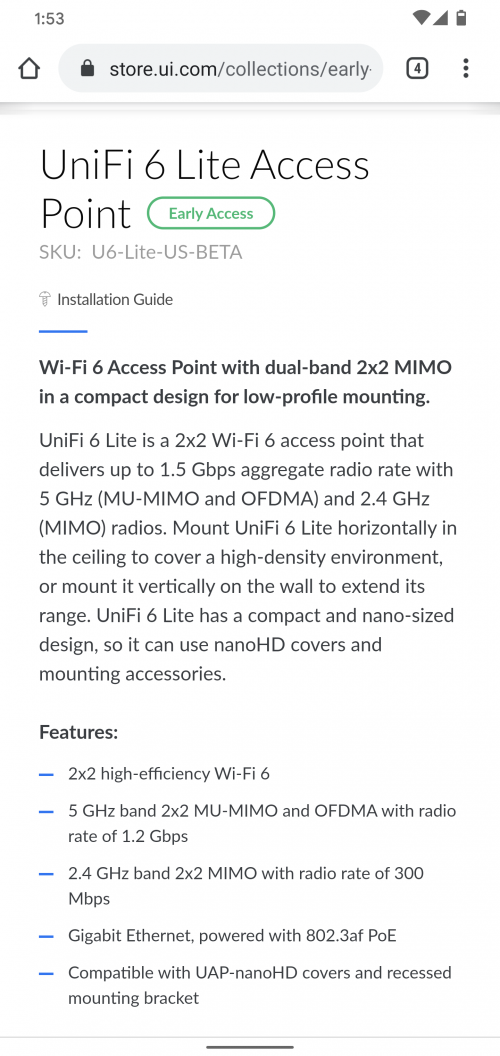
Great. Wait for uap ax series. They are similarly priced to ac. Any edgerouters or usg can handle gigabit speed.
TSwanttotree
post Jun 8 2020, 01:54 PM

On my way
****
Junior Member
677 posts

Joined: Apr 2008
QUOTE(h11g @ Jun 8 2020, 01:33 PM)
UAP AX series uses 24V POE as well?
*
Im afraid not.

user posted image
TSwanttotree
post Jun 8 2020, 04:48 PM

On my way
****
Junior Member
677 posts

Joined: Apr 2008
QUOTE(h11g @ Jun 8 2020, 04:07 PM)
So we’ll need to get a switch to support 802.3 POE to work
*
If u buy single pack, it comes with an adapter that supports the poe standard respectively. Unless you are deploying more units, then u will need 802.3af supported poe switch.
TSwanttotree
post Jun 18 2020, 01:09 PM

On my way
****
Junior Member
677 posts

Joined: Apr 2008
QUOTE(Drian @ Jun 18 2020, 12:37 PM)
Quick question
Does the USG or edgerouter support openvpn?
if yes how is the speed like?

My appletv does not support vpn app , which means i will need to rely on the router to do the VPN stuff so that I can watch disney/netflix etc with US content.
My internet speed is now 500mbit and it seems like my ac-68u can't do full 500mbit with openvpn. I think it was only 30Mbit/s when openvpn is on.
*
Edgerouters does support openvpn. Though none of the model can reach 500mbps. If you rely on vpn, i would recommend to run any x86 based routers. Eg: pfsense/opnsense/openwrt(x86) running on any descent cpu over 2ghz.

I would look into wireguard instead of openvpn, provided that your vpn provider offers it. Wireguard uses a lot less cpu/crypto resources which result faster connection.
TSwanttotree
post Jun 18 2020, 01:13 PM

On my way
****
Junior Member
677 posts

Joined: Apr 2008
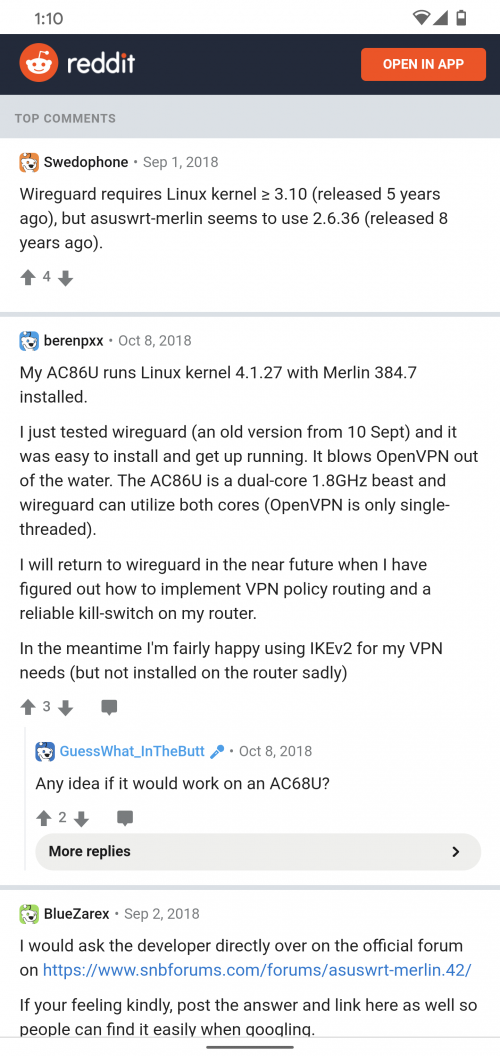
A quick google, i found someone runs wireguard vpn on his rt-ac86u.

user posted image

This post has been edited by wanttotree: Jun 18 2020, 01:21 PM
TSwanttotree
post Jun 18 2020, 06:39 PM

On my way
****
Junior Member
677 posts

Joined: Apr 2008
QUOTE(Drian @ Jun 18 2020, 06:14 PM)
pfsense ...hmm steep learning curve but I guess you're right, the fastest I think for home consumer is the AC-86u with its 1.8GHz cpu.
*
For a beginner yes pretty steep. Openvpn can only utilize 1 cpu core. Wireguard can use multiple cores. Easier on openwrt. Goodluck with your journey.
TSwanttotree
post Jun 28 2020, 11:55 AM

On my way
****
Junior Member
677 posts

Joined: Apr 2008
QUOTE(jongoz @ Jun 28 2020, 11:10 AM)
Hi all,
I am trying to get ER-X to work nicely with VOIP setup on the old Archer c5v (i've given up the BTU HG8240H route)

Previously I'm on Openwrt setup and it was working nicely. Plug Archer c5v to Wan port  and the er-x port (eth1) that has untag vlan 821/822.

I've followed the tutorial here but somehow the archer c5v is not communicating. here's the step i have done:
Followed the previous setup to create 'local 2' and disabled secondary IP - in the ER-X its now eth1 (not eth2).

Setup Vlan 821 and 822. tag to eth0 (CPU)

user posted image

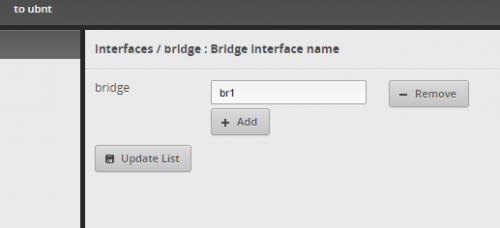
Setup Bridge - br1

user posted image

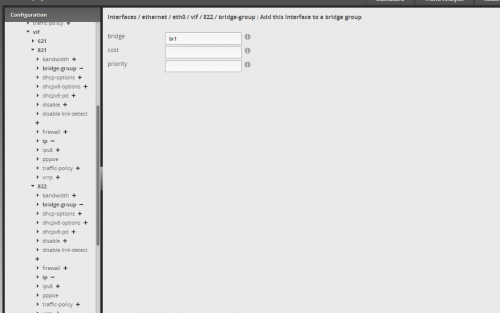
Then i link the vlan 821 and 822 into vif br1

user posted image

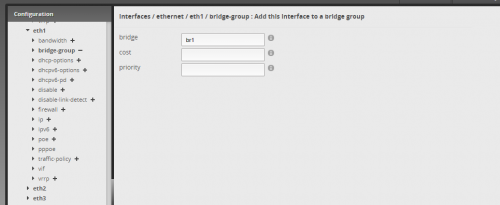
After that i link br1 into the eth1 port

user posted image

reboot both er-x and archer. still not connected.

anybody can help? what am i doing wrong?
*
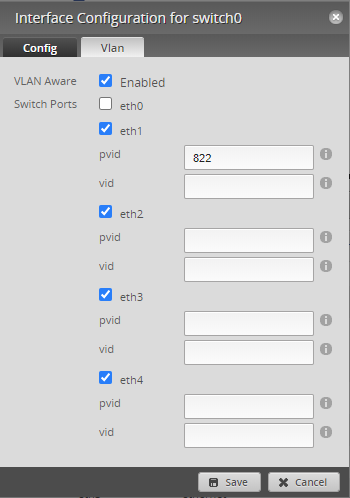
Have you made sure that your eth1 is at pvid(untag) instead of vid(tag)?
That setting is at = Dashboard > switch0 > Actions > Config > VLAN
I figure you might not have checked that cz i didnt see any of it mentioned in your post.
TSwanttotree
post Jun 28 2020, 12:30 PM

On my way
****
Junior Member
677 posts

Joined: Apr 2008
QUOTE(jongoz @ Jun 28 2020, 12:25 PM)
i made changes like this, rebooted archer but also not connecting.

user posted image
*
Make sure eth0 is on vid. Uncheck other port not used for vlan. Im no longer using maxis, so maybe voip is on 821. Try that. I also saw your eth0 is not enabled for vlan aware.

This post has been edited by wanttotree: Jun 28 2020, 12:30 PM
TSwanttotree
post Jun 28 2020, 02:03 PM

On my way
****
Junior Member
677 posts

Joined: Apr 2008
QUOTE(jongoz @ Jun 28 2020, 12:50 PM)
it doesn't allow me to tick eth0 for switch.

i think the only way to do it is a proper vlan setup for all switch ports. maybe i need to setup local vlan = 1, bridge it so that it does the routing properly.

hope to get some light at the end of the tunnel... right now have to live without VOIP for a while
*
Thats correct. Just as long as u alrdy tag 822/821 on eth0. Right now what you should do is. Instead of bridging eth0.822 with eth1. You should bridge eth0.822 with sw0.

4 Pages < 1 2 3 4 >Top
 

Change to:
| Lo-Fi Version
0.0217sec    0.21    7 queries    GZIP Disabled
Time is now: 5th December 2025 - 11:40 PM