Swipe "the" PHYSICAL credit card to "reset" SPay....do not use PayWave... must swipe and enter PIN to "reset"....
If still "Do not honor" when using SPay, it's time to shout at your financial service provider(s)...I have done that to RHB... I have tried to "reset" using PHYSICAL card two-three times but still get "Do not honor" error... after shouted, then only can "reset" whenever I want....
RHB system is not as mature as Maybank...
This post has been edited by azhar75: Jul 22 2017, 11:29 AM
i have a question. when we make a payment using samsung pay on newer nfc type machine, does it somehow will try to contact our phone through data?
I tried once in Watson's Queensbay Mall, transaction not successful with Host Not Available message. But when I tried in another pharmacy right beside it, it works just fine. I am suspecting data because the location of the cashier in Watson might be in too deep, Celcom's data is known to have problem in that side.
Cashier punching wrong button to initiate SPay...
Not all cashing machines are programmed the same with CC terminals... if cashier key in wrong info at cashing machine, the CC terminal won't recognize SPay ...
Watsons pharmacy is in my "SPay Blacklisted List" due to instability of the cashing machines and cashier reliability to initiate SPay...
Out of all vendors in Malaysia, I discovered that Watsons success rate to use SPay is about 50-50....
Summore, certain Watsons retailers forcing minimum of RM10 or RM50 in order to use credit cards. No synchronization between various branches of Watsons. However, Watsons at Sunway Pyramid does not have minimum purchase...
Avoid Watsons unless the promo price is a steal and standby cash or physical card if SPay is unsuccessful...
Chances of triggering error is higher if the terminal cannot segregate the signal properly, eg..... The terminal would read 2 consecutive card info, combine it and thus making it like invalid card
Especially old model terminal that also have nfc feature
I have no failure rate of either NFC or MST by tapping in between these "sensors" .
In fact the success rate is higher as the same terminal sometimes requiring me to sign the slip meaning it's MST for sure...but most of the times, NFC will be the one passed thru first for the same terminal... I was also surprise why I have to still sign the slip on the same terminal when other days and attempts mostly no need to sign... Even the same cashier I meet every time SPay also puzzled... sometimes need to sign while mostly no need for my SPay...
johnnybro88, recommending you to send email to ewarranty.sme@samsung.com to update their warranty database to follow the letter. The device is having a warranty until March 2018.
Details required:
» Click to show Spoiler - click again to hide... «
To our valued customers;
This SAMSUNG E-Warranty service is applicable only to Samsung mobile phones, tablets, gears, and Galaxy Cameras purchased through SAMSUNG authorised retailers in Malaysia only.
A) For SAMSUNG Mobile Phone/Tablet/Gear/Camera; Please provide us the information and email to ewarranty.sme@samsung.com
Information needed to facilitate your enquiry; 1. Purchase receipt (attach with email) 2. Full Name: 3. Mobile number : (e.g.: 01234567890) 4. Date of Purchase: 5. Model code: 6. IMEI number /Serial Number: (e.g.: 3554XXXXXXXXXXX) *If your purchase receipt do not have any info of IMEI or Serial Number of your device, please then provide us with a picture of the sticker on the outer box which contain the IMEI/Serial Number 7. Email Address:
This post has been edited by azhar75: Dec 15 2017, 12:49 PM
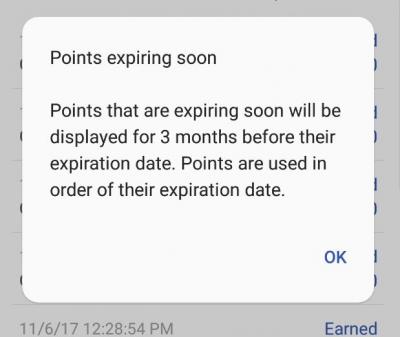
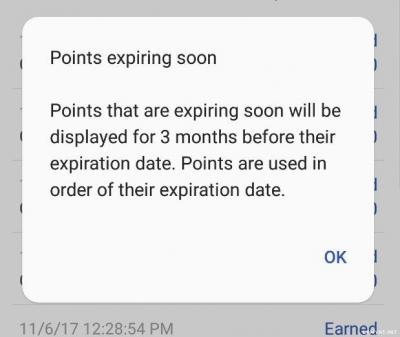
FYI, Points earned in a particular month will be valid for six months,
You guys better check the expiry date properly...
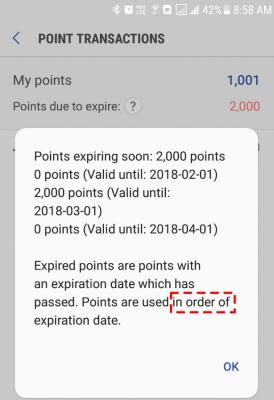
It's kinda "confusing" how the expiry date system / calculation works...for my case, why 2,000 Points expired on 1st March when the current point is only 1,001... should be 1,001 expiring on 1st March (?)...perhaps it's the max point expired per month (ie. 2K points...?)
Furthermore, that "last" 1,001 Points were collected on December 2017 and should have expiry date of 1st June 2018... (?)
This post has been edited by azhar75: Jan 1 2018, 02:41 PM
It's kinda "confusing" how the expiry date system / calculation works...for my case, why 2,000 Points expired on 1st March when the current point is only 1,001... should be 1,001 expiring on 1st March (?)...perhaps it's the max point expired per month (ie. 2K points...?)
Furthermore, that "last" 1,001 Points were collected on December 2017 and should have expiry date of 1st June 2018... (?)
Finally they have adjusted the expiry date correctly... keep up the good work SPay team...
This post has been edited by azhar75: Jan 6 2018, 06:02 PM


 Jul 22 2017, 11:21 AM


 Quote
Quote






 0.1447sec
 0.79
0.79
 7 queries
 GZIP Disabled