

Attached thumbnail(s)

ILLEGEAR Z5 & Z7 Discussion Thread V3, Now with Nvidia GeForce GTX 1060 6GB GDD
|
|
 Dec 2 2016, 06:50 AM Dec 2 2016, 06:50 AM
Return to original view | Post
#1
|
 
Junior Member
5 posts Joined: Nov 2013  
|
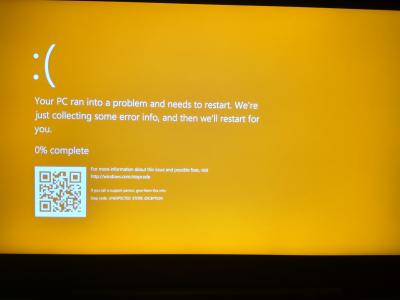
Another day, another problem. Last night my laptop crashed and had the problem shown on the yellow screen picture. When I restarted it, it says no bootable device. I noticed that system files were saved on my SSD but my SSD cannot be detected from the booting operations. Only my hard drive can be detected. Urgently require instructions as I really need to do my group project report.
Attached thumbnail(s)
|
|
|
|
|
|
Dec 2 2016, 01:55 PM
Return to original view | Post
#2
|
|
Junior Member
5 posts Joined: Nov 2013
|
QUOTE(Prince J @ Dec 2 2016, 11:11 AM) Hi faris, Done.Can you pm me your serial number? Will check and assist.  |
|
|
Dec 14 2016, 01:05 PM
Return to original view | IPv6 | Post
#3
|
|
Junior Member
5 posts Joined: Nov 2013
|
I did encounter something like that but I think it was a component problem, not the laptop itself. My SSD was unable to be detected. Anyways, so far keyboard, monitor and trackpad are ok. The internet wifi adapter is rather weak though. I notice that on the same table, my friend's weaker normal acer laptop has better connection and lower ping and less packet loss. In my room, my roommate can connect to internet while I can't. So yeah it leaves something to be desired.
|
|
|
Dec 14 2016, 10:50 PM
Return to original view | IPv6 | Post
#4
|
|
Junior Member
5 posts Joined: Nov 2013
|
QUOTE(Prince J @ Dec 14 2016, 03:37 PM) what WIFI card are you using? Intel® Dual Band Wireless-N 7265 |
|
|
Dec 15 2016, 11:30 PM
Return to original view | IPv6 | Post
#5
|
|
Junior Member
5 posts Joined: Nov 2013
|
QUOTE(Prince J @ Dec 15 2016, 10:58 AM) May I have your serial to check if you are the first batch Z5 skylake buyer that is entitled for Intel 8260-AC card upgrade? The 8260-AC is much better than 7265-N card. ILG8504350LAnother problem occurred. There's a clicking noise from the laptop. I am not sure if it comes from the hardware or what because it is silent when I mute the speakers. When I use headphones, the clicking can't be heard from outside but I can still hear it clicking from the headphones. |
|
|
Dec 18 2016, 01:06 AM
Return to original view | IPv6 | Post
#6
|
|
Junior Member
5 posts Joined: Nov 2013
|
Well guess I will be sticking with the 1k ping while my partner has 70 then.
|
|
|
|
|
|
Dec 29 2016, 09:04 PM
Return to original view | IPv6 | Post
#7
|
|
Junior Member
5 posts Joined: Nov 2013
|
What is the software or driver that makes the fan symbol pop? Now when I press the max cooling, the symbol no longer shows so in a noisy area I am unsure if the fan I am using is set to max or not.
|
|
|
Dec 30 2016, 03:43 PM
Return to original view | IPv6 | Post
#8
|
|
Junior Member
5 posts Joined: Nov 2013
|
QUOTE(Prince J @ Dec 29 2016, 09:45 PM) Hi Faris, http://www.illegear.com/downloads/MacroKeys.zipTry to reinstall hotkey driver. I think some software registry has been messed up. Is it this one? When i downloaded it, it doesn't automatically pop up an installation or whatever. |
|
|
Jan 9 2017, 08:32 PM
Return to original view | IPv6 | Post
#9
|
|
Junior Member
5 posts Joined: Nov 2013
|
Don't this computer have an auto temperature controller? My laptop will automatically shutdown when it overheats due to the fan not going faster at high temperature. In addition to that, there's no clear way to re-install the registry for the hotkeys. I still can't get the fan icon to pop up. I thought it already activated the first time I press the max fan button but it didn't and in the end, my laptop died from overheating. Please put up a simple guide or tutorial on how to do things like fan cleaning, thermal paste application, driver installation.
|
|
|
Jan 10 2017, 12:19 PM
Return to original view | IPv6 | Post
#10
|
|
Junior Member
5 posts Joined: Nov 2013
|
QUOTE(Prince J @ Jan 10 2017, 10:22 AM) I am sorry can you pm me your serial? I can't seem to find your post in this thread and your past post. I am not sure. But this happened about 3 times I think while playing a graphically intensive game like Paragon. I am not sure how to gauge the temperature since Paragon doesn't show the temperature unlike Overwatch. When the fan is maxed, I never experienced these shutdowns. But whenever it isn't maxed(even though I thought I maxed it), it will shutdown. [Just experienced the shutdown again but this time when I am sure the fan was maxed]As mentioned, have you reinstalled hotkey drivers from the DVD or the download link on the thread front page? There is no need to mod the registry. The problem you indicated here sound pretty much the windows update / 3rd party app installation override the hotkey drivers therefore the hotkey symbols are not showing. We did help few customers on the driver re-installation. If you are not sure how to do that, you are welcomed to send it in and we will more than happy to assist you on that. As for the temperature sensor, of course both the Z5 and Z7 have that. And what temperature you get on your Z7? We've never seen overheating shutdown in other customers' Z5/Z7 tho. This post has been edited by Faris Azri Aswandi: Jan 10 2017, 03:40 PM |
|
|
Jan 10 2017, 02:55 PM
Return to original view | IPv6 | Post
#11
|
|
Junior Member
5 posts Joined: Nov 2013
|
Oh yeah, I did try to make a bootable MS-DOS using my pendrive but there's no option to make it MS-DOS as shown in the picture.
Attached thumbnail(s) 
|
|
|
Jan 11 2017, 08:35 PM
Return to original view | IPv6 | Post
#12
|
|
Junior Member
5 posts Joined: Nov 2013
|
QUOTE(Prince J @ Jan 11 2017, 11:25 AM) Can we have the laptop to check physically? I don't think so. I am heading to Sarawak this saturday for 2 months or so and sending it right now would be risking not having a laptop my whole holidays.For Rufus, you need to make the bootable MS-DOS in windows 7 or 8.1 environment. I see. In that case, will the extracted data still work when booting when I use Win 10? Will there be any bad repercussion if the bios fail to upload successfully? |
|
|
Jan 15 2017, 03:34 PM
Return to original view | Post
#13
|
|
Junior Member
5 posts Joined: Nov 2013
|
QUOTE(dinbk90 @ Jan 11 2017, 03:40 AM) Why not u use the msi afterburner and rivaturner statistic, and set up on-screen display for your games? Its not that hard to monitor temp for gpu and cpu though using msi afterburner.... Thanks for the tips. I tried using them. Though, I can't seem to display the stats on screen. And sorry for 'mencelah' in your issues. I'm now gathering info, review, issues, etc on illegear laptop since I plan to buy one by mid year. Have been silently following this thread since last year. No worries. I actually did the same thing before buying the 6.3 k behemoth. Although, I seem to be facing weird problems so I can add some things to note from my personal experience; -if your hand sweats easily, you need to put a cloth or something to prevent the chasis from being damaged. The damage is subtle but I can see scratch like patterns on my left palmrest. -plug for headset lies on the right side so sometimes it may bother your hand when using a mouse if you're right-handed. -the area near the power button or close to the hinge of the screen is almost always hot -SSD failure (probably the company's fault, not Illegear) -adapter and plug may be loose so sometimes you have to fiddle with the charger and check regularly if you're actually charging (this problem is after I sent them for a replacement cable) -automatic shutdown from this current case -sometimes the battery cannot be detected or after you full charge, you will discover you can't use it without plugging in to charger and this requires another full charge This post has been edited by Faris Azri Aswandi: Jan 17 2017, 09:48 AM |
|
|
|
|
|
Jan 17 2017, 10:03 AM
Return to original view | Post
#14
|
|
Junior Member
5 posts Joined: Nov 2013
|
QUOTE(Prince J @ Jan 16 2017, 11:23 AM) Hi StenCL, It's not as bad as Dell laptop. That laptop looked like someone poured an acid onto the palm rest. It was black and blotched. Maybe my sweat is too acidic or something. Anyways, in comparison to Dell's, the scratch like marks look barely noticeable. Though, once someone points it out, you can easily see it.1st Feb is public holiday, you can send in on 2nd Feb. The heatsink and fans are right underneath the power button, it's normal to be a bit warmer than other area. We purposely put the heatsink around that area but not the side and palm rest. As for the hand sweats causing chassis damaged, we have never seen any existing Z7 user that sent for servicing having that problem though. The casing is made by anodized aluminium and it is supposed to be durable. For the adapter and power cord loose, intermittent shut down issue, you are welcome to send in for checking. The motherboard detects temperature and shutdown once it reaches thershold, 76C is still far below the shutdown level. I will bring it there when I can. I am merely giving out a personal review for future references. |
|
|
Jan 22 2017, 01:25 PM
Return to original view | Post
#15
|
|
Junior Member
5 posts Joined: Nov 2013
|
At first I assumed that Paragon is the only game that hardboots my Z7 but then even when playing other games like Dreadnought, it also hardboots the laptop. It also force me to set up the hotkeys every time the laptop is hardbooted. Someone said that this may be caused by the motherboard. Any way to diagnose the motherboard?
|
|
|
Feb 7 2017, 06:26 PM
Return to original view | Post
#16
|
|
Junior Member
5 posts Joined: Nov 2013
|
Yo, if something is wrong with the motherboard, will the whole laptop be replaced? How long for a fix? If so, I want to store all my files. This is definitely what I expected from a 6k laptop. Even Overwatch makes the laptop hardboot now. Like WTF?
|
|
|
Apr 23 2017, 10:07 PM
Return to original view | IPv6 | Post
#17
|
|
Junior Member
5 posts Joined: Nov 2013
|
I have never felt like throwing a laptop except this Z7. Might have if not for fearing I would damage the wall. Just got it back from the shop yesterday and I am already freezing so hard I have to manually hold the power button 10 seconds. Ctrl+alt+delete won't even come up.
|
|
|
Nov 24 2017, 02:31 PM
Return to original view | Post
#18
|
|
Junior Member
5 posts Joined: Nov 2013
|
Very disappointed with the Illegear Z7. Even after the fix last time, the problem with battery keeps coming back. It won't charge. If you unplug it, it dies. Just like that. Haiz... My work lost in a blink of an eye. This is retarded. If I wanted a desktop, I would have gotten a desktop. A batteryless laptop is pointless. Please check the battery for your products before coming up with new ones. Quality control please. I expected more from a 6k laptop. Would I send back to Illegear for repair? No. I'm already back in Sarawak. Just be more strict with your quality control so that future buyers don't experience what I experience.
|
|
|
Nov 25 2017, 04:31 PM
Return to original view | Post
#19
|
|
Junior Member
5 posts Joined: Nov 2013
|
QUOTE(AZIM@ILLEGEAR @ Nov 24 2017, 06:56 PM) Hi Faris Azri Aswandi, may I know whether you have reported this issue previously to us (either via WhatsApp/FB/other channels)? For rectification, you can actually ship the laptop back to our HQ for the process. Kindly PM me for more details. Yeah. I sent it to your HQ to fix it. It was one of the problems. It was either not fixed or replaced but still with a low quality part. I know I can ship it back but then I will have to pay for the shipping and I will lose working hours. So no thanks. I'll just have to live with this "desktop". I've been around since the V2 thread and the number of battery problems is staggering. Like come on. We want to support Malaysian products but it's difficult if the quality is questionable considering the price. Haiz. Just tighten your quality control standards.Hi wklim090, kindly PM me your serial number, will help to assist. |
|
|
Jul 7 2018, 11:04 AM
Return to original view | Post
#20
|
|
Junior Member
5 posts Joined: Nov 2013
|
I have no idea why but the battery can't be recharged. The computer is sluggish. It takes forever just to open a folder. No need to talk about games. Won't even go past the initial loading. Blue screen visits me everyday. Every single day at least once. stopcode store exception something. Tried everything I could try, still the same. Doesn't seem to be a virus since antivirus doesn't detect anything. Windows Defender stated that no action need to be taken on the driver but I suspect it's lying. My Z7 doesn't have a CD reader. Do I need to reformat according to the instructions below or is there an alternative method? Windows 7 & 10 http://www.illegear.com/downloads/zskylake7and10.zip (with one-click installer) Windows 8.1 http://www.illegear.com/downloads/zskylake81.zip Latest BIOS for SKYLAKE Z5 960M and 970M, this BIOS fix Shift+7 with Numlock issue. http://www.illegear.com/downloads/z5skylakebiosupdate.zip Steps (DOS method): 1. Prepare a USB pendrive and make a bootable USB pendrive with Rufus, download Rufus from https://rufus.akeo.ie/ 2. Open Rufus, file system choose "FAT32", create a bootable disc using "MS-DOS", format the pendrive. 3. Extract and transfer the downloaded BIOS files to the bootable USB pendrive. 4. Make sure the AC adapter is connected. Press F2 to enter into BIOS control panel upon boot up, set the pendrive as the highest boot priority, save and restart. 5. Flash BIOS, type "dos.bat", computer will restart by itself, after restart the computer will start flashing BIOS *warning do not remove the USB pendrive and power source during flashing*. 6. Enter F2 BIOS again, click "load default settings", done. This post has been edited by Faris Azri Aswandi: Jul 7 2018, 11:07 AM |
| Change to: |  0.0296sec 0.0296sec
 0.29 0.29
 7 queries 7 queries
 GZIP Disabled GZIP Disabled
Time is now: 6th December 2025 - 09:07 AM |
 Quote
Quote