Welcome Guest ( Log In | Register )

3 Pages  1 2 3 >Bottom

Outline · [ Standard ] · Linear+

 AMD Radeon™ Discussion V15, Radeon Software 20.10.1

views
     
nrw
post Nov 26 2018, 03:11 PM

Casual
***
Junior Member
398 posts

Joined: Jul 2014


QUOTE(shirohamada @ Nov 23 2018, 02:20 PM)
https://www.tomshw.de/2018/11/22/effizenzve...ing-igorslab/2/

just eyeballing the curve, i'm not gonna measure the slope, the rx590 peak efficiency is between 1450 to 1500MHz when undervolted.

and the gigabutt 580 peak efficiency at 1300. it is probably not the best asic quality.
if i have to guess, around 65% asic.
*
Reading the article you linked you are right.
Peak efficiency for the 590 is 1500Mhz with 30% gain (vs. stock) and 1300Mhz for the 580 with ~17%.
nrw
post Dec 1 2018, 03:04 PM

Casual
***
Junior Member
398 posts

Joined: Jul 2014


ATI's coming (mid December) driver (Adrenalin 2019) to support auto OC & undervolting in direct response to NVIDIA’s Turing OC Scanner.

https://videocardz.com/79193/amd-preparing-...in-2019-edition


nrw
post Dec 1 2018, 03:24 PM

Casual
***
Junior Member
398 posts

Joined: Jul 2014


QUOTE(Songchien @ Dec 1 2018, 03:22 PM)
But AMD cards doesn't have much room for OC to begin with?  confused.gif
*
yet massive room for UV wink.gif and since UV takes quite some time if you wanna do it well … a quick [stable (edited*)] solution at 80% accuracy would already be a giant leap.

This post has been edited by nrw: Dec 1 2018, 03:42 PM
nrw
post Jul 14 2019, 11:12 PM

Casual
***
Junior Member
398 posts

Joined: Jul 2014


QUOTE(yhsiau @ Jul 14 2019, 05:17 PM)
Some hardcore OC expert able to OC his 5700xt to catch up the performance with RTX 2080!?

Note: its a german website. so, use google to translate it.

https://www.tomshw.de/2019/07/11/ungefessel...und-rx-5700-xt/
*
that's Igor smile.gif

Best German reviewer around.
Card was under water and at 1.25V so nothing for long term operation.

Page 3 offers the sppt files for download but make sure you read the disclaimer before doing so.

I think undervolting is most promising... with custom designs coming those 2 card may really become quite interesting for those looking to upgrade at these price points.
nrw
post Aug 16 2019, 12:15 AM

Casual
***
Junior Member
398 posts

Joined: Jul 2014


PowerColor Red Devil seems to be the best custom card around this time. (Nitro+ not being tested just yet)Especially at the given rrp.

Just read a review on a German Site. Use google translate.

Review (computerbase.de)
nrw
post Aug 28 2019, 09:59 AM

Casual
***
Junior Member
398 posts

Joined: Jul 2014


QUOTE(greyshadow @ Aug 28 2019, 08:47 AM)
Btw, a noob question on GPU power source

my new card has 2 connector, 6 pins & 8 pins

and from my PSU (Super flower 600w) I have 2 PCI-E power cables
one with 2 x 2+6 pins connector (the other connector is a Y split from the main one)
the other cable is just with one 6+2 pins connector

Currently I'm plugging on both cables from PSU, leaving one splitted 6+2 connector dangling, and my GPU seems to run just fine

question is, can I just use the single cable with 2 connectors (splitted) to power up the GPU?
*
yes, you can just use the Y-cable.

If you are worried you can just touch the Y cable after a long gaming session and unless its very hot just keep using it that way should you prefer having 1 less cable visible in your casing.
nrw
post Sep 7 2019, 09:19 AM

Casual
***
Junior Member
398 posts

Joined: Jul 2014


QUOTE
Known Issues:

    Gears 5 may experience an application hang on loading screen with APU only (Ryzen) based desktop system configurations.
    HDMI® overscan and underscan options may be missing from Radeon Settings on AMD Radeon VII system configurations when the primary display is set to 60hz.
    Stutter may be experienced when Radeon FreeSync is enabled on 240hz refresh displays with Radeon RX 5700 series graphics products.
    Radeon Performance Metrics may report incorrect VRAM utilization.
    AMD Radeon VII may experience elevated memory clocks at idle or on desktop.
    Radeon Overlay may intermittently fail to appear when toggled in game.
    Audio for clips captured by Radeon ReLive may be corrupted or garbled when desktop recording is enabled.
    Enabling Enhanced Sync may cause game, application or system crashes on Radeon RX 5700 series graphics products.
Just disable Enhanced Sync and you're most likely having no more blue screens.

At least that's what being recommended and successfully fixes most issues.

nrw
post Sep 7 2019, 03:46 PM

Casual
***
Junior Member
398 posts

Joined: Jul 2014


QUOTE(irenic @ Sep 7 2019, 03:00 PM)
May i know why u rate Asus the lowest?
I’m considering to purchase between powercolor red devil and asus strix
*
he took price into consideration i think.

performance wise (taking temp/noise into consideration but ignoring the price tag) its probably: red devil/strix > windforce/pulse > thiccII

This post has been edited by nrw: Sep 7 2019, 03:47 PM
nrw
post Sep 7 2019, 04:32 PM

Casual
***
Junior Member
398 posts

Joined: Jul 2014


QUOTE(irenic @ Sep 7 2019, 04:25 PM)
i see. so seems like performance wise red devil and strix are on par. actually design wise i prefer powercolor, but some says powercolor use cheaper / low quality components. issit true?
*
does it (red devil) look less flashy? probably so.
but why bother. I have not seen their x5700 but from the review I have seen (computerbase.de) build quality is absolutely fine.

let me paste the link, photos and tables should be self explaining. should you feel the need to read the text use auto translation

https://www.computerbase.de/2019-08/powerco...aerke__kuehlung
nrw
post Sep 9 2019, 01:27 PM

Casual
***
Junior Member
398 posts

Joined: Jul 2014


https://www.amazon.fr/SAPPHIRE-Nitro-Radeon.../dp/B07XGV3FL3/

about time wink.gif 1-3 weeks for availability. amazon is always very conservative about this, so expect them to have it sooner.

shouldn't take long until its locally available.
nrw
post Nov 29 2019, 05:54 PM

Casual
***
Junior Member
398 posts

Joined: Jul 2014


QUOTE(shirohamada @ Nov 29 2019, 01:59 PM)
more like a waste of time.
just buy 240mm aio for cpu and 240mm aio for gpu.
*
nowdays grrd6... aio for gpu's... naaay not that good as they just cool the die.

nrw
post Dec 20 2019, 03:40 AM

Casual
***
Junior Member
398 posts

Joined: Jul 2014


QUOTE(chocobo7779 @ Dec 19 2019, 08:05 PM)
Apparently the 5500XT's PCI-E x8 interface severely bottlenecks the card sweat.gif

https://www.pcgameshardware.de/Radeon-RX-55...-4-GPU-1339415/

(Article in German)
*
actually that's just half the story.
for the 4GB card the issue is the card using shared memory once the 4GB are filled.
this means the memory (RAM->GPU) bus will be limiting the card.

this card and the poor efficiency combined with the (Malaysian) pricing is just a huge disappointment.
avoid it.

This post has been edited by nrw: Dec 20 2019, 03:40 AM
nrw
post Dec 30 2019, 04:09 AM

Casual
***
Junior Member
398 posts

Joined: Jul 2014


QUOTE(EBBattlefield @ Dec 30 2019, 02:54 AM)
never had i thought that we would reach a day when 4GB VRAM can be bottleneck....

RIP Radeon Fury owners  laugh.gif
*
tongue.gif wait until you see the 5600 XT
192 bit n 6GB GDDR6
nrw
post Jan 18 2020, 09:12 AM

Casual
***
Junior Member
398 posts

Joined: Jul 2014


Last minute changes to 5600 XT...
1,375 MHz will be changed to 1,615 MHz.
And Boost Clock from 1,560 MHz to 1,750 MHz.
Done by raising TDP.
So its almost a 5700 non XT just with a messed up memory interface.

Guess thats' their reaction to the 2060 price drop.
And mind you, thats for western countries where AMD prices their cards up to 20% more competitively towards Nvidia than AMD Malaysia does. (Shame on you Malaysian distributor)

Go with Nvidia wink.gif
nrw
post Feb 2 2020, 02:33 AM

Casual
***
Junior Member
398 posts

Joined: Jul 2014


Got myself a used 5700XT to play with.

Quite unfortunate AMD is not pricing the card competitively like elsewhere.

That is because the card itself is very efficient even surpassing Nvidia at lower voltage points, by quite a bit.

My 4 tested settings:

Radeon Setting: 1380MHz - 0.750V - 14.4Gbits
1080p Extreme Superposition: <=066W - 3577 - 54.20PPW

Radeon Setting: 1790MHz - 0.925V - 14.4Gbits
1080p Extreme Superposition: <=103W - 4686 - 45.50PPW

Radeon Setting: 1920MHz - 1.000V - 14.4Gbits
1080p Extreme Superposition: <=134W - 4982 - 37.18PPW

Radeon Setting: 2060MHz - 1.100V - 14.4Gbits
1080p Extreme Superposition: <=161W - 5297 - 32.90PPW

System: B450 Gaming Plus Max, R5 3600, 16GB DDR4 E-Dies @3733, CPU&GPU under waterblock, fully silent system

This post has been edited by nrw: Feb 2 2020, 02:33 AM
nrw
post Feb 5 2020, 01:14 PM

Casual
***
Junior Member
398 posts

Joined: Jul 2014


QUOTE(Acid_RuleZz @ Feb 5 2020, 12:47 PM)
I want to see how much it will affect 5600 XT performance with it gimped memory bus and VRAM capacity compare to 5700.
MHW with 4k texture can saturate my 980 Ti 6GB vram and frametime get worst when that happened.
*
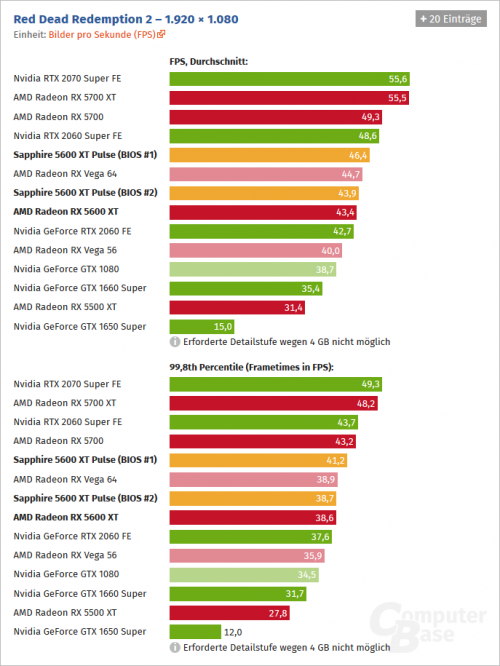
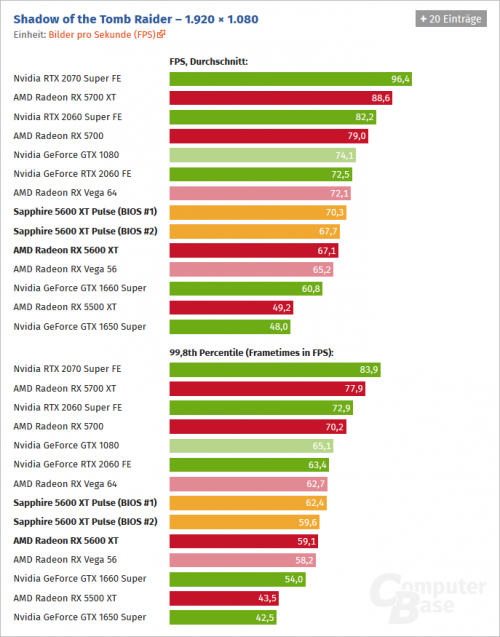
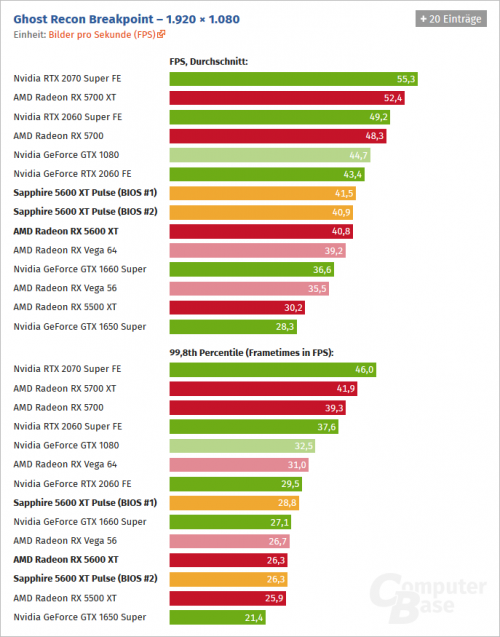
Just refer to benchmarks of games with textures exceeding 6GB.
Ghost Recon Breakpoint would be an example where even in FHD the 5700 has 49% better frame times than the 5600XT.
nrw
post Feb 5 2020, 02:42 PM

Casual
***
Junior Member
398 posts

Joined: Jul 2014


QUOTE(Acid_RuleZz @ Feb 5 2020, 02:23 PM)
Now that you mentioned it, few games in Goldfries benchmark actually use over 6GB for 5700.
Minimal gain in RDR2 but over 10fps in SOTTR and Breakpoint(i guess).
*
Does he even check frame times though?
I just checked few points in the video and he only compares average fps.
Personally, I'd rather rely on more extensive testing.

I'll be so free and inserts snippets of the 3 games you mentioned from a test on computerbase.de
1)
user posted image
2)
user posted image
3)
user posted image

This post has been edited by nrw: Feb 5 2020, 02:47 PM
nrw
post Feb 6 2020, 08:35 AM

Casual
***
Junior Member
398 posts

Joined: Jul 2014


QUOTE(goldfries @ Feb 5 2020, 10:34 PM)
Did you know that you can crash RX 5600 XT by running this game repeatedly? tongue.gif
*
Some of them yes, and that's the bad thing about this launch. they took cards that were binned and validated and gave them a hefty OC with a new BIOS. And now some of them will run flawlessly while others won't be able to cope with it. Very messy launch.
Heck, there are even cards that have left out a heatpipe compared to the 5700 design and now have to add it back thanks to boosted performance. And you will no know which card you received until you unpack and observe.

QUOTE(goldfries @ Feb 5 2020, 10:35 PM)
That video is showing the FPS counter in game only - easy for people to gauge performance.
You can refer to the product review below, I included 1% low

The things we do, unfortunately I'm unable to commit that much time into it.
You'll have to look at Gamers Nexus.
*
Missed out on that, my mistake!
Yes, there's an audience for each application.
I think however that percentiles are important as you immediately notice those slow frames with an other than that seemingly smooth average fps.

This post has been edited by nrw: Feb 6 2020, 08:38 AM
nrw
post Feb 6 2020, 12:10 PM

Casual
***
Junior Member
398 posts

Joined: Jul 2014


QUOTE(Acid_RuleZz @ Feb 6 2020, 11:39 AM)
Noice. What model is that?
Can you bypass that slider limit with MSI Afterburner or MorePowerTool or manually edit the soft power play table?
*
Reference, with that UV he won't need to do any modifications using MorePowerTool. He's short of the max board power.

GJ @S4PH !


oh, just noticed your posted this earlier:
QUOTE(Acid_RuleZz @ Feb 6 2020, 12:49 AM)
Also this is a neat benchmarking software with Afterburner ingtegration.  https://github.com/DevTechProfile/CapFrameX
» Click to show Spoiler - click again to hide... «

*
Ye, the most powerful application should be OCAT for capture w/o overlay and CapFrameX for evaluation, very powerful and time saving options.

This post has been edited by nrw: Feb 6 2020, 12:19 PM
nrw
post Feb 6 2020, 02:11 PM

Casual
***
Junior Member
398 posts

Joined: Jul 2014


QUOTE(Acid_RuleZz @ Feb 6 2020, 01:47 PM)
Yeah right, just remember he went from 5700 XT ref > 2070s > 5700 ref. So Navi show total board power now eh?
TDP don't throttle VRAM clock iirc.

Why you need OCAT when CapFrameX already come with PresentMon which is what OCAT use anyway.
*
1) TDP does effect vram, every +500 Mhz u raise it, that's 4-5W more consumption which goes off your total.
2) capture without overlay, superior capturing mechanics, perf_summary


This post has been edited by nrw: Feb 6 2020, 02:13 PM

3 Pages  1 2 3 >Top
 

Change to:
| Lo-Fi Version
0.0871sec    0.78    7 queries    GZIP Disabled
Time is now: 1st December 2025 - 08:41 AM