Welcome Guest ( Log In | Register )

Outline · [ Standard ] · Linear+

 AMD Radeon™ Discussion V15, Radeon Software 20.10.1

views
     
nrw
post Feb 7 2020, 12:28 PM

Casual
***
Junior Member
398 posts

Joined: Jul 2014


QUOTE(Acid_RuleZz @ Feb 7 2020, 11:24 AM)
1) I know but if the card hit power limit it will throttle the core clock, not VRAM unless it's severe. hmm.gif
2) Overlay is optional in CFX too, care to explain why the capturing mechanic is superior? CFX got better perf summary in report tab.
*
1) Oh, yeah you got it right looking at it this way. VRAM won't be throttled. It will just cause Core Clocks to throttle which sometimes can cause the score to decrease.
Miss interpreted your previous post.
2) If you want to record a specific scene for a specified period of time to compare different GPU's that's what OCAT is useful for.
E.g. a safe game is provided and running same graphic options at sequence 'x' F11 is pressed which will trigger a measurement to be performed in 'n' seconds for 'n2' seconds.
The visualization will be done by reporting it to CFX then.

CFX couldn't even show decimals until ZS added it recently. It might be that more features have been added and OCAT is 'obsolete' by now, if it can do the above by now, please share.

nrw
post Feb 22 2020, 01:57 PM

Casual
***
Junior Member
398 posts

Joined: Jul 2014


After having OC'ed the 2070S a while back now it's time to max the 5700XT out...
Pushing the limits
More points only if I drop room temp with AC.
Unfortunately the Samsung GDDR6 is not that good on this very card.

This post has been edited by nrw: Feb 22 2020, 01:58 PM
nrw
post Feb 22 2020, 04:13 PM

Casual
***
Junior Member
398 posts

Joined: Jul 2014


QUOTE(shirohamada @ Feb 22 2020, 03:56 PM)
because 5700xt is already oc'd to the max by amd.
that's why you see all the problems online.
you need to underclock and undervolt the card.
*
?! mostly agreed, but still doesn't match my post?
I think I've been showing with the score that quite some improvement can and was made.
If you refer to the GDDR6, it's the same 14Gbits spec every other card (including NVidia) is using on their top tiers.
And maxing Samsung dies out at 14.4Gbits ... that can be considered pretty poor. nod.gif

QUOTE(Acid_RuleZz @ Feb 22 2020, 03:52 PM)
Nice score.  thumbup.gif
Which model though?
*
Reference in 'cheap' custom loop.

This post has been edited by nrw: Feb 22 2020, 04:20 PM
nrw
post Feb 22 2020, 05:35 PM

Casual
***
Junior Member
398 posts

Joined: Jul 2014


Update with actual benchmark scores.
All setting stable. All but the gpu clock, voltage, and therefore temp being equal (...even fan rpm (5x 1050rpm arctic p12 on 600mm radiator surfance) is fixed)
image title = core-clock, mV, mem-clock (all Radeon settings, actual clock lower but clock stable given the load(except 5))
1) 1350,0750,1800 (crazy efficiency)
https://pictr.com/image/5vDz5j
2) 1790,0925,1800 (probably nice setting for air cooled (custom) cards that are supposed to run near silent)
https://pictr.com/image/5vDSvP
3) 1910,1000,1800 (pretty close to stock clock (1905) but with lesser voltage and more mem-clock)
https://pictr.com/image/5vDiZc
4) 2050,1100,1800 (my daily setting)
https://pictr.com/image/5vD1pl
5) 2180,1250,1800 (clock not stable and drops with temp over time)
https://pictr.com/image/5vD64G

This post has been edited by nrw: Feb 22 2020, 05:52 PM
nrw
post Feb 25 2020, 07:02 PM

Casual
***
Junior Member
398 posts

Joined: Jul 2014


QUOTE(amduser @ Feb 25 2020, 05:52 PM)
Wow... No problem even at full load? I checked in power colour website it started 700w sweat.gif

I wonder is the driver stable now? I see a lot of review with driver crashing, wonder if it is fixed now
*
Those calculators are silly.

Firstly they take the absolute maximum of every component at the same time, which you will never achive unless you run specific prime95 and furmark or w/e at the same time.

Secondly they take crazy values for fans and (hard)drives. Modern units consume much less. E.G. I've got 10 fans in my case and they suck well short of 10W in total with the silent profile I'm using. The calc would probably tell me something like 50-60W.

Thirdly if you have a quality PSU with modern topology it will have no issues with transient loads and can even deal with 110% of the rated 550W for a short time. Not that you ever gonna end up there unless you do crazy stuff.

Driver is a lottery lah, with a good card you might have 0 issues. You end up with a bad card try undervolting(/downclocking) and hope all is fine.
nrw
post Feb 26 2020, 01:16 AM

Casual
***
Junior Member
398 posts

Joined: Jul 2014


QUOTE(lawliet88 @ Feb 24 2020, 04:54 AM)
is it me or radeon software still buggy?
the "game" profile settings (especially the fan%) wont work unless u manual launch the software
*
You've installed two tools? Maybe afterburner in addition?
Go with one.
If that doesn't help try DDU & reinstalling of driver.

@cstkl1, goldfries, AcidRuleZz

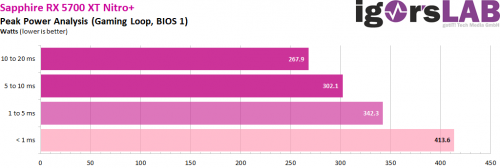
Lets agree for normal users any quality 550W PSU will comfortably handle it, even transients without OPP & OCP shutting things off. You can take 350W as reference for regular transients. I'll attach a screenshot of a test from Igorslab below. Edit: The 342.3W at 1to5ms are what matters. If your PSU would take those but shut off on the sub 1ms 413.6 it'd be a shitty unit.

Worth most running an 5700XT at something like 1790Mhz@0925mV@1800Mhz-VRAM anyways. With my temps thats less then 150W at all times, transients aside. Most of the time less than 110W. Will be a little more under air with higher temps, though.

user posted image

This post has been edited by nrw: Feb 26 2020, 01:30 AM
nrw
post Feb 27 2020, 04:37 PM

Casual
***
Junior Member
398 posts

Joined: Jul 2014


Wow, soon 10yrs on it then! Warranty about to expire 😂
Was their first high spec unit in cooperation with Flextronics.

nrw
post Feb 29 2020, 04:29 PM

Casual
***
Junior Member
398 posts

Joined: Jul 2014


Radeon Software Adrenalin 2020 Edition 20.2.2 Highlights (28/2/2020)
QUOTE
Fixed Issues

    Performing a task switch with some Radeon Software features enabled or some third-party applications with hardware acceleration running in the background may cause a system hang or black screen.
    Improvements have been made that allow for more responsive fan ramp up or fan ramp down times on Radeon RX 5700 series graphics products.
    Performance Metrics Overlay and Radeon WattMan incorrectly report lower than expected clock speeds on Radeon RX 5700 series graphics products during gaming workloads.
    When Instant Replay is enabled, a TDR or black screen may occur when launching games or applications.
    A black screen may occur when toggling HDR on in the game settings of Battlefield™ V.
    The Witcher 3: Wild Hunt™ may experience an application hang or black screen during certain parts of the game or intermittently during gameplay.
    Some video content in Chrome™ may appear as a black screen or be unresponsive on Radeon RX 5000 series graphics products when hardware acceleration is enabled.
    Metro Exodus™ may experience an application hang or TDR when choosing some specific dialogue prompts in the Sam’s Story DLC.
    Grand Theft Auto™ V may experience an application crash when invoking Radeon Software’s overlay with third party OSD applications running.
    Monster Hunter World™: Iceborne may experience intermittent crashes while idle or on the character creation screen.
    Some games colors may appear washed out when HDR mode has been enabled in game and Windows® on Radeon RX 5700 series graphics products
    After a Factory Reset installation with the ‘Keep My Settings’ option chosen, Instant Replay could fail to function if it was enabled in the previous Radeon Software installation.
    When invoking Radeon Software’s overlay while a game is open users may observe flickering in the game or in the Radeon Software interface.
    Radeon Software may experience a crash and error message when locking Windows® or performing a sleep or hibernate with the Radeon Software Streaming tab open.
    A loss of display with working audio may be experienced on a limited number of displays when performing a mode change on Radeon RX 5000 series graphics products.
    Radeon Software may fail to launch if Radeon Software’s overlay is disabled and a game is running in the background.
    Battlefield™ V may experience an application hang or TDR after extended periods of play.
    Some Origin™ games may fail to be detected or may detect the incorrect game title in Radeon Software.
    Some productivity applications are being detected and listed in the Radeon Software games tab.
    The Radeon Chill hotkey could sometimes continue to remain enabled once the user has removed or disabled the hotkey.
    Red Dead Redemption™ 2 may exhibit blocky textures on snow covered terrain.
    After resuming from sleep, Chrome™ may experience an application crash if video content was previously playing on Radeon RX 5700 series graphics products.
    Radeon FreeSync status in Radeon Software may sometimes fail to update when enabling or disabling the feature through the display itself.
    Fortnite™ may experience an application crash on Radeon RX 500 series Hybrid Graphics system configurations.

Known Issues

    Enhanced Sync may cause a black screen to occur when enabled on some games and system configurations. Enhanced Sync has been temporarily disabled from the gaming profile and any users who may be experiencing issues with Enhanced Sync enabled should disable it as a temporary workaround.
    Performance Metrics Overlay and Radeon WattMan incorrectly report higher than expected idle clock speeds on Radeon RX 5700 series graphics products. Performance and power consumption are not impacted by this incorrect reporting.
    DOOM™ may experience an intermittent system hang or application crash during gameplay.
    Desktop cursor may intermittently remain visible after toggling Radeon Software’s overlay in some games. A workaround is to bring up the game menu or task switch to refresh the cursor.
    A system crash or hang may occur when running the Final Fantasy XIV: Shadowbringers™ benchmark.
    The Gaming tab in Radeon Software may display some folder locations appearing as games.
    Radeon Software may open with an inconsistent window size or may not keep its previously set size when opened.
    Modifying the HDMI Scaling slider may cause FPS to become locked to 30.
    Some games may exhibit stutter intermittently during gameplay on Radeon RX 5000 series graphics products.
    Some games may experience stutter while using Instant Replay or third-party applications that stream or perform screen capture. A potential workaround is to disable these features or applications while gaming.
    Although Radeon Software Adrenalin 2020 Edition 20.2.2 resolves many black screen issues, AMD is aware that some users may still experience black screen or system hang issues during extended periods of gameplay. AMD will continue to monitor and investigate reports of these issues closely.[U]


This post has been edited by nrw: Feb 29 2020, 04:29 PM
nrw
post Mar 3 2020, 10:31 AM

Casual
***
Junior Member
398 posts

Joined: Jul 2014


https://www.igorslab.de/en/red-bios-editor-...navi-unlimited/

newly released vbios editor.
nrw
post Mar 5 2020, 12:08 PM

Casual
***
Junior Member
398 posts

Joined: Jul 2014


QUOTE(Acid_RuleZz @ Mar 5 2020, 11:40 AM)
also side sticker show 12v only rated at 240w. hmm.gif
*
haha yeah and on the photo it shows ... 32A (384W) instead of 83A which a 1000W PSU should have.
anyways, I wouldn't even pity anyone who would buy this thing wink.gif

QUOTE(S4PH @ Mar 5 2020, 09:38 AM)
interesting but im not adversed in vbiov editing  notworthy.gif
*
let's talk again when your card is water cooled
since you flashed an xt bios once already that's just a small step up the ladder now notworthy.gif
nrw
post Mar 12 2020, 08:24 PM

Casual
***
Junior Member
398 posts

Joined: Jul 2014


QUOTE(ZeroStrat @ Mar 12 2020, 07:43 PM)
I don't think so. CX has the greater feature set and is more reliable.
You can set a timer in CX as well. If you set 20 seconds you get 20 seconds (maybe 19.99s), everytime. Try same with OCAT. You probably get 18.9s, 19.5s, 20.4s, ...
You have been able to configure the number of decimals completely freely for about a year in CX. You should install the latest version.

The overlay of CX is based on RTSS and is therefore far superior to that of OCAT in terms of performance and reliability. In the next version there will be features that no other frametime tool ever had. Stay tuned.
*
I think if you followed the discussion u'd be aware that I was surprised to see myself how many feautures you have added throughout the last year that I have not been aware of. Came a long way.

Und eine Funktion, die Aufnahme in 'n' Sekunden zu starten (Timer nicht Duration) gibts noch immer nicht. Aber seis drum, man kann ja einen längeren Zeitraum aufnehmen und anschliessend die relevante Sequenz betrachten.
Weiter so und schön zu sehen, dass du so viel Zeit und Mühe in das Projekt streckst. Top Arbeit!

This post has been edited by nrw: Mar 12 2020, 08:25 PM
nrw
post Mar 12 2020, 08:52 PM

Casual
***
Junior Member
398 posts

Joined: Jul 2014


QUOTE(ZeroStrat @ Mar 12 2020, 08:31 PM)
Dürfen wir auf Deutsch quatschen hier? ^^ Eine Verzögerung gibt's nicht, das stimmt. Braucht kein Mensch das Feature. Man kann aber, wie du schon richtig festgestellt hast, auf der Analysis Page mit dem Range Slider den gewünschten Bereich einstellen.
*
Einmal ist keinmal brows.gif
Anyways, just been reading your feature "tease'' on CB.
Big task you've set yourselves there to add sensor data.
Will be great to see the interdependence between those and frame times.

Guess I'll be able to have my cake and eat it, too ... then

This post has been edited by nrw: Mar 12 2020, 09:26 PM
nrw
post Mar 25 2020, 12:14 PM

Casual
***
Junior Member
398 posts

Joined: Jul 2014


RDNA2 seems to be postponed to second half of this year, likely Q4 according to some well connected reviewers.
Initially reported by wccftech but confirmed by others such as igorslab.

This post has been edited by nrw: Mar 25 2020, 12:15 PM
nrw
post Apr 21 2020, 08:14 PM

Casual
***
Junior Member
398 posts

Joined: Jul 2014


uninstall all monitoring tools you have including iCUE, motherboards tools. then use ddu to uninstall the gpu & related drivers. then only install gpu install drivers and see if the problem persists.

the fan header on your gpu should still be plugged in getting 0 rpm as reading as the reading with it not having a fan plugged in will be different.

have you done anything with your card? replaced thermal compound,...?
nrw
post Apr 21 2020, 08:43 PM

Casual
***
Junior Member
398 posts

Joined: Jul 2014


To be able to rule out software/system error I'd proceed anyways to uninstall all monitoring tools and afterwards use ddu and reinstall adrenaline. It'll take you 10 minutes tops. You have surely tried resetting all adrenaline settings. Oh and their software suite isn't particularly stable.

I myself only have the driver installed using device manager and use afterburner. But that should be irrelevant.
nrw
post Apr 21 2020, 10:41 PM

Casual
***
Junior Member
398 posts

Joined: Jul 2014


QUOTE(amduser @ Apr 21 2020, 08:44 PM)
after i run DDU and reinstall now the fan speed seems to settle down, all 3 fan turned off when not running games, i think this is Radeon bug? hmm.gif

but there seems to be another problem where the other 2 fans that is not spinning, i give it a light push and it start spinning, but it spin quite slow and when i touch it with my finger i can stop it easily, where the 1 fan that is running at 100% just now, when i touch it lightly it almost want to cut my finger away
*
well part one fixed by DDU as expected. as I said there's lots of bugs in their software suite. flashy on the outside, crappy inside.
at least the cards usually work very well. having no issues with mine under water.

for the 2 fans you might want to check if this can be replicated in another system? might have to consider rma if this doesn't change.
they certainly have power if they turn. sounds a bit they do not get enough volts to get it spinning.

nrw
post Oct 20 2020, 06:51 PM

Casual
***
Junior Member
398 posts

Joined: Jul 2014


https://www.igorslab.de/en/amd-radeon-rx-60...card-exclusive/
nrw
post Oct 21 2020, 08:45 AM

Casual
***
Junior Member
398 posts

Joined: Jul 2014


Yeah, there goes the presumed efficiency.

I think the Navi 21 XL as in 3070 challenger might be the more interesting AMD offering... let's see in a weeks time.
nrw
post Oct 29 2020, 12:51 AM

Casual
***
Junior Member
398 posts

Joined: Jul 2014


No1 wanna talk about how the cache is starting to limit RDNA2 in 4k and above? Check the 2k and 4k slides.
How will AMD possibly support developers for InfinityCache if they can't even support OEM/ODM's with APU's? Forget about that in the near feauture.
SMA sounds great but really scarce on details.

Wonder what prices in here will be like.
The 6800 is priced too high. the 6800XT is fine. the 6900XT likewise.
nrw
post Oct 29 2020, 01:45 PM

Casual
***
Junior Member
398 posts

Joined: Jul 2014


SSJBen from my understanding IC could be software controlled though.

This post has been edited by nrw: Oct 29 2020, 01:53 PM

3 Pages < 1 2 3 >Top
 

Change to:
| Lo-Fi Version
0.1058sec    0.24    7 queries    GZIP Disabled
Time is now: 1st December 2025 - 12:58 PM