Outline ·
[ Standard ] ·
Linear+
Xiaomi Redmi Note 3 Club V5, Now with MIUI 8 woohoo!!
|
GameSky
|
 Jul 24 2016, 08:43 PM Jul 24 2016, 08:43 PM
|

|
btw afaik there is two kind fo fingerprint sensor variant on redmi note 3..
one is goodix and another one..forgot the name lol.. and seems some got different camera sensor, aside from lcd
|
|
|
|
|
|
GameSky
|
Jul 24 2016, 09:10 PM
|
|
|
QUOTE(game4life @ Jul 24 2016, 09:03 PM) yes can root. but the process is quite troublesome  yup. mine is focal tech. those who have goodix will have issue with cm13. im lucky no need to install patches  haha same, sometime ppl with focaltech maybe got different camera sensor QUOTE(JasonW13 @ Jul 24 2016, 09:04 PM) hi..i experienced issue on my daily lockscreen wallpaper..it does not change to another photo at all... am on MIUI Global 7.3.7.0 anybody experienced this and how to resolve this? many thanks! launch carousel using miui launcher instead |
|
|
|
|
|
GameSky
|
Jul 24 2016, 09:49 PM
|
|
|
QUOTE(JasonW13 @ Jul 24 2016, 09:32 PM) yes i didn't use any third party ROM or launcher... so how can we go about this? try go wallpaper.carousel..any wallpaper selection comes out? also seems known issue at miui forum..probably server problem |
|
|
|
|
|
GameSky
|
Jul 25 2016, 12:27 AM
|
|
|
QUOTE(Nip @ Jul 25 2016, 12:00 AM) no diff if use the official or non official ways to unlock bootloader? official way..you can flash any rom without much problem unofficial way...you have to mod thr mbn file included in the official rom ..else it might brick your phone |
|
|
|
|
|
GameSky
|
Jul 25 2016, 08:52 AM
|
|
|
QUOTE(DarkWRC @ Jul 25 2016, 08:11 AM) Bought my rn3 from directd yesterday...wanted to buy MY set but out of stock...bought AP set for rm799... Very famous set indeed...maybe 5 out of 10 people bought this... Really enjoy the fingerprint function... pretty sure you will get addicted to it |
|
|
|
|
|
GameSky
|
Jul 25 2016, 01:07 PM
|
|
|
lol, mine was instantly unlocked within few seconds last time ..probably it links to your mi account groups in forum as well. |
|
|
|
|
|
GameSky
|
Jul 25 2016, 01:20 PM
|
|
|
QUOTE(sam240 @ Jul 25 2016, 01:17 PM) Thanks for the link. "Wipe data" is meaning will wipe all installed apps and setting I did? If yes, then after unlock bootloader, I need to install back all my 3rd party app and redo all the setting/profile again  use the backup tool in your phone, backup then restore after you done. |
|
|
|
|
|
GameSky
|
Jul 25 2016, 02:35 PM
|
|
|
QUOTE(kuance @ Jul 25 2016, 02:24 PM) Anyway guys, I have one problem here. I have my bootloader unlocked, I can confirm this coz I've double checked with command at the command prompt and the unlock state is TRUE. And the problem I facing here, is to boot into the recovery mode. Since I have China Dev MIUI 8 on my device, and I am unlocked. But why no recovery? Everytime I switch off my phone, and open it by holding the volume + power, or either by going into the "updater" apps, and from menu i choose to reboot to recovery. all i get is a BLACK SCREEN WITH AN UNPLUGGED USB PHONE image. why is that? Seems like no recovery on my phone. I've tried to flash TWRP with flashify, or any other method, it just dont works. Can anyone provide me a step by step to get into TWRP? i assume you're using pro aka snapdragon version? then download this. img https://dl.twrp.me/kenzo/restart your phone to fastboot mode (vol down + power) use the adb terminal and type - fastboot flash recovery nameoffile.img - fastboot reboot. then try enter recovery via vol up + power. before that..unlocked officially or unofficial way This post has been edited by GameSky: Jul 25 2016, 02:36 PM |
|
|
|
|
|
GameSky
|
Jul 25 2016, 03:26 PM
|
|
|
QUOTE(kuance @ Jul 25 2016, 03:19 PM) I will try to use that mentioned method. Thanks. I remember I messed up with flashing TWRP but forgot what method I am using, it all just end up soft bricking my device (stuck at the MI logo forever). Yes. Im on SD variant, and Yes I am unlocked using the officially way. getting permission from xiaomi and unlock it with their software dled from official site. if you flashed official miui rom again, you'll need to "cook" the boot.img or flash universal boot.img patcher http://forum.xda-developers.com/redmi-note...psboot-t3371667else, you can flash miui eu roms, comes with pre-cooked boot.img |
|
|
|
|
|
GameSky
|
Jul 25 2016, 03:37 PM
|
|
|
QUOTE(MooTikPin @ Jul 25 2016, 03:34 PM) Guys, is miui 8 stable version available for redmi note 3 dy? no stable version yet. tho there is dev version atm |
|
|
|
|
|
GameSky
|
Jul 25 2016, 03:39 PM
|
|
|
flashed custom kernel for miui 8..gonna test it for a while.. This post has been edited by GameSky: Jul 25 2016, 03:39 PM Attached thumbnail(s)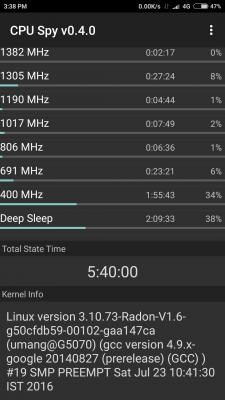
|
|
|
|
|
|
GameSky
|
Jul 25 2016, 03:48 PM
|
|
|
QUOTE(MooTikPin @ Jul 25 2016, 03:45 PM) Thanks bro Coz mi4i has it, tot the redmi note 3 i have is fake if you mean global beta, already got it..but stable not yet. Stable release will only be released on 16 August onward. |
|
|
|
|
|
GameSky
|
Jul 25 2016, 04:45 PM
|
|
|
QUOTE(kuance @ Jul 25 2016, 03:59 PM) So do you mean I cant just boot into fastboot and adb flash the recovery img of twrp? I need to "cook" before I can do all those? It's so troublesome T.T I dont wanna mess up with too complicated things. And from the link you give me. Seems like it mentioned that I need to flash the universal boot.img everytime i flash rom or OTA. awwwwww EDIT: WEIRD!!!!! When my device is switch on in homescreen, i open up command promt from minamal adb, and type in adb devices. It can detect my device. But when I go into Fastboot mode(the Mi Bunny mode), i type in adb devices. There are no adb devices listed.... WHY!!????  IN that case, how am i going to flash? EDIT 2: DONE AND SOLVED. even thou adb devices found no device. I fastboot flash recovery and everything seems going well, flashed the universal boot.img as well that was built in of the Safe twrp. Gonna flash the Radon V1.6 custom kernal and give it a try : ) more likely device driver not installed. anyway if u flash ota or miui en official..you will need to flash the universal boot img patcher after you flashed the rom. or better, flash to miui eu roms..less bloatware and more lighter |
|
|
|
|
|
GameSky
|
Jul 26 2016, 09:37 AM
|
|
|
by far rr 6.0 custom rom far more stable compared to others, aside from weird earphone jack bug (need plug fast) other wise it's stable and smooth. Attached thumbnail(s)
|
|
|
|
|
|
GameSky
|
Jul 26 2016, 01:15 PM
|
|
|
thats where custom rom community comes in lol
|
|
|
|
|
|
GameSky
|
Jul 27 2016, 10:38 AM
|
|
|
QUOTE(kuance @ Jul 27 2016, 10:34 AM) Anyone tried the CM13 on their redmi note 3 pro? I'm downloading now and planning to try it out  remember to unlock your bootloader first. also check your fingerprint is it focaltech or goodix, check via miui hardware test (tap on kernel version few times), check on system. if it's goodix, then most of the cm will give you fingerprint problems, otherwise I'd recommend using RR 6.0 rom, been using it for few days and it's stable . |
|
|
|
|
|
GameSky
|
Jul 27 2016, 11:56 AM
|
|
|
as for CM 13 only santhosh will RELOCK your bootloader, since he's using leaked mm bootloader. Other cm 13 like thestrix, aosp, RR doesn't lock your bootloader. before flashing to other rom, make sure your BOOTLOADER is unlocked. Anyone with goodix fingerprint might have problem on fingerprint can't detect or error (as most ppl in xda mentioned). for gapps, I'm using gapps micro from opengapps. http://opengapps.org/ |
|
|
|
|
|
GameSky
|
Jul 27 2016, 12:01 PM
|
|
|
QUOTE(zher4883 @ Jul 27 2016, 11:57 AM) Is there anyway to tell which model of fingerprint sensor mine is? check previous post. tap on kernel version few times in about until enter CIT (hardware test), tap on Software and scroll down. it should mention focaltech, goodix or atmel This post has been edited by GameSky: Jul 27 2016, 12:05 PM |
|
|
|
|
|
GameSky
|
Jul 27 2016, 12:02 PM
|
|
|
QUOTE(kuance @ Jul 27 2016, 12:01 PM) I hold back for trying out RR because of the reported audio volume is low, and there are some earphone bug or something. But in CM13, the most heard of bug is the 4G bug, which they cant get to use 4G, only 3g, which in this case doesnt bother me much... lol. since im focaltech, im safe to try i believe. audio volume is quite loud for me..the earphone bug is funny, just don't plug too slow ..otherwise it's stable, no ril, fp bugs ..4G works fine. or you could flash viper4android This post has been edited by GameSky: Jul 27 2016, 12:03 PM |
|
|
|
|
|
GameSky
|
Jul 27 2016, 01:10 PM
|
|
|
QUOTE(Nip @ Jul 27 2016, 12:21 PM) did u change the kernel or use the 1 that come with the rom? i tried radon kenzo v1.7 the battery drain quite fast. did u got fc when tried to set another fp lock? mine keep fc settings try to set another fp. set 2 already tho when the rom 1 boot. what fp sensor? goodix? no fc or such problem here. if still getting fc, flash the radios.zip included in that thread |
|
|
|
|



 Quote
Quote

 0.0221sec
 0.40
0.40
 7 queries
 GZIP Disabled