

Guys, for unifi, if you are changing new router, you need to reset the ppoe password by calling them/live support, if not it will not work by using the old password on new router
Tech Support [Guide] Recovering PPPoE Password from Router
Tech Support [Guide] Recovering PPPoE Password from Router
|
|
 Mar 18 2022, 08:58 AM Mar 18 2022, 08:58 AM
|
 
Junior Member
67 posts Joined: Jun 2018 
|
Guys, for unifi, if you are changing new router, you need to reset the ppoe password by calling them/live support, if not it will not work by using the old password on new router
|
|
|
|
|
|
Mar 18 2022, 10:25 AM
Show posts by this member only | IPv6 | Post
#82
|

Senior Member
1,704 posts Joined: Jan 2005
|
QUOTE(doublecool @ Mar 18 2022, 08:58 AM) Guys, for unifi, if you are changing new router, you need to reset the ppoe password by calling them/live support, if not it will not work by using the old password on new router after changing now router ..the old password still can use ? they sent password via sms..setup now router using sms password.. then the old router password still can connect .,. |
|
|
Mar 18 2022, 12:54 PM
Show posts by this member only | IPv6 | Post
#83
|
|
Junior Member
289 posts Joined: Sep 2012
|
QUOTE(doublecool @ Mar 18 2022, 08:58 AM) Guys, for unifi, if you are changing new router, you need to reset the ppoe password by calling them/live support, if not it will not work by using the old password on new router It depends. I've changed multiple routers throughout 7 years of service. Never changed password before. Same password like what I have when I first installed unifi. |
|
|
Mar 18 2022, 01:51 PM
|

Senior Member
1,258 posts Joined: Jan 2003
|
QUOTE(doublecool @ Mar 18 2022, 08:58 AM) Guys, for unifi, if you are changing new router, you need to reset the ppoe password by calling them/live support, if not it will not work by using the old password on new router Where did you get this info from? I've changed router multiple times, including sometimes reusing an old router for a while. Never had to reset the password... Blinklime liked this post
|
|
|
Mar 18 2022, 02:47 PM
|
|
Junior Member
67 posts Joined: Jun 2018
|
QUOTE(kkm @ Mar 18 2022, 01:51 PM) Where did you get this info from? I've changed router multiple times, including sometimes reusing an old router for a while. Never had to reset the password... i called 100, asked the guy why i cannot use old password, he told me new router need to use new passwordif you can use old password, idk why |
|
|
Mar 18 2022, 06:56 PM
|
|
Senior Member
1,704 posts Joined: Jan 2005
|
QUOTE(doublecool @ Mar 18 2022, 02:47 PM) i called 100, asked the guy why i cannot use old password, he told me new router need to use new password yes ,100 told same as u ...if you can use old password, idk why after reset will sms password ..use for new router .. but the old router still using old password because router cannot see the password... after new router setup and can connect using sms password ... connect back old router ..old router also can connect to internet ... i suspect sms password same as old router password ? |
|
|
|
|
|
Mar 18 2022, 07:14 PM
|
|
Senior Member
1,882 posts Joined: Sep 2017
|
QUOTE(doublecool @ Mar 18 2022, 02:47 PM) i called 100, asked the guy why i cannot use old password, he told me new router need to use new password if you can use old password, idk why QUOTE(sgpdsmss @ Mar 18 2022, 06:56 PM) yes ,100 told same as u ... When you request to reset the pppoe password,the currenct router is still connected to internet because it had been authenticated at first. (as long as you didn't reboot or disconnect your router then the internet will still work for awhile)after reset will sms password ..use for new router .. but the old router still using old password because router cannot see the password... after new router setup and can connect using sms password ... connect back old router ..old router also can connect to internet ... i suspect sms password same as old router password ? So after you received the new password, the system had changed password for your unifi pppoe account. (And at the same time old password is no longer to use) It will only accept your new password for authentication to connect internet. And if you can find the current pppoe account password,then it does not require to reset your password. Just disconnect your current router and change to your new router with current pppoe credential then it will work. This post has been edited by go626201: Mar 18 2022, 07:15 PM |
|
|
Mar 18 2022, 09:48 PM
|
|
Senior Member
1,704 posts Joined: Jan 2005
|
QUOTE(go626201 @ Mar 18 2022, 07:14 PM) When you request to reset the pppoe password,the currenct router is still connected to internet because it had been authenticated at first. (as long as you didn't reboot or disconnect your router then the internet will still work for awhile) during setup new router to connect successful,So after you received the new password, the system had changed password for your unifi pppoe account. (And at the same time old password is no longer to use) It will only accept your new password for authentication to connect internet. And if you can find the current pppoe account password,then it does not require to reset your password. Just disconnect your current router and change to your new router with current pppoe credential then it will work. need more time to configure others device so power off 1st n keep .. then turn on old router again it also can connected .. still connected until now ..nearly a week |
|
|
Mar 19 2022, 09:45 AM
|
|
Senior Member
1,258 posts Joined: Jan 2003
|
Unifi doesn't issue you the new credentials immediately, you may have to wait a day or two.
If you search around, there are methods to recover your existing pp/oe ID and PW if your old router is still connected. |
|
|
Apr 9 2022, 02:52 PM
Show posts by this member only | IPv6 | Post
#90
|
|
Senior Member
6,801 posts Joined: Oct 2008 From: Kuala Lumpur  
|
Just to add on, For Digi Fibre default router (Zyxel EX-3300-t0), the username is admin and password is behind the router. Unfortunately I can't figure out how to obtain the PPPoe password using the HTML method.
|
|
|
Apr 9 2022, 03:39 PM
|
|
Junior Member
219 posts Joined: Sep 2008
|
QUOTE(YoungMan @ Apr 9 2022, 02:52 PM) Just to add on, For Digi Fibre default router (Zyxel EX-3300-t0), the username is admin and password is behind the router. Unfortunately I can't figure out how to obtain the PPPoe password using the HTML method. 1. Search "Google show password extension"2. Install "Showpassword" extension 3. Open the router using chrome 4. Bring the mouse cursor to the PPPoe password... This post has been edited by AdamNg: Apr 9 2022, 03:45 PM kamil129 liked this post
|
|
|
Apr 15 2022, 12:55 PM
|
|
Senior Member
6,801 posts Joined: Oct 2008 From: Kuala Lumpur
|
QUOTE(AdamNg @ Apr 9 2022, 04:39 PM) 1. Search "Google show password extension" Update: tried on the Zyxel router and it didn't work. It just show a - and that's all. Guest it's encrypted in some ways. 2. Install "Showpassword" extension 3. Open the router using chrome 4. Bring the mouse cursor to the PPPoe password... For the BTU, it showed tab characters for the PON password. When I try to remove the extention, edit the password by adding a random char at the end then navigate to other page, chrome save password also display the PON password as tab characters only. That's all on the password extention for both the router and modem. This post has been edited by YoungMan: Apr 15 2022, 01:35 PM |
|
|
Apr 28 2022, 12:43 PM
|

Newbie
32 posts Joined: Oct 2014
|
QUOTE(Gaara92 @ Nov 21 2021, 12:23 AM) This is my mikrotik pppoe server setup. Still no credentials appeared on the logs. Hey, have you figured out how to get it working? so far i got my self a mikrotik mAP lite just to try get the pppoe server working but still figuring out how to do so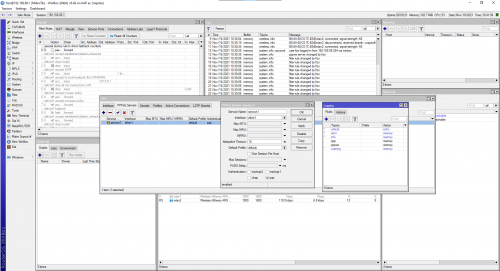 |
|
|
|
|
|
Apr 28 2022, 01:24 PM
|
|
Newbie
32 posts Joined: Oct 2014
|
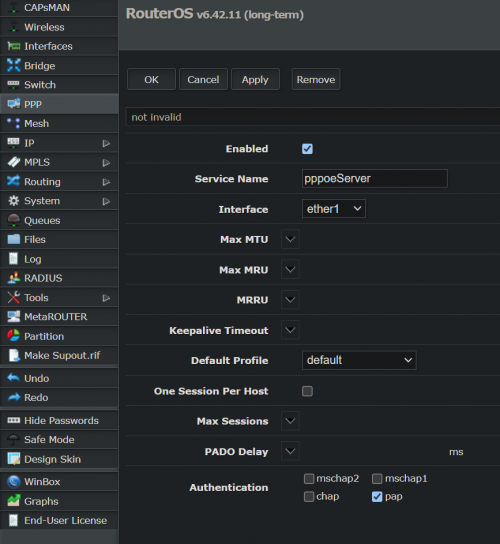 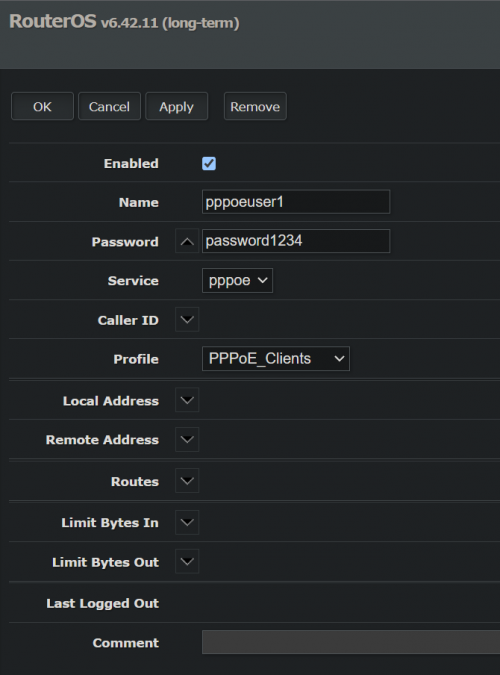 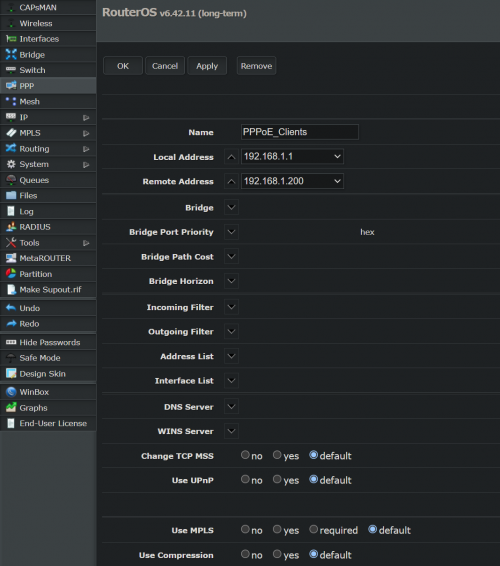 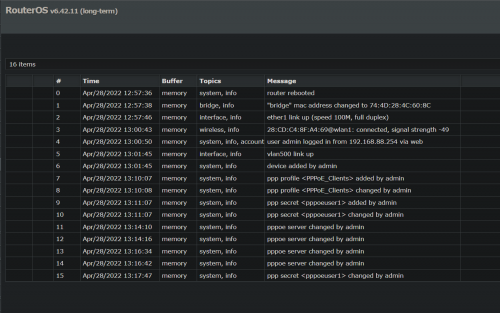 |
|
|
Apr 28 2022, 03:25 PM
|
|
Newbie
32 posts Joined: Oct 2014
|
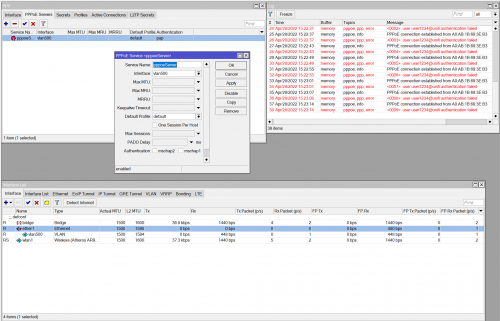 i managed to get something in the logs after creating a vlan500 but now just need to figure out how to see the password edit: just needed to add ppp into logging and now it shows the user and password 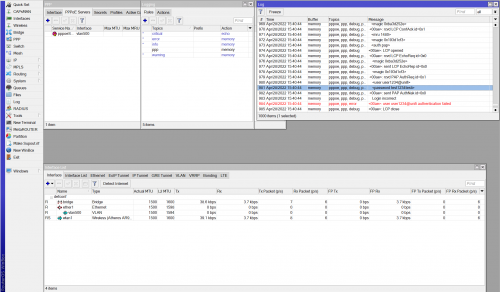 This post has been edited by Rightslash: Apr 28 2022, 03:42 PM |
|
|
May 11 2022, 10:39 AM
|

Junior Member
86 posts Joined: Apr 2006
|
Anyone here know how do I "extract" my "own personal" username & password from my TM stock router, Netis DL4480V, so that I could set up my new router?
My router was set up by TM technician many years ago. The technician never gave me my "own personal" username and password. I tried the HTML method that mentioned in previous page but the username and password are "pppoe@ccs" & "3487_TmPPPoE", which I believe are default username and password. I tried "backup" method but the backup .xml file is encrypted. What I see on the router's WAN Set Up is this: 
|
|
|
Jun 15 2024, 03:01 PM
|

Senior Member
1,473 posts Joined: Oct 2006 From: Jupiter
|
maybe it's just too old, just write here in case anyone who still using TP Link C1200 (v1) and need to get their unifi id password from this router without calling 100
right click pppoe password box which has the existing password, inspect element, find the following line CODE <input id="pppoe_password" name="password" type="text" minlength="0" class="hidden"> change the class="hidden" to class="show" and press Enter then the unifi password will show right beside the hidden dot password k bai |
|
|
Jun 25 2024, 04:28 PM
|

Junior Member
143 posts Joined: May 2022
|
I just store it on sealnote inside my phone
|
| Change to: |  0.0288sec 0.0288sec
 0.33 0.33
 6 queries 6 queries
 GZIP Disabled GZIP Disabled
Time is now: 8th December 2025 - 06:35 AM |
 Quote
Quote