just wanna update this thread.. apparently you can get pppoe password by using this step if you are tplink user and use chrome..
first, login your tplink router account at tplinkwifi.net
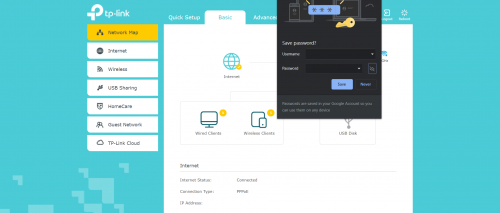
after that, navigate to Advanced>Network>Internet. also work with Basic>Network>Internet.
in that section, you will find your pppoe username and also pppoe password that been hidden by default.
click on the password and type at the end of password with only one alphabet/number or whatever things you want but make sure you remember that alphabet. please do not click save for safety reason.
after that, try to move to another for eg. basic or lan section.
you might find out that google will ask you if you wanna save the new password. click on that unhide button and you will find your pppoe password + the new alphabet.
this works for me when i changing to the new router.
 This post has been edited by portgasz: Jul 11 2020, 06:09 PM

 May 24 2019, 01:26 PM


 Quote
Quote








 0.0335sec
 0.86
0.86
 6 queries
 GZIP Disabled