

QUOTE(tot31 @ Apr 16 2017, 02:49 PM)
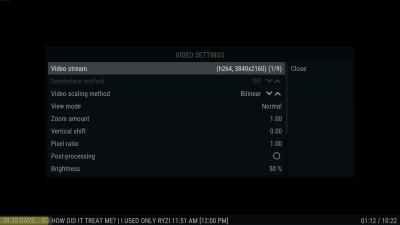
You must set Configure inputstream.adaptive settings manually like in the screenshot otherwise it will only play 720p.

I did that manually. It didn't work for me. 
Kodi Official Discussion Thread V2, Free and Open Source (GPL) Media Center
|
|
 Apr 16 2017, 02:52 PM Apr 16 2017, 02:52 PM
Show posts by this member only | IPv6 | Post
#3021
|
 
Senior Member
858 posts Joined: Jan 2003  
|
QUOTE(tot31 @ Apr 16 2017, 02:49 PM) You must set Configure inputstream.adaptive settings manually like in the screenshot otherwise it will only play 720p. I did that manually. It didn't work for me. |
|
|
|
|
|
Apr 16 2017, 02:54 PM
Show posts by this member only | IPv6 | Post
#3022
|

Senior Member
2,451 posts Joined: Jan 2003 From: GOD's Land
|
The screenshot from my Mibox

|
|
|
Apr 16 2017, 02:59 PM
Show posts by this member only | IPv6 | Post
#3023
|
|
Senior Member
858 posts Joined: Jan 2003
|
QUOTE(tot31 @ Apr 16 2017, 02:54 PM) The screenshot from my Mibox I saw this but mine doesn't work and the youtube player platform is not the same.This post has been edited by OCMAX: Apr 16 2017, 03:14 PM |
|
|
Apr 16 2017, 03:05 PM
Show posts by this member only | IPv6 | Post
#3024
|
|
Senior Member
2,451 posts Joined: Jan 2003 From: GOD's Land
|
QUOTE(OCMAX @ Apr 16 2017, 02:59 PM) I saw this but ine doesn't work and the youtube player platform is not the same. It works on all various builds. I mainly use Ultra TT v4.3 build on my pc and Libreelec as well as on my Mibox. I also have JesusMedia Box kodi 17.1 fork that uses Genesis Reborn build and it works also but I have to uninstall Youtube version 5.4.13 and install Youtube 5.3.12 or 5.4.1 to make it work. |
|
|
Apr 16 2017, 03:11 PM
Show posts by this member only | IPv6 | Post
#3025
|
|
Senior Member
858 posts Joined: Jan 2003
|
QUOTE(tot31 @ Apr 16 2017, 03:05 PM) It works on all various builds. I mainly use Ultra TT v4.3 build on my pc and Libreelec as well as on my Mibox. I also have JesusMedia Box kodi 17.1 fork that uses Genesis Reborn build and it works also but I have to uninstall Youtube version 5.4.13 and install Youtube 5.3.12 or 5.4.1 to make it work. I think I found out the problem.I need to select the 4k stream at video setting during the playback or else it won't play 4K automatically.  I have no problem playing 4K movies in many addons. only youtube is pain in the a**  This post has been edited by OCMAX: Apr 16 2017, 03:23 PM |
|
|
Apr 16 2017, 03:18 PM
|

Senior Member
585 posts Joined: Nov 2007
|
QUOTE(OCMAX @ Apr 16 2017, 04:11 PM) I think I found out the problem. maybe youtube addons till incompatible with youtube sourceI need to select the 4k stream at video setting during the playback or else it won't play 4K automatically. I have no problem playing 4K movies in many addons. only youtube is pain in the a** |
|
|
|
|
|
Apr 16 2017, 03:19 PM
Show posts by this member only | IPv6 | Post
#3027
|
|
Senior Member
858 posts Joined: Jan 2003
|
QUOTE(NyOx @ Apr 16 2017, 03:18 PM) maybe youtube addons till incompatible with youtube source no idea! but now I know the trick I can play 4K vid in youtube d. thanks for the help.  |
|
|
Apr 16 2017, 03:27 PM
|
|
Senior Member
585 posts Joined: Nov 2007
|
QUOTE(OCMAX @ Apr 16 2017, 04:19 PM) no idea! but now I know the trick I can play 4K vid in youtube d. nice thanks for the help.  |
|
|
Apr 16 2017, 03:31 PM
Show posts by this member only | IPv6 | Post
#3029
|
|
Senior Member
2,451 posts Joined: Jan 2003 From: GOD's Land
|
QUOTE(OCMAX @ Apr 16 2017, 03:11 PM) I think I found out the problem. Mine plays automatically 4K although in the settings I set it as manual.I need to select the 4k stream at video setting during the playback or else it won't play 4K automatically. I have no problem playing 4K movies in many addons. only youtube is pain in the a** |
|
|
Apr 16 2017, 03:39 PM
Show posts by this member only | IPv6 | Post
#3030
|
|
Senior Member
858 posts Joined: Jan 2003
|
QUOTE(tot31 @ Apr 16 2017, 03:31 PM) Mine plays automatically 4K although in the settings I set it as manual. Mine at first only played 720p |
|
|
Apr 16 2017, 03:44 PM
Show posts by this member only | IPv6 | Post
#3031
|
|
Senior Member
2,451 posts Joined: Jan 2003 From: GOD's Land
|
QUOTE(OCMAX @ Apr 16 2017, 03:39 PM) Mine at first only played 720p Anyway it's great to know that it works for you. |
|
|
Apr 16 2017, 03:45 PM
Show posts by this member only | IPv6 | Post
#3032
|
|
Senior Member
858 posts Joined: Jan 2003
|
QUOTE(tot31 @ Apr 16 2017, 03:44 PM) Anyway it's great to know that it works for you. Yeah!  |
|
|
Apr 16 2017, 03:53 PM
Show posts by this member only | IPv6 | Post
#3033
|
|
Senior Member
858 posts Joined: Jan 2003
|
QUOTE(tot31 @ Apr 16 2017, 03:31 PM) Mine plays automatically 4K although in the settings I set it as manual. Update! after playing a few 4K vid from youtube. Some are able to play 4K automatically. Some need to select manually. hahahaa example: Transfomers 5 4K autoplay works This post has been edited by OCMAX: Apr 16 2017, 04:49 PM |
|
|
|
|
|
Apr 16 2017, 10:58 PM
|
|
Senior Member
525 posts Joined: Mar 2010
|
cant get the sports channel working...
|
|
|
Apr 16 2017, 11:53 PM
|
|
Senior Member
1,691 posts Joined: Nov 2008
|
Working well here M Vs C
|
|
|
Apr 17 2017, 01:16 AM
|

All Stars
24,455 posts Joined: Nov 2010
|
QUOTE(OCMAX @ Apr 16 2017, 03:53 PM) Update! after playing a few 4K vid from youtube. Some are able to play 4K automatically. Some need to select manually. hahahaa To get 4k display, u need a 4k tv.example: Transfomers 5 4K autoplay works Most 4k tvs come with youtube 4k capable app. Why the need to do it via kodi youtube? |
|
|
Apr 17 2017, 01:18 AM
Show posts by this member only | IPv6 | Post
#3037
|
|
Senior Member
858 posts Joined: Jan 2003
|
QUOTE(AVFAN @ Apr 17 2017, 01:16 AM) To get 4k display, u need a 4k tv. my native Samsung TV youtube apps sucks. I must used a mouse to scroll the page and it doesn't have 4k selection. max is only 1080p. I tested both on my TV and my friend Sharp 4K TV. same thing. Most 4k tvs come with youtube 4k capable app. Why the need to do it via kodi youtube?  |
|
|
Apr 17 2017, 01:26 AM
|
|
All Stars
24,455 posts Joined: Nov 2010
|
QUOTE(OCMAX @ Apr 17 2017, 01:18 AM) my native Samsung TV youtube apps sucks. I must used a mouse to scroll the page and it doesn't have 4k selection. max is only 1080p. I tested both on my TV and my friend Sharp 4K TV. same thing. Must be diff class of 4k tvs then.I think need to have google androidtv os. My sharp tv fine with 4k in netflix and youtube. So, i never use youtube with my boxes... This post has been edited by AVFAN: Apr 17 2017, 01:27 AM |
|
|
Apr 17 2017, 01:30 AM
Show posts by this member only | IPv6 | Post
#3039
|
|
Senior Member
858 posts Joined: Jan 2003
|
QUOTE(AVFAN @ Apr 17 2017, 01:26 AM) Must be diff class of 4k tvs then. nope! Samsung doesn't run on Android. Is Samsung OS, same goes to Sharp. I tested and tried to install APK. it pop up an error message.. LOLI think need to have google androidtv os. My sharp tv fine with 4k in netflix and youtube. So, i never use youtube with my boxes... This post has been edited by OCMAX: Apr 17 2017, 01:30 AM |
|
|
Apr 17 2017, 01:37 AM
|
|
All Stars
24,455 posts Joined: Nov 2010
|
QUOTE(OCMAX @ Apr 17 2017, 01:30 AM) nope! Samsung doesn't run on Android. Is Samsung OS, same goes to Sharp. I tested and tried to install APK. it pop up an error message.. LOL I am sure samsung is not androidtv.Same with lg, panasonic doing their own thing. All other OLDER 4ktv of other brands also none. Google androidtv started in 2014. Since 2015, sony and sharp dropped failed googletv and adopted google androidtv in their premium product line, followed by philips. Your fren's sharp is either old or lower 4k model. This post has been edited by AVFAN: Apr 17 2017, 01:38 AM |
| Change to: |  0.0270sec 0.0270sec
 0.34 0.34
 6 queries 6 queries
 GZIP Disabled GZIP Disabled
Time is now: 11th December 2025 - 07:44 AM |
 Quote
Quote