Welcome Guest ( Log In | Register )

Outline · [ Standard ] · Linear+

 Need Help deciding, Better HS fan or Side Fan?

views
     
TSvassalle
post Dec 21 2006, 10:10 PM, updated 19y ago

On my way
****
Senior Member
610 posts

Joined: Jun 2006
From: Ampang, Selangor


Guys,

Really need your help here. I have some sort of a temperature problem, my specs are as below:

Proc: e6300 (im kinda lucky coz this proc could run @ 3.2ghz at stock vcore, but..)
Mobo: gigabyte ds3
Heatsink: Thermaltake BigTyp 120 vx
Case: gigabyte aurora3d

@ 3200, my idle and load with case closed is 47c and 57c respectively
However, with case open, the temperature is 40c and 48c rclxub.gif

It really makes me wanna throw away the side panel! doh.gif

So, should I

a) get a better fan for my heatsink, maybe a silverstone f121 or something.. or
b) mod my side panel to include a maybe 12 cm fan?

Which one will yield the best result in bridging the gap between open and close case temperature?
which one is the more quieter option?

Hope you guys can help me out. Thanks in advance.


sHawTY
post Dec 21 2006, 10:24 PM

Frequent Reporter
********
All Stars
14,909 posts

Joined: Jul 2005

Learn to open or post something in the right section...

This should not be here...

This should be either in the technical support or hardware question & answers section...
TSvassalle
post Dec 21 2006, 10:30 PM

On my way
****
Senior Member
610 posts

Joined: Jun 2006
From: Ampang, Selangor


technical support or hardware q n a?

and i thought adding another fan to my side panel is modding my case? is it not?
stevenlee
post Dec 21 2006, 10:32 PM

look @ my Star *o* ...hoho
*******
Senior Member
3,158 posts

Joined: Apr 2005
From: -Butterworth, Penang-


@3200 with 57c is normal...cos u kinda oc very high....

u kinda lucky to get such a good proc whihc can oc so high at stock vcore
TSvassalle
post Dec 21 2006, 10:34 PM

On my way
****
Senior Member
610 posts

Joined: Jun 2006
From: Ampang, Selangor


QUOTE(stevenlee @ Dec 21 2006, 10:32 PM)
@3200 with 57c is normal...cos u kinda oc very high....

u kinda lucky to get such a good proc whihc can oc so high at stock vcore
*
yeah.. but i just noticed that when i open my side panel, the temperature drops like 9c! Im sure there's a way for me to cut down on the difference.

Planning to add a blow hole on my side panel, just need to get some advice for the sifus on whether it would bring much difference to my setup.
mruzian
post Dec 21 2006, 11:11 PM

Androidify
*****
Senior Member
744 posts

Joined: Oct 2005
From: Android World


bro since the temp differs so much when u open
the side panel...i think ur casing airflow is bad

so instead of changing the hsf its better for u
to improve the airflow inside ur case

and i agreed on adding those side intake fan
i bet it will bring down those temp
and improve airflow inside ur case

p/s : make sure u hv the front intake and rear out oso tongue.gif
TSvassalle
post Dec 21 2006, 11:14 PM

On my way
****
Senior Member
610 posts

Joined: Jun 2006
From: Ampang, Selangor


yeah.. my case has a 12 cm front intake, and 2 x 12 cm rear out.. its the stock fan that comes with the case, dont know about the cfm, but its not loud, which is good

would an intake fan be noisy?
and how much difference would it make?

This post has been edited by vassalle: Dec 21 2006, 11:29 PM
ynneb25
post Dec 21 2006, 11:32 PM

Does ur eye hurt? :P
*****
Senior Member
708 posts

Joined: May 2005
From: PJ


QUOTE(vassalle @ Dec 21 2006, 11:14 PM)
yeah.. my case has a 12 cm front intake, and 2 x 12 cm rear out.. its the stock fan that comes with the case, dont know about the cfm, but its not loud, which is good

would an intake fan be noisy?
and how much difference would it make?
*
just change all ur fans to coolermaster fans...problem solved...reasonable rpm and silence
ianho
post Dec 21 2006, 11:33 PM

Cucimangkoklife
Group Icon
VIP
15,705 posts

Joined: Mar 2005
From: Tg. Rambutan
I nice fat 120mm side intake wud b looooooooooovely. Ure gfx card will love u for it too.
E-J@1
post Dec 22 2006, 12:23 AM

Capital Eâ„¢
*******
Senior Member
2,603 posts

Joined: Sep 2006
how bout ur cable management? are they messy? try tidy it up 1st, if no different, then better add another case fan lor, this cause by bad case air flow
ianho
post Dec 22 2006, 12:26 AM

Cucimangkoklife
Group Icon
VIP
15,705 posts

Joined: Mar 2005
From: Tg. Rambutan
QUOTE(E-J@1 @ Dec 22 2006, 12:23 AM)
how bout ur cable management? are they messy? try tidy it up 1st, if no different, then better add another case fan lor, this cause by bad case air flow
*
Eh ure case is like Hurricane now lar. 4x120mm fans. 2 intake, 2 exhaust. Bad airflow? laugh.gif
E-J@1
post Dec 22 2006, 12:31 AM

Capital Eâ„¢
*******
Senior Member
2,603 posts

Joined: Sep 2006
QUOTE(ianho @ Dec 22 2006, 12:26 AM)
Eh ure case is like Hurricane now lar. 4x120mm fans. 2 intake, 2 exhaust. Bad airflow?  laugh.gif
*
bad airflow? nope, in fact even better compared to my previous 3 cases, aahhh my Lian Li wub.gif btw, the temp drop 6-8c when i changed to Lian Li wub.gif cause of the better air flow thumbup.gif

This post has been edited by E-J@1: Dec 22 2006, 12:31 AM
TSvassalle
post Dec 22 2006, 12:32 AM

On my way
****
Senior Member
610 posts

Joined: Jun 2006
From: Ampang, Selangor


well.. the cable is alright i guess. its kinda hard to hide the cable for my this case. The thing is, the case is quite huge! dont know why im having this problem.

QUOTE(ianho @ Dec 22 2006, 12:26 AM)
Eh ure case is like Hurricane now lar. 4x120mm fans. 2 intake, 2 exhaust. Bad airflow?  laugh.gif
*
my case is like hurricane? if it is, im still okay with this hurricane. LoL

how much noise will a 12 cm side fan add to my case?


EDIT: saw the reply already.. hehe. sorry


This post has been edited by vassalle: Dec 22 2006, 12:35 AM
E-J@1
post Dec 22 2006, 12:48 AM

Capital Eâ„¢
*******
Senior Member
2,603 posts

Joined: Sep 2006
QUOTE(vassalle @ Dec 22 2006, 12:32 AM)
well.. the cable is alright i guess. its kinda hard to hide the cable for my this case. The thing is, the case is quite huge! dont know why im having this problem.
my case is like hurricane? if it is, im still okay with this hurricane. LoL

how much noise will a 12 cm side fan add to my case?
EDIT: saw the reply already.. hehe. sorry
*
eerrrr, u case like hurricane!!! unsure.gif

anyway, bout the noise depends on what case fan u wanna put lor... adding another one do increase the total dBa produce even it's a silent fan tongue.gif
ianho
post Dec 22 2006, 06:41 AM

Cucimangkoklife
Group Icon
VIP
15,705 posts

Joined: Mar 2005
From: Tg. Rambutan
QUOTE(vassalle @ Dec 22 2006, 12:32 AM)
well.. the cable is alright i guess. its kinda hard to hide the cable for my this case. The thing is, the case is quite huge! dont know why im having this problem.
my case is like hurricane? if it is, im still okay with this hurricane. LoL

how much noise will a 12 cm side fan add to my case?
EDIT: saw the reply already.. hehe. sorry
*
No lar I meant e-J@i's case lar. His case got 4x120mm fans like hurricane. laugh.gif
sniper on the roof
post Dec 22 2006, 10:25 AM

20k VIP Club
Group Icon
VIP
23,414 posts

Joined: Jan 2003
From: Taipei
QUOTE(vassalle @ Dec 21 2006, 11:14 PM)
yeah.. my case has a 12 cm front intake, and 2 x 12 cm rear out.. its the stock fan that comes with the case, dont know about the cfm, but its not loud, which is good

would an intake fan be noisy?
and how much difference would it make?
*
At least show pic ler... or what case is it.

Personally I think it's very badly screwed up airflow.

Edit: Oopss...me bad. Aurora 3D..but show us the pic. Are you using side window or the mesh?

QUOTE(ianho @ Dec 22 2006, 12:26 AM)
Eh ure case is like Hurricane now lar. 4x120mm fans. 2 intake, 2 exhaust. Bad airflow?  laugh.gif
*
That's not airflow... airflow is having 2 fans and yet achieving case=~ambient temps.

Adding more and more fans is like shooting a mosquito with a squad of MG42 gunners.

This post has been edited by sniper on the roof: Dec 22 2006, 10:53 AM
j@y !!!
post Dec 22 2006, 10:50 AM

Getting Started
**
Junior Member
215 posts

Joined: Aug 2006
From: Ipoh & KL


after add a 120mm front panel fan, 1 80mm side panel fan & 2 80mm rear panel fan the temperature straight decrease 7 to 9c... is it good? but a bit noisy la doh.gif doh.gif

This post has been edited by j@y !!!: Dec 22 2006, 10:51 AM
TSvassalle
post Dec 22 2006, 11:39 AM

On my way
****
Senior Member
610 posts

Joined: Jun 2006
From: Ampang, Selangor


QUOTE(sniper on the roof @ Dec 22 2006, 10:25 AM)
At least show pic ler... or what case is it.

Personally I think it's very badly screwed up airflow.

Edit: Oopss...me bad. Aurora 3D..but show us the pic. Are you using side window or the mesh?
That's not airflow... airflow is having 2 fans and yet achieving case=~ambient temps.
*
Will take the picture later tonite once I get home. The cable management is so so la.. Compu-zone ppl pasangkan.. could be better, but I dont think the cables are the problem.

My guess is that the airflow problem is caused by the hd cage which is aligned towards the side panel (will show picture when I get back). So the intake fan airflow have to go through thouse swiss cheese holes..

BTW, Im using the side window. Didnt get the mesh.

QUOTE(sniper on the roof @ Dec 22 2006, 10:25 AM)
Adding more and more fans is like shooting a mosquito with a squad of MG42 gunners.


Err.. what else can i to increase the airflow besides adding in more fans? rclxub.gif tried googling for any mods that could be made to my case but couldnt find any. Just some ppl talking about the hd cage..
E-J@1
post Dec 22 2006, 11:58 AM

Capital Eâ„¢
*******
Senior Member
2,603 posts

Joined: Sep 2006
QUOTE(vassalle @ Dec 22 2006, 11:39 AM)
Err.. what else can i to increase the airflow besides adding in more fans?  rclxub.gif tried googling for any mods that could be made to my case but couldnt find any. Just some ppl talking about the hd cage..
*
can increase wat... instead add more fan u change the intake to 130cfm fan but noisy la biggrin.gif
SUSAllnGap
post Dec 22 2006, 12:02 PM

[ Modding with Passion(tm) ]
*******
Senior Member
4,561 posts

Joined: Jan 2003
From: Penangites


QUOTE(vassalle @ Dec 22 2006, 11:39 AM)
Will take the picture later tonite once I get home. The cable management is so so la.. Compu-zone ppl pasangkan.. could be better, but I dont think the cables are the problem.

My guess is that the airflow problem is caused by the hd cage which is aligned towards the side panel (will show picture when I get back). So the intake fan airflow have to go through thouse swiss cheese holes..

BTW, Im using the side window. Didnt get the mesh.

Err.. what else can i to increase the airflow besides adding in more fans?  rclxub.gif tried googling for any mods that could be made to my case but couldnt find any. Just some ppl talking about the hd cage..
*
i've seen the casing itself, and yep the airflow is bad......

1x 120mm intake and 2x 120mm exhaust doesnt make the air flow good...


there's some detailed pics of the casing over here : http://www.bjorn3d.com/read.php?cID=810&pageID=1629


Problems :

- the stock fan is a low cfm fan
- the front 120mm fan doesnt suck in any cool air efficient coz the path is blocked by the HDD cage, front grill, and the worst part is the front filter that filter air.......
- just imagine you have got the same fan, 1 intake and 3 exhaust including the the 2x rear and the PSU, the casing is choking for fresh air dude.....

Solution :

- increase the intake capacity by adding a hole at the side panel, then make an air duct direct to your TT heatsink
- add a 120mm fan on the side panel, 2x 120mm better still...
- ask uncle ianho to make a big lubang on the base of the casing and install fan there...

hope that helps


over casing pics....see here, the HDD casing is blocking the airflow from the front intake
user posted image


these are the pics of the intake fan.....
the blow side of the intake fan is blocked by the HDD cage, intake is blocked by the filter, and there duct from the front panel is also blocking the airflow.

user posted image
user posted image
user posted image

rear part of the casing is okay because of the 2x 120mm intakes
user posted image


usually i dont want to tembak here and there coz you know you spend so much on the casing, then someone say negative things about it......but if you're serious about the airflow problem, i hope you'll accept my suggestion.....k

This post has been edited by AllnGap: Dec 22 2006, 12:09 PM
TSvassalle
post Dec 22 2006, 12:14 PM

On my way
****
Senior Member
610 posts

Joined: Jun 2006
From: Ampang, Selangor


QUOTE(AllnGap @ Dec 22 2006, 12:02 PM)
i've seen the casing itself, and yep the airflow is bad......

1x 120mm intake and 2x 120mm exhaust doesnt make the air flow good...
there's some detailed pics of the casing over here : http://www.bjorn3d.com/read.php?cID=810&pageID=1629
Problems :

- the stock fan is a low cfm fan
- the front 120mm fan doesnt suck in any cool air efficient coz the path is blocked by the HDD cage, front grill, and the worst part is the front filter that filter air.......
- just imagine you have got the same fan, 1 intake and 3 exhaust including the the 2x rear and the PSU, the casing is choking for fresh air dude.....

Solution :

-  increase the intake capacity by adding a hole at the side panel
-  add a 120mm fan on the side panel, 2x 120mm better still...
- ask uncle ianho to make a big lubang on the base of the casing and install fan there...

hope that helps
*
Thanks AllnGap, that cleared alot of my doubts concerning the case. My only concern is that my system will be very noisy after adding another 2 or 3 fans. I know there will always be a trade off between silence and coolness, but really much want to strike a balance between the two..

I'd probably add a 120mm fan on the side panel for now and hopefully it improves the airflow.

Just wondering, i have an old thermaltake case fan2 12mm lying around somewhere, if I were to replace the fan infront with this fan, would it help improve the airflow situation. I'm sure its going to be noisier but just wondering if its worth it?

Again, thanks for links and the thorough explanation. very much appreciate it.

SUSAllnGap
post Dec 22 2006, 12:20 PM

[ Modding with Passion(tm) ]
*******
Senior Member
4,561 posts

Joined: Jan 2003
From: Penangites


QUOTE(vassalle @ Dec 22 2006, 12:14 PM)
Thanks AllnGap, that cleared alot of my doubts concerning the case. My only concern is that my system will be very noisy after adding another 2 or 3 fans. I know there will always be a trade off between silence and coolness, but really much want to strike a balance between the two..

I'd probably add a 120mm fan on the side panel for now and hopefully it improves the airflow.

Just wondering, i have an old thermaltake case fan2 12mm lying around somewhere, if I were to replace the fan infront with this fan, would it help improve the airflow situation. I'm sure its going to be noisier but just wondering if its worth it?

Again, thanks for links and the thorough explanation. very much appreciate it.
*
AFAIK, a fan on the sidepanel covering the CPU and GPU area helps the most even you've got a good intake....

i went to this forummer's place before, same casing as yours....his Opteron 170 also get the same problem, have to open up the side panel and the temp drop a lot !
then the front intake filter must be clean very often coz if it's dusty, the airflow is like totally zero....

regarding changing the front intake, i suggest you to remove the filter, cut the mesh, remove the plastic bracket from the front......that will actually work better than replacing the fan itself coz a filter that near to a fan will simply kill the airflow....

just imagine you put on a surgical mask, it's difficult to breath right ?
the same apply for the fan also

This post has been edited by AllnGap: Dec 22 2006, 12:26 PM
E-J@1
post Dec 22 2006, 12:24 PM

Capital Eâ„¢
*******
Senior Member
2,603 posts

Joined: Sep 2006
QUOTE(AllnGap @ Dec 22 2006, 12:02 PM)
... usually i dont want to tembak here and there coz you know you spend so much on the casing, then someone say negative things about it......but if you're serious about the airflow problem, i hope you'll accept my suggestion.....k
*
u state "someone say negative things about it".... may i know em hmm.gif sweat.gif
SUSAllnGap
post Dec 22 2006, 12:28 PM

[ Modding with Passion(tm) ]
*******
Senior Member
4,561 posts

Joined: Jan 2003
From: Penangites


QUOTE(E-J@1 @ Dec 22 2006, 12:24 PM)
u state "someone say negative things about it"....  may i know em hmm.gif  sweat.gif
*
sometimes, people get offended easily you know.........and sometimes i'm really good at spotting all the weaknesses tongue.gif
SUSAllnGap
post Dec 22 2006, 12:31 PM

[ Modding with Passion(tm) ]
*******
Senior Member
4,561 posts

Joined: Jan 2003
From: Penangites


just remember this :

Good airflow is equals to free flow and cooling on the hot spot, meaning no obstruction for the intake the exhaust and active cooling on the hottest spot, which is near the CPU, GPU and mofset area.....

i built some kind of wind tunnel last time, with motors to monitor the airflow,not really accurate but it can give whether air is moving faster or slower and stuff like that....

i think it's got related with fluid mechanics stuff.......i tested that if you duct the intake for a fan to a specific length, the pressure is more, then putting a grill or anything which will distort the direction of flow, like grills and things like that, the airflow will drop a lot....the same applies for exhaust......

This post has been edited by AllnGap: Dec 22 2006, 12:37 PM
TSvassalle
post Dec 22 2006, 12:54 PM

On my way
****
Senior Member
610 posts

Joined: Jun 2006
From: Ampang, Selangor


QUOTE(AllnGap @ Dec 22 2006, 12:20 PM)
AFAIK, a fan on the sidepanel covering the CPU and GPU area helps the most even you've got a good intake....
Yerp.. definitely will be doing that after christmas! smile.gif

QUOTE(AllnGap @ Dec 22 2006, 12:20 PM)
i went to this forummer's place before, same casing as yours....his Opteron 170 also get the same problem, have to open up the side panel and the temp drop a lot !
then the front intake filter must be clean very often coz if it's dusty, the airflow is like totally zero....


SHould have done more research before i bought the case. Anyway, its kinda good to know that i'm not the only one facing this problem. So what did the forumer do to solve his problem?

QUOTE(AllnGap @ Dec 22 2006, 12:20 PM)
regarding changing the front intake, i suggest you to remove the filter, cut the mesh, remove the plastic bracket from the front......that will actually work better than replacing the fan itself coz a filter that near to a fan will simply kill the airflow....
just imagine you put on a surgical mask, it's difficult to breath right ?
the same apply for the fan also
*
Remove the filter - can try later today
cut the mesh - dont think i have the tools.. imagine that i would have to remove my mobo etc.. shocking.gif rclxub.gif
plastic bracket from the front - have to see later.. i think i could pull this one off tongue.gif

But if i remove the filter, my system will be super dusty super fast rite? doh.gif

QUOTE(AllnGap @ Dec 22 2006, 12:20 PM)
sometimes, people get offended easily you know.........and sometimes i'm really good at spotting all the weaknesses

I always believe constructive comments are good! but kinda ouch coz when i bought this case i thought it would be like a 'complete' case, that I wouldnt need to change here and there to make it work. I actually opted for this case because of the size. Thinking that it could bring better airflow. Thats why i was willing to shell out RM 440 for this case. Boy was i wrong doh.gif

QUOTE(AllnGap @ Dec 22 2006, 12:20 PM)
i built some kind of wind tunnel last time, with motors to monitor the airflow,not really accurate but it can give whether air is moving faster or slower and stuff like that....

i think it's got related with fluid mechanics stuff.......i tested that if you duct the intake for a fan to a specific length, the pressure is more, then putting a grill or anything which will distort the direction of flow, like grills and things like that, the airflow will drop a lot....the same applies for exhaust......

about the wind tunnel, where can i get such a thing? Dont really get you actually, does the wind tunnel replace the fan or the grill? icon_question.gif
sniper on the roof
post Dec 22 2006, 01:26 PM

20k VIP Club
Group Icon
VIP
23,414 posts

Joined: Jan 2003
From: Taipei
I beg to differ from Allngap..

Personally I'm not a big fan of side panel fans cos I'm a bit of a silent freak (silent means you won't know your comp is on until you look into the power LED)

So this means blowholes and sidepanel fans are out of the question for me since soundwave travels straight. Having a side panel fan with the rig on the table means it's goes straight to your ears.

1:

Find out whether better airflow fixes the problem or not. Simple... no need to drill anything.. just leave your front case doors open and remove all the 5" bay bezels. Check if that reduces your temps.

2:

If that works... then you can remove the original crappy HDD cage. Build a tunnel/shroud using whatever material you can find....acrylic, wood or even cardboard ....pimp it up a bit... mount the fan inwards as per the pic (blue = fan).

Reason for this is that the space between the front of the case and the fan reduces some back pressure thereby increasing the cfm. And having the fan closer inside means your northbridge, southbridge, vga and cpu benefits from the turbulent air directly vented from outside.

No major cutting or drilling involved in this.

However, if you have the time or tool...it's always best to remove those stamped grills on the fan mounts both on the intake and exhaust. Intel did a presentation sometime back... those stamped grill reduce airflow at about 40%.

Edit: oops..forgot to add attachment. Fixed.

This post has been edited by sniper on the roof: Dec 22 2006, 01:27 PM


Attached thumbnail(s)
Attached Image Attached Image
TSvassalle
post Dec 22 2006, 02:28 PM

On my way
****
Senior Member
610 posts

Joined: Jun 2006
From: Ampang, Selangor


QUOTE(sniper on the roof @ Dec 22 2006, 01:26 PM)
Personally I'm not a big fan of side panel fans cos I'm a bit of a silent freak (silent means you won't know your comp is on until you look into the power LED)
Oh.. I like silent as well.. but dont really mind if there's some sound, as long that its not high pitched or annoying.

QUOTE(sniper on the roof @ Dec 22 2006, 01:26 PM)
So this means blowholes and sidepanel fans are out of the question for me since soundwave travels straight. Having a side panel fan with the rig on the table means it's goes straight to your ears.
My pc is on the floor actually and the side panel is facing away from my bed (I dont really mind the sound when im sitting on the table, but when im on my bed, it has to be quiete!). but i love always love a quieter solution, ceterus paribus.

QUOTE(sniper on the roof @ Dec 22 2006, 01:26 PM)
1:

Find out whether better airflow fixes the problem or not. Simple... no need to drill anything.. just leave your front case doors open and remove all the 5" bay bezels. Check if that reduces your temps.
Never thought of this yet. Will try it later. have to take out one of the optical drives till i get a longer ide cable I guess. (had to mount on my optical drives on the 1st and 3rd slot. The 'middle'/slave ide connector cannot reach my dvdrw drive if i mount it on the 2nd slot shakehead.gif )

QUOTE(sniper on the roof @ Dec 22 2006, 01:26 PM)
2:

If that works... then you can remove the original crappy HDD cage. Build a tunnel/shroud using whatever material you can find....acrylic, wood or even cardboard ....pimp it up a bit... mount the fan inwards as per the pic (blue = fan).

Reason for this is that the space between the front of the case and the fan reduces some back pressure thereby increasing the cfm. And having the fan closer inside means your northbridge, southbridge, vga and cpu benefits from the turbulent air directly vented from outside.

No major cutting or drilling involved in this.
Hhmm.. Interesting idea. Had to re-read the description few times to understand.
So from what I understand, remove the hard disk cage. Mount my hard disk at the 5" area is it? so that the area where the hard disk drive was before is clear, allowing a unrestrictive air flow from the intake fan?

the tunnel/shroud this is kinda difficult to imagine. I need to create something that could 'hold' my intake fan rite? I'd be damn if i could pull this off drool.gif

QUOTE(sniper on the roof @ Dec 22 2006, 01:26 PM)
However, if you have the time or tool...it's always best to remove those stamped grills on the fan mounts both on the intake and exhaust. Intel did a presentation sometime back... those stamped grill reduce airflow at about 40%.
well, probably not in the near future la kot. but 40%? rclxub.gif damn these case designers should have left it out in the first place!

Good to hear a solution from a different approach. Thanks abang sniper! Very much appreciate it rclxms.gif


This post has been edited by vassalle: Dec 22 2006, 02:31 PM
ianho
post Dec 22 2006, 02:32 PM

Cucimangkoklife
Group Icon
VIP
15,705 posts

Joined: Mar 2005
From: Tg. Rambutan
The biggest problem with this case is the HDD cage n the side mesh. This was the config tested by Custom PC magazine. There's an issue where they tested about 20 cases with a military grade FIR camera to see the heat signatures of all the cases they tested. The Aurora came out the worst. The HDD temps were the highest coz no intake. The graphics cards were extremely hot. N the roof of the case was extremely hot showing a bright red spot up there. Well, I'll bring along the magazine to show u what I mean later. That's the best coz that issue actually uses equipment to test n show where the hotspots r exactly instead of guessing.
TSvassalle
post Dec 22 2006, 02:45 PM

On my way
****
Senior Member
610 posts

Joined: Jun 2006
From: Ampang, Selangor


Lian Li EX 34 = $35.95 rclxub.gif mahal la pulak barang Lian Li ni! @ Coolerguys

Err.. I guess silence doesnt come cheap.. This mod have to wait for bonus la I guess.. cry.gif

QUOTE(ianho @ Dec 22 2006, 02:32 PM)
The biggest problem with this case is the HDD cage n the side mesh. This was the config tested by Custom PC magazine. There's an issue where they tested about 20 cases with a military grade FIR camera to see the heat signatures of all the cases they tested. The Aurora came out the worst. The HDD temps were the highest coz no intake. The graphics cards were extremely hot. N the roof of the case was extremely hot showing a bright red spot up there. Well, I'll bring along the magazine to show u what I mean later. That's the best coz that issue actually uses equipment to test n show where the hotspots r exactly instead of guessing.
*
Is there anyway i can get the review from the Internet? Anyway, did the magazine mentioned anyway on how to overcome the problem?

Graphics card i'm not too concern coz I dont OC, and its only a 7300gt. As it is, the idle temp is 45c which is alrite I guess.

But why in the world is the roof hot? rclxub.gif

Mine is an arcrylic side panel. Not the mesh. So that take cares one of the problems.

This post has been edited by vassalle: Dec 22 2006, 02:46 PM
ianho
post Dec 22 2006, 02:51 PM

Cucimangkoklife
Group Icon
VIP
15,705 posts

Joined: Mar 2005
From: Tg. Rambutan
QUOTE(vassalle @ Dec 22 2006, 02:45 PM)
Lian Li EX 34 = $35.95 rclxub.gif mahal la pulak barang Lian Li ni! @ Coolerguys

Err.. I guess silence doesnt come cheap.. This mod have to wait for bonus la I guess..  cry.gif
Is there anyway i can get the review from the Internet? Anyway, did the magazine mentioned anyway on how to overcome the problem?

Graphics card i'm not too concern coz I dont OC, and its only a 7300gt. As it is, the idle temp is 45c which is alrite I guess.

But why in the world is the roof hot?  rclxub.gif

Mine is an arcrylic side panel. Not the mesh. So that take cares one of the problems.
*
Dude, it's a rm40 magazine ler. If they put the feature article for that month on their site then no1 buy the mag lor. laugh.gif laugh.gif Wait lar, after xmas then u get to read the mag over a cuppa coffee. thumbup.gif

The roof gets extremely hot coz the ventilation is bad. All the hot air rise to the top n got stuck there.
TSvassalle
post Dec 22 2006, 03:38 PM

On my way
****
Senior Member
610 posts

Joined: Jun 2006
From: Ampang, Selangor


QUOTE(ianho @ Dec 22 2006, 02:51 PM)
Dude, it's a rm40 magazine ler. If they put the feature article for that month on their site then no1 buy the mag lor.  laugh.gif  laugh.gif Wait lar, after xmas then u get to read the mag over a cuppa coffee. thumbup.gif

The roof gets extremely hot coz the ventilation is bad. All the hot air rise to the top n got stuck there.
*
Cool. Can't wait to see the report. Funny that none of the reviews on the net mentioned about this. I only found out about the hard disk cage problem by reading pages and pages in various forums. Most of the review will say good value case, ample space and good ventilation shakehead.gif

I think sniper's mod is a bit 'out of range' for me at the moment. THough I would really love to have a quiete case with really good airflow. But dont think I can afford it anytime soon. ALready spent RM3k for my system plus another RM 190 for the TBTVX sweat.gif sweat.gif wish money grow on trees whistling.gif


SUSAllnGap
post Dec 22 2006, 03:40 PM

[ Modding with Passion(tm) ]
*******
Senior Member
4,561 posts

Joined: Jan 2003
From: Penangites


QUOTE(vassalle @ Dec 22 2006, 12:54 PM)
Thinking that it could bring better airflow. Thats why i was willing to shell out RM 440 for this case. Boy was i wrong  doh.gif

*
yalor.......that's why i dont want so spoilt the fun....knowing that you spent so much on a casing that doesnt have good airflow is heartbreaking isnt it.....

QUOTE(sniper on the roof @ Dec 22 2006, 01:26 PM)
I beg to differ from Allngap..

Personally I'm not a big fan of side panel fans cos I'm a bit of a silent freak (silent means you won't know your comp is on until you look into the power LED)

So this means blowholes and sidepanel fans are out of the question for me since soundwave travels straight. Having a side panel fan with the rig on the table means it's goes straight to your ears.

1:

Find out whether better airflow fixes the problem or not. Simple... no need to drill anything.. just leave your front case doors open and remove all the 5" bay bezels. Check if that reduces your temps.

2:

If that works... then you can remove the original crappy HDD cage. Build a tunnel/shroud using whatever material you can find....acrylic, wood or even cardboard ....pimp it up a bit... mount the fan inwards as per the pic (blue = fan).

Reason for this is that the space between the front of the case and the fan reduces some back pressure thereby increasing the cfm. And having the fan closer inside means your northbridge, southbridge, vga and cpu benefits from the turbulent air directly vented from outside.

No major cutting or drilling involved in this.

However, if you have the time or tool...it's always best to remove those stamped grills on the fan mounts both on the intake and exhaust. Intel did a presentation sometime back... those stamped grill reduce airflow at about 40%.

Edit: oops..forgot to add attachment. Fixed.
*
1. i tried that also with that forummer with Opty 170......works for a while only coz once the bay door is shut tight, it's really limiting airflow again coz the holes are really small.......

it's the same old airflow problem that every casing has, especially those with bay doors......


2. good idea also.....but why not just make a duct from side panel to the heatsink area right ?
that fan is claimed to be at 18dB rolleyes.gif

since opening side panel will allow around 10°C drop.....

This post has been edited by AllnGap: Dec 22 2006, 03:45 PM
sniper on the roof
post Dec 22 2006, 03:55 PM

20k VIP Club
Group Icon
VIP
23,414 posts

Joined: Jan 2003
From: Taipei
QUOTE(vassalle @ Dec 22 2006, 02:28 PM)
Will try it later. have to take out one of the optical drives  till i get a longer ide cable I guess.

Hhmm.. Interesting idea. Had to re-read the description few times to understand.
So from what I understand, remove the hard disk cage. Mount my hard disk at the 5" area is it? so that the area where the hard disk drive was before is clear, allowing a unrestrictive air flow from the intake fan?

the tunnel/shroud this is kinda difficult to imagine. I need to create something that could 'hold' my intake fan rite? I'd be damn if i could pull this off  drool.gif
well, probably not in the near future la kot. but 40%?  rclxub.gif damn these case designers should have left it out in the first place!

*
On the ODD.... no need to remove lar... the whole idea is just to open up holes in front to see if its merely intake restriction

On the fan grills.... not that case designer don't think about it but it's an EMI issue..hence folks like Lian Li still have that stupid fine mesh to cover the hole but users can remove it.

On the air guide... apa susah? Find a couple piece of styrofoam... measure a bit... cut with knife... make sure can ngam ngam squeze a 12cm fan in the center... at worst double side tape the fan also... Kasi spraypaint kau kau --> Mission accomplished.

On the roof is hot thing...that's important too. Hot air pocket trapped on top of the case = psu fan have to spin faster to remove heat = noise.

On no money for lian li thing.. then do the cheapo silent approach of HDD suspension. --> check this in www.silentpcreview.com.
Or if you don't have too many HDD's...then can use those 5"--> 3.5" converter. Pretty cheap..couple bucks per pop. Pic attached as well.


Edit: How come today I asyik forgot attach pic wan.Corrected.

This post has been edited by sniper on the roof: Dec 22 2006, 04:23 PM


Attached thumbnail(s)
Attached Image Attached Image
TSvassalle
post Dec 22 2006, 04:08 PM

On my way
****
Senior Member
610 posts

Joined: Jun 2006
From: Ampang, Selangor


QUOTE(AllnGap @ Dec 22 2006, 03:40 PM)
yalor.......that's why i dont want so spoilt the fun....knowing that you spent so much on a casing that doesnt have good airflow is heartbreaking isnt it.....

yerp.. it is painful doh.gif

QUOTE(AllnGap @ Dec 22 2006, 03:40 PM)
2. good idea also.....but why not just make a duct from side panel to the heatsink area right ?
that fan is claimed to be at 18dB  rolleyes.gif

since opening side panel will allow around 10°C drop.....
*
Hhmm.. interesting idea too but the duct have to bend a bit i guess. Coz if go straight to the side panel, it will hit the handle hmm.gif

cant wait to go home at take some photos la. easier to describe..
TSvassalle
post Dec 22 2006, 04:24 PM

On my way
****
Senior Member
610 posts

Joined: Jun 2006
From: Ampang, Selangor


QUOTE(sniper on the roof @ Dec 22 2006, 03:55 PM)
On the ODD.... no need to remove lar... the whole idea is just to open up holes in front to see if its merely intake restriction

On the fan grills.... not that case designer don't think about it but it's an EMI issue..hence folks like Lian Li still have that stupid fine mesh to cover the hole but users can remove it.

On the air guide... apa susah? Find a couple piece of styrofoam... measure a bit... cut with knife... make sure can ngam ngam squeze a 12cm fan in the center... at worst double side tape the fan also... Kasi spraypaint kau kau --> Mission accomplished.

On the roof is hot thing...that's important too. Hot air pocket trapped on top of the case = psu fan have to spin faster to remove heat = noise.

On no money for lian li thing.. then do the cheapo silent approach of HDD suspension. --> check this in www.silentpcreview.com.
Or if you don't have too many HDD's...then can use those 5"--> 3.5" converter. Pic attached as well.
Edit: How come today I asyik forgot attach pic wan.Corrected.
*
what can I do for the roof thing?

I think i found the el-cheopo solution you are referring to. suspending the hard disk using some elastic materials rite? gotta go back and check whether i could find a way to ikat my hdisk that way on the 5" slot sweat.gif

QUOTE(sniper on the roof @ Dec 22 2006, 03:55 PM)
Or if you don't have too many HDD's...then can use those 5"--> 3.5" converter. Pretty cheap..couple bucks per pop. Pic attached as well.

ahh.. brilliant! could get this from LYP i assume. I only have 1 hdisk atm, but planning to get a second one later. would never know this thing exists actually if not for you. thats why i love this forum icon_idea.gif

This post has been edited by vassalle: Dec 22 2006, 04:36 PM
sniper on the roof
post Dec 22 2006, 04:33 PM

20k VIP Club
Group Icon
VIP
23,414 posts

Joined: Jan 2003
From: Taipei
QUOTE(vassalle @ Dec 22 2006, 04:24 PM)
what can I do for the roof thing?

I think i found the el-cheopo solution you are referring to. suspending the hard disk using some elastic materials rite? gotta go back and check whether i could find a way to ikat my hdisk that way on the 5" slot  sweat.gif
*
Roof thing --> Do nothing.. once airflow is fixed (exhaust not chocked)...it'll fix itself. Somefolks will say blowhole but I hate them.

Suspension thing --> You gotta remove those annoying tool free thingy first. (con-job... cos it's fine if ur an OEM that have to assembly thousands of PC's but a private individual that cannot spend extra 5 secs to unscrew a thumbscrew ought to be shot at the scrotum)
E-J@1
post Dec 22 2006, 05:14 PM

Capital Eâ„¢
*******
Senior Member
2,603 posts

Joined: Sep 2006
QUOTE(sniper on the roof @ Dec 22 2006, 01:26 PM)
... If that works... then you can remove the original crappy HDD cage. Build a tunnel/shroud using whatever material you can find....acrylic, wood or even cardboard ....pimp it up a bit... mount the fan inwards as per the pic (blue = fan).
*
bro, wanna ask, instead removing the HDD cage what if placing another fan at the 5" bay, using Scythe "KAMA BAY" 120mm Fan

user posted image

which one is better, placing ur HDD at the 5" bay or add another 120mm fan at the 5" bay hmm.gif
SUSAllnGap
post Dec 22 2006, 05:18 PM

[ Modding with Passion(tm) ]
*******
Senior Member
4,561 posts

Joined: Jan 2003
From: Penangites


QUOTE(E-J@1 @ Dec 22 2006, 05:14 PM)
bro, wanna ask, instead removing the HDD cage what if placing another fan at the 5" bay, using Scythe "KAMA BAY" 120mm Fan

user posted image

which one is better, placing ur HDD at the 5" bay or add another 120mm fan at the 5" bay hmm.gif
*
this will only work if you leave the bay door open....if you close the bay door, then it's meaningless
E-J@1
post Dec 22 2006, 05:56 PM

Capital Eâ„¢
*******
Senior Member
2,603 posts

Joined: Sep 2006
QUOTE(AllnGap @ Dec 22 2006, 05:18 PM)
this will only work if you leave the bay door open....if you close the bay door, then it's meaningless
*
this is the main reason i hate casing with cover...
anyway, so it didn't matter much where u place it... hands.gif as long it has sufficient air sucking in biggrin.gif
TSvassalle
post Dec 22 2006, 06:00 PM

On my way
****
Senior Member
610 posts

Joined: Jun 2006
From: Ampang, Selangor


QUOTE(AllnGap @ Dec 22 2006, 05:18 PM)
this will only work if you leave the bay door open....if you close the bay door, then it's meaningless
*
I guess the option to put a fan at the 5" bay can be ruled out for now coz I dont plan to leave the bay door open all the time.

At the moment, from the suggestions that I got from you very helpful ppl, there's a few option that I can take:

1) easiest is to remove the air filter, plastic cover, put in a stronger intake fan (to ensure the air gets through the hdd cage) and put a 120mm fan at the side panel. But this might be a bit noisy. Not too sure how noisy and also make my computer dusty quite fast.

2) put the harddisk at the 5" bay by using the 3.5" to 5" converter. Take out the hard disk cage and do an air tunnel there. For this, im not really that crafty, so theres a big chance that the air tunnel will suk. haha.. and if i do move my hdisk to the 5" bay, it "might" increase the temp as there will be no airflow at all at that area. (albeit there is minimal airflow in the current setup). This solution will be more quieter than the option 1.

3) another option would be to use an air duct directly to my heatsink fan.. and probably get a silverstone fm121 fan to go with my heatsink. This solution will be more quite than option 1, but probably as silent as option 2. From what I understand, im sure this will bring about improvement over the current setup, but probably lower than method 1 and 2?

Did I miss anything else?

Thanks guys. Really appreciate all your help.

This post has been edited by vassalle: Dec 22 2006, 06:02 PM
sniper on the roof
post Dec 22 2006, 06:41 PM

20k VIP Club
Group Icon
VIP
23,414 posts

Joined: Jan 2003
From: Taipei
Option 3 cools only the cpu but nothing else.
TSvassalle
post Dec 22 2006, 10:20 PM

On my way
****
Senior Member
610 posts

Joined: Jun 2006
From: Ampang, Selangor


Okay, manage to take some photos of my setup.
» Click to show Spoiler - click again to hide... «


think i will have a lot of difficulty to take out the hdisk cage. hate it when its like bolted to the case shakehead.gif same goes for the metal enclosure for the intake fan.

However, i Managed to get the air filter out of after 'battling' for almost 15 minutes with my aurora. Took the whole 5 minutes to figure out how to get the front panel open. It wasnt stated in the manual doh.gif sweat.gif sweat.gif damn i feel dumb

To my dismay, the temperature dropped @ idle only about 1c! cry.gif cry.gif

now have to weight up my options again.. mebbe should leave the air filter in? that will prolly take me another 15 minutes! haha

This post has been edited by vassalle: Dec 22 2006, 10:22 PM
sHawTY
post Dec 22 2006, 11:10 PM

Frequent Reporter
********
All Stars
14,909 posts

Joined: Jul 2005

That's the problem with the old 3D Aurora, the front panel is really hard to take out...

I have both old 3D Aurora & the new 3D Aurora 570 in my room...

And believe me, the newer 3D Aurora 570 is a lot better than the older 3D Aurora... wink.gif

But the problem about the harddisk bay is still there, the harddisk bay is facing the sidepanel, which i'm thinking of sending the casing to ianho, cut out the front blowhole to a direct blowhole, to make more air go into the casing... smile.gif

I'm thinking of sending my Aurora 570 for ianho for modding this two things:

1) Turning the HDD Cage so that it'll face the pci slot, this will result to more air to go directly to the graphic card and a cooler harddisk...

2) Cutting blowholes on all 120MM fan cage, the front, and the two exhaust...

TS, you can't rely on the stock "gaygaybytes" fans, they suck so much, why?
Because the fan only turns in 980RPm...

So the aiflow is really low, directly when i got the casing from moderno, i quickly change the intake fan to the Vantec Spectrum 120MM UV led fan b'coz i know that the stock "gaygaybytes" fan is not strong enough to bring cool air to the casing... sweat.gif

Looking for some extra money to send this casing to ianho for some mod... rolleyes.gif

This post has been edited by sHawTY: Dec 22 2006, 11:13 PM
TSvassalle
post Dec 22 2006, 11:15 PM

On my way
****
Senior Member
610 posts

Joined: Jun 2006
From: Ampang, Selangor


QUOTE(sHawTY @ Dec 22 2006, 11:10 PM)
That's the problem with the old 3D Aurora, the front panel is really hard to take out...

I have both old 3D Aurora & the new 3D Aurora 570 in my room...

And believe me, the newer 3D Aurora 570 is a lot better than the older 3D Aurora... wink.gif

But the problem about the harddisk bay is still there, the harddisk bay is facing the sidepanel, which i'm thinking of sending the casing to ianho, cut out the front blowhole to a direct blowhole, to make more air go into the casing... smile.gif

I'm thinking of sending my Aurora 570 for ianho for modding this two things:

1) Turning the HDD Cage so that it'll face the pci slot, this will result to more air to go directly to the graphic card and a cooler harddisk...

2) Cutting blowholes on all 120MM fan cage, the front, and the two exhaust...

TS, you can't rely on the stock gigabyte fans, they suck so much, why?
Because the fan only turns in 980RPm...

So the aiflow is really low, directly when i got the casing from moderno, i quickly change the intake fan to the Vantec Spectrum 120MM UV led fan b'coz i know that the fan is not strong enough to bring cool air to the casing... sweat.gif

Looking for some extra money to send this casing to ianho for some mod... rolleyes.gif
*
thanks for the tips!

actually msged him about asking him to quote me the price to cut out the blow holes..
maybe can get him to turn the hdisk cage if possible..

how much noisier is the Vantec Spectrum over the default fan? how much is it?

I really love everything else about this case. Really hope i can get past this (sounds like me talking to a gurl) LoL tongue.gif

This post has been edited by vassalle: Dec 22 2006, 11:16 PM
sHawTY
post Dec 22 2006, 11:21 PM

Frequent Reporter
********
All Stars
14,909 posts

Joined: Jul 2005

QUOTE(vassalle @ Dec 22 2006, 11:15 PM)
thanks for the tips!

actually msged him about asking him to quote me the price to cut out the blow holes..
maybe can get him to turn the hdisk cage if possible..

how much noisier is the Vantec Spectrum over the default fan? how much is it?

I really love everything else about this case. Really hope i can get past this (sounds like me talking to a gurl) LoL  tongue.gif
*
How much noisier?
I can't hear any sound from the Vantec fans liao... laugh.gif

Believe me, the Vantec Spectrum fan noise is really acceptable, coz you won't hear anything wink.gif
[unless if u put u're ears 1cm beside the fan, offcourse you'll hear some noise sweat.gif ]

The Vantec Spectrum UV Led is 1800RPM, so the airflow is higher, but even if the speed is higher than the Gaygaybytes fans, it's noise is really acceptable, you won't hear any sound icon_rolleyes.gif

Remember to tell me how much will ianho charge for those mod's ya?
I'm interested to do those mod's to, as the HDD cage is really blocking the air from entering the casing... sweat.gif
E-J@1
post Dec 22 2006, 11:26 PM

Capital Eâ„¢
*******
Senior Member
2,603 posts

Joined: Sep 2006
QUOTE(sHawTY @ Dec 22 2006, 11:10 PM)
...Turning the HDD Cage so that it'll face the pci slot...
*
eehhhh! muat ke? klu turning the HDD facing PCI...
sHawTY
post Dec 22 2006, 11:34 PM

Frequent Reporter
********
All Stars
14,909 posts

Joined: Jul 2005

QUOTE(E-J@1 @ Dec 22 2006, 11:26 PM)
eehhhh! muat ke? klu turning the HDD facing PCI...
*
Yes it will, don't you know how long does these Gaygaybytes 3D Aurora casings are? laugh.gif

And the new 3D Aurora 570 is even longer, 10% longer, as for my Aurora 570, i won't worry about it, and i even think, even if i mod it to be like that, i can still fit two 8800GTX in my casing as the casing is freaking long, and it has so many clearance, not sure about the older 3D aurora though whistling.gif
sniper on the roof
post Dec 22 2006, 11:41 PM

20k VIP Club
Group Icon
VIP
23,414 posts

Joined: Jan 2003
From: Taipei
1800rpm 120mm fan is quiet? You must live next to a highway tongue.gif

All my fans spin around 1K rpm niah.
TSvassalle
post Dec 22 2006, 11:46 PM

On my way
****
Senior Member
610 posts

Joined: Jun 2006
From: Ampang, Selangor


owhh.. sharks.. now im confused..

en sniper, what fans would you recommend me, or should i just live with the stock fan?
sHawTY
post Dec 22 2006, 11:48 PM

Frequent Reporter
********
All Stars
14,909 posts

Joined: Jul 2005

QUOTE(sniper on the roof @ Dec 22 2006, 11:41 PM)
1800rpm 120mm fan is quiet? You must live next to a highway tongue.gif

All my fans spin around 1K rpm niah.
*
Well, it is quiet to me... smile.gif
Seriously, i see in pc wizard 2006, asus pc probe, speedfan, and the fan speed is around 1700 - 1800 RPm, and i don't hear anything from it...

So for me, it is quiet enough, read my post earlier, i didn't say it's 100% silent, i say it's silent enough for me... rolleyes.gif
ianho
post Dec 22 2006, 11:50 PM

Cucimangkoklife
Group Icon
VIP
15,705 posts

Joined: Mar 2005
From: Tg. Rambutan
QUOTE(vassalle @ Dec 22 2006, 11:46 PM)
owhh.. sharks.. now im confused..

en sniper, what fans would you recommend me, or should i just live with the stock fan?
*
1800rpm 120mm fans r ok lar. I haf 4 of them running to keep King Kong cool. I dont hear anything oso. Even if u wanna keep using the stock fans is ok oso. As long as u improve matters in terms of more intake. Right now, ure major problem is virtually no intake. Truning the HDD cage is also a good idea as suggested by Shawty.
sniper on the roof
post Dec 22 2006, 11:59 PM

20k VIP Club
Group Icon
VIP
23,414 posts

Joined: Jan 2003
From: Taipei
Well...to each their own. It's a lot more quieter here where I stay so 1800rpm is considered ultra loud for me.

Speaking of infra-red shot.. I digged up this shot of my casing tongue.gif
Well...its the mirage version which is essentially the same thing except front door niah.

My rig..only 2x 12cm...spinning at 1k rpm...cpu fan at 1.2K rpm
user posted image

Yellow spot is the SLI of Custom PC's test rig
user posted image

This post has been edited by sniper on the roof: Dec 23 2006, 12:02 AM
ianho
post Dec 23 2006, 12:14 AM

Cucimangkoklife
Group Icon
VIP
15,705 posts

Joined: Mar 2005
From: Tg. Rambutan
QUOTE(sniper on the roof @ Dec 22 2006, 11:59 PM)
Well...to each their own. It's a lot more quieter here where I stay so 1800rpm is considered ultra loud for me.

Speaking of infra-red shot.. I digged up this shot of my casing tongue.gif
Well...its the mirage version which is essentially the same thing except front door niah.

My rig..only 2x 12cm...spinning at 1k rpm...cpu fan at 1.2K rpm


Yellow spot is the SLI of Custom PC's test rig

*
Bugger move to new house in quiet neighborhood sudah action kar? laugh.gif laugh.gif laugh.gif
Ya. The Akasa was 1 of the top cases in that test. Very well ventilated case. I always liked it but in KL tadak.
SUSAllnGap
post Dec 25 2006, 11:41 AM

[ Modding with Passion(tm) ]
*******
Senior Member
4,561 posts

Joined: Jan 2003
From: Penangites


QUOTE(sniper on the roof @ Dec 22 2006, 11:41 PM)
1800rpm 120mm fan is quiet? You must live next to a highway tongue.gif

All my fans spin around 1K rpm niah.
*
can you hear your neighbour doing 'project' at night ? whistling.gif
ianho
post Dec 28 2006, 10:03 PM

Cucimangkoklife
Group Icon
VIP
15,705 posts

Joined: Mar 2005
From: Tg. Rambutan
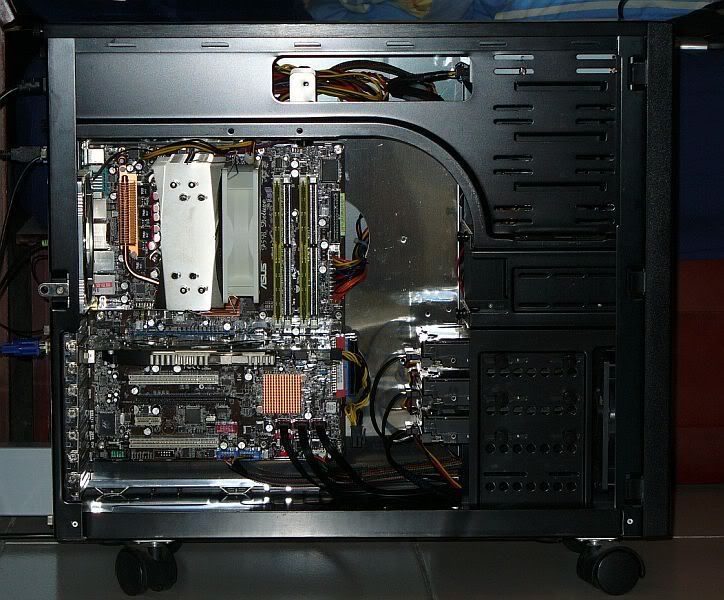
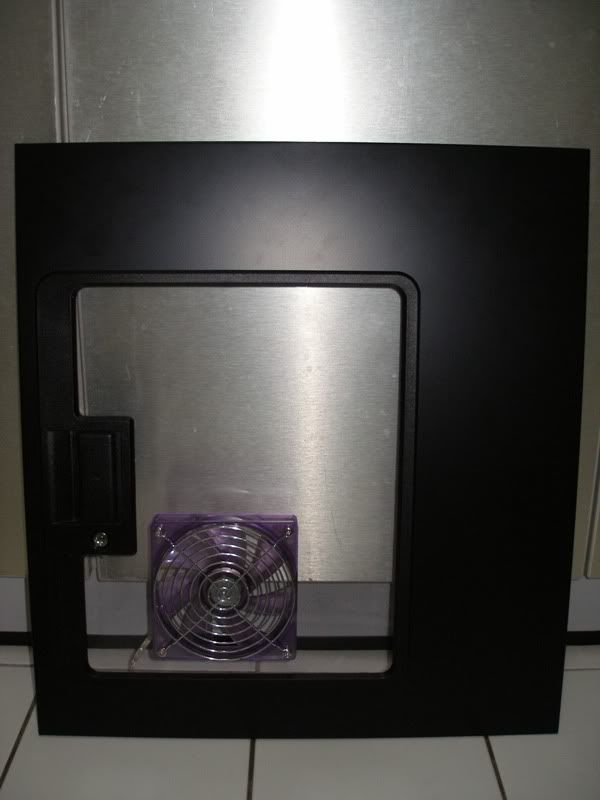
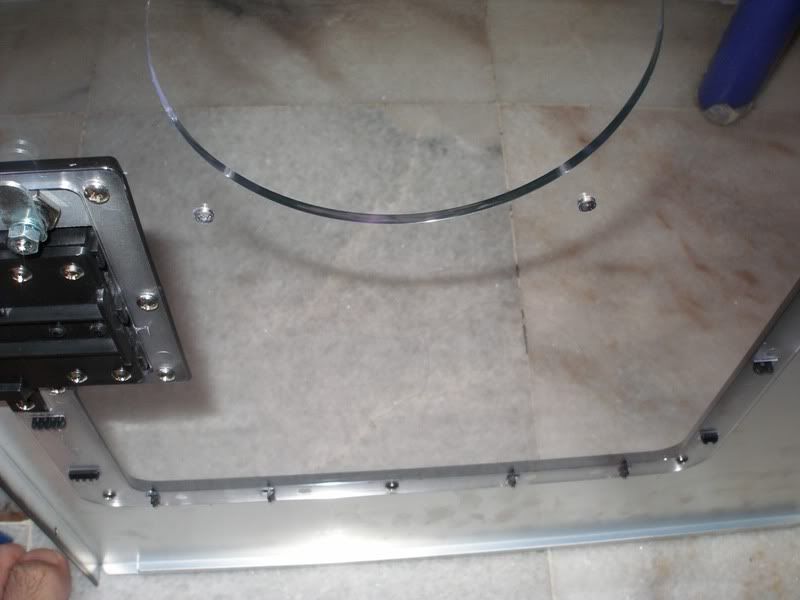
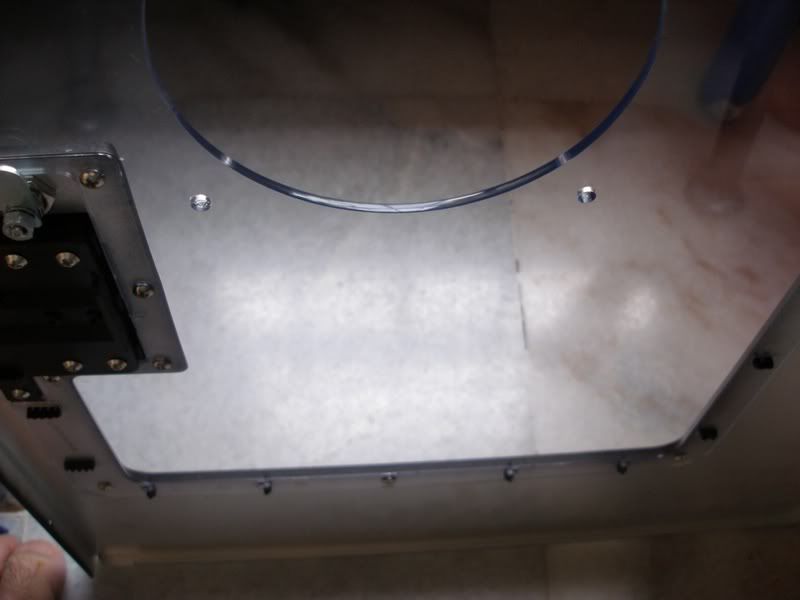
Well, I just cut vassale's side panel today. Let's c if the new 120mm Vizo fan he bought for the side intake works to drop his CPU temps.

user posted image


Check out that Crystal edge polishing on the blowhole. U can even see reflections on the blowhole edge. Crystal edge blowholes FTW!!!!!!!!!!!!! laugh.gif

user posted image

user posted image


TSvassalle
post Dec 28 2006, 11:07 PM

On my way
****
Senior Member
610 posts

Joined: Jun 2006
From: Ampang, Selangor


W000ttt... Im so happyy! my temperature with the side fan is atleast at par if not better than having the side case open. rclxm9.gif rclxm9.gif

idle @ 35c
load @ 43c rclxms.gif

Attached Image Attached Image

so very satisfied with ianho's work. reflections on the blowhole edge?!! thumbup.gif
And he also took time to give a few pointers to this newbie. Thanks dude!

About the noise, im using the viso 120mm fan. its not loud, but not silent. for me its bearable (my ceiling fan is more noisier). But for the performance im getting rite now, i dont think i can complain much. biggrin.gif

Just noticed something, check out my system temp @ 30c for both idle and load. Before it was at 40c idle! rclxm9.gif icon_idea.gif thumbup.gif

This post has been edited by vassalle: Dec 28 2006, 11:09 PM
sHawTY
post Dec 31 2006, 12:03 PM

Frequent Reporter
********
All Stars
14,909 posts

Joined: Jul 2005

Bro, as you know, right now i'm using 3D Aurora 570 with the stock gaygaybyte fan [900 - 1000RPM] , what i get for my nortbridge is 40degrees [using PCCooler NB-400CU] damn hotter than when i'm using Tsunami Dream as my casing... grumble.gif

Then, 58degrees for my GPU Temperatures [Using Tsunami Dream casing got me 50degrees for my GPU temps]

See, you can see for u'reself, the fans were too slow... sweat.gif

I think the stock fan is too slow, so i've decided to change the fan... tongue.gif

Then, i've changed all the gaygaybyte 120MM fans [1 intake, 2 exhaust] to Vantec Spectrum 120MM UVLed fan, [the speed is around 1700 - 1800RPM] and what i got is, a much cooler parts in my casing... smile.gif

Nahh, this is what i got:
Nortbridge: 35degrees [Cool!!!] thumbup.gif
GPU: 50degrees [The Same temp when i'm using Thermaltake Tsunami Dream Casing] rclxm9.gif

So, this proves it, the stock gaygaybyte fans were too freaking slow to push some good cfm's... doh.gif

Don't ask about my cpu temp, i'm using Swiftech Watercooling Kit, so the temps are still the same, 30degrees on idle icon_rolleyes.gif

So now, all my casing fan & watercooling kit fans are using Vantec Spectrum 120MM UVLed Fan... notworthy.gif

And the best part is, i don't have to mod my casing at all!!! rclxm9.gif

This post has been edited by sHawTY: Dec 31 2006, 12:07 PM
SUSAllnGap
post Dec 31 2006, 12:54 PM

[ Modding with Passion(tm) ]
*******
Senior Member
4,561 posts

Joined: Jan 2003
From: Penangites


QUOTE(ianho @ Dec 28 2006, 10:03 PM)
Well, I just cut vassale's side panel today.  Let's c if the new 120mm Vizo fan he bought for the side intake works to drop his CPU temps.

user posted image
Check out that Crystal edge polishing on the blowhole.  U can even see reflections on the blowhole edge. Crystal edge blowholes FTW!!!!!!!!!!!!!  laugh.gif

user posted image

user posted image
*
woooww.....that's like laser cut quality......... rclxms.gif


QUOTE(vassalle @ Dec 28 2006, 11:07 PM)
W000ttt... Im so happyy! my temperature with the side fan is atleast at par if not better than having the side case open.  rclxm9.gif  rclxm9.gif

idle @ 35c
load @ 43c  rclxms.gif

Attached Image Attached Image

so very satisfied with ianho's work. reflections on the blowhole edge?!!  thumbup.gif
And he also took time to give a few pointers to this newbie. Thanks dude!

About the noise, im using the viso 120mm fan. its not loud, but not silent. for me its bearable (my ceiling fan is more noisier). But for the performance im getting rite now, i dont think i can complain much. biggrin.gif

Just noticed something, check out my system temp @ 30c for both idle and load. Before it was at 40c idle!  rclxm9.gif  icon_idea.gif  thumbup.gif
*
glad that works for ya...


Change to:
| Lo-Fi Version
0.0289sec    0.63    6 queries    GZIP Disabled
Time is now: 21st December 2025 - 05:41 PM