Welcome Guest ( Log In | Register )

Outline · [ Standard ] · Linear+

 Need Help deciding, Better HS fan or Side Fan?

views
     
SUSAllnGap
post Dec 22 2006, 12:02 PM

[ Modding with Passion(tm) ]
*******
Senior Member
4,561 posts

Joined: Jan 2003
From: Penangites


QUOTE(vassalle @ Dec 22 2006, 11:39 AM)
Will take the picture later tonite once I get home. The cable management is so so la.. Compu-zone ppl pasangkan.. could be better, but I dont think the cables are the problem.

My guess is that the airflow problem is caused by the hd cage which is aligned towards the side panel (will show picture when I get back). So the intake fan airflow have to go through thouse swiss cheese holes..

BTW, Im using the side window. Didnt get the mesh.

Err.. what else can i to increase the airflow besides adding in more fans?  rclxub.gif tried googling for any mods that could be made to my case but couldnt find any. Just some ppl talking about the hd cage..
*
i've seen the casing itself, and yep the airflow is bad......

1x 120mm intake and 2x 120mm exhaust doesnt make the air flow good...


there's some detailed pics of the casing over here : http://www.bjorn3d.com/read.php?cID=810&pageID=1629


Problems :

- the stock fan is a low cfm fan
- the front 120mm fan doesnt suck in any cool air efficient coz the path is blocked by the HDD cage, front grill, and the worst part is the front filter that filter air.......
- just imagine you have got the same fan, 1 intake and 3 exhaust including the the 2x rear and the PSU, the casing is choking for fresh air dude.....

Solution :

- increase the intake capacity by adding a hole at the side panel, then make an air duct direct to your TT heatsink
- add a 120mm fan on the side panel, 2x 120mm better still...
- ask uncle ianho to make a big lubang on the base of the casing and install fan there...

hope that helps


over casing pics....see here, the HDD casing is blocking the airflow from the front intake
user posted image


these are the pics of the intake fan.....
the blow side of the intake fan is blocked by the HDD cage, intake is blocked by the filter, and there duct from the front panel is also blocking the airflow.

user posted image
user posted image
user posted image

rear part of the casing is okay because of the 2x 120mm intakes
user posted image


usually i dont want to tembak here and there coz you know you spend so much on the casing, then someone say negative things about it......but if you're serious about the airflow problem, i hope you'll accept my suggestion.....k

This post has been edited by AllnGap: Dec 22 2006, 12:09 PM
SUSAllnGap
post Dec 22 2006, 12:20 PM

[ Modding with Passion(tm) ]
*******
Senior Member
4,561 posts

Joined: Jan 2003
From: Penangites


QUOTE(vassalle @ Dec 22 2006, 12:14 PM)
Thanks AllnGap, that cleared alot of my doubts concerning the case. My only concern is that my system will be very noisy after adding another 2 or 3 fans. I know there will always be a trade off between silence and coolness, but really much want to strike a balance between the two..

I'd probably add a 120mm fan on the side panel for now and hopefully it improves the airflow.

Just wondering, i have an old thermaltake case fan2 12mm lying around somewhere, if I were to replace the fan infront with this fan, would it help improve the airflow situation. I'm sure its going to be noisier but just wondering if its worth it?

Again, thanks for links and the thorough explanation. very much appreciate it.
*
AFAIK, a fan on the sidepanel covering the CPU and GPU area helps the most even you've got a good intake....

i went to this forummer's place before, same casing as yours....his Opteron 170 also get the same problem, have to open up the side panel and the temp drop a lot !
then the front intake filter must be clean very often coz if it's dusty, the airflow is like totally zero....

regarding changing the front intake, i suggest you to remove the filter, cut the mesh, remove the plastic bracket from the front......that will actually work better than replacing the fan itself coz a filter that near to a fan will simply kill the airflow....

just imagine you put on a surgical mask, it's difficult to breath right ?
the same apply for the fan also

This post has been edited by AllnGap: Dec 22 2006, 12:26 PM
SUSAllnGap
post Dec 22 2006, 12:28 PM

[ Modding with Passion(tm) ]
*******
Senior Member
4,561 posts

Joined: Jan 2003
From: Penangites


QUOTE(E-J@1 @ Dec 22 2006, 12:24 PM)
u state "someone say negative things about it"....  may i know em hmm.gif  sweat.gif
*
sometimes, people get offended easily you know.........and sometimes i'm really good at spotting all the weaknesses tongue.gif
SUSAllnGap
post Dec 22 2006, 12:31 PM

[ Modding with Passion(tm) ]
*******
Senior Member
4,561 posts

Joined: Jan 2003
From: Penangites


just remember this :

Good airflow is equals to free flow and cooling on the hot spot, meaning no obstruction for the intake the exhaust and active cooling on the hottest spot, which is near the CPU, GPU and mofset area.....

i built some kind of wind tunnel last time, with motors to monitor the airflow,not really accurate but it can give whether air is moving faster or slower and stuff like that....

i think it's got related with fluid mechanics stuff.......i tested that if you duct the intake for a fan to a specific length, the pressure is more, then putting a grill or anything which will distort the direction of flow, like grills and things like that, the airflow will drop a lot....the same applies for exhaust......

This post has been edited by AllnGap: Dec 22 2006, 12:37 PM
SUSAllnGap
post Dec 22 2006, 03:40 PM

[ Modding with Passion(tm) ]
*******
Senior Member
4,561 posts

Joined: Jan 2003
From: Penangites


QUOTE(vassalle @ Dec 22 2006, 12:54 PM)
Thinking that it could bring better airflow. Thats why i was willing to shell out RM 440 for this case. Boy was i wrong  doh.gif

*
yalor.......that's why i dont want so spoilt the fun....knowing that you spent so much on a casing that doesnt have good airflow is heartbreaking isnt it.....

QUOTE(sniper on the roof @ Dec 22 2006, 01:26 PM)
I beg to differ from Allngap..

Personally I'm not a big fan of side panel fans cos I'm a bit of a silent freak (silent means you won't know your comp is on until you look into the power LED)

So this means blowholes and sidepanel fans are out of the question for me since soundwave travels straight. Having a side panel fan with the rig on the table means it's goes straight to your ears.

1:

Find out whether better airflow fixes the problem or not. Simple... no need to drill anything.. just leave your front case doors open and remove all the 5" bay bezels. Check if that reduces your temps.

2:

If that works... then you can remove the original crappy HDD cage. Build a tunnel/shroud using whatever material you can find....acrylic, wood or even cardboard ....pimp it up a bit... mount the fan inwards as per the pic (blue = fan).

Reason for this is that the space between the front of the case and the fan reduces some back pressure thereby increasing the cfm. And having the fan closer inside means your northbridge, southbridge, vga and cpu benefits from the turbulent air directly vented from outside.

No major cutting or drilling involved in this.

However, if you have the time or tool...it's always best to remove those stamped grills on the fan mounts both on the intake and exhaust. Intel did a presentation sometime back... those stamped grill reduce airflow at about 40%.

Edit: oops..forgot to add attachment. Fixed.
*
1. i tried that also with that forummer with Opty 170......works for a while only coz once the bay door is shut tight, it's really limiting airflow again coz the holes are really small.......

it's the same old airflow problem that every casing has, especially those with bay doors......


2. good idea also.....but why not just make a duct from side panel to the heatsink area right ?
that fan is claimed to be at 18dB rolleyes.gif

since opening side panel will allow around 10°C drop.....

This post has been edited by AllnGap: Dec 22 2006, 03:45 PM
SUSAllnGap
post Dec 22 2006, 05:18 PM

[ Modding with Passion(tm) ]
*******
Senior Member
4,561 posts

Joined: Jan 2003
From: Penangites


QUOTE(E-J@1 @ Dec 22 2006, 05:14 PM)
bro, wanna ask, instead removing the HDD cage what if placing another fan at the 5" bay, using Scythe "KAMA BAY" 120mm Fan

user posted image

which one is better, placing ur HDD at the 5" bay or add another 120mm fan at the 5" bay hmm.gif
*
this will only work if you leave the bay door open....if you close the bay door, then it's meaningless
SUSAllnGap
post Dec 25 2006, 11:41 AM

[ Modding with Passion(tm) ]
*******
Senior Member
4,561 posts

Joined: Jan 2003
From: Penangites


QUOTE(sniper on the roof @ Dec 22 2006, 11:41 PM)
1800rpm 120mm fan is quiet? You must live next to a highway tongue.gif

All my fans spin around 1K rpm niah.
*
can you hear your neighbour doing 'project' at night ? whistling.gif
SUSAllnGap
post Dec 31 2006, 12:54 PM

[ Modding with Passion(tm) ]
*******
Senior Member
4,561 posts

Joined: Jan 2003
From: Penangites


QUOTE(ianho @ Dec 28 2006, 10:03 PM)
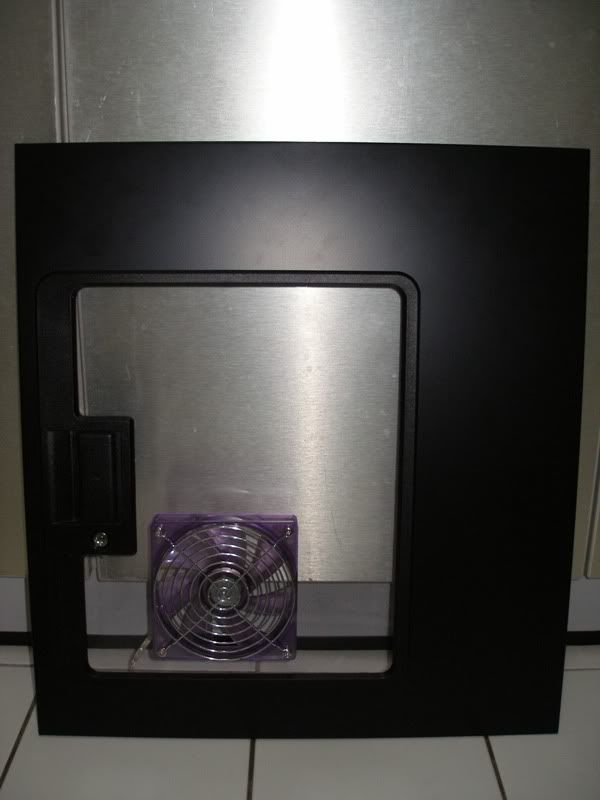
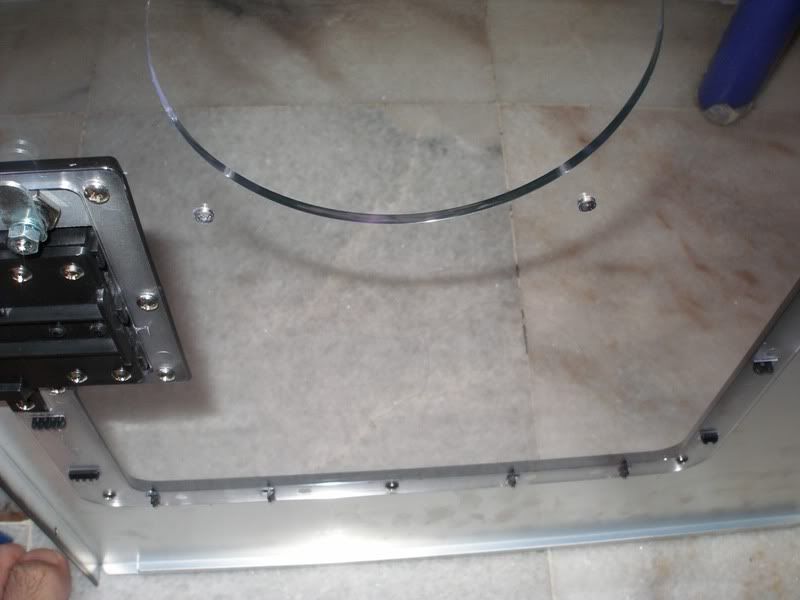
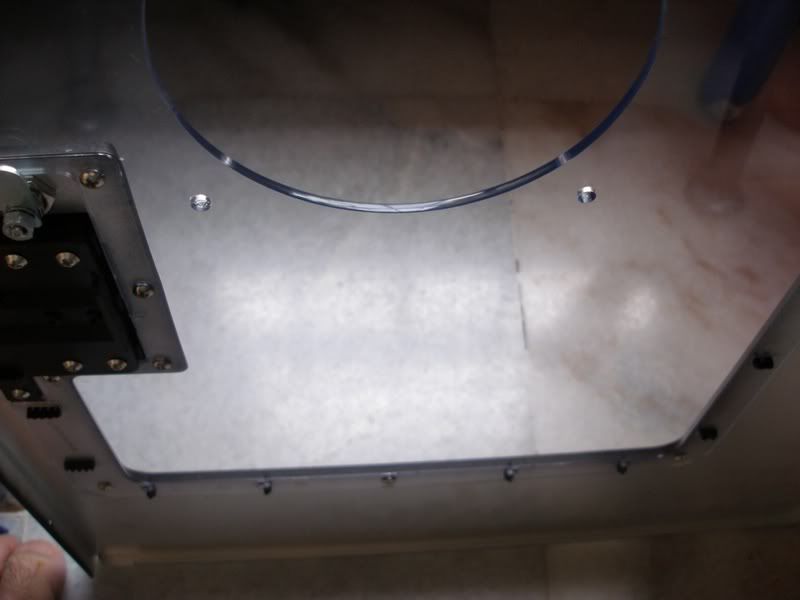
Well, I just cut vassale's side panel today.  Let's c if the new 120mm Vizo fan he bought for the side intake works to drop his CPU temps.

user posted image
Check out that Crystal edge polishing on the blowhole.  U can even see reflections on the blowhole edge. Crystal edge blowholes FTW!!!!!!!!!!!!!  laugh.gif

user posted image

user posted image
*
woooww.....that's like laser cut quality......... rclxms.gif


QUOTE(vassalle @ Dec 28 2006, 11:07 PM)
W000ttt... Im so happyy! my temperature with the side fan is atleast at par if not better than having the side case open.  rclxm9.gif  rclxm9.gif

idle @ 35c
load @ 43c  rclxms.gif

[attachmentid=172256][attachmentid=172259]

so very satisfied with ianho's work. reflections on the blowhole edge?!!  thumbup.gif
And he also took time to give a few pointers to this newbie. Thanks dude!

About the noise, im using the viso 120mm fan. its not loud, but not silent. for me its bearable (my ceiling fan is more noisier). But for the performance im getting rite now, i dont think i can complain much. biggrin.gif

Just noticed something, check out my system temp @ 30c for both idle and load. Before it was at 40c idle!  rclxm9.gif  icon_idea.gif  thumbup.gif
*
glad that works for ya...


Change to:
| Lo-Fi Version
0.0202sec    0.26    7 queries    GZIP Disabled
Time is now: 21st December 2025 - 01:17 AM