Welcome Guest ( Log In | Register )

159 Pages « < 39 40 41 42 43 > » Bottom

Outline · [ Standard ] · Linear+

 Microsoft Windows 10 (V.2)

views
     
MjMax15
post Oct 4 2016, 08:47 AM

Uncle Scrooge is back!
******
Senior Member
1,372 posts

Joined: Nov 2004
From: Heritage Waterfront City


QUOTE(JasonKing @ Oct 3 2016, 04:39 PM)
Take a dump file of the application that is hanging and analyze using windows debugger. You can see then what its causing it to lag or hang.
*
how to find dump file?
no bsod, just lag/not responding for a while, then continue to work again

QUOTE(horns @ Oct 3 2016, 06:54 PM)
what's your computer's specs?
honestly, when you reach this stage, i really think the better idea is to do a clean install.
*
i5 6400 proc
16 gb ram
win10 pro x64

but other program i can use like normal
just start button/desktop hang there when certain file/folder opened
then it continue to worked again. lol

.........................................................................................................


then this new problem came last night
its my home pc,

suddenly my aztech wifi usb cannot find/detect my home wifi connection
neighbors one can detect all, which is weird
reinstalled driver done,
restart router done,
router setting- set all wifi frequency, done
damn win10, just installed last week, suddenly cannot find wifi doh.gif
tsg_7
post Oct 4 2016, 11:47 AM

Look at all my stars!!
*******
Senior Member
2,223 posts

Joined: Aug 2008
From: Port Klang, Selangor
QUOTE(horns @ Oct 3 2016, 11:47 PM)
er no the previous w10 free upgrade was for w7 and up; ms gave us one year to upgrade.
*
Give us 1year to upgrade? Means? Within 1year period have free upgrade?
horns
post Oct 4 2016, 12:43 PM

\m/
*******
Senior Member
3,038 posts

Joined: Nov 2009
QUOTE(MjMax15 @ Oct 4 2016, 08:47 AM)
how to find dump file?
no bsod, just lag/not responding for a while, then continue to work again
i5 6400 proc
16 gb ram
win10 pro x64

but other program i can use like normal
just start button/desktop hang there when certain file/folder opened
then it continue to worked again. lol

.........................................................................................................
then this new problem came last night
its my home pc,

suddenly my aztech wifi usb cannot find/detect my home wifi connection
neighbors one can detect all, which is weird
reinstalled driver done,
restart router done,
router setting- set all wifi frequency, done
damn win10, just installed last week, suddenly cannot find wifi doh.gif
*
everything looks good. have you tried this? https://forum.lowyat.net/index.php?showtopi...post&p=81647915

for the wifi issue, try find and use latest drivers from manufacturer (usually they should provide w10 compatible drivers). also, check out this page, https://support.microsoft.com/en-us/help/10...nnection-issues

QUOTE(tsg_7 @ Oct 4 2016, 11:47 AM)
Give us 1year to upgrade? Means? Within 1year period have free upgrade?
*
there was a w10 free upgrade offer for all users of w7 and up to upgrade to w10. the deal has expired in last july.

MjMax15
post Oct 4 2016, 12:51 PM

Uncle Scrooge is back!
******
Senior Member
1,372 posts

Joined: Nov 2004
From: Heritage Waterfront City


QUOTE(horns @ Oct 4 2016, 12:43 PM)
everything looks good. have you tried this? https://forum.lowyat.net/index.php?showtopi...post&p=81647915

for the wifi issue, try find and use latest drivers from manufacturer (usually they should provide w10 compatible drivers). also, check out this page, https://support.microsoft.com/en-us/help/10...nnection-issues
there was a w10 free upgrade offer for all users of w7 and up to upgrade to w10. the deal has expired in last july.
*
thanks
for wifi, ill try later when at home
for hang issue, i think i must live with it sad.gif
because at a few second windows will resume back lol

thanks thumbsup.gif
horns
post Oct 4 2016, 03:32 PM

\m/
*******
Senior Member
3,038 posts

Joined: Nov 2009
QUOTE(MjMax15 @ Oct 4 2016, 12:51 PM)
thanks
for wifi, ill try later when at home
for hang issue, i think i must live with it sad.gif
because at a few second windows will resume back lol

thanks thumbsup.gif
*
uh? meaning previous steps didn't solve your issue? one guy also said if you have installed latest updates it will resolve automatically.

you can also try find out other possible solutions with search engines.
MjMax15
post Oct 4 2016, 03:49 PM

Uncle Scrooge is back!
******
Senior Member
1,372 posts

Joined: Nov 2004
From: Heritage Waterfront City


QUOTE(horns @ Oct 4 2016, 03:32 PM)
uh? meaning previous steps didn't solve your issue? one guy also said if you have installed latest updates it will resolve automatically.

you can also try find out other possible solutions with search engines.
*
which one? for wifi ill do it later
hang issue, cannot be helped imo
my windows 1607 version
i think the latest one because no more update so far
horns
post Oct 5 2016, 02:01 AM

\m/
*******
Senior Member
3,038 posts

Joined: Nov 2009
Yes i meant the hang part.

I have a laptop running w10 1607, 16gb ram too. No issue here. (It's a clean install)
TSstasio
post Oct 6 2016, 09:33 AM

10k Club
********
All Stars
18,506 posts

Joined: Oct 2007
From: P.Jaya
Windows 10 Cumulative Update 1607 (Build 14393.223) KB3197356

x86:
http://download.windowsupdate.com/c/msdown...2bfd1c5480f.msu

x64:
http://download.windowsupdate.com/d/msdown...cc521a938f1.msu
TSstasio
post Oct 8 2016, 07:33 AM

10k Club
********
All Stars
18,506 posts

Joined: Oct 2007
From: P.Jaya
Windows 10 Insider Preview Build 14942

https://blogs.windows.com/windowsexperience...mqWm6ek35XfF.97

https://forums.mydigitallife.info/threads/7...uild-14942-(PC)
TSstasio
post Oct 9 2016, 02:13 PM

10k Club
********
All Stars
18,506 posts

Joined: Oct 2007
From: P.Jaya
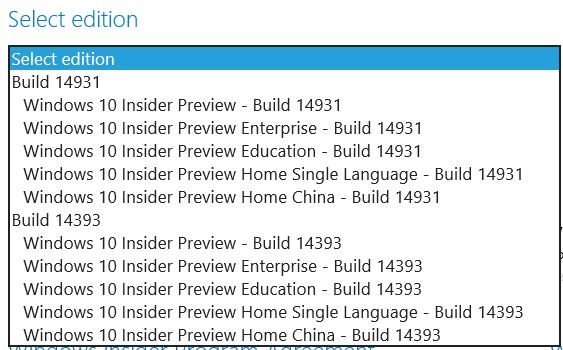
Windows 10 Insider Preview Build 14931 ISO

https://www.microsoft.com/en-us/software-do...previewadvanced

user posted image
horns
post Oct 10 2016, 02:38 AM

\m/
*******
Senior Member
3,038 posts

Joined: Nov 2009
QUOTE(stasio @ Oct 8 2016, 07:33 AM)
the ideas of linking 'programs and features' to 'apps and features' in settings, and getting rid of control panel from right-click pop-up menu are not that practical imo.

by the way you can still do win key + r then type 'control' to get to control panel.
IceBikers
post Oct 11 2016, 10:01 AM

Enthusiast
*****
Senior Member
960 posts

Joined: Jan 2003


having trouble updating windows lately.. its keep on fail to update and undo.. for few days already

followed the workaround from the google and it is still not working

Attached Image

PhakFuhZai
post Oct 11 2016, 11:17 PM

harimau putih
******
Senior Member
1,587 posts

Joined: Apr 2011
if a laptop freeze randomly, without even showing BSoD, mouse and keyboard no response at all, Ctrl Alt Del no response also, had to long hold the power button to power cycle it. This happens roughly 1-2 times a day, got one time it just freezes when playing movie, the audio instantly became trghhhhhhhhh like that

what would the cause be?

any tools which can use to analyze the thing? When it doesn't even show the BSoD, there's no way to even see the memory dump sad.gif

running Win10 Pro, HP Pavilion 15, Core i7 7500 with additional 4 GB + 4 GB RAM

horns
post Oct 12 2016, 02:41 AM

\m/
*******
Senior Member
3,038 posts

Joined: Nov 2009
QUOTE(IceBikers @ Oct 11 2016, 10:01 AM)
having trouble updating windows lately.. its keep on fail to update and undo.. for few days already

followed the workaround from the google and it is still not working

Attached Image
*
maybe you should skip this and get the latest cu for 1607

Cumulative Update for Windows 10 Version 1607 - KB3194798 (OS Build 14393.321)

x64: http://download.windowsupdate.com/c/msdown...49bb4b5e108.msu
x86: http://download.windowsupdate.com/d/msdown...65711809c90.msu

https://support.microsoft.com/en-us/help/12...-update-history

QUOTE(PhakFuhZai @ Oct 11 2016, 11:17 PM)
if a laptop freeze randomly, without even showing BSoD, mouse and keyboard no response at all, Ctrl Alt Del no response also, had to long hold the power button to power cycle it. This happens roughly 1-2 times a day, got one time it just freezes when playing movie, the audio instantly became trghhhhhhhhh like that

what would the cause be?

any tools which can use to analyze the thing? When it doesn't even show the BSoD,  there's no way to even see the memory dump sad.gif

running Win10 Pro, HP Pavilion 15, Core i7 7500 with additional 4 GB + 4 GB RAM
*
it could be caused by many things. for the media playback part, have you updated display/audio drivers?
TSstasio
post Oct 12 2016, 06:31 AM

10k Club
********
All Stars
18,506 posts

Joined: Oct 2007
From: P.Jaya
Windows 10 Cumulative Update 1511 - KB 3192441 (Build 10586.633)

x86:
http://download.windowsupdate.com/c/msdown...210574ee06a.msu

x64:
http://download.windowsupdate.com/c/msdown...f0ed11d29ac.msu


Ebony & Ivory
post Oct 12 2016, 05:47 PM

Enthusiast
*****
Senior Member
962 posts

Joined: Jan 2016
QUOTE(PhakFuhZai @ Oct 11 2016, 11:17 PM)
if a laptop freeze randomly, without even showing BSoD, mouse and keyboard no response at all, Ctrl Alt Del no response also, had to long hold the power button to power cycle it. This happens roughly 1-2 times a day, got one time it just freezes when playing movie, the audio instantly became trghhhhhhhhh like that

what would the cause be?

any tools which can use to analyze the thing? When it doesn't even show the BSoD,  there's no way to even see the memory dump sad.gif

running Win10 Pro, HP Pavilion 15, Core i7 7500 with additional 4 GB + 4 GB RAM
*
check event logs.

in control panel > system and security > administrative tools
PhakFuhZai
post Oct 12 2016, 09:20 PM

harimau putih
******
Senior Member
1,587 posts

Joined: Apr 2011
QUOTE(horns @ Oct 12 2016, 02:41 AM)
maybe you should skip this and get the latest cu for 1607

Cumulative Update for Windows 10 Version 1607 - KB3194798 (OS Build 14393.321)

x64: http://download.windowsupdate.com/c/msdown...49bb4b5e108.msu
x86: http://download.windowsupdate.com/d/msdown...65711809c90.msu

https://support.microsoft.com/en-us/help/12...-update-history
it could be caused by many things. for the media playback part, have you updated display/audio drivers?
*
the laptop is just 2 weeks old, latest HP refreshment with 7th gen i7
don't think the driver is old

QUOTE(Ebony & Ivory @ Oct 12 2016, 05:47 PM)
check event logs.

in control panel > system and security > administrative tools
*
hmm.. will check
but I doubt will find anything

update:

CODE
A corrected hardware error has occurred.

Component: PCI Express Root Port
Error Source: Advanced Error Reporting (PCI Express)

Bus:Device:Function: 0x0:0x1D:0x3
Vendor ID:Device ID: 0x8086:0x9D1B
Class Code: 0x30400

The details view of this entry contains further information.


this warning occured ALOT everytime the system boot up

This post has been edited by PhakFuhZai: Oct 12 2016, 09:25 PM
ktek
post Oct 12 2016, 10:13 PM

小喇叭
********
All Stars
13,217 posts

Joined: Jul 2006
QUOTE(PhakFuhZai @ Oct 12 2016, 09:20 PM)
the laptop is just 2 weeks old, latest HP refreshment with 7th gen i7
don't think the driver is old
hmm.. will check
but I doubt will find anything
update:
CODE
A corrected hardware error has occurred.
Component: PCI Express Root Port
Error Source: Advanced Error Reporting (PCI Express)
Bus:Device:Function: 0x0:0x1D:0x3
Vendor ID:Device ID: 0x8086:0x9D1B
Class Code: 0x30400
The details view of this entry contains further information.

this warning occured ALOT everytime the system boot up
*


you kor nen heh power saving eh shu.
shi kon leh zak control panel -> power option -> change plan setting -> change advanced -> pcie link state = all off

another place is intel graphic, look for power saving management. all off /disable for testing purpose.
TSstasio
post Oct 14 2016, 02:18 AM

10k Club
********
All Stars
18,506 posts

Joined: Oct 2007
From: P.Jaya
Windows 10 Insider Preview Build 14946

https://blogs.windows.com/windowsexperience...QSzW7iPCQWmi.97

https://twitter.com/WZorNET
TSstasio
post Oct 15 2016, 07:09 PM

10k Club
********
All Stars
18,506 posts

Joined: Oct 2007
From: P.Jaya
Microsoft Update Catalog is now available for non-IE users at ..... rclxms.gif

http://www.catalog.update.microsoft.com/

159 Pages « < 39 40 41 42 43 > » Top
 

Change to:
| Lo-Fi Version
0.0230sec    2.00    6 queries    GZIP Disabled
Time is now: 23rd December 2025 - 08:23 AM