

Must put in a word here for Mikrotik. Too many Asus fanpeople already. :-)
This post has been edited by soonwai: Jan 22 2016, 05:33 PM
Unifi Best router for UNIFI 30 mbps, Budget around 400 to 500
Unifi Best router for UNIFI 30 mbps, Budget around 400 to 500
|
|
 Jan 22 2016, 05:33 PM Jan 22 2016, 05:33 PM
|
 
All Stars
11,460 posts Joined: Oct 2007 From: KL  
|
Must put in a word here for Mikrotik. Too many Asus fanpeople already. :-)
This post has been edited by soonwai: Jan 22 2016, 05:33 PM |
|
|
|
|
|
Jan 23 2016, 12:43 AM
|

Junior Member
44 posts Joined: Jan 2016
|
If thats me with the budget for a router , Archer C7 u cant go wrong
 |
|
|
Mar 30 2016, 10:14 AM
|

Junior Member
237 posts Joined: Nov 2005 From: Big Hill Leg
|
Hi all Sifu, Is the D-Link DIR-850L recommended? Can it use for HyppTV? Any Comment? Planning to get a Wifi Router to replace the shitty stock Innotec router. Thanks.
|
|
|
Mar 30 2016, 03:38 PM
|
|
Senior Member
3,329 posts Joined: Jan 2003 From: Selangor
|
QUOTE(soonwai @ Jan 22 2016, 05:33 PM) Must put in a word here for Mikrotik. Too many Asus fanpeople already. :-) +1 for mikrotik.  |
|
|
Mar 30 2016, 03:55 PM
Show posts by this member only | IPv6 | Post
#65
|
 
Staff
12,090 posts Joined: Dec 2004 From: Malaysia
|
However if you're really not tech savvy enough and require a very user friendly interface then better avoid Mikrotik. No doubt Mikrotik products are very good for its price but it definitely requires some reading on configuring it for first time users.
|
|
|
Mar 30 2016, 05:02 PM
|

Junior Member
288 posts Joined: Nov 2013 From: Autonomous State of Sarawak 
|
Just got unifi at my home
Anyone can recommend me a router? I prefer asus with dual band. My house is 3 storey so need a router that have large coverage. Budget 300-500 |
|
|
|
|
|
Mar 30 2016, 06:51 PM
|
|
All Stars
11,460 posts Joined: Oct 2007 From: KL
|
QUOTE(OKLY @ Mar 30 2016, 03:55 PM) However if you're really not tech savvy enough and require a very user friendly interface then better avoid Mikrotik. No doubt Mikrotik products are very good for its price but it definitely requires some reading on configuring it for first time users. Very true if you want to get into the depths of the router. For basic setup, Mikrotik now has Quickset which simplifies things a lot. Everything is set here except for VLAN which will still need to be done manually.TS, check my Mikrotik UniFi Guide and see how easy it is now. |
|
|
Mar 30 2016, 10:38 PM
|
|
All Stars
11,460 posts Joined: Oct 2007 From: KL
|
QUOTE(TheDeadlySins420 @ Mar 30 2016, 05:02 PM) Just got unifi at my home Get one with low gain antennas (say, not more than 4dBi) and high output power and put in the middle floor. 2.4Ghz will be best for this. If your house is big, you'll still get blindspots here and there. Also keep in mind that your router's signal may reach your device but the device might not be able to reach back to the router. Also need to check for congestion, if congested then use multiple lower power APs in strategic locations.Anyone can recommend me a router? I prefer asus with dual band. My house is 3 storey so need a router that have large coverage. Budget 300-500 My router is on the 1st floor back room and covers the entire house including ground floor quite well. If I had a 2nd floor, it'll probably cover that as well. But mine is not too big, typical 20x70 DS terrace. See the speedtests around the house in my sig. ps: Asus should have quite good power output. They got sued by Linksys for it a few years back. Not sure if current models are like that. |
|
|
Mar 30 2016, 10:52 PM
|

Senior Member
2,507 posts Joined: Jan 2003
|
Mikrotik is good but mostly is overkill for most users.i prefer edge router by ubiquity.
|
|
|
Mar 30 2016, 11:38 PM
|
|
All Stars
11,460 posts Joined: Oct 2007 From: KL
|
QUOTE(Xefron @ Mar 30 2016, 10:52 PM) Mikrotik is good but mostly is overkill for most users.i prefer edge router by ubiquity. That's true. The thing with Mikrotik is that their software is the same from their cheapest USD22 wifi router to their highest end CCR routers. Hopefully one day they'll come out with a dumbed down version for consumers.I love Ubiquiti's UAP-ACs but the ERL is priced quite high here. I was looking at it at one time. There's also ERX which is cheaper but honestly I'm out of touch with their routers. |
|
|
Mar 31 2016, 12:01 AM
|
|
Junior Member
288 posts Joined: Nov 2013 From: Autonomous State of Sarawak
|
QUOTE(soonwai @ Mar 30 2016, 10:38 PM) Get one with low gain antennas (say, not more than 4dBi) and high output power and put in the middle floor. 2.4Ghz will be best for this. If your house is big, you'll still get blindspots here and there. Also keep in mind that your router's signal may reach your device but the device might not be able to reach back to the router. Also need to check for congestion, if congested then use multiple lower power APs in strategic locations. Will take note thank you My router is on the 1st floor back room and covers the entire house including ground floor quite well. If I had a 2nd floor, it'll probably cover that as well. But mine is not too big, typical 20x70 DS terrace. See the speedtests around the house in my sig. ps: Asus should have quite good power output. They got sued by Linksys for it a few years back. Not sure if current models are like that.  |
|
|
Mar 31 2016, 12:16 AM
|

Senior Member
1,139 posts Joined: Aug 2006
|
But with that router u still need to purchase another access point
|
|
|
Mar 31 2016, 10:15 AM
|

Senior Member
2,348 posts Joined: Apr 2008
|
QUOTE(soonwai @ Jan 22 2016, 05:33 PM) Must put in a word here for Mikrotik. Too many Asus fanpeople already. :-) guy, this is not about fanboys or haters. I have no choice to choose Asus, do you know why? it is because of this feature, 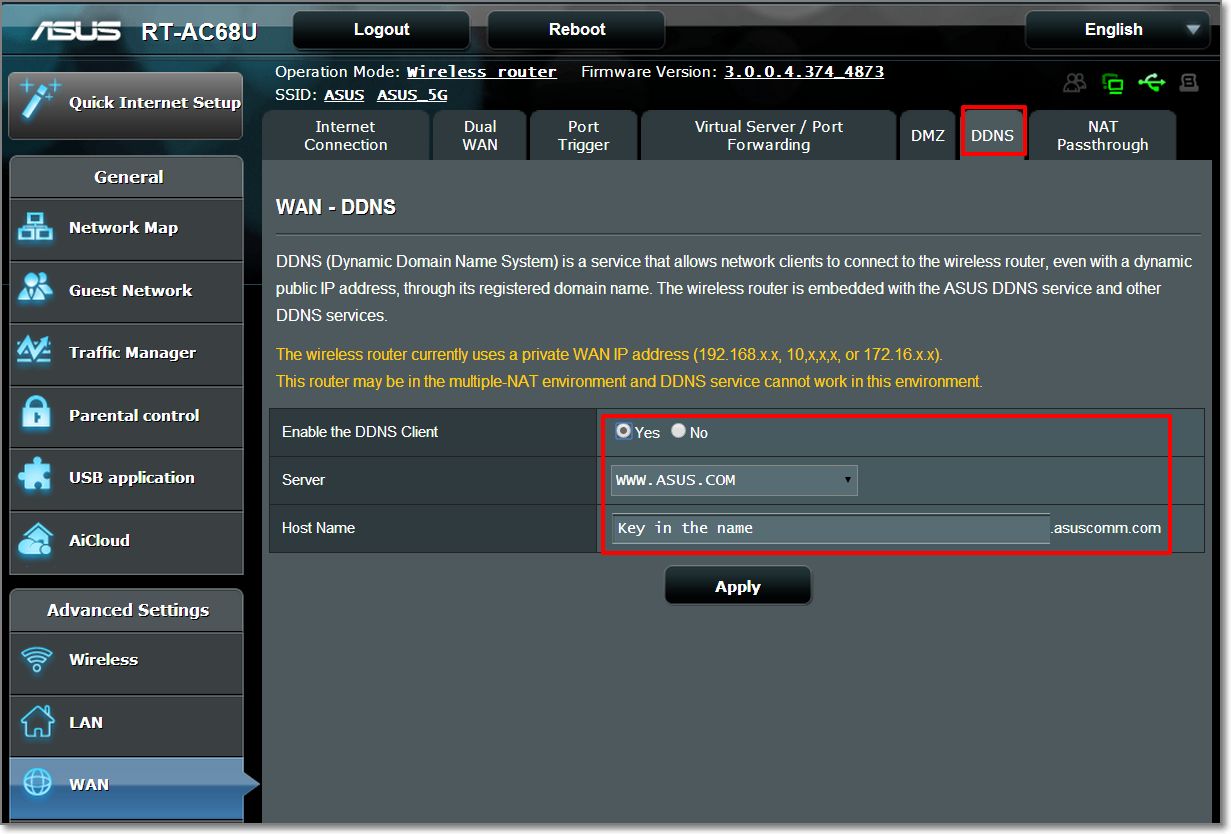 you don't understand what is this? perhaps you should install CCTV and alarm at your home in the future. You should know why we need Asus router. perhaps there still many people just blindly purchase a router by following the brand. Then just blindly become as a fanboy of Asus. However, Asus has a great "FREE" feature that others router don't have. Asus has their own DDNS, its totally free. If you use Dyndns.org, you need to pay the monthly DDNS subscriptions. However, for Asus, their DDNS is free and fast. That's why I need to buy an Asus router (or modem for streamyx user) to do my own CCTV and alarm settings on my own smartphone. I'm using Paradox and this is the sample. I need to set the DDNS to the app in order to connect my home alarm by 3G/4G or by outdoor wifi.  same as also with my home CCTV. This post has been edited by junclj: Mar 31 2016, 10:55 AM |
|
|
|
|
|
Mar 31 2016, 11:20 AM
|
|
Junior Member
433 posts Joined: Jan 2003
|
IMHO, Mikrotik is more of an enthusiast router.
Asus is more of a mainstream router, you buy, plug in, set in username and the rest is quite frankly automated. Up and running in 10 minutes. All these name calling is really unwarranted for. Your money, how you spent it is your choice. Nothing to do with anyone. |
|
|
Mar 31 2016, 11:38 AM
|
|
All Stars
10,429 posts Joined: Jan 2003 
|
mikrotik hAP ac lite
Dual-Concurrent 2.4/5GHz AP, 802.11ac, Five Ethernet ports, POE-out on port 5, USB for 3G/4G support I am waiting for this to arrive in Malaysia. |
|
|
Mar 31 2016, 11:39 AM
|

Junior Member
56 posts Joined: Jun 2015
|
QUOTE(GearX_SaM @ Nov 14 2015, 02:39 AM) Recently just upgraded my unifi from 5 mbps to 30mbps. good router. I'm using the asus n14uhp. Good price and performance However I am still using the old dlink dir615 router and it has been almost 4 years. Besides I am constantly getting 20mbps speed when connecting to wifi and very low signal for a floor above. I am thinking to get asus RT-N66U. Is it a good buy? |
|
|
Mar 31 2016, 12:13 PM
|
|
All Stars
11,460 posts Joined: Oct 2007 From: KL
|
QUOTE(junclj @ Mar 31 2016, 10:15 AM) guy, this is not about fanboys or haters. I have no choice to choose Asus, do you know why? Right on, dude, in my book there're no haters just fanboys. I like Asus routers, I have 2 (rt-n12 & rt-n16) in my house and love Mikrotik, Apple, TP-Link & D-Link too, for their own respective reasons. ... perhaps you should install CCTV and alarm at your home in the future. You should know why we need Asus router. ... perhaps there still many people just blindly purchase a router by following the brand. Then just blindly become as a fanboy of Asus. However, Asus has a great "FREE" feature that others router don't have. Asus has their own DDNS, its totally free. If you use Dyndns.org, you need to pay the monthly DDNS subscriptions. However, for Asus, their DDNS is free and fast. ... As for dynamic dns, if you're informed then you'll have more choices. Almost all routers have a free ddns option. DLink is the best because they have give you a free dyndns account. Asus & Mikrotik provide their own. TP-Link can use afraid. I don't use CCTV so perhaps I'm missing something. I use ddns for Plex. Watching parts of 'Patriot Games' from the coffee shop is kinda like watching your own CCTV except my house is not that big. |
|
|
Mar 31 2016, 02:47 PM
|
|
Senior Member
2,348 posts Joined: Apr 2008
|
QUOTE(soonwai @ Mar 31 2016, 12:13 PM) Right on, dude, in my book there're no haters just fanboys. I like Asus routers, I have 2 (rt-n12 & rt-n16) in my house and love Mikrotik, Apple, TP-Link & D-Link too, for their own respective reasons. no, others modem does not offers free ddns. Dyndns have to pay monthly subscription. However, asus modem just type in your decided username then use directly without doing any registration process from website.As for dynamic dns, if you're informed then you'll have more choices. Almost all routers have a free ddns option. DLink is the best because they have give you a free dyndns account. Asus & Mikrotik provide their own. TP-Link can use afraid. I don't use CCTV so perhaps I'm missing something. I use ddns for Plex. Watching parts of 'Patriot Games' from the coffee shop is kinda like watching your own CCTV except my house is not that big. |
|
|
Mar 31 2016, 03:23 PM
|

Junior Member
25 posts Joined: Mar 2016 From: KL
|
should i upgrade to 30mpbs? mine now is 5
|
|
|
Mar 31 2016, 05:13 PM
|
|
Senior Member
2,348 posts Joined: Apr 2008
|
QUOTE(paddylam @ Mar 31 2016, 03:23 PM) should i upgrade to 30mpbs? mine now is 5 I think you should first ask TM before you upgrade. The most problem usually that we are facing is penalty. You should ask TM to double confirm your contract status. I was too upgraded from 8mbps streamyx to unifi 30mbps at two days ago. Actually that time I am quite worry about the penalty. My streamyx account was 6 years ago. Last time got upgrade from 1mbps to 2mbps, until last year December I request for upgrade to 8mbps again. So I am worried about whether the penalty impose if two years contract is really existed. After visit TMpoint to double confirm my streamyx termination, the TM officer was checked my streamyx account was confirmed automatic terminated after my unifi installation. No penalty impose but just need to pay aditional RM1.xx monthly to keep my old phone number due to some reason about my home alarm was bound with my old phone number. |
| Change to: |  0.0265sec 0.0265sec
 0.81 0.81
 6 queries 6 queries
 GZIP Disabled GZIP Disabled
Time is now: 24th December 2025 - 07:04 AM |
 Quote
Quote