

Is it ok if i use below 1.45v daily use i3 8350k temp below 90
Skylake/Kaby/Coffee/Comet/Rocket Lake OC V1, Show off your OC here
Skylake/Kaby/Coffee/Comet/Rocket Lake OC V1, Show off your OC here
|
|
 Nov 5 2017, 08:26 AM Nov 5 2017, 08:26 AM
Show posts by this member only | IPv6 | Post
#321
|
 
Junior Member
345 posts Joined: Jun 2009  
|
Is it ok if i use below 1.45v daily use i3 8350k temp below 90
|
|
|
|
|
|
Nov 5 2017, 09:20 AM
|
 
Elite
8,711 posts Joined: Nov 2007 From: Butterworth, PG / Machang, Kelantan 
|
QUOTE(keyo @ Nov 5 2017, 08:26 AM) Is it ok if i use below 1.45v daily use i3 8350k temp below 90 There's no safe voltage when it comes to OC but I'd recommend to stay below 1.5V under air/water and under 100C. Intel recommended max vCore is 1.52v: 
Source: https://www.intel.com/content/www/us/en/pro...heet-vol-1.html This post has been edited by owikh84: Nov 5 2017, 09:33 AM |
|
|
Nov 7 2017, 09:00 PM
|

Senior Member
523 posts Joined: Aug 2017 From: some place 
|
 managed 4.6ghz on my 8700k without touching the voltage, did i win the lottery? undelided @ ~78c managed 4.6ghz on my 8700k without touching the voltage, did i win the lottery? undelided @ ~78c |
|
|
Nov 8 2017, 07:51 PM
|
|
Junior Member
345 posts Joined: Jun 2009
|
QUOTE(crumpetss @ Nov 7 2017, 09:00 PM) managed 4.6ghz on my 8700k without touching the voltage, did i win the lottery? undelided @ ~78c |
|
|
Nov 10 2017, 11:03 PM
|
|
Senior Member
523 posts Joined: Aug 2017 From: some place
|
QUOTE(keyo @ Nov 8 2017, 07:51 PM) can you show cpuz Attached thumbnail(s) 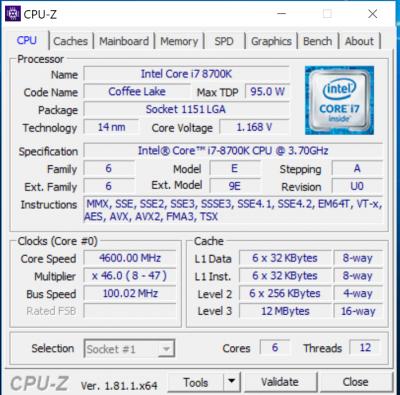
|
|
|
Nov 16 2017, 01:25 PM
|

Junior Member
81 posts Joined: Jan 2006
|
QUOTE(owikh84 @ Oct 18 2017, 11:52 AM) OC Guide for GIGABYTE Z370 board, top post updated. noob overclocker here. i followed these steps on an Aorus Ultra Gaming + 8700k but it went into boot loop on windows logo with the circly things[JOOMAG] GIGABYTE Z370 OC Guide [attachmentid=9250293] |
|
|
|
|
|
Nov 18 2017, 06:09 PM
|
|
Junior Member
345 posts Joined: Jun 2009
|
QUOTE(azcromex @ Nov 16 2017, 01:25 PM) noob overclocker here. i followed these steps on an Aorus Ultra Gaming + 8700k but it went into boot loop on windows logo with the circly things Pump voltage not all proc same vid (stock voltage )Apa yg aku tahu lah kalau salah tolong betulkan This post has been edited by keyo: Nov 18 2017, 06:12 PM |
|
|
Nov 20 2017, 02:02 PM
|
|
Senior Member
523 posts Joined: Aug 2017 From: some place
|
QUOTE(azcromex @ Nov 16 2017, 01:25 PM) noob overclocker here. i followed these steps on an Aorus Ultra Gaming + 8700k but it went into boot loop on windows logo with the circly things restart your pc, when booting try to boot into bios, revert those changes |
|
|
Nov 21 2017, 01:39 AM
|

Newbie
15 posts Joined: Nov 2017
|
Can 5.2GHz vcore go lower?


 This post has been edited by BroD: Nov 21 2017, 01:49 AM |
|
|
Nov 21 2017, 07:07 AM
|
|
Elite
8,711 posts Joined: Nov 2007 From: Butterworth, PG / Machang, Kelantan
|
QUOTE(BroD @ Nov 21 2017, 01:39 AM) Can 5.2GHz vcore go lower? Hi bro,
Assuming that you've tried lower voltage, I'm afraid there's no other way to get any lower vCore. Plus, your mobo is the Hero so should be among the best Z370 boards in terms of power delivery, voltage control etc. Every CPU comes with its unique VID (stock voltage), so it may vary from one chip to another. |
|
|
Nov 22 2017, 02:04 AM
|
|
Newbie
15 posts Joined: Nov 2017
|
QUOTE(owikh84 @ Nov 21 2017, 07:07 AM) Hi bro, Maybe you can tell me how to OC properly? Sometimes I see just a single setting can decide how low the vcore can go or how stable the system is. You are using Maximus X Apex & Maximus X Hero, I would be thankful if you can share your BIOS settings.Assuming that you've tried lower voltage, I'm afraid there's no other way to get any lower vCore. Plus, your mobo is the Hero so should be among the best Z370 boards in terms of power delivery, voltage control etc. Every CPU comes with its unique VID (stock voltage), so it may vary from one chip to another. This post has been edited by BroD: Nov 22 2017, 02:07 AM |
|
|
Nov 22 2017, 07:10 AM
|
|
Elite
8,711 posts Joined: Nov 2007 From: Butterworth, PG / Machang, Kelantan
|
QUOTE(BroD @ Nov 22 2017, 02:04 AM) Maybe you can tell me how to OC properly? Sometimes I see just a single setting can decide how low the vcore can go or how stable the system is. You are using Maximus X Apex & Maximus X Hero, I would be thankful if you can share your BIOS settings. Wait, tonight I will share my stable 5GHz OC BIOS settings.Now I am testing an entry-level board.  Will come back to you, so stay tuned.  |
|
|
Nov 22 2017, 07:23 PM
|
|
Elite
8,711 posts Joined: Nov 2007 From: Butterworth, PG / Machang, Kelantan
|
QUOTE(BroD @ Nov 22 2017, 02:04 AM) Maybe you can tell me how to OC properly? Sometimes I see just a single setting can decide how low the vcore can go or how stable the system is. You are using Maximus X Apex & Maximus X Hero, I would be thankful if you can share your BIOS settings. Here's my 5GHz OC settings for the following setup: M10H_setting.txt ( 72.86k )
Number of downloads: 35
M10H_setting.txt ( 72.86k )
Number of downloads: 35Summarizing up those important settings: » Click to show Spoiler - click again to hide... « My PC specs: CPU: Intel Core i7-8700K MB: ASUS ROG Maximus X HERO (BIOS 0505) RAM: G.Skill TridentZ RGB DDR4-3200 CL16 2x8GB Cooling: Custom WC This post has been edited by owikh84: Nov 22 2017, 07:24 PM |
|
|
|
|
|
Nov 23 2017, 12:31 AM
|
|
Newbie
15 posts Joined: Nov 2017
|
QUOTE(owikh84 @ Nov 22 2017, 07:23 PM) Here's my 5GHz OC settings for the following setup: Wow..thank you so much. That's a long list lol. Why are you still using BIOS 0505 instead of the latest BIOS 0802? Is it better?
M10H_setting.txt ( 72.86k )
Number of downloads: 35Summarizing up those important settings: » Click to show Spoiler - click again to hide... « My PC specs: CPU: Intel Core i7-8700K MB: ASUS ROG Maximus X HERO (BIOS 0505) RAM: G.Skill TridentZ RGB DDR4-3200 CL16 2x8GB Cooling: Custom WC |
|
|
Nov 23 2017, 06:52 AM
|
|
Elite
8,711 posts Joined: Nov 2007 From: Butterworth, PG / Machang, Kelantan
|
QUOTE(BroD @ Nov 23 2017, 12:31 AM) Wow..thank you so much. That's a long list lol. Why are you still using BIOS 0505 instead of the latest BIOS 0802? Is it better? These are the settings that I used last month with the older 0505 BIOS before testing other motherboards. Now testing the 0802, should be better or worse  |
|
|
Nov 23 2017, 10:20 PM
|
|
Elite
8,711 posts Joined: Nov 2007 From: Butterworth, PG / Machang, Kelantan
|
Here are my stable i7-8700K @ 5.0GHz/4.5GHz OC results on two Z370 boards with Prime95 v29.3 running for 3 hours.
ROG Maximus X HERO: 1.280v (Same as APEX) 
TUF Z370-Pro Gaming: 1.328v 
You can see that the TUF required 0.048v more voltage than the HERO. |
|
|
Nov 23 2017, 10:36 PM
|
|
Newbie
15 posts Joined: Nov 2017
|
QUOTE(owikh84 @ Nov 23 2017, 10:20 PM) Here are my stable i7-8700K @ 5.0GHz/4.5GHz OC results on two Z370 boards with Prime95 v29.3 running for 3 hours. Hi bro...so, what do you think about bios 0802? Are you running the same cpu on both prime and hero? Were you using small fft test for both? By the way, the latest version of prime95 is 29.4.5ROG Maximus X HERO: 1.280v (Same as APEX)
TUF Z370-Pro Gaming: 1.328v
You can see that the TUF required 0.048v more voltage than the HERO. Edit: cpu package power on mine is almost 200w running prime95..is it normal? This post has been edited by BroD: Nov 23 2017, 10:39 PM |
|
|
Nov 24 2017, 12:26 AM
|
|
Elite
8,711 posts Joined: Nov 2007 From: Butterworth, PG / Machang, Kelantan
|
QUOTE(BroD @ Nov 23 2017, 10:36 PM) Hi bro...so, what do you think about bios 0802? Are you running the same cpu on both prime and hero? Were you using small fft test for both? By the way, the latest version of prime95 is 29.4.5 I just tested the new 0802 BIOS, so need more time to really comment about it.Edit: cpu package power on mine is almost 200w running prime95..is it normal? But initial testing found that it is better than the old 0505 BIOS, especially in terms of RAM OC. New BIOS allows me to POST easy, run stably at DDR4-4200. Need to test more on this though. With the 0505 BIOS, I had issue getting my B-die kit to POST at DDR4-4133+. 
To answer your other questions: Yes, exactly the same 8700K CPU was used on both TUF and HERO. For Prime95, I always used Custom Blend 1344K min/max 14500MB RAM to stress both CPU+IMC/RAM altogether. Prime95 is very stressful that your CPU power package could hit as much as 180-200W when highly overclocked/overvolted. |
|
|
Nov 25 2017, 10:05 AM
|
|
Elite
8,711 posts Joined: Nov 2007 From: Butterworth, PG / Machang, Kelantan
|
DDR4-4200 CL18 @ 1.35v passed HCl ~500%...
(excuse me for the loose timing, need to go higher then only optimize it) now testing CL17 @ 1.40v 
|
|
|
Nov 25 2017, 11:53 AM
|
|
Senior Member
523 posts Joined: Aug 2017 From: some place
|
QUOTE(owikh84 @ Nov 25 2017, 10:05 AM) DDR4-4200 CL18 @ 1.35v passed HCl ~500%... bro congrats on 4200mhz! also, isnt 1.40v too much for ram?(excuse me for the loose timing, need to go higher then only optimize it) now testing CL17 @ 1.40v
|
| Change to: |  0.0411sec 0.0411sec
 0.44 0.44
 6 queries 6 queries
 GZIP Disabled GZIP Disabled
Time is now: 5th December 2025 - 03:14 AM |
 Quote
Quote