


Black Screen After Booting, Windows 10
|
|
 Aug 22 2015, 12:05 AM, updated 11y ago Aug 22 2015, 12:05 AM, updated 11y ago
Show posts by this member only | Post
#1
|
 
Junior Member
93 posts Joined: Jun 2015  
|
Guys, I need help, I'd upgraded my notebook from windows 7 to windows 10 yesterday, did a reset and everything is looking good. Windows 10 is much more faster compared to previous version, I mean it's user interface, it's smooth. I really like it very much. But there's only one real problem though that makes me want to turn back to windows 7. The problem that is the windows seems to be getting into black screen after booting and I had to wait a long time before entering the login screen. At first it was plain black screen with nothing on and after a minutes or so the cursor came up but still black and finally for a nearly 3 minutes then only the login screen seems to appear. For the last 16 hours or so, I've been trying a lot of fix that I could get my hands on online, but nothing seems to work and I am stuck in my uncertainty. So what am I gonna do guys?My laptop model is HP DV6 6168tx with 2GB DDR5 of AMD display card HD6700 series, 8GB of ram and with intel core i7 processor. My previous windows version is windows 7 home premium.
|
|
|
|
|
|
Aug 22 2015, 12:11 AM
Show posts by this member only | Post
#2
|

Senior Member
2,056 posts Joined: Apr 2008
|
Backup all data then reset windows. It will reinstall itself fresh. You then need to install the programs back.
|
|
|
Aug 22 2015, 12:15 AM
Show posts by this member only | Post
#3
|
|
Junior Member
93 posts Joined: Jun 2015
|
yeah, I did that, still it doesn't work.
|
|
|
Aug 22 2015, 10:09 AM
Show posts by this member only | Post
#4
|

Senior Member
3,038 posts Joined: Nov 2009
|
what did you try so far? did you try to clean up your gpu driver and reinstall it?
http://h30434.www3.hp.com/t5/Notebook-Lock...mp/td-p/5173491 https://community.amd.com/thread/184756 |
|
|
Aug 22 2015, 06:32 PM
Show posts by this member only | Post
#5
|

Senior Member
977 posts Joined: Jan 2009 From: In the middle...
|
Where did u get your driver from? Try latest driver from AMD specific for Win10 is you havent...
|
|
|
Aug 22 2015, 06:32 PM
Show posts by this member only | Post
#6
|
|
Junior Member
93 posts Joined: Jun 2015
|
QUOTE(horns @ Aug 22 2015, 10:09 AM) what did you try so far? did you try to clean up your gpu driver and reinstall it? I did try that one too. I boot up into safe mode, uninstall the amd driver and reinstall it back, just like i read in some of the forum i found online, another solution i found is to disable the intel display,still the same result. I also try to update the driver manually using the inf file, still nothings work. I also try to turn off fast boot. Didn't work as well. I did try to unplug the batery and hold the power key for 20 to 30 seconds but stil this didn't help. I even try to restore the driver back to previous version but didn't succeed. For 16 hours or so i try so many things that i could find online...nothing works...everything else was good in windows 10, super fast i could say,but his is the only things that irritates me so much.. I upgrade both of my cousins asus laptop from windows 8, and their windows works fine. No black screen whatsoever,Evrything is great for them but when I upgrade mine,,this problem stuck with me.http://h30434.www3.hp.com/t5/Notebook-Lock...mp/td-p/5173491 https://community.amd.com/thread/184756  |
|
|
|
|
|
Aug 22 2015, 06:36 PM
Show posts by this member only | Post
#7
|
|
Junior Member
93 posts Joined: Jun 2015
|
QUOTE(mrl @ Aug 22 2015, 06:32 PM) Where did u get your driver from? Try latest driver from AMD specific for Win10 is you havent... I even try this, I go to amd website and get the 15.7 driver version for windows 10, but it didn't work. first i try to install like normal, and after i search online, most of them suggest to did a manual upgrade from the device manager, i did try that one, extract the file and manually picked the inf file and install it. installation seems to work just fine but the result is still the same. |
|
|
Aug 22 2015, 07:24 PM
Show posts by this member only | IPv6 | Post
#8
|

Senior Member
561 posts Joined: Jul 2015
|
I had this problem too when I upgraded my laptop. I think its bec Win10 deciding which GPU to use, integrated GPU on the i7 or the AMD.
What I did was do a clean install of Win10, not reset. It should be pretty straight forward if your HDD is MBR. Mine was GPT so I had to change some settings in BIOS before it would install. |
|
|
Aug 22 2015, 08:37 PM
Show posts by this member only | Post
#9
|
|
Senior Member
3,038 posts Joined: Nov 2009
|
QUOTE(redz10 @ Aug 22 2015, 06:32 PM) I did try that one too. I boot up into safe mode, uninstall the amd driver and reinstall it back, just like i read in some of the forum i found online, another solution i found is to disable the intel display,still the same result. I also try to update the driver manually using the inf file, still nothings work. I also try to turn off fast boot. Didn't work as well. I did try to unplug the batery and hold the power key for 20 to 30 seconds but stil this didn't help. I even try to restore the driver back to previous version but didn't succeed. For 16 hours or so i try so many things that i could find online...nothing works...everything else was good in windows 10, super fast i could say,but his is the only things that irritates me so much.. I upgrade both of my cousins asus laptop from windows 8, and their windows works fine. No black screen whatsoever,Evrything is great for them but when I upgrade mine,,this problem stuck with me. wow. you did try a lot of things. very sorry but i have zero knowledge about amd gpu. normally i just use ddu (http://www.wagnardmobile.com/forums/) to do a cleanup in safe mode, reboot, and install the new driver. if there is nothing else to try, a clean install might be useful to you.wait do the laptops of your cousins have amd gpu too? and they run well? |
|
|
Aug 23 2015, 06:44 AM
|
|
Junior Member
93 posts Joined: Jun 2015
|
QUOTE(horns @ Aug 22 2015, 08:37 PM) wow. you did try a lot of things. very sorry but i have zero knowledge about amd gpu. normally i just use ddu (http://www.wagnardmobile.com/forums/) to do a cleanup in safe mode, reboot, and install the new driver. if there is nothing else to try, a clean install might be useful to you. That's the problem, my cousins laptop run with nvdia gpu,, many things that i read online told that windows ten dont know which one to use,hence they suggest to disable one of them, but trying those methods still doesnt makes me close to the solution,duh...another thing that i forget to mention is i did try run the cmd from the windows ten advance boot option and type the bootmenupolicy legacy to enable the safe mode via f8 key, and then once i got into the safe mode, i delete the driver reboot and reinstall it fresh once again. I did try also downloaded the windows 10 latest update and install it.The problem with the clean install, im afraid that the key from my windows 7 might not compatible with windows 10. That's why i never run the clean install. I have the installation media ready though, the one that i've downloaded from kickass, but as i mention just now, the key is the problem. The next thing i did try is to clean install back my windows 7 using my key and try to upgrade it back. Yeah, my hours are gone just like that, but i did try so many things for more than half of my day.Still...wait do the laptops of your cousins have amd gpu too? and they run well? |
|
|
Aug 23 2015, 09:50 AM
|
|
Senior Member
977 posts Joined: Jan 2009 From: In the middle...
|
QUOTE(redz10 @ Aug 23 2015, 06:44 AM) That's the problem, my cousins laptop run with nvdia gpu,, many things that i read online told that windows ten dont know which one to use,hence they suggest to disable one of them, but trying those methods still doesnt makes me close to the solution,duh...another thing that i forget to mention is i did try run the cmd from the windows ten advance boot option and type the bootmenupolicy legacy to enable the safe mode via f8 key, and then once i got into the safe mode, i delete the driver reboot and reinstall it fresh once again. I did try also downloaded the windows 10 latest update and install it.The problem with the clean install, im afraid that the key from my windows 7 might not compatible with windows 10. That's why i never run the clean install. I have the installation media ready though, the one that i've downloaded from kickass, but as i mention just now, the key is the problem. The next thing i did try is to clean install back my windows 7 using my key and try to upgrade it back. Yeah, my hours are gone just like that, but i did try so many things for more than half of my day.Still... If your Win7 keys are legit keys, you need not to worry about the key... upon installation it will not prompt you for the keys but directly generate your keys and keep it inside the machine... If your installation media asked for the key, get the ISO from Microsoft directly instead of some other ISO provided by torrents...But, if you're running illegitimate keys and using cracked installation, I'm sorry coz I don't think many of us can really help, in fact it is against the rule here to talk about pirated software. I've had various random problems with cracked windows previously that I simply refuse to deal with cracked, customized OS anymore. |
|
|
Aug 23 2015, 11:46 AM
|
|
Senior Member
3,038 posts Joined: Nov 2009
|
QUOTE(redz10 @ Aug 23 2015, 06:44 AM) That's the problem, my cousins laptop run with nvdia gpu,, many things that i read online told that windows ten dont know which one to use,hence they suggest to disable one of them, but trying those methods still doesnt makes me close to the solution,duh...another thing that i forget to mention is i did try run the cmd from the windows ten advance boot option and type the bootmenupolicy legacy to enable the safe mode via f8 key, and then once i got into the safe mode, i delete the driver reboot and reinstall it fresh once again. I did try also downloaded the windows 10 latest update and install it.The problem with the clean install, im afraid that the key from my windows 7 might not compatible with windows 10. That's why i never run the clean install. I have the installation media ready though, the one that i've downloaded from kickass, but as i mention just now, the key is the problem. The next thing i did try is to clean install back my windows 7 using my key and try to upgrade it back. Yeah, my hours are gone just like that, but i did try so many things for more than half of my day.Still... oh they have different cards.as for clean w10 install, yes w7 key is not compatible with w10, so you cannot use it during the w10 installation process because they are not compatible. the good news is, you don't need w10 key to do that. during the clean install, you skip all places that ask you for key. once you're in windows, connect the computer to internet and the os will be activated automatically. for w10 upgrade offer, ms uses a different approach than giving all users unique w10 key. after a successful upgrade, the hardware id of your computer has been sent to and stored at ms activation server. this hardware id will be used to identify your computer and make w10 activated. of course, if you insisted on having a w10 key, you can retrieve it by running produkey, http://nirsoft.net/utils/product_cd_key_viewer.html. the thing is that we all have the same generic w10 key in our systems. you can verify that by pasting the last 5 characters of the key at search engines and find out it's everywhere. unless you have verified that iso from kickass was an untouched copy with official checksums from ms, i think it's better to use w10 media creation tool to download the iso from ms directly, http://windows.microsoft.com/en-us/windows...on-tool-install |
|
|
Aug 23 2015, 05:53 PM
|
|
Junior Member
93 posts Joined: Jun 2015
|
QUOTE(horns @ Aug 23 2015, 11:46 AM) oh they have different cards. For that method that you were mentioning above, we must first upgrade it to windows 10 then only we can do the clean install right? or do the clean install straight from windows 7? FYI, i turned backed to my windows 7...hmm..so if i am about to do the upgrade first then it will probably eat my time..I've seen this somewhere but never try it, because im afraid that the key s not compatible..so thats that and for the kickass version, they've put there without any modification, so it is legit right? here's the link http://kat.cr.prx.websiteproxy.co.uk/micro...-t11021685.htmlas for clean w10 install, yes w7 key is not compatible with w10, so you cannot use it during the w10 installation process because they are not compatible. the good news is, you don't need w10 key to do that. during the clean install, you skip all places that ask you for key. once you're in windows, connect the computer to internet and the os will be activated automatically. for w10 upgrade offer, ms uses a different approach than giving all users unique w10 key. after a successful upgrade, the hardware id of your computer has been sent to and stored at ms activation server. this hardware id will be used to identify your computer and make w10 activated. of course, if you insisted on having a w10 key, you can retrieve it by running produkey, http://nirsoft.net/utils/product_cd_key_viewer.html. the thing is that we all have the same generic w10 key in our systems. you can verify that by pasting the last 5 characters of the key at search engines and find out it's everywhere. unless you have verified that iso from kickass was an untouched copy with official checksums from ms, i think it's better to use w10 media creation tool to download the iso from ms directly, http://windows.microsoft.com/en-us/windows...on-tool-install This post has been edited by redz10: Aug 23 2015, 06:00 PM |
|
|
|
|
|
Aug 23 2015, 05:58 PM
|
|
Junior Member
93 posts Joined: Jun 2015
|
QUOTE(mrl @ Aug 23 2015, 09:50 AM) If your Win7 keys are legit keys, you need not to worry about the key... upon installation it will not prompt you for the keys but directly generate your keys and keep it inside the machine... If your installation media asked for the key, get the ISO from Microsoft directly instead of some other ISO provided by torrents... So you're sayin that I can do the clean install straight away from my windows 7? yes mine is the legitimate key upon which i bought my laptop from...i never change it..if this can be apply it may be a good news for me...i thought that we must do the upgrade first and only then can we do the clean install??? am i wrong??But, if you're running illegitimate keys and using cracked installation, I'm sorry coz I don't think many of us can really help, in fact it is against the rule here to talk about pirated software. I've had various random problems with cracked windows previously that I simply refuse to deal with cracked, customized OS anymore. |
|
|
Aug 23 2015, 08:28 PM
|
|
Senior Member
977 posts Joined: Jan 2009 From: In the middle...
|
QUOTE(redz10 @ Aug 23 2015, 05:58 PM) So you're sayin that I can do the clean install straight away from my windows 7? yes mine is the legitimate key upon which i bought my laptop from...i never change it..if this can be apply it may be a good news for me...i thought that we must do the upgrade first and only then can we do the clean install??? am i wrong?? ooouuuhhhh... you already revert back to 7.... You will need to upgrade then only clean installthere's a few to go around this... 1. Just install Windows10 without upgrading, without keys preferably on different partition... This will give you 30-days trial of Windows 10. Certain customization features will be disabled but you should be able to find out if there will be any issue after you clean install Win10. If everything checks out, re-upgrade the Win7 and do clean install. 2. Re-upgrade to Windows 10 and do the clean install. Pretty sure this will make you lose Win7 permanently. I would say go with the option number 1. |
|
|
Aug 23 2015, 08:47 PM
|
|
Senior Member
3,038 posts Joined: Nov 2009
|
QUOTE(redz10 @ Aug 23 2015, 05:53 PM) For that method that you were mentioning above, we must first upgrade it to windows 10 then only we can do the clean install right? or do the clean install straight from windows 7? FYI, i turned backed to my windows 7...hmm..so if i am about to do the upgrade first then it will probably eat my time..I've seen this somewhere but never try it, because im afraid that the key s not compatible..so thats that and for the kickass version, they've put there without any modification, so it is legit right? here's the link http://kat.cr.prx.websiteproxy.co.uk/micro...-t11021685.html yes, the windows 10 upgrade offer has only one upgrade path: do w10 upgrade on an activated old os. the key thing is to make sure the computer is connected to the internet during the process. once the old os is upgraded to an activated w10, you can do w10 clean install on the same device without key.yes, they said it's unmodified. said only. don't simply trust what people said without your own verification. since you have the iso already, download sha1sum.exe (https://code.google.com/p/toolkits/downloads/detail?name=sha1sum.exe) and do verification. put sha1sum.exe and iso in the same folder, press shift+right click and select command prompt from the menu, type 'sha1sum iso_filename' and press enter. the checksum must match 60CCE9E9C6557335B4F7B18D02CFE2B438A8B3E2. if it's not, i suggest you get official w10 with media creation tool. |
|
|
Aug 23 2015, 08:47 PM
|
|
Junior Member
93 posts Joined: Jun 2015
|
nevermind my windows 7, i have the installation media for that as well, i'll try to do the option 2, and see what comes out...thank you so much for your feedback, i'll reply to this post afterwards...
|
|
|
Aug 23 2015, 08:48 PM
|
|
Junior Member
93 posts Joined: Jun 2015
|
QUOTE(horns @ Aug 23 2015, 08:47 PM) yes, the windows 10 upgrade offer has only one upgrade path: do w10 upgrade on an activated old os. the key thing is to make sure the computer is connected to the internet during the process. once the old os is upgraded to an activated w10, you can do w10 clean install on the same device without key. I'll do this now,thanks,,yes, they said it's unmodified. said only. don't simply trust what people said without your own verification. since you have the iso already, download sha1sum.exe (https://code.google.com/p/toolkits/downloads/detail?name=sha1sum.exe) and do verification. put sha1sum.exe and iso in the same folder, press shift+right click and select command prompt from the menu, type 'sha1sum iso_filename' and press enter. the checksum must match 60CCE9E9C6557335B4F7B18D02CFE2B438A8B3E2. if it's not, i suggest you get official w10 with media creation tool. |
|
|
Aug 23 2015, 09:00 PM
|
|
Junior Member
93 posts Joined: Jun 2015
|
QUOTE(horns @ Aug 23 2015, 08:47 PM) yes, the windows 10 upgrade offer has only one upgrade path: do w10 upgrade on an activated old os. the key thing is to make sure the computer is connected to the internet during the process. once the old os is upgraded to an activated w10, you can do w10 clean install on the same device without key. It match..yes, they said it's unmodified. said only. don't simply trust what people said without your own verification. since you have the iso already, download sha1sum.exe (https://code.google.com/p/toolkits/downloads/detail?name=sha1sum.exe) and do verification. put sha1sum.exe and iso in the same folder, press shift+right click and select command prompt from the menu, type 'sha1sum iso_filename' and press enter. the checksum must match 60CCE9E9C6557335B4F7B18D02CFE2B438A8B3E2. if it's not, i suggest you get official w10 with media creation tool. This post has been edited by redz10: Aug 23 2015, 09:00 PM Attached thumbnail(s) 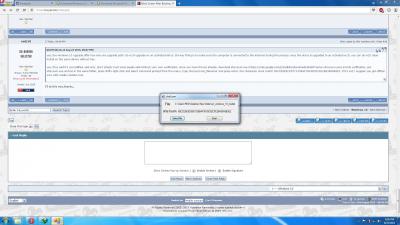
|
|
|
Aug 23 2015, 09:05 PM
|
|
Senior Member
3,038 posts Joined: Nov 2009
|
QUOTE(redz10 @ Aug 23 2015, 09:00 PM) It match.. nice; it's an untouched copy. |
| Change to: |  0.0273sec 0.0273sec
 0.52 0.52
 6 queries 6 queries
 GZIP Disabled GZIP Disabled
Time is now: 11th December 2025 - 01:07 AM |
 Quote
Quote