
QUOTE('ed @ Nov 12 2015, 07:46 AM)
Noted, but how does it connect since the box lack of bluetooth connection? Is it by plugin the usb dongle that come with the remote?

Yes, the air mouse are RF wireless, just plug in the dongle. Lowyat.NET -> Garage Sales -> Special Interest Garage Sales -> Home Electronics & Wares Garage Sales
Media Player [WTS] HIMEDIA H8 Plus 4K UHD, Dual Band WIFI and Gigabit Ethernet
|
|
 Nov 12 2015, 08:39 AM Nov 12 2015, 08:39 AM
Return to original view | Post
#81
|
 
Junior Member
108 posts Joined: Aug 2011 From: Penang  
|
QUOTE('ed @ Nov 12 2015, 07:46 AM) Noted, but how does it connect since the box lack of bluetooth connection? Is it by plugin the usb dongle that come with the remote? Yes, the air mouse are RF wireless, just plug in the dongle. |
|
|
|
|
|
Nov 13 2015, 08:24 PM
Return to original view | Post
#82
|
|
Junior Member
108 posts Joined: Aug 2011 From: Penang
|
QUOTE(waeguk @ Nov 13 2015, 07:05 PM) Just received delivery... Out of box, hook up to tv and connect wifi. Just pmed you my whatsapp number, pls whatsapp me your Partner ID, I will remote to your box. Disappointing performance so far after 1 hour tests. Tried most apps eg kodi (azdrama, filmontv, dramago,etc), show box, . Either got error or buffering always or lagging Media center doesnt work ie cannot access my LAN folder, hangs and drops back to menu. Tried es file explorer, access lan folder, tried to play small avi file with all apps eg mx player, es media player, etc.... Lagging and stuttering. My old wtv player works fine all this while. Somehow this device affects wifi performance from my tablets and phones etc, its as though its sucking the wifi bandwidth while loading. I had to shutdown this himedia in order to post this in this forum!?! How? P/S : Azdrama was down since two weeks ago, it happen to all box. https://forum.lowyat.net/topic/3139601/+2943 This post has been edited by nicety: Nov 13 2015, 08:55 PM |
|
|
Nov 13 2015, 10:34 PM
Return to original view | Post
#83
|
|
Junior Member
108 posts Joined: Aug 2011 From: Penang
|
QUOTE(petlu28 @ Nov 13 2015, 10:19 PM) Azdrama work back. I watching now. Thank you bro for feedback. By the way Movies HD has been down last two days and resumed today. I found new app for English streaming quite close to MoviesHD, will post in this thread once uploaded in my skydrive. |
|
|
Nov 14 2015, 12:00 AM
Return to original view | Post
#84
|
|
Junior Member
108 posts Joined: Aug 2011 From: Penang
|
QUOTE(petlu28 @ Nov 13 2015, 10:19 PM) Azdrama work back. I watching now. Dear Customers,Please update your Azdrama addon to latest version 1.0.25 if your azdrama still not working. |
|
|
Nov 14 2015, 01:31 AM
Return to original view | Post
#85
|
|
Junior Member
108 posts Joined: Aug 2011 From: Penang
|
QUOTE(petlu28 @ Nov 14 2015, 12:03 AM) Need manually update? Your box already pre-configured with auto update, that is the reason you can watch :-D |
|
|
Nov 14 2015, 02:09 PM
Return to original view | Post
#86
|
|
Junior Member
108 posts Joined: Aug 2011 From: Penang
|
QUOTE(waeguk @ Nov 14 2015, 12:22 PM) I tried this morning for a little while, checked the settings of kodi, the addon updates seems to be auto also. Tried manually clicking UPDATE ALL but don't see progress indicator anywhere, not sure completed. Azdrama still doesnt work when playing random HK tv dramas. Dramago works better but not for all especially new episodes don't work (no playback when click on mirror link). All kinds of kodi addons generally don't work or too slow buffering (especially HD) eg. music and movie addons Bro, please whatsapp me. I hook up a mouse and it's better to stop videos before going back to previous menus using RETURN button on remote etc.... else will be streaming multiple sources at same time. Moviebox hd works (no buffering in between playback), tried watching RONALDO for few mins. Media center works now but find the 1080p video quality is very rough, color very cold etc.... when compared side by side with my wdtv. Is there a way to see what app or downloading activity is running in background? Any way to kill the running app / activity eg. like how we do it on our android phone / tablet? Will report more later when home |
|
|
|
|
|
Nov 15 2015, 10:49 AM
Return to original view | Post
#87
|
|
Junior Member
108 posts Joined: Aug 2011 From: Penang
|
QUOTE(GuyM @ Nov 15 2015, 09:04 AM) Bro Nicety, is it norm that most of the channels on Renegade are not usable? Renegade is just TV guide, you need to link the TV program with the live streaming addon as per below guide :https://seo-michael.co.uk/tutorial-how-to-i...egades-sky-epg/ |
|
|
Nov 15 2015, 02:23 PM
Return to original view | Post
#88
|
|
Junior Member
108 posts Joined: Aug 2011 From: Penang
|
QUOTE(nicety @ Nov 13 2015, 10:34 PM) Thank you bro for feedback. By the way Movies HD has been down last two days and resumed today. Dear customers, I found new app for English streaming quite close to MoviesHD, will post in this thread once uploaded in my skydrive. Uploaded the new English streaming app in the skydrive, please download from our customer repository skydrive, sort the APK file by most recent date. P/S : pls keep the app low profile to avoid being blocked by local USP. |
|
|
Nov 15 2015, 08:44 PM
Return to original view | Post
#89
|
|
Junior Member
108 posts Joined: Aug 2011 From: Penang
|
QUOTE(gahkin @ Nov 15 2015, 07:31 PM) i wan't to ask this support same as blu ray menu ? i download from intenet got bd-iso and bdmv (file structure) also can call up the interactive menu ? i can't play this on my acryan hd3 as it only support bd-lite (mean no menu , only play directly) Bluray full menu required full Bluray stack with full licenses. Therefore most of the media player will support only lite menu as the license will increase the unit cost. To seet he lite menu, just press menu button on your remote while you play back Bluray movie. Blueray lite menu support in Q5II, Q6II, Q10II, Q16II, Q5III, Q10III, Q16III, H8 quad core and H8 Octa core. |
|
|
Nov 16 2015, 11:32 PM
Return to original view | Post
#90
|
|
Junior Member
108 posts Joined: Aug 2011 From: Penang
|
QUOTE(gahkin @ Nov 16 2015, 05:55 PM) What is lite menu mean ? No menu or only some selection? Got screenshot to see? Pls find below Blu-ray Lite menu in H8 Octa core :
This post has been edited by nicety: Nov 16 2015, 11:40 PM |
|
|
Nov 17 2015, 07:15 PM
Return to original view | Post
#91
|
|
Junior Member
108 posts Joined: Aug 2011 From: Penang
|
QUOTE(pijaklu @ Nov 17 2015, 12:22 PM) Im confused with ur price. i saw got rm460 and rm500. which is which? should i buy from u here or go to ur lelong page to order? which one is better deal? thanks There is only one price in this thread RM460 and I do not sell in lelong. You must refer to some other lelong seller who sell RM500. |
|
|
Nov 17 2015, 07:21 PM
Return to original view | Post
#92
|
|
Junior Member
108 posts Joined: Aug 2011 From: Penang
|
QUOTE(plumberly @ Nov 17 2015, 01:30 PM) Tried to connect the optical cable from H8 to my Onkyo AVR on optical #1 port. Goto Setting -> play back -> audio output = SPDIFOn AVR SELECT DIGITAL AUDIO, selected optical #1. Cannot get any sound output. Also tried #2, same problem. Is there something I did wrong? No shape bend on the optical cable. Both ends fully plugged in. Thanks. |
|
|
Nov 17 2015, 09:37 PM
Return to original view | Post
#93
|
|
Junior Member
108 posts Joined: Aug 2011 From: Penang
|
QUOTE(plumberly @ Nov 17 2015, 07:43 PM) Many many thanks! Sorry, not "audio output", should be "hdmi output" as per below screen :See what I mean when I said where have I gone wrong? Ha. Saw a few overseas threads ask  ing the same question on why no sound! Ha. Though they may not be using H8, I guess they have to do something similar on the audio setting.
On the bottom half of H8 remote, what are TV mode Subtitle Audio buttons for? I pressed them and some numbers were displayed on the top left corner. Thanks. P/S Just tried to update the setting. From the main menu, went to setting, playback. Cannot find "audio output". Also opened up Kodi and looked there. Tak ada. Please clarify. Thanks. 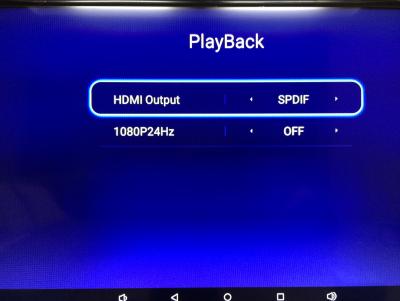
The "TV Mode" button is for switch the resolution setting of the box. The "Subtitle" button is for switch the subtitles when play movie from media center. Most of the blueray file support multiple subtitles, use this button as short cut to switch different subtitle. 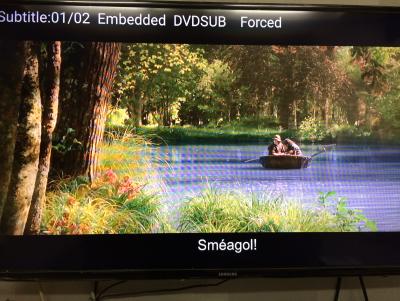
The "Audio" button is for switch audio track when play movie from media center.
This post has been edited by nicety: Nov 17 2015, 09:40 PM |
|
|
|
|
|
Nov 18 2015, 08:08 PM
Return to original view | Post
#94
|
|
Junior Member
108 posts Joined: Aug 2011 From: Penang
|
QUOTE(plumberly @ Nov 18 2015, 09:53 AM) Many thanks again. To be honest, today smart gadgets will not have full instruction including the expensive iPhone and iPad which come with minimum instruction. Don't worry, I'm your instruction just feel free to ask, this is our value added service.Tried the HDMI output to sxxxx last night, not working either. Will try again later today. Thanks for the tips on the 3 buttons. The instruction sheet from H8 could be better if it already has what you described on the button function. Maybe they are in the sheet already but either I did not see them or they are so easily missed that I did not see them. Does not matter how good or powerful a product is, if the instruction is not there, lacking or poorly worded, in the view of the customer that product is just average. My apology for my criticism on H8. Just trying to make it a better product by improving some of the flaws here and there as a user. I hope other readers here will find your answers to my questions beneficial to their use of the H8. Cheerio. |
|
|
Nov 18 2015, 08:12 PM
Return to original view | Post
#95
|
|
Junior Member
108 posts Joined: Aug 2011 From: Penang
|
QUOTE(pijaklu @ Nov 18 2015, 01:30 PM) |
|
|
Nov 18 2015, 08:23 PM
Return to original view | Post
#96
|
|
Junior Member
108 posts Joined: Aug 2011 From: Penang
|
QUOTE(pijaklu @ Nov 18 2015, 01:31 PM) You may ask the seller because the seller purposely tag with other brand and model such as cs918 and m8s. And there are few mistake in the spec :1). H8 Octa core does not have Xunlei 2). H8 does not support HiControl as per Himedia web site. |
|
|
Nov 18 2015, 08:30 PM
Return to original view | Post
#97
|
|
Junior Member
108 posts Joined: Aug 2011 From: Penang
|
QUOTE(plumberly @ Nov 18 2015, 02:57 PM) Nicety, H8 Octa core 2GB ram model latest firmware is 107, I think you goto wrong folder already. 3.0.1 is under the Q16 folder, pls take note.Wanting to update the firmware to the latest 3.x in your skydrive. * download and unzip the file to UPDATE directory in a pen drive * plug the pen drive into the USB port * start H8 and go to the firmware update menu Or * insert a pointed stick into the hole next to the power plug to start the firmware update? Thanks. P/S Mine has kernel version = 3.10. Does this mean I already have the latest firmware 3.x? Thanks. H8 Octa core 1GB budgetary model is use different firmware, pls kindly take note. The latest firmware for budgetary model is 1.0.5. As per my firmware step by step guide, there is two method to refresh firmware, via setting or Restore button. Restore button is clean upgrade, but it will purge all the apps installed. My usual advise is apply new patch only if you encounter problem. This post has been edited by nicety: Nov 18 2015, 08:34 PM |
|
|
Nov 19 2015, 10:53 PM
Return to original view | Post
#98
|
|
Junior Member
108 posts Joined: Aug 2011 From: Penang
|
QUOTE(LeonOni @ Nov 19 2015, 10:00 PM) hello, i need one can pm? already place order.. Thank you bro, pls pm me your order number of email address such that I could identify you. |
|
|
Nov 23 2015, 08:51 PM
Return to original view | Post
#99
|
|
Junior Member
108 posts Joined: Aug 2011 From: Penang
|
QUOTE(pltan @ Nov 23 2015, 02:21 PM) Is this the newest model? Yes, H8 is latest model with latest chipset support HDMI 2.0 and android 5.1. The USB port is 2.0 and 100MB Ethernet port.No USB 3.0 or Gigabit port? Is that right? |
|
|
Nov 23 2015, 08:52 PM
Return to original view | Post
#100
|
|
Junior Member
108 posts Joined: Aug 2011 From: Penang
|
QUOTE(samowong @ Nov 23 2015, 07:21 PM) Hi. I've transferred the funds to your account. Please check your account and pm. Thank you bro, payment received. Wil dispatch as soon as possible. |
|
Topic ClosedOptions
|
| Change to: |  0.0368sec 0.0368sec
 0.70 0.70
 7 queries 7 queries
 GZIP Disabled GZIP Disabled
Time is now: 14th December 2025 - 05:49 AM |
 Quote
Quote