Welcome Guest ( Log In | Register )

Bump Topic Topic Closed RSS Feed
29 Pages « < 9 10 11 12 13 > » Bottom

Outline · [ Standard ] · Linear+

Media Player [WTS] HIMEDIA H8 Plus 4K UHD, Dual Band WIFI and Gigabit Ethernet

views
     
petlu28
post Nov 16 2015, 10:10 AM

Look at all my stars!!
*******
Senior Member
3,936 posts

Joined: Dec 2010
I will try it.


QUOTE(AVFAN @ Nov 15 2015, 07:12 PM)
this new movies app is quite good.

works smoothly, reliable.

do pm if u need help.

can't be too open about anything as they get knocked off quickly. biggrin.gif
*
gahkin
post Nov 16 2015, 05:55 PM

Enthusiast
*****
Senior Member
735 posts

Joined: Jan 2003
From: Selayang , Kepong


QUOTE(nicety @ Nov 15 2015, 08:44 PM)
Bluray full menu required full Bluray stack with full licenses. Therefore most of the media player will support only lite menu as the  license will increase the unit cost. To seet he lite menu, just press menu button on your remote while you play back Bluray movie. Blueray lite menu support in Q5II, Q6II, Q10II, Q16II, Q5III, Q10III, Q16III, H8 quad core and H8 Octa core.
*
What is lite menu mean ? No menu or only some selection? Got screenshot to see?
TSnicety
post Nov 16 2015, 11:32 PM

Getting Started
**
Junior Member
108 posts

Joined: Aug 2011
From: Penang


QUOTE(gahkin @ Nov 16 2015, 05:55 PM)
What is lite menu mean ? No menu or only some selection? Got screenshot to see?
*
Pls find below Blu-ray Lite menu in H8 Octa core :

Attached Image

This post has been edited by nicety: Nov 16 2015, 11:40 PM
SUSpijaklu
post Nov 17 2015, 12:22 PM

New Member
*
Junior Member
16 posts

Joined: Jun 2013
From: Joined: Today, 9:05 AM


Im confused with ur price. i saw got rm460 and rm500. which is which? should i buy from u here or go to ur lelong page to order? which one is better deal? thanks


plumberly
post Nov 17 2015, 01:30 PM

Look at all my stars!!
*******
Senior Member
4,761 posts

Joined: Jun 2007
From: My house


Tried to connect the optical cable from H8 to my Onkyo AVR on optical #1 port.

On AVR SELECT DIGITAL AUDIO, selected optical #1.

Cannot get any sound output. Also tried #2, same problem.

Is there something I did wrong? No shape bend on the optical cable. Both ends fully plugged in.

Thanks.

This post has been edited by plumberly: Nov 17 2015, 01:39 PM
TSnicety
post Nov 17 2015, 07:15 PM

Getting Started
**
Junior Member
108 posts

Joined: Aug 2011
From: Penang


QUOTE(pijaklu @ Nov 17 2015, 12:22 PM)
Im confused with ur price. i saw got rm460 and rm500. which is which? should i buy from u here or go to ur lelong page to order? which one is better deal? thanks
*
There is only one price in this thread RM460 and I do not sell in lelong. You must refer to some other lelong seller who sell RM500.


TSnicety
post Nov 17 2015, 07:21 PM

Getting Started
**
Junior Member
108 posts

Joined: Aug 2011
From: Penang


QUOTE(plumberly @ Nov 17 2015, 01:30 PM)
Tried to connect the optical cable from H8 to my Onkyo AVR on optical #1 port.

On AVR SELECT DIGITAL AUDIO, selected optical #1.

Cannot get any sound output. Also tried #2, same problem.

Is there something I did wrong? No shape bend on the optical cable. Both ends fully plugged in.

Thanks.
*
Goto Setting -> play back -> audio output = SPDIF
plumberly
post Nov 17 2015, 07:43 PM

Look at all my stars!!
*******
Senior Member
4,761 posts

Joined: Jun 2007
From: My house


QUOTE(nicety @ Nov 17 2015, 07:21 PM)
Goto Setting -> play back -> audio output = SPDIF
*
Many many thanks!

See what I mean when I said where have I gone wrong? Ha. Saw a few overseas threads asking the same question on why no sound! Ha. Though they may not be using H8, I guess they have to do something similar on the audio setting.


On the bottom half of H8 remote, what are
TV mode
Subtitle
Audio buttons for?

I pressed them and some numbers were displayed on the top left corner.

Thanks.


P/S
Just tried to update the setting. From the main menu, went to setting, playback. Cannot find "audio output".

Also opened up Kodi and looked there. Tak ada.

Please clarify. Thanks.

This post has been edited by plumberly: Nov 17 2015, 08:44 PM
TSnicety
post Nov 17 2015, 09:37 PM

Getting Started
**
Junior Member
108 posts

Joined: Aug 2011
From: Penang


QUOTE(plumberly @ Nov 17 2015, 07:43 PM)
Many many thanks!

See what I mean when I said where have I gone wrong? Ha. Saw a few overseas threads askAttached Image ing the same question on why no sound! Ha. Though they may not be using H8, I guess they have to do something similar on the audio setting.
On the bottom half of H8 remote, what are
TV mode
Subtitle
Audio buttons for?

I pressed them and some numbers were displayed on the top left corner.

Thanks.
P/S
Just tried to update the setting. From the main menu, went to setting, playback. Cannot find "audio output".

Also opened up Kodi and looked there. Tak ada.

Please clarify. Thanks.
*
Sorry, not "audio output", should be "hdmi output" as per below screen :
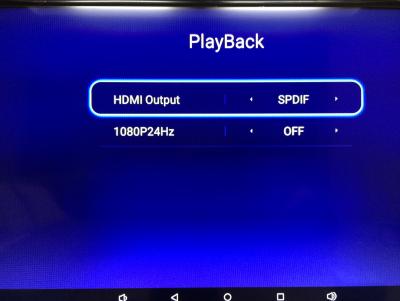
Attached Image

The "TV Mode" button is for switch the resolution setting of the box.

The "Subtitle" button is for switch the subtitles when play movie from media center. Most of the blueray file support multiple subtitles, use this button as short cut to switch different subtitle.
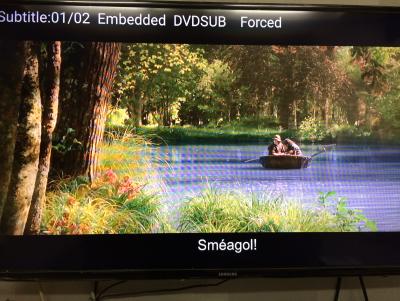
Attached Image

The "Audio" button is for switch audio track when play movie from media center.

Attached Image

This post has been edited by nicety: Nov 17 2015, 09:40 PM

plumberly
post Nov 18 2015, 09:53 AM

Look at all my stars!!
*******
Senior Member
4,761 posts

Joined: Jun 2007
From: My house


QUOTE(nicety @ Nov 17 2015, 09:37 PM)
Sorry, not "audio output", should be "hdmi output" as per below screen :

The "TV Mode" button is for switch the resolution setting of the box.

The "Subtitle" button is for switch the subtitles when play movie from media center. Most of the blueray file support multiple subtitles, use this button as short cut to switch different subtitle.

The "Audio" button is for switch audio track when play movie from media center.

*
Many thanks again.

Tried the HDMI output to sxxxx last night, not working either. Will try again later today.

Thanks for the tips on the 3 buttons. The instruction sheet from H8 could be better if it already has what you described on the button function. Maybe they are in the sheet already but either I did not see them or they are so easily missed that I did not see them. Does not matter how good or powerful a product is, if the instruction is not there, lacking or poorly worded, in the view of the customer that product is just average.

My apology for my criticism on H8. Just trying to make it a better product by improving some of the flaws here and there as a user. I hope other readers here will find your answers to my questions beneficial to their use of the H8.

Cheerio.

This post has been edited by plumberly: Nov 18 2015, 09:54 AM
SUSpijaklu
post Nov 18 2015, 01:30 PM

New Member
*
Junior Member
16 posts

Joined: Jun 2013
From: Joined: Today, 9:05 AM


QUOTE(nicety @ Nov 17 2015, 07:15 PM)
There is only one price in this thread RM460 and I do not sell in lelong. You must refer to some other lelong seller who sell RM500.
*
QUOTE(nicety @ Aug 12 2015, 01:50 AM)
New arrival Rockchip 3368 64-bit ARM A53 support Android 5.1

user posted image

Item:  [WTS] HIMEDIA H8 Octa Core 4K UHD Android TV Box

OS:  Google Android 5.1

CPU:  Rockchip 3368 64-bit ARM A53 upto 1.5GHz

Memory:  2GB DDR

Flash memory:  16G Flash

[b]Price : RM460
For warranty purpose, please place the order online at
http://www.penangapps.com/Common/Ads.aspx?AdsID=174

Budgetary model available now if you have budget constraint :
https://forum.lowyat.net/index.php?showtopic=3727931&hl=

Warranty:  12 months
Memory:  2GB DDR

Flash Memory:  16G eMMC

Video Output: 4K (3840*2160)

Price : RM500
Please place your order online at below link :
http://penangapps.com/Common/Ads.aspx?AdsID=166

Warranty:  12 months

[
SUSpijaklu
post Nov 18 2015, 01:31 PM

New Member
*
Junior Member
16 posts

Joined: Jun 2013
From: Joined: Today, 9:05 AM


QUOTE(nicety @ Nov 17 2015, 07:15 PM)
There is only one price in this thread RM460 and I do not sell in lelong. You must refer to some other lelong seller who sell RM500.
*
http://www.lelong.com.my/himedia-h8-octa-c...6-11-Sale-P.htm

same model?
plumberly
post Nov 18 2015, 02:57 PM

Look at all my stars!!
*******
Senior Member
4,761 posts

Joined: Jun 2007
From: My house


Nicety,

Wanting to update the firmware to the latest 3.x in your skydrive.

* download and unzip the file to UPDATE directory in a pen drive
* plug the pen drive into the USB port
* start H8 and go to the firmware update menu

Or

* insert a pointed stick into the hole next to the power plug to start the firmware update?

Thanks.


P/S Mine has kernel version = 3.10. Does this mean I already have the latest firmware 3.x? Thanks.

This post has been edited by plumberly: Nov 18 2015, 03:09 PM
TSnicety
post Nov 18 2015, 08:08 PM

Getting Started
**
Junior Member
108 posts

Joined: Aug 2011
From: Penang


QUOTE(plumberly @ Nov 18 2015, 09:53 AM)
Many thanks again.

Tried the HDMI output to sxxxx last night, not working either. Will try again later today.

Thanks for the tips on the 3 buttons. The instruction sheet from H8 could be better if it already has what you described on the button function. Maybe they are in the sheet already but either I did not see them or they are so easily missed that I did not see them. Does not matter how good or powerful a product is, if the instruction is not there, lacking or poorly worded, in the view of the customer  that product is just average.

My apology for my criticism on H8. Just trying to make it a better product by improving some of the flaws here and there as a user.  I hope other readers here will find your answers to my questions beneficial to their use of the H8.

Cheerio.
*
To be honest, today smart gadgets will not have full instruction including the expensive iPhone and iPad which come with minimum instruction. Don't worry, I'm your instruction just feel free to ask, this is our value added service.


TSnicety
post Nov 18 2015, 08:12 PM

Getting Started
**
Junior Member
108 posts

Joined: Aug 2011
From: Penang


QUOTE(pijaklu @ Nov 18 2015, 01:30 PM)

*
Sorry bro, copy and paste wrongly. Just deleted the duplicated lines.

plumberly
post Nov 18 2015, 08:21 PM

Look at all my stars!!
*******
Senior Member
4,761 posts

Joined: Jun 2007
From: My house


QUOTE(nicety @ Nov 18 2015, 08:08 PM)
To be honest, today smart gadgets will not have full instruction including the expensive iPhone and iPad which come with minimum instruction. Don't worry, I'm your instruction just feel free to ask, this is our value added service.
*
OK thanks!
TSnicety
post Nov 18 2015, 08:23 PM

Getting Started
**
Junior Member
108 posts

Joined: Aug 2011
From: Penang


QUOTE(pijaklu @ Nov 18 2015, 01:31 PM)
You may ask the seller because the seller purposely tag with other brand and model such as cs918 and m8s. And there are few mistake in the spec :
1). H8 Octa core does not have Xunlei
2). H8 does not support HiControl as per Himedia web site.
TSnicety
post Nov 18 2015, 08:30 PM

Getting Started
**
Junior Member
108 posts

Joined: Aug 2011
From: Penang


QUOTE(plumberly @ Nov 18 2015, 02:57 PM)
Nicety,

Wanting to update the firmware to the latest 3.x in your skydrive.

* download and unzip the file to UPDATE directory in a pen drive
* plug the pen drive into the USB port
* start H8 and go to the firmware update menu

Or

* insert a pointed stick into the hole next to the power plug to start the firmware update?

Thanks.
P/S  Mine has kernel version = 3.10. Does this mean I already have the latest firmware 3.x? Thanks.
*
H8 Octa core 2GB ram model latest firmware is 107, I think you goto wrong folder already. 3.0.1 is under the Q16 folder, pls take note.

H8 Octa core 1GB budgetary model is use different firmware, pls kindly take note. The latest firmware for budgetary model is 1.0.5.

As per my firmware step by step guide, there is two method to refresh firmware, via setting or Restore button. Restore button is clean upgrade, but it will purge all the apps installed. My usual advise is apply new patch only if you encounter problem.

This post has been edited by nicety: Nov 18 2015, 08:34 PM
plumberly
post Nov 18 2015, 09:58 PM

Look at all my stars!!
*******
Senior Member
4,761 posts

Joined: Jun 2007
From: My house


QUOTE(nicety @ Nov 18 2015, 08:30 PM)
H8 Octa core 2GB ram model latest firmware is 107, I think you goto wrong folder already. 3.0.1 is under the Q16 folder, pls take note.

H8 Octa core 1GB budgetary model is use different firmware, pls kindly take note. The latest firmware for budgetary model is 1.0.5.

As per my firmware step by step guide, there is two method to refresh firmware, via setting or Restore button. Restore button is clean upgrade, but it will purge all the apps installed. My usual advise is apply new patch only if you encounter problem.
*
Many thanks. Don't know why in my head I think I have Q16! Ha. Maybe due to the fact I was thinking of getting Q16 before! Ha.

Thanks for highlighting my error. Otherwise I will be wasting my time and creating a mess to solve later. Ha.
LeonOni
post Nov 19 2015, 09:59 PM

Getting Started
**
Junior Member
201 posts

Joined: Feb 2009


hello, i need one can pm? already place order

29 Pages « < 9 10 11 12 13 > » Top
Topic ClosedOptions
 

Change to:
| Lo-Fi Version
0.0268sec    0.41    6 queries    GZIP Disabled
Time is now: 8th December 2025 - 11:32 AM