
where ur location? have demo set? can i test the player in ur shop??
Media Player [WTS] HIMEDIA H8 Plus 4K UHD, Dual Band WIFI and Gigabit Ethernet
 Lowyat.NET -> Garage Sales -> Special Interest Garage Sales -> Home Electronics & Wares Garage Sales
Media Player [WTS] HIMEDIA H8 Plus 4K UHD, Dual Band WIFI and Gigabit Ethernet
|
|
 Nov 10 2015, 08:52 AM Nov 10 2015, 08:52 AM
|
 
Newbie
2 posts Joined: Jul 2010  
|
where ur location? have demo set? can i test the player in ur shop??
|
|
|
|
|
|
Nov 10 2015, 11:09 AM
|

Junior Member
15 posts Joined: Jan 2003 From: Seremban
|
QUOTE(vacuos @ Nov 10 2015, 03:34 AM) Received the player today. Is the remote meant to be laggy? I had to click and wait like 5 seconds before I could click again. Hi media won't respond if I click twice quickly. Solved the problem with a usb mouse and keyboard. But I'm having issues with wifi. For some reason speed test shows wifi speed on hi media being ~500kbps. On my 10mbps maxis network. My other devices show much faster speeds. Any recommendations? |
|
|
Nov 10 2015, 12:26 PM
|

Junior Member
108 posts Joined: Aug 2011 From: Penang
|
QUOTE(vacuos @ Nov 10 2015, 11:09 AM) Solved the problem with a usb mouse and keyboard. But I'm having issues with wifi. For some reason speed test shows wifi speed on hi media being ~500kbps. On my 10mbps maxis network. My other devices show much faster speeds. Any recommendations? Please share with me how do you test speed in Himedia and on other device. |
|
|
Nov 10 2015, 01:11 PM
|
|
Junior Member
15 posts Joined: Jan 2003 From: Seremban
|
QUOTE(nicety @ Nov 10 2015, 12:26 PM) Please share with me how do you test speed in Himedia and on other device. I restarted the modem/router and it's working fine now. Happy with the product now, still learning how to navigate. Thanks nicety. Would certainly recommend you to others. |
|
|
Nov 10 2015, 01:33 PM
|
|
Junior Member
108 posts Joined: Aug 2011 From: Penang
|
QUOTE(nicety @ Nov 10 2015, 12:26 PM) Please share with me how do you test speed in Himedia and on other device. Just to share, whether Maxis or TM or TIME, the committed speed by your ISP is best effort within Malaysia network only, it does not guaranteed you have the same full speed in oversea. Especially most of the streaming content servers are oversea. Snapshot the below two speed test for reference, both test at the same router same PC same speed test tool and same timing :The below speed test from my router to Kuala Perlis :  The below speed test from my router to Shanghai : 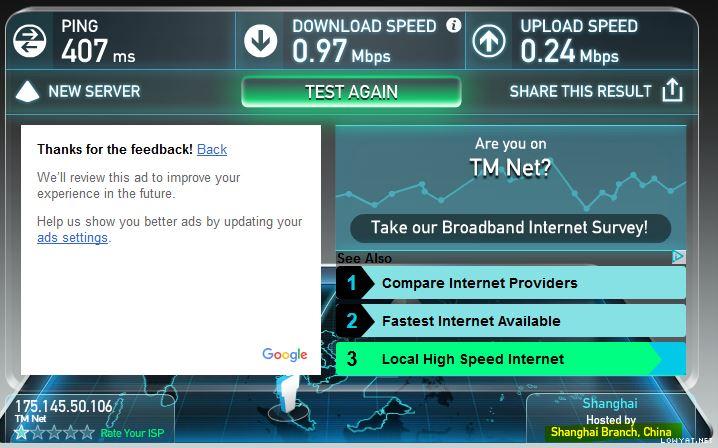 There is significant speed different between local Malaysia and Oversea, the reason is the international trunk between the countries. Most of the local ISP has better peering with US and Japan, but peering with other countries are limitted, some passthru US or Japan which cause the speed deteriorated. If not mistaken, TM has Internet peering with Hong Kong, the traffic to China content servers are psssthru HK. In summary, even we have 30MB with your ISP, it does not mean you have 30MB across worldwide, it depend on the international bandwidth available when stream movies from oversea content servers. This post has been edited by nicety: Nov 10 2015, 01:38 PM Attached thumbnail(s) 

|
|
|
Nov 10 2015, 06:11 PM
|
|
Newbie
0 posts Joined: May 2011
|
i bought himedia q16 sometime..everything was ok...recently when i play 3d movies. the picture and sound is out of sync. Please help
|
|
|
|
|
|
Nov 10 2015, 06:22 PM
|
|
Junior Member
108 posts Joined: Aug 2011 From: Penang
|
QUOTE(johntan4321 @ Nov 10 2015, 06:11 PM) i bought himedia q16 sometime..everything was ok...recently when i play 3d movies. the picture and sound is out of sync. Please help Just response to Q16 thread below, pls check :https://forum.lowyat.net/index.php?showtopi...&#entry77280824 |
|
|
Nov 10 2015, 08:19 PM
|

Senior Member
633 posts Joined: Apr 2006
|
Which is the best performing android player eg. no lag or bugs? Is it X8H plus (quad core) or this HIMEDIA H8 (Octa Core) or other model? |
|
|
Nov 10 2015, 10:07 PM
|
|
Junior Member
108 posts Joined: Aug 2011 From: Penang
|
QUOTE(waeguk @ Nov 10 2015, 08:19 PM) Which is the best performing android player eg. no lag or bugs? To be honest, most of the android could perform its jobs well in term of online streaming. Himedia or Minix are not making magic to the box, but the stability of the box and wiling to continue improve the product as per customers feedback is the differentiation. Below buyer reference guide for your reference :Is it X8H plus (quad core) or this HIMEDIA H8 (Octa Core) or other model? https://forum.lowyat.net/topic/3201002/+1 I will not say minix and Himedia box do not have lagging, but we guide our customers to use the apps that could stream smoothly. In term of Media codec and audio passthru, Minix is still behind Himedia because Himedia original strength is producing media player, it support wide range video and audio codec. |
|
|
Nov 11 2015, 01:59 PM
|
|
Junior Member
116 posts Joined: Jun 2012
|
Can suggest any gamepad or air mouse/ remote that compatible with this box?
|
|
|
Nov 11 2015, 06:54 PM
|
|
Junior Member
108 posts Joined: Aug 2011 From: Penang
|
QUOTE('ed @ Nov 11 2015, 01:59 PM) Can suggest any gamepad or air mouse/ remote that compatible with this box? Thank you for inquiry. Mele F10 deluxe is compatible.https://forum.lowyat.net/index.php?showtopic=3348470&hl= However, gamepad I have no suggestion. |
|
|
Nov 12 2015, 07:46 AM
|
|
Junior Member
116 posts Joined: Jun 2012
|
QUOTE(nicety @ Nov 11 2015, 06:54 PM) Thank you for inquiry. Mele F10 deluxe is compatible. Noted, but how does it connect since the box lack of bluetooth connection? Is it by plugin the usb dongle that come with the remote?https://forum.lowyat.net/index.php?showtopic=3348470&hl= However, gamepad I have no suggestion. |
|
|
Nov 12 2015, 08:39 AM
|
|
Junior Member
108 posts Joined: Aug 2011 From: Penang
|
QUOTE('ed @ Nov 12 2015, 07:46 AM) Noted, but how does it connect since the box lack of bluetooth connection? Is it by plugin the usb dongle that come with the remote? Yes, the air mouse are RF wireless, just plug in the dongle. |
|
|
|
|
|
Nov 12 2015, 01:59 PM
|
|
Junior Member
116 posts Joined: Jun 2012
|
QUOTE(nicety @ Nov 12 2015, 08:39 AM) Yes, the air mouse are RF wireless, just plug in the dongle. Noted, Thanx Nicety for your help. |
|
|
Nov 13 2015, 02:24 PM
|
|
Junior Member
27 posts Joined: Jun 2008
|
QUOTE('ed @ Nov 12 2015, 01:59 PM) Noted, Thanx Nicety for your help. Can someone suggest apps to view 4K video? |
|
|
Nov 13 2015, 07:05 PM
|
|
Senior Member
633 posts Joined: Apr 2006
|
Just received delivery... Out of box, hook up to tv and connect wifi.
Disappointing performance so far after 1 hour tests. Tried most apps eg kodi (azdrama, filmontv, dramago,etc), show box, . Either got error or buffering always or lagging Media center doesnt work ie cannot access my LAN folder, hangs and drops back to menu. Tried es file explorer, access lan folder, tried to play small avi file with all apps eg mx player, es media player, etc.... Lagging and stuttering. My old wtv player works fine all this while. Somehow this device affects wifi performance from my tablets and phones etc, its as though its sucking the wifi bandwidth while loading. I had to shutdown this himedia in order to post this in this forum!?! How? This post has been edited by waeguk: Nov 13 2015, 07:07 PM |
|
|
Nov 13 2015, 08:24 PM
|
|
Junior Member
108 posts Joined: Aug 2011 From: Penang
|
QUOTE(waeguk @ Nov 13 2015, 07:05 PM) Just received delivery... Out of box, hook up to tv and connect wifi. Just pmed you my whatsapp number, pls whatsapp me your Partner ID, I will remote to your box. Disappointing performance so far after 1 hour tests. Tried most apps eg kodi (azdrama, filmontv, dramago,etc), show box, . Either got error or buffering always or lagging Media center doesnt work ie cannot access my LAN folder, hangs and drops back to menu. Tried es file explorer, access lan folder, tried to play small avi file with all apps eg mx player, es media player, etc.... Lagging and stuttering. My old wtv player works fine all this while. Somehow this device affects wifi performance from my tablets and phones etc, its as though its sucking the wifi bandwidth while loading. I had to shutdown this himedia in order to post this in this forum!?! How? P/S : Azdrama was down since two weeks ago, it happen to all box. https://forum.lowyat.net/topic/3139601/+2943 This post has been edited by nicety: Nov 13 2015, 08:55 PM |
|
|
Nov 13 2015, 10:19 PM
|
|
Senior Member
3,936 posts Joined: Dec 2010
|
Azdrama work back. I watching now.
QUOTE(nicety @ Nov 13 2015, 08:24 PM) Just pmed you my whatsapp number, pls whatsapp me your Partner ID, I will remote to your box. P/S : Azdrama was down since two weeks ago, it happen to all box. https://forum.lowyat.net/topic/3139601/+2943 |
|
|
Nov 13 2015, 10:34 PM
|
|
Junior Member
108 posts Joined: Aug 2011 From: Penang
|
QUOTE(petlu28 @ Nov 13 2015, 10:19 PM) Azdrama work back. I watching now. Thank you bro for feedback. By the way Movies HD has been down last two days and resumed today. I found new app for English streaming quite close to MoviesHD, will post in this thread once uploaded in my skydrive. |
|
|
Nov 13 2015, 10:37 PM
|
|
Senior Member
3,936 posts Joined: Dec 2010
|
Ok. Will waiting it. Thanks bro
QUOTE(nicety @ Nov 13 2015, 10:34 PM) Thank you bro for feedback. By the way Movies HD has been down last two days and resumed today. I found new app for English streaming quite close to MoviesHD, will post in this thread once uploaded in my skydrive. |
|
Topic ClosedOptions
|
| Change to: |  0.0290sec 0.0290sec
 1.29 1.29
 6 queries 6 queries
 GZIP Disabled GZIP Disabled
Time is now: 19th December 2025 - 02:54 AM |
 Quote
Quote