Welcome Guest ( Log In | Register )

Outline · [ Standard ] · Linear+

 Linksys AM300=weak modem, latest firmware seems ok.

views
     
TSradioactive
post Nov 15 2006, 12:15 AM, updated 17y ago

Regular
******
Senior Member
1,857 posts

Joined: Dec 2005
Im using Linksys AM300 Annex A. 24/7 on..and bt.
But after sometime bout a month+.....it starts to hang..meaning stop responding...
DSL and Ethernet light on, but internet no. Even the modem config page is inaccesible.
I have to reboot the modem(powering on/off) to make my modem work again.
I even attached a cooler on top to cool it off. I think unstable tmnet's line oso contributed partly to my modem hang.
I thought linksys are reliable....anyone experienced this be4?

Additional info...i always have to forward periodically my modem port to get my bt to run smoothly...even the settings are all correct but i have to click save settings to make it forward the port properly.

Updates:
such an old thread, its alive icon_idea.gif

alrite, after so many dog years, my conclusion is that this modem is has firmware issues. latest firmware seems to make it acceptable.
don't expect much though. best modem i've used so far is 3com until it got killed by Lord Zeus.
I have long terminated my streamyx. now i'm using izzinet. kyocera modem. made in japan quality.


This post has been edited by radioactive: Aug 26 2009, 12:55 AM
cyberic
post Nov 15 2006, 02:10 AM

Regular
******
Senior Member
1,131 posts

Joined: Jan 2003


AM300 owner also...got the same problem like u.. this modem is really weak compare to my thomson speedtouch st510 v4 (the best and most stable modem i ever use but mine oredi died). Soon, i'm goin to ditch this stupid modem and get the thomson speedtouch 536 from Australia.

1. AM300's configuration webpage is really slow. I can't find the hardware spec for this modem but i think this modem dun hv a good/fast processor and enough ram to sustain our BT usage. Basically, this modem oni good enough for surfing ler..hmm..maybe good oso if we set it bridge mode oni and pair it with a powerful wireless router like Linksys WRT54G or Belkin pre-N.

2. The port forwarding setting need to be save every time i reboot the modem...really annoying. If not it wont work.

3. If we set the modulation to AUTO mode..sometimes u notice that the modem sync at wrong speed like 1024/96.. my advice dun use the auto mode.

until today there is still no new firmware from Linksys. Get another modem ler
karhoe
post Dec 4 2006, 10:57 AM

Look at all my stars!!
*******
Senior Member
6,238 posts

Joined: Sep 2005
From: Kuala Lumpur


No problem for me
scorps
post Dec 4 2006, 11:07 AM

Something you call love, but I call sex
*******
Senior Member
9,572 posts

Joined: Jun 2005
From: Terengganu Darul Iman


QUOTE(cyberic @ Nov 15 2006, 03:10 AM)
AM300 owner also...got the same problem like u.. this modem is really weak compare to my thomson speedtouch st510 v4 (the best and most stable modem i ever use but mine oredi died). Soon, i'm goin to ditch this stupid modem and get the thomson speedtouch 536 from Australia.

1. AM300's configuration webpage is really slow. I can't find  the hardware spec for this modem but i think this modem dun hv a good/fast processor and enough ram to sustain our BT usage. Basically, this modem oni good enough for surfing ler..hmm..maybe good oso if we set it bridge mode oni and pair it with a powerful wireless router like Linksys WRT54G or Belkin pre-N.

2. The port forwarding setting need to be save every time i reboot the modem...really annoying. If not it wont work.

3. If we set the modulation to AUTO mode..sometimes u notice that the modem sync at wrong speed like 1024/96.. my advice dun use the auto mode.

until today there is still no new firmware from Linksys. Get another modem ler
*
usb can't connect maybe my usb port out of dated lol
i install the driver for sb ,but still not working the usb,

and i'm facing problem when make port forward for this modem ,
and it very high security compare to aztech 600eu

another problem not yet arriving
karhoe
post Dec 9 2006, 07:56 PM

Look at all my stars!!
*******
Senior Member
6,238 posts

Joined: Sep 2005
From: Kuala Lumpur


QUOTE(cyberic @ Nov 15 2006, 02:10 AM)
AM300 owner also...got the same problem like u.. this modem is really weak compare to my thomson speedtouch st510 v4 (the best and most stable modem i ever use but mine oredi died). Soon, i'm goin to ditch this stupid modem and get the thomson speedtouch 536 from Australia.

1. AM300's configuration webpage is really slow. I can't find  the hardware spec for this modem but i think this modem dun hv a good/fast processor and enough ram to sustain our BT usage. Basically, this modem oni good enough for surfing ler..hmm..maybe good oso if we set it bridge mode oni and pair it with a powerful wireless router like Linksys WRT54G or Belkin pre-N.

2. The port forwarding setting need to be save every time i reboot the modem...really annoying. If not it wont work.

3. If we set the modulation to AUTO mode..sometimes u notice that the modem sync at wrong speed like 1024/96.. my advice dun use the auto mode.

until today there is still no new firmware from Linksys. Get another modem ler
*
Yea, my line speed sync wrongly! I get 1512 / 64 !!!!

QUOTE(karhoe @ Dec 4 2006, 10:57 AM)
No problem for me
*
I take back my word, this modem sux
blindbox
post Dec 12 2006, 04:40 PM

Meh
******
Senior Member
1,705 posts

Joined: Nov 2004


QUOTE(radioactive @ Nov 15 2006, 12:15 AM)
Im using Linksys AM300 Annex A. 24/7 on..and bt.
But after sometime bout a month+.....it starts to hang..meaning stop responding...
DSL and Ethernet light on, but internet no. Even the modem config page is inaccesible.
I have to reboot the modem(powering on/off) to make my modem work again.
I even attached a cooler on top to cool it off. I think unstable tmnet's line oso contributed partly to my modem hang.
I thought linksys are reliable....anyone experienced this be4?

Additional info...i always have to forward periodically my modem port to get my bt to run smoothly...even the settings are all correct but i have to click save settings to make it forward the port properly.
*
If you use it as a router (probably, or it doesn't matter at all), it probably is experiencing the linksys's dreaded problem. It takes 5 days for the connection list to be removed. That is one of the major reason wrt54g owns with a 3rd party firmware.
scorps
post Dec 12 2006, 11:30 PM

Something you call love, but I call sex
*******
Senior Member
9,572 posts

Joined: Jun 2005
From: Terengganu Darul Iman


QUOTE(cyberic @ Nov 15 2006, 03:10 AM)
AM300 owner also...got the same problem like u.. this modem is really weak compare to my thomson speedtouch st510 v4 (the best and most stable modem i ever use but mine oredi died). Soon, i'm goin to ditch this stupid modem and get the thomson speedtouch 536 from Australia.

1. AM300's configuration webpage is really slow. I can't find  the hardware spec for this modem but i think this modem dun hv a good/fast processor and enough ram to sustain our BT usage. Basically, this modem oni good enough for surfing ler..hmm..maybe good oso if we set it bridge mode oni and pair it with a powerful wireless router like Linksys WRT54G or Belkin pre-N.

2. The port forwarding setting need to be save every time i reboot the modem...really annoying. If not it wont work.

3. If we set the modulation to AUTO mode..sometimes u notice that the modem sync at wrong speed like 1024/96.. my advice dun use the auto mode.

until today there is still no new firmware from Linksys. Get another modem ler
*
yes,now look like i and u have same problem,
at first time i'm using this modem,no pproblem,
but after 3 or 4days make some problem,
that problem same to you,
that is need to setting again in the modem to do portforward,
if not the port will not open,
that make me very annoying,

so who know how to fix this problem,please tell us,
i think better aztech600eu,


lonewalker
post Dec 14 2006, 09:51 PM

Getting Started
**
Junior Member
204 posts

Joined: Nov 2005
Hey guys i have the a similar problem too (AM300)

The modem occasionally hands and reboots when it gets hot. I Overcame this by putting a fan next to it. However a second problem arises, i cant resolve DNS entries while running bit torrent. It seem that the modem cannot sustain 30+ multiple connections.

Is this a firmware problem or a hardware problem? Are there any third party firmware for this modem?

@ Quote Cyberig
Basically, this modem oni good enough for surfing ler..hmm..maybe good oso if we set it bridge mode oni and pair it with a powerful wireless router like Linksys WRT54G or Belkin pre-N.

HOw do you go about bridging the modem? There are 2 bridge options in the modem setup (Which, the default bridge or the other one?)
I'm using Linksys's WRT54GS
cyberic
post Dec 17 2006, 03:43 AM

Regular
******
Senior Member
1,131 posts

Joined: Jan 2003


QUOTE(lonewalker @ Dec 14 2006, 09:51 PM)
Hey guys i have the a similar problem too (AM300)

The modem occasionally hands and reboots when it gets hot. I Overcame this by putting a fan next to it. However a second problem arises, i cant resolve DNS entries while running bit torrent. It seem that the modem cannot sustain 30+ multiple connections.

Is this a firmware problem or a hardware problem? Are there any third party firmware for this modem?

@ Quote Cyberig
Basically, this modem oni good enough for surfing ler..hmm..maybe good oso if we set it bridge mode oni and pair it with a powerful wireless router like Linksys WRT54G or Belkin pre-N.

HOw do you go about bridging the modem? There are 2 bridge options in the modem setup (Which, the default bridge or the other one?)
I'm using Linksys's WRT54GS
*
Choose the bridge mode only if u want to pair it with wrt54gs. In the bridge mode oni the AM300 is just a dumb bridge for WRT54GS..the wireless router will do the dialing instead of AM300. RFC 1483 bridging is abit different ...u can google for it smile.gif
scorps
post Dec 18 2006, 10:51 PM

Something you call love, but I call sex
*******
Senior Member
9,572 posts

Joined: Jun 2005
From: Terengganu Darul Iman


only when make linksys as router mode, and connect to aztech na8300 as switch,
the connection very stabil, but the port forward problem still same
cyberic
post Dec 20 2006, 12:06 AM

Regular
******
Senior Member
1,131 posts

Joined: Jan 2003


QUOTE(scorps @ Dec 18 2006, 10:51 PM)
only when make linksys as router mode, and connect to aztech na8300 as switch,
the connection very stabil, but the port forward problem still same
*
don't use AM300 in router mode unless Linksys release a new firmware to address the problem. U can use it as bridge only..let the aztech na8300 ( I suppose this is a wireless router) do the router work and other thing mah.

currently, i testing AM300 with my DIY pfsense router box (PIII 933/256MB RAM/ 4GB HDD). After overnight BT download, I can't surf net (http timeout) until i stop my torrent. I'm going to test it with Speedtouch 536 soon.
scorps
post Dec 20 2006, 02:14 AM

Something you call love, but I call sex
*******
Senior Member
9,572 posts

Joined: Jun 2005
From: Terengganu Darul Iman


QUOTE(cyberic @ Dec 20 2006, 01:06 AM)
don't use AM300 in router mode unless Linksys release a new firmware to address the problem. U can use it as bridge only..let the aztech na8300 ( I suppose this is a wireless router) do the router work and other thing mah.

currently, i testing AM300 with my DIY pfsense router box (PIII 933/256MB RAM/ 4GB HDD). After overnight BT download, I can't surf net (http timeout) until i stop my torrent. I'm going to test it with Speedtouch 536 soon.
*

thanks for that suggestion,
i already try to do like what u said,
but my wifi router have facing dc problem,
so i'm just make wifi route function as switch,
hehehehe

it quite ok untill now...
scorps
post Dec 24 2006, 12:22 PM

Something you call love, but I call sex
*******
Senior Member
9,572 posts

Joined: Jun 2005
From: Terengganu Darul Iman


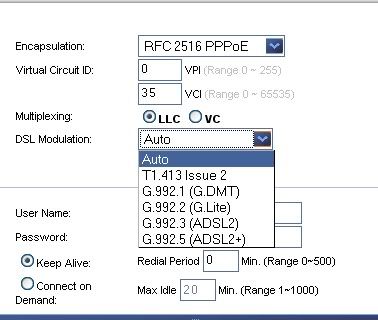
what should i choose in here??
right now i'm choosing auto
but the modem keep hang ,
i dont know why..
i'm use torrent but this problem just appear,
before this not appear..


user posted image
and how about the Multiplexing??
it is LLC or Vc more suitable??
cyberic
post Dec 24 2006, 07:22 PM

Regular
******
Senior Member
1,131 posts

Joined: Jan 2003


QUOTE(scorps @ Dec 24 2006, 12:22 PM)
what should i choose in here??
right now i'm choosing auto
but the modem keep hang ,
i dont know why..
i'm use torrent but this problem just appear,
before this not appear..
user posted image
and how about the Multiplexing??
it is LLC or Vc more suitable??
*
for me, AM300 connect properly only with T1.413 issue 2...i can't use G.DMT or others (my Speedtouch 510 or 536 can connect using G.DMT instead) This DSL modulation selection won't cure ur modem hang problem coz by BT ler.

About multiplexing, I dunno streamyx's DSLAM settings..i tested LLC or VC and find no different. I just choose either 1...i think TMnet maybe using VC. Google for LLC and VC to find out the different.

Note: I won't use auto mode as sometimes it will connect at wrong speed... eg 1024 / 96. This is 1 of the bug i discover.
lonewalker
post Dec 25 2006, 01:43 AM

Getting Started
**
Junior Member
204 posts

Joined: Nov 2005
QUOTE(cyberic @ Dec 17 2006, 03:43 AM)
Choose the bridge mode only if u want to pair it with wrt54gs. In the bridge mode oni the AM300 is just a dumb bridge for WRT54GS..the wireless router will do the dialing instead of AM300. RFC 1483 bridging is abit different ...u can google for it smile.gif
*
Okay, bridge mode the regular bridge only mode. WRT54GS wont dial. either will direct access to the modem via Ethernet port on the pc works.

Both dialing using PPPoE

rioven
post Dec 25 2006, 03:20 AM

Enthusiast
*****
Senior Member
975 posts

Joined: Sep 2004
From: Setapak


offtopic : cyberic..where to get speedtouch modem?

used once before...kinda weak..dsl modulation..u have to try which is best for u..
scorps
post Dec 25 2006, 05:05 AM

Something you call love, but I call sex
*******
Senior Member
9,572 posts

Joined: Jun 2005
From: Terengganu Darul Iman


QUOTE(rioven @ Dec 25 2006, 04:20 AM)
offtopic : cyberic..where to get speedtouch modem?

used once before...kinda weak..dsl modulation..u have to try which is best for u..
*
hahaha..u also get the problem with this modem ..
cyberic
post Dec 26 2006, 01:14 AM

Regular
******
Senior Member
1,131 posts

Joined: Jan 2003


QUOTE(lonewalker @ Dec 25 2006, 01:43 AM)
Okay, bridge mode the regular bridge only mode. WRT54GS wont dial. either will direct access to the modem via Ethernet port on the pc works.

Both dialing using PPPoE
*
not sure y u face problem. It works for me with 3 different modem with WRT54GS.

1. if both modem n router use same IP like 192.168.1.1. I would change either 1's IP
2. modem in bridge mode, connected to router's WAN port.
3. configure router's connection to use PPPoE (supply the username and password here)
4. After save, u should be able to surf net within min. (wireless setting can be setup together or after u sure internet is working)

QUOTE(rioven @ Dec 25 2006, 03:20 AM)
offtopic : cyberic..where to get speedtouch modem?

used once before...kinda weak..dsl modulation..u have to try which is best for u..
*
ST510 v4 or ST536 v6? both work great for me smile.gif

ST510v4 bought from local Distributor (VRnet Sdn Bhd, closed down oredi) work really good for me...won't hang even heavy BT smile.gif fast n stable. Cost me RM350 that time but worth it smile.gif never had problem.

u can't get ST536 v6 in Malaysia. i manage to bought it from singapore yahoo auction for SG60 (its actually free modem for singnet customer for renew their broadband contract...we can't get this kind of free modem deal in Malaysia), loaded with singnet customize firmware but i flashed it thomson generic firmware. Not really test this modem for BT but modem's web GUI is a lot faster and better than others especially AM300 (its web gui is really slow). Currently i oni use it in bridge mode with my DIY router. Overall, i personally love speedtouch product very much!! one of the best modem!!


rioven
post Dec 27 2006, 03:50 AM

Enthusiast
*****
Senior Member
975 posts

Joined: Sep 2004
From: Setapak


thanks for information..been looking that modem long time ago..maybe buy modem speedtouch when visiting singapore.
yup..am300 kinda slow..(borrow friend unit)...n dissapointed with the performance (me always thinking..linksys = good)
scorps
post Dec 27 2006, 04:18 AM

Something you call love, but I call sex
*******
Senior Member
9,572 posts

Joined: Jun 2005
From: Terengganu Darul Iman


QUOTE(rioven @ Dec 27 2006, 04:50 AM)
thanks for information..been looking that modem long time ago..maybe buy modem speedtouch when visiting singapore.
yup..am300 kinda slow..(borrow friend unit)...n dissapointed with the performance (me always thinking..linksys = good)
*
huhuhuh..
maybe this is first model of modem that they have design,
so need to improve more and more,

SUSspanker
post Dec 31 2006, 02:34 PM

Custom Made e-Penis
*******
Senior Member
7,606 posts

Joined: Dec 2004
From: Subang


I have a Linksys AM300. The is the worst modem/router I ever had. It freezes up within 6 hours of running p2p apps, and features are weak.

Stay away from this modem at all costs.
scorps
post Dec 31 2006, 02:44 PM

Something you call love, but I call sex
*******
Senior Member
9,572 posts

Joined: Jun 2005
From: Terengganu Darul Iman


QUOTE(spanker @ Dec 31 2006, 03:34 PM)
I have a Linksys AM300. The is the worst modem/router I ever had. It freezes up within 6 hours of running p2p apps, and features are weak.

Stay away from this modem at all costs.
*
hehehehe yes u right,
now i use this modem with bridge mode,
and connect to my wifi router,
keep dc again, cry.gif
badtz_mark
post Jan 1 2007, 10:16 AM

Enthusiast
*****
Senior Member
800 posts

Joined: Jan 2003
From: KL,Malaysia


i was planning to get this modem,after i came across this thread now i have doubts,any alternative for suggestion?
scorps
post Jan 1 2007, 03:47 PM

Something you call love, but I call sex
*******
Senior Member
9,572 posts

Joined: Jun 2005
From: Terengganu Darul Iman


QUOTE(scorps @ Dec 31 2006, 03:44 PM)
hehehehe yes u right,
now i use this modem with bridge mode,
and connect to my wifi router,
keep dc again, cry.gif
*
maybe aztech 600eu ...
this modem support for usb and ethernet ..
badtz_mark
post Jan 2 2007, 08:24 AM

Enthusiast
*****
Senior Member
800 posts

Joined: Jan 2003
From: KL,Malaysia


i juz bought yesterday,run BT+emule whole nites no problem at all
scorps
post Jan 2 2007, 10:25 AM

Something you call love, but I call sex
*******
Senior Member
9,572 posts

Joined: Jun 2005
From: Terengganu Darul Iman


QUOTE(badtz_mark @ Jan 2 2007, 09:24 AM)
i juz bought yesterday,run BT+emule whole nites no problem at all
*
bro, which modem ??
aztech or linksys am300 that u mention??
kytehx
post Jan 2 2007, 10:54 AM

Getting Started
**
Junior Member
93 posts

Joined: Aug 2006
From: Klang


QUOTE(scorps @ Dec 31 2006, 02:44 PM)
hehehehe yes u right,
now i use this modem with bridge mode,
and connect to my wifi router,
keep dc again, cry.gif
*
i use thie modem with bridge mode and use my belkin wireless router to dial my modem..no problem at all
but if use the modem with pppoe mode then it will hang doh.gif
badtz_mark
post Jan 2 2007, 12:15 PM

Enthusiast
*****
Senior Member
800 posts

Joined: Jan 2003
From: KL,Malaysia


AM300 bought yesterday
scorps
post Jan 2 2007, 02:04 PM

Something you call love, but I call sex
*******
Senior Member
9,572 posts

Joined: Jun 2005
From: Terengganu Darul Iman


QUOTE(badtz_mark @ Jan 2 2007, 01:15 PM)
AM300 bought yesterday
*
what mode that are u using??
bridge mode or pppoe mode??

This post has been edited by scorps: Jan 2 2007, 02:04 PM
TSradioactive
post Feb 3 2007, 01:31 AM

Regular
******
Senior Member
1,857 posts

Joined: Dec 2005
alrite...i had enuff....im gonna try to ask the person about tis problem and izit possible to rma since its less its bought last year september...
jolipoli81
post Oct 16 2007, 06:31 PM

Look at all my blinks
******
Senior Member
1,256 posts

Joined: Mar 2007


I try to install the USB driver and connect my modem using USB, but the USB lights doesnt appear at all...
when i check in derivce manager, there is a yellow queston mark on the USB port....and when i try to update the driver, it says INF invalid, anybody have any idea how to conenct using USB?!?!?

dont ask me why i didnt use the LAN cable, because another computer is sharing this connection....
scorps
post Oct 18 2007, 10:26 PM

Something you call love, but I call sex
*******
Senior Member
9,572 posts

Joined: Jun 2005
From: Terengganu Darul Iman


QUOTE(jolipoli81 @ Oct 16 2007, 07:31 PM)
I try to install the USB driver and connect my modem using USB, but the USB lights doesnt appear at all...
when i check in derivce manager, there is a yellow queston mark on the USB port....and when i try to update the driver, it says INF invalid, anybody have any idea how to conenct using USB?!?!?

dont ask me why i didnt use the LAN cable, because another computer is sharing this connection....
*
what version of windows u use??

try to using another port ??
jolipoli81
post Oct 19 2007, 10:12 PM

Look at all my blinks
******
Senior Member
1,256 posts

Joined: Mar 2007


QUOTE(scorps @ Oct 18 2007, 10:26 PM)
what version of windows u use??

try to using another port ??
*
okay, that problem is solve, i just didnt follow the intructions while installing the USB driver....

now comes the major problems same as other members here....
after changing from D-link to this modem, it keeps disconnect after say for 2-3 hours! any suggestions how should i set this modem to the best settings?
scorps
post Oct 20 2007, 02:36 AM

Something you call love, but I call sex
*******
Senior Member
9,572 posts

Joined: Jun 2005
From: Terengganu Darul Iman


QUOTE(jolipoli81 @ Oct 19 2007, 11:12 PM)
okay, that problem is solve, i just didnt follow the intructions while installing the USB driver....

now comes the major problems same as other members here....
after changing from D-link to this modem, it keeps disconnect after say for 2-3 hours! any suggestions how should i set this modem to the best settings?
*
that the suck of this modem...
but you can try to update firmware..
latest firmware..


i'm not try yet..
but the latest firmware is availabe...
jolipoli81
post Oct 20 2007, 03:20 AM

Look at all my blinks
******
Senior Member
1,256 posts

Joined: Mar 2007


QUOTE(scorps @ Oct 20 2007, 02:36 AM)
that the suck of this modem...
but you can try to update firmware..
latest firmware..
i'm not try yet..
but the latest firmware is availabe...
*
already upgrade to version 1.19.02 but still occurs! and makes things worst!!!!
now my bitcomet got problems with that
scorps
post Oct 20 2007, 10:14 AM

Something you call love, but I call sex
*******
Senior Member
9,572 posts

Joined: Jun 2005
From: Terengganu Darul Iman


QUOTE(jolipoli81 @ Oct 20 2007, 04:20 AM)
already upgrade to version 1.19.02 but still occurs! and makes things worst!!!!
now my bitcomet got problems with that
*
so it's still have a problem??
that's why i'm not using this modem anymore doh.gif
ma43q
post Jan 25 2008, 07:54 AM

Regular
******
Senior Member
1,820 posts

Joined: Jan 2005
hmm, my linksys AM300 using PPOE hang now and then but clocking total download speed of 128-130kB/s (streamyx) with Bitcomet 0.98. well, i guess the modem hung due to too much traffic from bitcomet. maybe need to firmware update.
ch_tan
post Mar 5 2008, 06:57 PM

New Member
*
Junior Member
14 posts

Joined: Jul 2006
use latest firmware 1.19.04, no problem for me at all running pppoe,
even on older firmware i have no problem, just tat u need manual config instead of using the cd's auto setting which is too noob and unreliable.

here's what i suggest:

use firefox instead of IE7, dunno why IE7 hangs on thier site and cant update the bios smoothly. Hence i use firefox browser.

download latest firmware here
http://www-my.linksys.com/servlet/Satellit...a#versiondetail

reset the router,


in network card set manual ip,
default gateway use the router's home ip(default 192.168.1.1)

set streamyx DNS 202.188.1.133 , 202.188.0.5

Log in to router's home config via firefox,(default 192.168.1.1)

go to Adminstration/firmware update and update the bios

wait for the process bar to complete , once the router is auto rebooted, u can manually set the port forward for torrent. for me i use DMZ for my torrent pc's ip, fors wonder but no firewall only. only other ip connect to the router need port forwarding if they want to BT or open any ports.

hope this helps...

this router is cheap and powerful. love it~~!!
RacingTech
post Mar 25 2008, 11:58 PM

Casual
***
Junior Member
404 posts

Joined: Jan 2003
From: Kuching, Sarawak


so how is every other owner out there? any luck after this firmware? i plan to buy a new modem with router lately but dono wat to go to for the modem part. as for the router, i am going for wrt54gl... please advice!!!


QUOTE(ch_tan @ Mar 5 2008, 06:57 PM)
use latest firmware 1.19.04, no problem for me at all running pppoe,
even on older firmware i have no problem, just tat u need manual config instead of using the cd's auto setting which is too noob and unreliable.

here's what i suggest:

use firefox instead of IE7, dunno why IE7 hangs on thier site and cant update the bios smoothly. Hence i use firefox browser.

download latest firmware here
http://www-my.linksys.com/servlet/Satellit...a#versiondetail

reset the router,
in network card set manual ip,
default gateway use the router's home ip(default 192.168.1.1)

set streamyx DNS 202.188.1.133 , 202.188.0.5

Log in to router's home config via firefox,(default 192.168.1.1)

go to Adminstration/firmware update and update the bios

wait for the process bar to complete , once the router is auto rebooted, u can manually set the port forward for torrent. for me i use DMZ for my torrent pc's ip, fors wonder but no firewall only. only other ip connect to the  router need port forwarding if they want to BT or open any ports.

hope this helps...

this router is cheap and powerful. love it~~!!
*
mron
post Mar 26 2008, 10:41 PM

Getting Started
**
Junior Member
81 posts

Joined: Oct 2004
been using am300 all this while..
no problems...
have used it in both bridged and router mode..
connection stable....
RacingTech
post Mar 27 2008, 09:31 AM

Casual
***
Junior Member
404 posts

Joined: Jan 2003
From: Kuching, Sarawak


can u please let us know wat version of firmware u r using? thanks in advance.... smile.gif

QUOTE(mron @ Mar 26 2008, 10:41 PM)
been using am300 all this while..
no problems...
have used it in both bridged and router mode..
connection stable....
*
s[H]sIkuA
post Apr 13 2008, 07:02 PM

live in the present
*******
Senior Member
2,162 posts

Joined: Sep 2004


Just got this today, currently test drive it.. hopefully doesn't encounter any problem blush.gif

oh and already update the firmware to the new .04 version just now
vez
post Jun 16 2008, 07:49 PM

Look at all my stars!!
*******
Senior Member
4,624 posts

Joined: Mar 2007


anyone using 1.19.04 firmware? the modem no need to relogin when I want to access the modem web interface, I have 4 computers connected to router, whenever I login from one of my computers, it will never go though prompt page for user/password if i try to login from 3 others computer, weird, it doesn't happen on 02 firmware sad.gif
peterliew
post Aug 10 2008, 11:49 PM

New Member
*
Junior Member
19 posts

Joined: May 2005


yes, me too..
every morning and night ...Off/On the modem...
cant use auto setting,
i must choice ADSL2+ to online...
"LLC" must put 0 - 35 ..if not..auto cant work....


Firmware version 02
only connect 1pc for BT ..24/7....

stupid modem
Amaru
post Dec 8 2008, 05:13 AM

Regular
******
Senior Member
1,050 posts

Joined: Nov 2007
I've been experiencing hanging problems with AM300 as well, since the first day I got it. Not sure if it's because of streamyx or my fault. Anyway the next time it disconnects, I'm going to check if the firmware is the latest.

Anyway thinking of getting a dlink modem just to test.

Update 08/12/2008 2:30pm
Upgraded to firmware v1.19.04 a few hours ago. Been surfing for 2 hours and 40 minutes now without disconnection. Maybe this solved the hanging problem. My current setup:
Modem : Linksys AM300
Modem Firmware : v1.19.04
Modem Settings Using default RFC1483 Bridged.
Wireless Router : D-Link Di524

Update 08/12/2008 8pm
I had to reboot the modem after 5 hours. Sigh. I will try Full Bridged next time and see what happens.

Update 11/12/2008 9pm
After changing it to Full Bridged last night I've got the best performance so far. No disconnections yet!

Update 13/12/2008 2:11am
Okay it seems to disconnect about once a day now. I think that's bearable enough for me. Maybe I'll buy another one next year. Thinking of Linksys WAG200G (modem+router combined).

This post has been edited by Amaru: Dec 13 2008, 02:13 AM
pengiranijam
post May 2 2009, 02:38 PM

Regular
******
Senior Member
1,568 posts

Joined: Dec 2004
From: Malaysia Truly Asia


This thread seems old, not updated...

Unlucky, feel like new technology tricky seems that old technology even better, now still using WAG200G...

No problem with it since using it on February 2008, no hang, no lang WiFi... love it...

This post has been edited by pengiranijam: May 2 2009, 02:48 PM
Zeroize
post May 31 2009, 11:33 AM

Hardcock Gamer
*****
Senior Member
895 posts

Joined: Jan 2003
From: -- Alor Star, Kedah -- -- Gelang Patah, Johor --


I'm AM300 user too, bridge mode connected to WRT150N, used more than 2 years no problem at all.

Are you guys who facing problems all using PPPOE?
badtz_mark
post Jul 25 2009, 06:53 PM

Enthusiast
*****
Senior Member
800 posts

Joined: Jan 2003
From: KL,Malaysia


my AM300 somehow died i think..
its showing the "Recovery Tool"
asking me to upload the firmware...when i tried...nothing happens...


Change to:
| Lo-Fi Version
0.0282sec    1.34    5 queries    GZIP Disabled
Time is now: 17th December 2025 - 04:18 PM