Welcome Guest ( Log In | Register )

Outline · [ Standard ] · Linear+

 Linksys AM300=weak modem, latest firmware seems ok.

views
     
cyberic
post Nov 15 2006, 02:10 AM

Regular
******
Senior Member
1,130 posts

Joined: Jan 2003


AM300 owner also...got the same problem like u.. this modem is really weak compare to my thomson speedtouch st510 v4 (the best and most stable modem i ever use but mine oredi died). Soon, i'm goin to ditch this stupid modem and get the thomson speedtouch 536 from Australia.

1. AM300's configuration webpage is really slow. I can't find the hardware spec for this modem but i think this modem dun hv a good/fast processor and enough ram to sustain our BT usage. Basically, this modem oni good enough for surfing ler..hmm..maybe good oso if we set it bridge mode oni and pair it with a powerful wireless router like Linksys WRT54G or Belkin pre-N.

2. The port forwarding setting need to be save every time i reboot the modem...really annoying. If not it wont work.

3. If we set the modulation to AUTO mode..sometimes u notice that the modem sync at wrong speed like 1024/96.. my advice dun use the auto mode.

until today there is still no new firmware from Linksys. Get another modem ler
cyberic
post Dec 17 2006, 03:43 AM

Regular
******
Senior Member
1,130 posts

Joined: Jan 2003


QUOTE(lonewalker @ Dec 14 2006, 09:51 PM)
Hey guys i have the a similar problem too (AM300)

The modem occasionally hands and reboots when it gets hot. I Overcame this by putting a fan next to it. However a second problem arises, i cant resolve DNS entries while running bit torrent. It seem that the modem cannot sustain 30+ multiple connections.

Is this a firmware problem or a hardware problem? Are there any third party firmware for this modem?

@ Quote Cyberig
Basically, this modem oni good enough for surfing ler..hmm..maybe good oso if we set it bridge mode oni and pair it with a powerful wireless router like Linksys WRT54G or Belkin pre-N.

HOw do you go about bridging the modem? There are 2 bridge options in the modem setup (Which, the default bridge or the other one?)
I'm using Linksys's WRT54GS
*
Choose the bridge mode only if u want to pair it with wrt54gs. In the bridge mode oni the AM300 is just a dumb bridge for WRT54GS..the wireless router will do the dialing instead of AM300. RFC 1483 bridging is abit different ...u can google for it smile.gif
cyberic
post Dec 20 2006, 12:06 AM

Regular
******
Senior Member
1,130 posts

Joined: Jan 2003


QUOTE(scorps @ Dec 18 2006, 10:51 PM)
only when make linksys as router mode, and connect to aztech na8300 as switch,
the connection very stabil, but the port forward problem still same
*
don't use AM300 in router mode unless Linksys release a new firmware to address the problem. U can use it as bridge only..let the aztech na8300 ( I suppose this is a wireless router) do the router work and other thing mah.

currently, i testing AM300 with my DIY pfsense router box (PIII 933/256MB RAM/ 4GB HDD). After overnight BT download, I can't surf net (http timeout) until i stop my torrent. I'm going to test it with Speedtouch 536 soon.
cyberic
post Dec 24 2006, 07:22 PM

Regular
******
Senior Member
1,130 posts

Joined: Jan 2003


QUOTE(scorps @ Dec 24 2006, 12:22 PM)
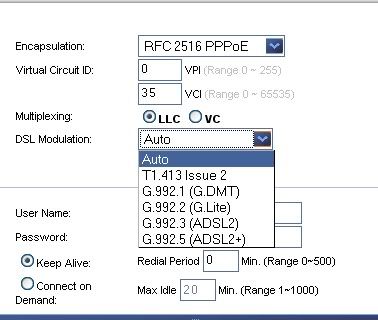
what should i choose in here??
right now i'm choosing auto
but the modem keep hang ,
i dont know why..
i'm use torrent but this problem just appear,
before this not appear..
user posted image
and how about the Multiplexing??
it is LLC or Vc more suitable??
*
for me, AM300 connect properly only with T1.413 issue 2...i can't use G.DMT or others (my Speedtouch 510 or 536 can connect using G.DMT instead) This DSL modulation selection won't cure ur modem hang problem coz by BT ler.

About multiplexing, I dunno streamyx's DSLAM settings..i tested LLC or VC and find no different. I just choose either 1...i think TMnet maybe using VC. Google for LLC and VC to find out the different.

Note: I won't use auto mode as sometimes it will connect at wrong speed... eg 1024 / 96. This is 1 of the bug i discover.
cyberic
post Dec 26 2006, 01:14 AM

Regular
******
Senior Member
1,130 posts

Joined: Jan 2003


QUOTE(lonewalker @ Dec 25 2006, 01:43 AM)
Okay, bridge mode the regular bridge only mode. WRT54GS wont dial. either will direct access to the modem via Ethernet port on the pc works.

Both dialing using PPPoE
*
not sure y u face problem. It works for me with 3 different modem with WRT54GS.

1. if both modem n router use same IP like 192.168.1.1. I would change either 1's IP
2. modem in bridge mode, connected to router's WAN port.
3. configure router's connection to use PPPoE (supply the username and password here)
4. After save, u should be able to surf net within min. (wireless setting can be setup together or after u sure internet is working)

QUOTE(rioven @ Dec 25 2006, 03:20 AM)
offtopic : cyberic..where to get speedtouch modem?

used once before...kinda weak..dsl modulation..u have to try which is best for u..
*
ST510 v4 or ST536 v6? both work great for me smile.gif

ST510v4 bought from local Distributor (VRnet Sdn Bhd, closed down oredi) work really good for me...won't hang even heavy BT smile.gif fast n stable. Cost me RM350 that time but worth it smile.gif never had problem.

u can't get ST536 v6 in Malaysia. i manage to bought it from singapore yahoo auction for SG60 (its actually free modem for singnet customer for renew their broadband contract...we can't get this kind of free modem deal in Malaysia), loaded with singnet customize firmware but i flashed it thomson generic firmware. Not really test this modem for BT but modem's web GUI is a lot faster and better than others especially AM300 (its web gui is really slow). Currently i oni use it in bridge mode with my DIY router. Overall, i personally love speedtouch product very much!! one of the best modem!!


Change to:
| Lo-Fi Version
0.5856sec    0.71    6 queries    GZIP Disabled
Time is now: 16th December 2025 - 01:17 AM