Welcome Guest ( Log In | Register )

Bump Topic Topic Closed RSS Feed
127 Pages « < 34 35 36 37 38 > » Bottom

Outline · [ Standard ] · Linear+

 Huawei Honor 7 Official Thread v1, your unfair advantage!

views
     
goldfries
post Oct 5 2015, 08:36 PM

40K Club
Group Icon
Forum Admin
44,415 posts

Joined: Jan 2003


QUOTE(NightFelix @ Oct 5 2015, 08:22 PM)
Omg.... You have so bad coverage signals, almost all yellow and red...
That time I over-quota already. Connectivity is there but speed throttled.

Not sure if that affects it, can't remember what I was up to that day.
goldfries
post Oct 5 2015, 08:37 PM

40K Club
Group Icon
Forum Admin
44,415 posts

Joined: Jan 2003


QUOTE(azeemzuhair @ Oct 5 2015, 08:33 PM)
Hence SOT is <2 hours...?
Connection bad but SOT still 1 hr 36 minutes la. biggrin.gif

I still have to check mail and other stuff.
Birdkai
post Oct 5 2015, 08:40 PM

Getting Started
**
Junior Member
244 posts

Joined: Sep 2013
QUOTE(WA300 @ Oct 5 2015, 06:53 PM)
If so, abit weird le... Mine working fine like this:

[attachmentid=5066207]
*
The phone won't lock? it just displaying the clock forever? I shut off the animation, and it just stay on the clock after the cover closed.
azeemzuhair
post Oct 5 2015, 08:43 PM

Look at all my stars!!
*******
Senior Member
2,190 posts

Joined: Nov 2011


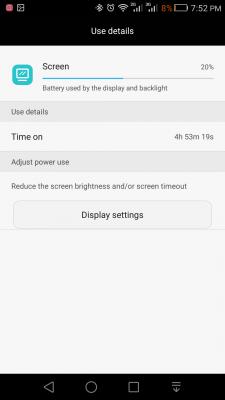
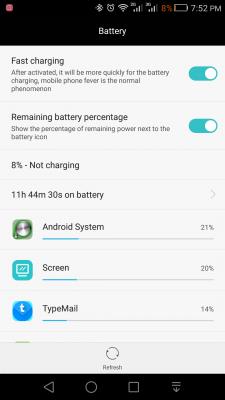
Battery Report No. 2:
Age : 2nd charge cycle starting from 100%.
Mode : 100% dual SIM active with WiFi+
Bluetooth : 100% paired with Sony Smartband Talk SWR30.
HERE map/GPS : 5 minutes.
YouTube & NAS streaming : ~2 hours.
Gaming : Strikers 1945 v3 for 30 minutes.
Camera pix : 3 with flash.
Camera vids : None.
Browsing, social apps & others : ~2 hour.
Screen brightness : Auto @ 50% slider.
Special tweaks : Root but no tweaks on Governor.
Attached Image
Attached Image

Attached Image Attached Image

As can be seen, there's a seriously bad "Awake" activities since the device is turned on. Even when the device is in idle, "Awake" still happening. Even the graph has no flat line but instead sharp 45 degrees diagonal drop. This is bad. Hence, the deep sleep mode was not active. ROM update is desperately needed.

This post has been edited by azeemzuhair: Oct 5 2015, 08:45 PM
Birdkai
post Oct 5 2015, 08:45 PM

Getting Started
**
Junior Member
244 posts

Joined: Sep 2013
QUOTE(azeemzuhair @ Oct 5 2015, 08:43 PM)
Battery Report No. 2:
Age : 2nd charge cycle starting from 100%.
Mode : 100% dual SIM active with WiFi+
Bluetooth : 100% paired with Sony Smartband Talk SWR30.
HERE map/GPS : 5 minutes.
YouTube & NAS streaming : ~2 hours.
Gaming : Strikers 1945 v3 for 30 minutes.
Camera pix : 3 with flash.
Camera vids : None.
Browsing, social apps & others : ~2 hour.
Screen brightness : Auto @ 50% slider.
Special tweaks : Root but no tweaks on Governor.

Attached Image
Attached Image

Attached Image   Attached Image

As can be seen, there's a seriously bad "Awake" activities since the device is turned on. Even when the device is in idle, "Awake" still happening. Hence, the deep sleep mode was not active. ROM update is desperately needed.
*
The type mail seems behaving weird? If you have the LED flashing for notifications, then it may cause wakelock too. I got no wakelock after i found the culprit.
azeemzuhair
post Oct 5 2015, 08:48 PM

Look at all my stars!!
*******
Senior Member
2,190 posts

Joined: Nov 2011


QUOTE(Birdkai @ Oct 5 2015, 08:45 PM)
The type mail seems behaving weird? If you have the LED flashing for notifications, then it may cause wakelock too. I got no wakelock after i found the culprit.
*
I turned off LED both in all apps (TypeMail/Whatsapp/WhatsMapp Solo/others) as well as in EMUI Display settings.
WA300
post Oct 5 2015, 09:02 PM

Casual
***
Junior Member
440 posts

Joined: Jul 2007


QUOTE(Rolland @ Oct 5 2015, 08:11 PM)
Finally i figure out what is the problem.

If i turn on the smiley face when close case, then i will have no weather info. If i turn off the case animation, then the weather information come out.

So i make a reverse selection of turning on animation, off weather information, try animation ok. And then on back weather information and both of them looks good now. Problem solve. It is very strange programming indeed.
*
Glad to hear that rclxms.gif

WA300
post Oct 5 2015, 09:07 PM

Casual
***
Junior Member
440 posts

Joined: Jul 2007


QUOTE(Birdkai @ Oct 5 2015, 08:40 PM)
The phone won't lock? it just displaying the clock forever? I shut off the animation, and it just stay on the clock after the cover closed.
*
The phone will be locked according to the time you set for screen lock time. The clock or animation should be off when your screen is locked. Mine screen lock is 30 second.


Birdkai
post Oct 5 2015, 09:18 PM

Getting Started
**
Junior Member
244 posts

Joined: Sep 2013
QUOTE(WA300 @ Oct 5 2015, 09:07 PM)
The phone will be locked according to the time you set for screen lock time. The clock or animation should be off when your screen is locked. Mine screen lock is 30 second.
*
Let me restart and see. When my cover closed, the BIG CLOCK on smart cover showing nicely, but it stay on forever, i even put a timer on my other phone, after one minute still on....
Birdkai
post Oct 5 2015, 09:22 PM

Getting Started
**
Junior Member
244 posts

Joined: Sep 2013
QUOTE(WA300 @ Oct 5 2015, 09:07 PM)
The phone will be locked according to the time you set for screen lock time. The clock or animation should be off when your screen is locked. Mine screen lock is 30 second.
*
Do you need to press the lock button? My screen display the BIG Clock forever...if i use animation, after the animation the phone locked. If i turn off animation, then it just displays the Big clock forever....
JayChouYEE
post Oct 5 2015, 09:24 PM

Enthusiast
*****
Senior Member
737 posts

Joined: Dec 2009
honor 7 owners what is the android version for you phone?
5.0 or 5.1.1 ?
azeemzuhair
post Oct 5 2015, 09:24 PM

Look at all my stars!!
*******
Senior Member
2,190 posts

Joined: Nov 2011


5.0.2

Rolland
post Oct 5 2015, 09:44 PM

Getting Started
**
Junior Member
214 posts

Joined: Oct 2008
QUOTE(Birdkai @ Oct 5 2015, 09:22 PM)
Do you need to press the lock button? My screen display the BIG Clock forever...if i use animation, after the animation the phone locked. If i turn off animation, then it just displays the Big clock forever....
*
Birdkai, i think the setting is some sort of confusing programming. Try playing around with the smart cover on and off setting. Mine some how work ok after i play around with the setting a few time hmm.gif
Birdkai
post Oct 5 2015, 09:50 PM

Getting Started
**
Junior Member
244 posts

Joined: Sep 2013
QUOTE(Rolland @ Oct 5 2015, 09:44 PM)
Birdkai, i think the setting is some sort of confusing programming. Try playing around with the smart cover on and off setting. Mine some how work ok after i play around with the setting a few time  hmm.gif
*
This is.......kinda stupid. I just leave the animation On then, smiley face...what a joke. Please anyone if found out the same problem or solution for this situation, please share. (Smart cover grid ON, Weather OFF, Animation OFF) and the CLOCK keep showing unless you press the lock button.
azeemzuhair
post Oct 5 2015, 09:53 PM

Look at all my stars!!
*******
Senior Member
2,190 posts

Joined: Nov 2011


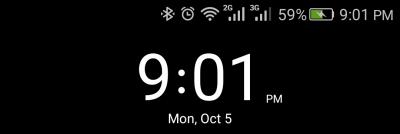
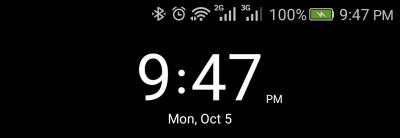
Fast charging report No. 2;
Adapter : ASUS ZenPower 5V;2A PowerBank.

Charging state : Phone is on.

Rate:
0 minute = 7%
31 minutes = 32%
1 hour = 59%
1 hour 34 minutes = 91%
1 hour 47 minutes = 100%

Attached Image Attached Image Attached Image

Attached Image Attached Image
azeemzuhair
post Oct 5 2015, 09:54 PM

Look at all my stars!!
*******
Senior Member
2,190 posts

Joined: Nov 2011


QUOTE(Birdkai @ Oct 5 2015, 09:50 PM)
This is.......kinda stupid. I just leave the animation On then, smiley face...what a joke. Please anyone if found out the same problem or solution for this situation, please share. (Smart cover grid ON, Weather OFF, Animation OFF) and the CLOCK keep showing unless you press the lock button.
*
Expect lots of bugs in the first stock ROM release.
azeemzuhair
post Oct 5 2015, 10:23 PM

Look at all my stars!!
*******
Senior Member
2,190 posts

Joined: Nov 2011


Lai lai lai lai... Lazada Code RM200 discount: HZ200Axpw.... first come, first serve leeehhhh.... valid until 11:59PM tonite...

Attached Image

My new daily driver which will be replacing my current ZTE Nubia Z7 Max soon....

This post has been edited by azeemzuhair: Oct 5 2015, 10:28 PM
Birdkai
post Oct 5 2015, 10:25 PM

Getting Started
**
Junior Member
244 posts

Joined: Sep 2013
QUOTE(goldfries @ Oct 5 2015, 08:37 PM)
Connection bad but SOT still 1 hr 36 minutes la. biggrin.gif

I still have to check mail and other stuff.
*
Can assure you, bad connectivity is critical. Like your phone gonna sync one simple thing, take 1 second to complete normally, but you got bad connectivity and throttled, it takes longer to complete the syncing, thus longer load time and wakelock.
NightFelix
post Oct 5 2015, 10:32 PM

Samsung Exynos
********
All Stars
17,467 posts

Joined: May 2008
From: Lazada


QUOTE(azeemzuhair @ Oct 5 2015, 10:23 PM)
Lai lai lai lai... Lazada Code RM200 discount: HZ200Axpw.... first come, first serve leeehhhh.... valid until 11:59PM tonite...

Attached Image

My new daily driver which will be replacing my current ZTE Nubia Z7 Max soon....
*
Just got notification from my apps too lol, you are quicker than me....
azeemzuhair
post Oct 5 2015, 10:34 PM

Look at all my stars!!
*******
Senior Member
2,190 posts

Joined: Nov 2011


QUOTE(NightFelix @ Oct 5 2015, 10:32 PM)
Just got notification from my apps too lol, you are quicker than me....
*
I'm the "Admin" maaa.... j/k... Since so many ppl looking for the RM200 voucher to get H7, we throw many voucher leehhh....

This post has been edited by azeemzuhair: Oct 5 2015, 10:35 PM

127 Pages « < 34 35 36 37 38 > » Top
Topic ClosedOptions
 

Change to:
| Lo-Fi Version
0.0389sec    0.57    6 queries    GZIP Disabled
Time is now: 13th December 2025 - 03:07 AM