Just registered for the pre-order. I read a few review on Huawei Kirin chipset's graphic chip Mali728-MP4 performance for 3D gaming. They all comment that it is bad. But i am curious how bad is bad? Bad till unable to play game like modern combat,real racing?
I am quite confuse now, as should i upgrade my entry level phone every 2 years ( i m now using moto G 2013 ), or one shot pay installment for a flagship that cost more than 2k and hope that it can last 3 to 4 years? ( probably Note 5 or LG G4 )
As with the incident with Oppo find 7 recently, my friend bought one 1789, 10 months ago. Now it was having a sales at 998 a few week back. He rush to bought a S2 at 2200 four years back and it is unusable today.
Life too short to worry about this matter If entry / mid level phone able to satisfy your usage then just go for it. High end android tend to depreciate more when you sold it off after a year. I suggest go for manufacturer which able to get you constant update, that will last you longer. Eg nexus devices
Haha, bro. thanks for your enlightenment. There will be never end for chasing technology. Today's flagship may become yesterday's classic. Like my moto G, can't even find a booth that willing to accept it as trade in, even a 10 ringgit KFC coupon for the phone also they are not offering. But recall back that it is 729RM when i have it and it has the update of 5.1 recently, it has been utilize to its fullest, no regret. Quote recently from a T-800 machine, " old but not obsolete!!" .
Well. I still love the " honey bear , where are you " Looking forward for Monday.
How to get so low price of 1149? I can only use lucky 15 to get down to 1299, can't key in a second voucher which cost 20 ringgit from lazada too. Macam mana ya?
Nope... cannot apply multiple codes like 11th Street online shopping... but I personally prefer Lazada because shipping "always" FREE... summore can return/refund within 14 days... I have got 100% full refund for 4 items already...
Wow, return 4 item? It is due to defect right? Not due to use use no siok return back?
Get my loot from lazada too, but i wasn't as patient to get the Luck150. only can lucky15, shoosh ~~ Seem like all the phone cover given is blue color? Btw, is the USB connector type C ? It don't look like type C , don't smell like type C. Which mean i can charge it using normal USB cable and charger right? Probably using my Moto G charger?
And anyone know where can i download theme? The huawei China website has only theme for EMUI 3.0, are they compatible with EMUI3.1 ?
And why is it the theme download so troublesome, need to manual copy to phone then only install?
Sammy and Soony can direct download mia
This post has been edited by Rolland: Oct 1 2015, 11:04 PM
The auto brightness function for honor 7 looks cacat, it is very dim at 50% setting, and it doesn't automatically go brighter when i go into a bright room. I have to use manual mode to set it at 50%, only then it is bright. Is it i am having a defect ambient sensor for auto brightness?
Looking forward for your reply :-)
This post has been edited by Rolland: Oct 4 2015, 01:33 AM
This kind of voucher code from smartphone app, is it only appears in the dropdown notification? because if I see a voucher notification (like from the few days ago MyCyberSale), i click on the notification, which open up the Lazada app, then from within the app, I cannot find the relevant page of the voucher code already.
If not mistaken, you just need to remember the code and key in during purchase, then it can be use already. No need to download like 11 street voucher.
By the way , anyone use SD card? Any recommendation of SD card for honor 7?
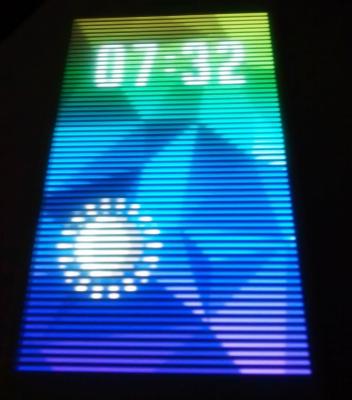
anyone using the smart cover? I saw inside setting it will show clock and temperature reading. But in reality only a clock and a round animation showing night or day. Is there anyway to enable the temperature reading?
u can change setting under smart assis > more > smart cover
Thanks for the reply . I already turn on everything including weather information inside the smart assist tab. It still doesn't show the temperature reading, like " 27C " etc etc. Hmm, i m using Large font ,does this make the reading unable to show up?
By the way , anyone know how to join duplicate contact? I see that inside contact, for a same phone number, it make two duplicate contact, one for phone and the other for whatsapp ( a small whatsapp icon beside it ), whenever i deleted the whatsapp contact, i can't find the contact inside whatsapp, and more weird thing coming up, whenever i add contact from whatsapp to existing contact, it never turn up success. Ini EMUI betoi betoi pelik.
[quote=WA300,Oct 5 2015, 07:05 AM] [quote=Rolland,Oct 5 2015, 01:26 AM] Thanks for the reply . I already turn on everything including weather information inside the smart assist tab. It still doesn't show the temperature reading, like " 27C " etc etc. Hmm, i m using Large font ,does this make the reading unable to show up?
I'm using large font too and the temperature does showed up on the screen with the weather icon on top of it. Maybe you can try reset it again and see it works or not.
[/quote]
Try reboot it and turn and off smart assist. My screen look like this, still no temperature reading.
If so, abit weird le... Mine working fine like this:
[attachmentid=5066207]
Finally i figure out what is the problem.
If i turn on the smiley face when close case, then i will have no weather info. If i turn off the case animation, then the weather information come out.
So i make a reverse selection of turning on animation, off weather information, try animation ok. And then on back weather information and both of them looks good now. Problem solve. It is very strange programming indeed.
Do you need to press the lock button? My screen display the BIG Clock forever...if i use animation, after the animation the phone locked. If i turn off animation, then it just displays the Big clock forever....
Birdkai, i think the setting is some sort of confusing programming. Try playing around with the smart cover on and off setting. Mine some how work ok after i play around with the setting a few time
took the plunge, tried the finger print thing because i don't like clicking button to unlock, wish there is any finger can unlock the phone
it is really fast unlock
U can make fingerprint profile inside fingerprint ID > fingerprint management > there is a total of 5 finger print can be safe , i am now using my left hand index finger to unlock and right index finger to unlock. It is really quick in my opinion Well done finger print sensor.
May I ask some information regarding the smart key? Did you guys encounter that it can't use Ultra snapshot when the volume down ultra snapshot is enable? Is it a either one implementation that when ultra snap shot is assign to volume down key, it can't be use at the smart key? Is there a way to un-assign ultra snap shot at volume down key?
Another thing is the ultra snapshot only function during screen off?
I saw there is a multi screen tab at setting, may I know how to use that?
1) Toggle off the volume down key combo inside the camera settings. I suggest better leave the ultra snap invoked by vol down key. Assign other useful usage for the Smart Key. Don't waste it...
2) Ultra snap works only when screen is off. So, you may not know what is snapped during off screen and whether the object is properly focus or not. One of the usage for ultra snapshot is at parking basement where you just need quick pix of the parking lots number/column marking.
3) Multi screen = screen cast to your "smart" TV. If ur TV does not support miracast tech, u may need either Chromecast adapter or proprietary miracast adapter:
Did anyone using the huawei smart cover encounter that when it is close, when call arrive, it is hard to register your touch to swipe it to answer and hang up?
Btw, if I use tampered class, will it make the smart cover unable to use ? I notice that the factory screen protector doesn't last long, finger mark and nail mark start to turn up :-(


 Sep 23 2015, 04:10 PM


 Quote
Quote


 . I already turn on everything including weather information inside the smart assist tab. It still doesn't show the temperature reading, like " 27C " etc etc. Hmm, i m using Large font ,does this make the reading unable to show up?


 I see. Thank you very much for the answer.
 0.0271sec
 0.16
0.16
 7 queries
 GZIP Disabled