

Attached thumbnail(s)

for P4 2.8E USER
|
|
 Nov 12 2006, 12:00 PM Nov 12 2006, 12:00 PM
|
 
Junior Member
103 posts Joined: Jan 2003  
|
Anyone noe what is the acpi temp? Now it decrease to 48C adi? Please help me....
Attached thumbnail(s)
|
|
|
|
|
|
Nov 12 2006, 12:27 PM
|
|
Senior Member
889 posts Joined: Jan 2003 From: KL
|
QUOTE(conchunchun @ Nov 12 2006, 12:00 PM) Anyone noe what is the acpi temp? Now it decrease to 48C adi? Please help me.... that should be ur pwm temp. some circuit to power ur cpu. E series cpu seems to stress this one more as compared to C series cpu.This post has been edited by apexi78: Nov 12 2006, 12:27 PM |
|
|
Nov 12 2006, 06:00 PM
|
|
Junior Member
103 posts Joined: Jan 2003
|
QUOTE(apexi78 @ Nov 12 2006, 12:27 PM) that should be ur pwm temp. some circuit to power ur cpu. E series cpu seems to stress this one more as compared to C series cpu. Whr is the circuit located in mb? My mb is 865 PE-AL. Could we cool down it? Thanks |
|
|
Nov 13 2006, 11:18 PM
|
|
Junior Member
162 posts Joined: Nov 2006
|
My com will auto restart before entering bios chking...Only then it will load the window. How to solve this problem? Is it due to my cd rom? I chk adi all is in correct and tight connection.
I burn the image file of memtest86 by using nero in a cdrw...But when i insert the cd into the cd rom and restart com...It din load the memtest but in state the com keep on restart till i eject the cd out..Please help..... This post has been edited by hahaha85: Nov 13 2006, 11:18 PM |
|
|
Nov 14 2006, 07:11 AM
|

All Stars
14,909 posts Joined: Jul 2005 
|
QUOTE(hahaha85 @ Nov 13 2006, 11:18 PM) My com will auto restart before entering bios chking...Only then it will load the window. How to solve this problem? Is it due to my cd rom? I chk adi all is in correct and tight connection. There's two assumptions here:I burn the image file of memtest86 by using nero in a cdrw...But when i insert the cd into the cd rom and restart com...It din load the memtest but in state the com keep on restart till i eject the cd out..Please help..... 1) There's a part that is extremely hot... 2) You're bios is corrupted - need to flash a new bios This post has been edited by sHawTY: Nov 14 2006, 07:12 AM |
|
|
Nov 14 2006, 08:06 AM
|
|
Junior Member
162 posts Joined: Nov 2006
|
This is my com spec:
P4 2.8 E DFI 865 PE-AL 1G ddr ram 1 cd rom 1 cd-rw ati 9200se 300W acbel pure power Most probably is which part heated? Which it caused by not enough psu? Or mb spoilt adi? |
|
|
|
|
|
 Nov 14 2006, 10:00 AM Nov 14 2006, 10:00 AM
|

Senior Member
775 posts Joined: Sep 2006 From: Sungai Mati, Muar, Johor ; Now at Wangsa Maju, KL.
|
QUOTE(hahaha85 @ Nov 14 2006, 08:06 AM) This is my com spec: I think you PSU might not enough juice...just my opinion...300W is a bit low lor...P4 2.8 E DFI 865 PE-AL 1G ddr ram 1 cd rom 1 cd-rw ati 9200se 300W acbel pure power Most probably is which part heated? Which it caused by not enough psu? Or mb spoilt adi? |
|
|
Nov 14 2006, 10:55 AM
|
|
All Stars
14,909 posts Joined: Jul 2005
|
QUOTE(hahaha85 @ Nov 14 2006, 08:06 AM) This is my com spec: I don't know, you have to check the temperature...P4 2.8 E DFI 865 PE-AL 1G ddr ram 1 cd rom 1 cd-rw ati 9200se 300W acbel pure power Most probably is which part heated? Which it caused by not enough psu? Or mb spoilt adi? Hey wait, i didn't say that anything is extremely overheated, what i've said earlier is, they are just assumptions...  I think you're 300W true power Acbel psu, is more than enough to power up you're system as you are running everything in stock... No oc, not a lot of hardwares also, so 300W True Power is more than enough...  Why don't u try flashing the bios for you're motherboard to the newest version? It might help you know... |
|
|
Nov 14 2006, 11:22 AM
|

Senior Member
1,242 posts Joined: Aug 2005 From: Sila Mampir,JB sTaTus:GTX 680 SLI 
|
QUOTE(Kataro @ Nov 14 2006, 10:00 AM) I think you PSU might not enough juice...just my opinion...300W is a bit low lor... no larr enuffQUOTE(sHawTY @ Nov 14 2006, 10:55 AM) I don't know, you have to check the temperature... 300w for s478 is more than enuff for his rig since his hardware just low end stuff.maybe just maybe a new bios might work but do at ur risk.if u donno how to flash plz go ask help from a professional.so let us know the update orait.Hey wait, i didn't say that anything is extremely overheated, what i've said earlier is, they are just assumptions... I think you're 300W true power Acbel psu, is more than enough to power up you're system as you are running everything in stock... No oc, not a lot of hardwares also, so 300W True Power is more than enough... Why don't u try flashing the bios for you're motherboard to the newest version? It might help you know... This post has been edited by styloe: Nov 14 2006, 11:23 AM |
|
|
Nov 14 2006, 01:47 PM
|
|
Junior Member
162 posts Joined: Nov 2006
|
QUOTE Q: How to find your motherboard version? A: The revision number that we are interested in can be found on the side of the PCI-E, PCI slot(or ISA slot) OR on top of the printer port. Please refer to pictures below on its location. How to find the mb version? My one is dfi 865PE-AL. Rev A or Rev B? I din c any rev at my mb. Please helpl. QUOTE If users do not have floppy drive in their computer system, there is an alternative option we provide here. The "Winflash" program allows users to update BIOS on the platform of Windows operating systems. Users only need to download the Winflash program files and the needed BIOS update flash named xxxxxx.bin, save them in any storage device windows system have access with. Run Winflash Ver. 1.84 software and follow the instruction guide to update BIOS. It means i can flash my bios inside win by using winflash? By referring to my thumbnail. the ver of bios in my com is newer if compared to the one given in the web. How? Attached thumbnail(s) 
|
|
|
Nov 14 2006, 03:32 PM
|
|
Senior Member
1,242 posts Joined: Aug 2005 From: Sila Mampir,JB sTaTus:GTX 680 SLI
|
@haha
ur problems kinda weird.ermmm can u tell us when each time the problem occurs?eachtime booting is it?i think its written at ur mobo which rev u just need to look carefully ok?maybe overheating problems have u did some spring cleaning for ur pc.maybe got dust at ur heatsink hence it got hot so its unstable..i also need the age of ur hardware.maybe its ur ram or hdd |
|
|
Nov 14 2006, 04:35 PM
|

Senior Member
908 posts Joined: Jul 2006
|
QUOTE(hahaha85 @ Nov 13 2006, 11:18 PM) My com will auto restart before entering bios chking...Only then it will load the window. How to solve this problem? Is it due to my cd rom? I chk adi all is in correct and tight connection. hmm, why u ask like tat? i mean y u point your finger to your cd-rom only? is there anything tat we shud know? if u really suspect your cd-rom, let disconnect it first. or perhaps you can disconect everything and left 1 HDD only. see whether it boot directly to window or not.I burn the image file of memtest86 by using nero in a cdrw...But when i insert the cd into the cd rom and restart com...It din load the memtest but in state the com keep on restart till i eject the cd out..Please help..... |
|
|
Nov 14 2006, 04:41 PM
|
|
Junior Member
162 posts Joined: Nov 2006
|
My com has been around 3 years++. My cpu hsf just installed a new one(scythe ninja). THe problem happens before i change my hsf. I tot is my hsf not good enough. But till now the problem still occurs. I do not attach my cd rom the problem happen when I am playing fifa 2007. It auto reboot. Sigh.....
This post has been edited by hahaha85: Nov 14 2006, 04:42 PM |
|
|
|
|
|
Nov 14 2006, 04:58 PM
|

Junior Member
96 posts Joined: Oct 2005 From: Penang
|
p4 2.8 ht
under air condition room non oc idle : 32~34 C loaded : 40~42 C oc to 3.2ghz (vcore = 1.46) idle : 37~38 C loaded : 47~49 C cooled with scythe ninja plus rev b with stock thermal paste. |
|
|
Nov 14 2006, 06:36 PM
|
|
All Stars
14,909 posts Joined: Jul 2005
|
QUOTE(hahaha85 @ Nov 14 2006, 01:47 PM) How to find the mb version? My one is dfi 865PE-AL. Rev A or Rev B? I din c any rev at my mb. Please helpl. Use CPUz... It means i can flash my bios inside win by using winflash? By referring to my thumbnail. the ver of bios in my com is newer if compared to the one given in the web. How? Or PCWizard could help...  About flashing bios in windows, yes, it can be done, but be worry though, as the pc needs to be free at all, what i meant was, u have to make sure that's there are zero programs running at the background... As if something goes wrong [if there are other program running in background] you're board is toasted... About the newest version, just try it, who knows that it'll help you in covering the auto restart problem... But i am not sure that it'll help you in solving the non-eject optical drive... Why don't u try reflashing the firmware of the optical drive too?  |
|
|
Nov 15 2006, 12:27 AM
|
|
Junior Member
162 posts Joined: Nov 2006
|
QUOTE(cklim85 @ Nov 14 2006, 04:58 PM) p4 2.8 ht Wah..wat hsf u use? wat mb u use? I am using dfi 865PE-AL wif scythe ninja plus. My idle temp is 47C and full load is 60-63C. Wat software u use to chk? I chk using speedfan v4.31 n compared wif bios the temp different. Bios temp higher 1-3C.under air condition room non oc idle : 32~34 C loaded : 40~42 C oc to 3.2ghz (vcore = 1.46) idle : 37~38 C loaded : 47~49 C cooled with scythe ninja plus rev b with stock thermal paste. |
|
|
Nov 15 2006, 01:14 AM
|
|
All Stars
14,909 posts Joined: Jul 2005
|
QUOTE(hahaha85 @ Nov 15 2006, 12:27 AM) Wah..wat hsf u use? wat mb u use? I am using dfi 865PE-AL wif scythe ninja plus. My idle temp is 47C and full load is 60-63C. Wat software u use to chk? I chk using speedfan v4.31 n compared wif bios the temp different. Bios temp higher 1-3C. Different board, reports different temperature reading as different boards uses different temperature sensoring chip...No wonder there's some differences in degrees between a lot of boards... But, talk about the temperature differences between u and cklim85 temperature, that's 10 degrees lower... Yeah cklim85, what kind of heatsink and motherboard do u use?  |
|
|
Nov 16 2006, 11:43 PM
|
 
Staff
7,948 posts Joined: Jan 2005 From: Soviet Sarawak
|
QUOTE(lucifah @ Nov 7 2006, 12:21 AM) i'll update my readings next week when i open up my rig for cleaning and apply new coat of AS5. 2 yrs of 24/7 computing - there gotta be tonnes of dust inside those fins. nasttyyy... QUOTE(sHawTY @ Nov 7 2006, 12:24 AM) Ehh bro, don't forget to post up some picture on the fan and the heatsink...  Can't wait to see how much dust have been accumulated in u're pc as it's not been turned off for 2 years on 24/7...  QUOTE(styloe @ Nov 7 2006, 11:25 AM) i usually clean my pc every month since my room beside the main road aka damn dust Here's some pics for u guys to puke at: .2year holly u must have a few kg of dust in there I was doing nothing one night, so i opened up my casing (after 1+ yrs) 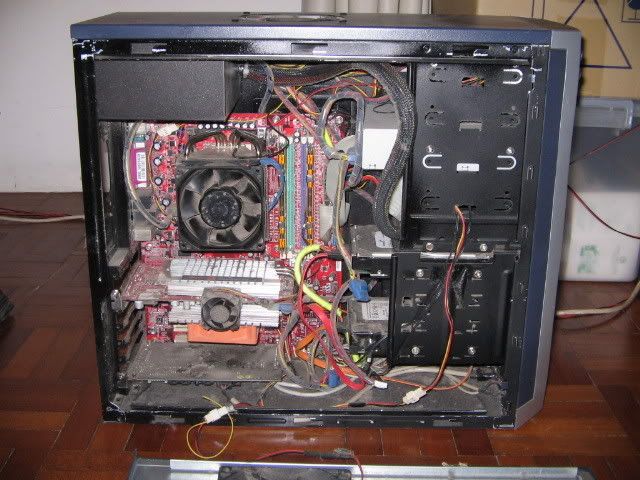 Shit. look at those dusts... they look like some fungus or something. Totally no air-flow. No wondr my temp is sooo high - much higher than stock HSF 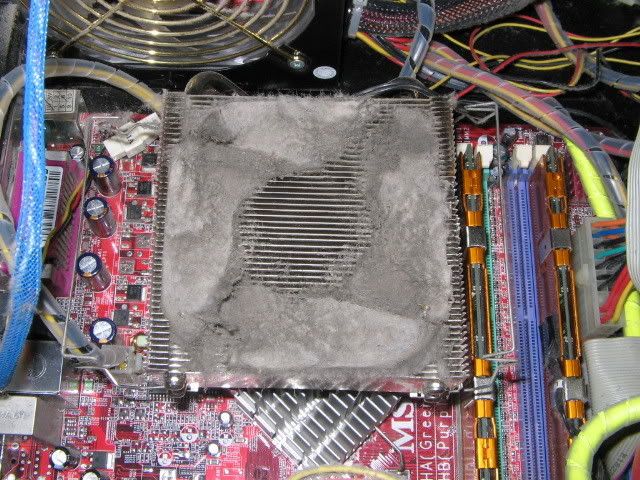 the fan blades are not spared as well 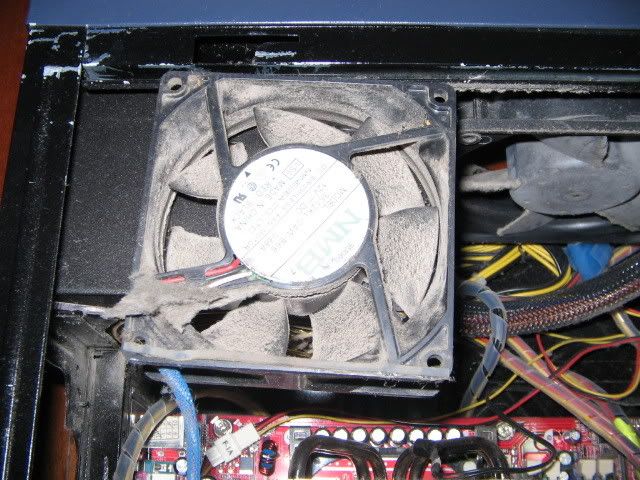 this the dust ball that i collected - weighing at a gargantuous 15gm (+/- 5%) 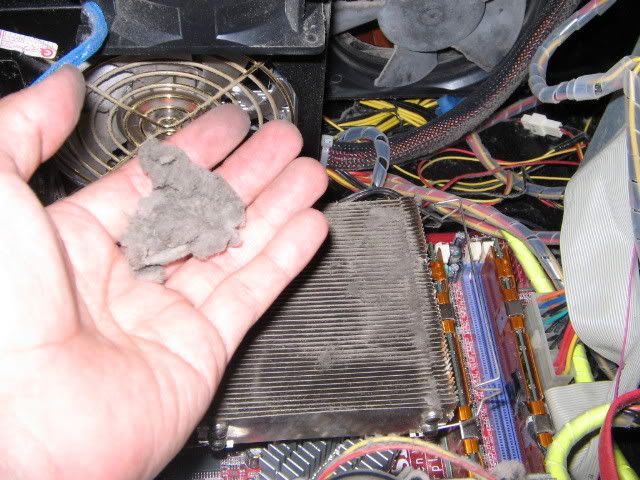 Worry no more. Everything has been cleaned. New AS5 applied. Howver the rig is w/o the video card (soon to arrive x800xt PE), so no readings at all. perhaps will reconfigure fan placement to reduce this gunks |
|
|
Nov 17 2006, 08:03 AM
|
|
All Stars
14,909 posts Joined: Jul 2005
|
QUOTE(lucifah @ Nov 16 2006, 11:43 PM) Here's some pics for u guys to puke at: What the... I was doing nothing one night, so i opened up my casing (after 1+ yrs) Shit. look at those dusts... they look like some fungus or something. Totally no air-flow. No wondr my temp is sooo high - much higher than stock HSF Worry no more. Everything has been cleaned. New AS5 applied. Howver the rig is w/o the video card (soon to arrive x800xt PE), so no readings at all. perhaps will reconfigure fan placement to reduce this gunks Didn't u take any pictures after cleaning up?  Sure need a powerful vacuum to clean up that heatsink... Woh, X800XT PE for you're system? Nice... |
|
|
Nov 17 2006, 01:11 PM
|
|
Junior Member
162 posts Joined: Nov 2006
|
I got a noobies question here to ask? Can I use vaccum cleaner in my house for daily clean to suck the dust in my mb, gc, cd rom, fan and hsf?
|
| Change to: |  0.0201sec 0.0201sec
 0.77 0.77
 6 queries 6 queries
 GZIP Disabled GZIP Disabled
Time is now: 20th December 2025 - 06:24 AM |
 Quote
Quote