QUOTE(JusticeDeserves @ Sep 4 2021, 05:24 AM)
Does anyone know if Xiao mi 34 supports vesa mount?

Vesa 100x100mmhttps://www.anandtech.com/show/15918/xiaomi...monitor-for-399
Ultrawide monitor fan's club, Ultrawide master race
|
|
 Sep 4 2021, 03:30 PM Sep 4 2021, 03:30 PM
Return to original view | Post
#1
|
 
Senior Member
5,987 posts Joined: Jan 2003 From: North Borneo & South Nihon/Nippon  
|
QUOTE(JusticeDeserves @ Sep 4 2021, 05:24 AM) Does anyone know if Xiao mi 34 supports vesa mount? Vesa 100x100mmhttps://www.anandtech.com/show/15918/xiaomi...monitor-for-399 |
|
|
|
|
|
Nov 1 2021, 10:15 AM
Return to original view | Post
#2
|
|
Senior Member
5,987 posts Joined: Jan 2003 From: North Borneo & South Nihon/Nippon
|
QUOTE(OldSchoolJoke @ Oct 31 2021, 03:47 PM) greetings, looking for UW monitor 34" Mostly will be 3440x1440 resolution.....is there much options for 4k UW? anyone have experience with PBP/PIP in UW? how does it work? the way i see it just split the screen in half but we can't change the resolution to fit the screen size there also..... 2560x1080 option.... |
|
|
Nov 1 2021, 11:25 AM
Return to original view | Post
#3
|
|
Senior Member
5,987 posts Joined: Jan 2003 From: North Borneo & South Nihon/Nippon
|
QUOTE(lonely66 @ Nov 1 2021, 11:04 AM) I think dell got 4k 34" monitor, u can check in shopee or lazada... plenty of 4k monitors (3840x2160p).... There are actually no "UW 4k": a close analogy would be "UHD 5k" with 5120x2160 resolution (not a form that's commonly in existence)...Related to that there's the 32:9 ratio options.... the "Super Ultra-Wides" SUWHD: 3840x1080..... (4k horizontal) SUWQHD: 5120x1440.... (5k horizontal)... |
|
|
Nov 1 2021, 11:29 AM
Return to original view | Post
#4
|
|
Senior Member
5,987 posts Joined: Jan 2003 From: North Borneo & South Nihon/Nippon
|
QUOTE(OldSchoolJoke @ Nov 1 2021, 11:01 AM) what options do i have for LG 3440x1440? 3440x1440.... basically there are 2 panel options... VA or IPS.... personally I've chosen IPS w Acer Nitro XV340CKP....only found LG 35WN75C is prism+ any good? Prism+.... not a very trust-worthy brand from the point of warranty (being new)... a Singapore based company rebadging China monitors... This post has been edited by BeastX: Nov 1 2021, 11:33 AM |
|
|
Nov 1 2021, 12:15 PM
Return to original view | Post
#5
|
|
Senior Member
5,987 posts Joined: Jan 2003 From: North Borneo & South Nihon/Nippon
|
QUOTE(OldSchoolJoke @ Nov 1 2021, 12:08 PM) does XV340CKP support PBP? checked on site, doesn't state anything Edit correction: got PBP and PIP... but I never tested...i see. thanks for the insight of prism+ This post has been edited by BeastX: Nov 1 2021, 12:21 PM |
|
|
Nov 1 2021, 12:24 PM
Return to original view | Post
#6
|
|
Senior Member
5,987 posts Joined: Jan 2003 From: North Borneo & South Nihon/Nippon
|
QUOTE(OldSchoolJoke @ Nov 1 2021, 12:08 PM) does XV340CKP support PBP? checked on site, doesn't state anything It's in the system menu: Shown at 5.10 minutes.... I've not tested...i see. thanks for the insight of prism+ |
|
|
|
|
|
Nov 13 2021, 08:35 AM
Return to original view | Post
#7
|
|
Senior Member
5,987 posts Joined: Jan 2003 From: North Borneo & South Nihon/Nippon
|
QUOTE(mystvearn @ Nov 12 2021, 07:22 AM) Can someone recommend me a monitor with good color accuracy and high resolution? Need monitor for work. Found out that the LG 29wk600 is OK but lacking vertical pixel resolution. Also does not fit well with my dell 27" 1440p monitor since its too wide and not curve. The LG works for single use but not for multiple monitor setup. If you're doing graphic intensive work... a flat monitor would be better... otherwise it''ll be wonky as you cannot judge straight lines...ultra-wide (3440x1440, 21:9) has the same pixel pitch... & same physical height as your Dell..... VA panels will be curved (<<< if you don't need it for straight lines)... IPS panels will be flat. 3&4 are two 34"@3440x1440 and 2 is a 27"@2560x1440... physically as shown too...  This post has been edited by BeastX: Nov 13 2021, 08:56 AM mystvearn liked this post
|
|
|
Nov 13 2021, 08:51 AM
Return to original view | Post
#8
|
|
Senior Member
5,987 posts Joined: Jan 2003 From: North Borneo & South Nihon/Nippon
|
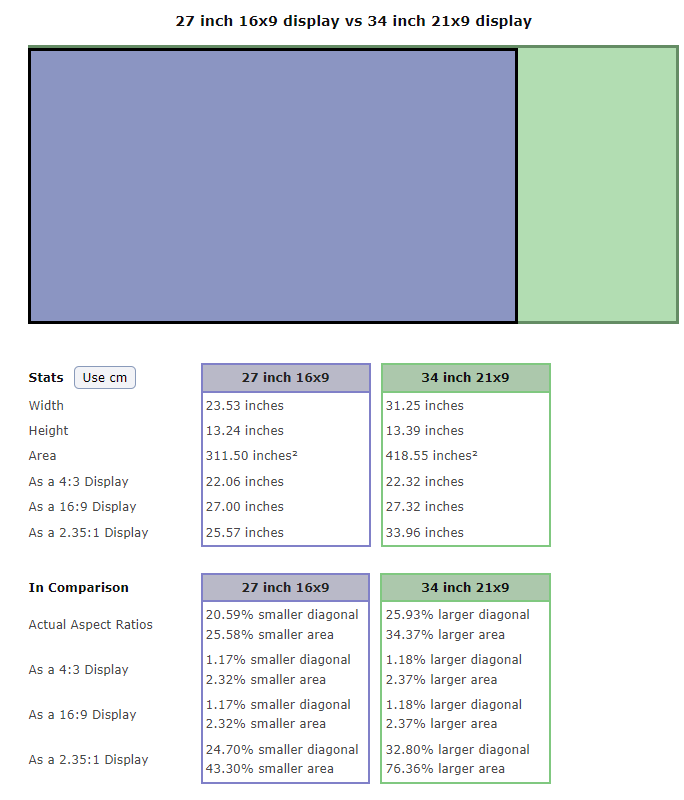
QUOTE(ReaperX @ Oct 12 2021, 05:00 PM) A 27" non-Ultrawide (16x9) is more or less the same height with a 34" Ultrawide (21x9). In fact 34" Ultrawide is slightly higher. Actually, the same panel manufacturer will cut from the same sheet for both the 27 & 34.... so both panels have the exact same height (and pixels)...» Click to show Spoiler - click again to hide... « |
|
|
Nov 14 2021, 06:44 AM
Return to original view | Post
#9
|
|
Senior Member
5,987 posts Joined: Jan 2003 From: North Borneo & South Nihon/Nippon
|
QUOTE(mystvearn @ Nov 14 2021, 05:40 AM) What is monitor 1? Monitor 1: 2560x1600 laptop screen...Is this your setup? How do you view everything? I have assumed it is in a parabolic configuration. And, Yes parabolic...you may need a deep desk... This post has been edited by BeastX: Nov 14 2021, 06:44 AM |
|
|
Nov 14 2021, 05:31 PM
Return to original view | IPv6 | Post
#10
|
|
Senior Member
5,987 posts Joined: Jan 2003 From: North Borneo & South Nihon/Nippon
|
QUOTE(mystvearn @ Nov 14 2021, 04:02 PM) Just wondering, why does a curve monitor does not work? I work with graphic work, but mostly viewing 3D obj content. If I take a screenshot with the snipping tool in windows and send it to people, it will still appear flat regardless of the curvature of the screen. Most of the time I am on microsoft office. Just need an IPS display that will fit in with the Dell. Any recommendations? This list mostly are ultrawide... w some super ultra-wide...https://www.rtings.com/monitor/reviews/best...tures/ultrawide This post has been edited by BeastX: Nov 14 2021, 05:34 PM mystvearn liked this post
|
|
|
Nov 14 2021, 07:59 PM
Return to original view | IPv6 | Post
#11
|
|
Senior Member
5,987 posts Joined: Jan 2003 From: North Borneo & South Nihon/Nippon
|
QUOTE(fightingdragons @ Nov 14 2021, 05:52 PM) Hi guys, can anyone recommend 1-2 suitable ultra wide monitor based on my usage criteria? I have been reading and watching too many reviews but prefer if got some real forumers sharing own recommendation/experience. Sometimes too much info is also not good! I suggest you don't go Ultra-wide...My usage (in order of importance/frequency): Excel/PowerPoint + Stock trading (main reason I want a bigger screen to view multiple charts) + Fortnite + movies Budget: 1-2k. 2k+ also stretchable Definitely want a monitor with anti-glare, kind to my eyes as I still want to keep the pair. My laptop is not super canggih type - midrange. Huawei matebook x pro core i7 with Nvidia GeForce MX250 Thank you in advance! 43" 4k monitor/TV....@60Hz... around RM1.5k If you can discern much tighter pixels or sit much closer to the monitor.... 4k at 27"/28"@60Hz monitor will do... around RM1k... or 32" 4k@60Hz...<< an in between... Mate-view at 3:2 ratio gives you even more vertical pixels... not cheap though... Every monitor without a glass surface for touch... is an anti-glare monitor... for usability in bright environment, you may need monitors with 400nits and above This post has been edited by BeastX: Nov 15 2021, 06:23 AM |
|
|
Nov 15 2021, 07:57 AM
Return to original view | IPv6 | Post
#12
|
|
Senior Member
5,987 posts Joined: Jan 2003 From: North Borneo & South Nihon/Nippon
|
QUOTE(mystvearn @ Nov 15 2021, 06:58 AM) Just wondering. How do you view and present ppt slides with ultrawide monitor with zoom/webex? With 2 dell 27 " 1440p monitors, I put the display as one screen and the master view in the other screen. I broadcast the screen which has full view of ppt. That's the bane of Zoom/Google meet/Webex meeting....if you share your desktop (21:9) and your slides are 16:9... you'll have 2 huge black bars on the side and also top and bottom...You have 2 solutions... share by window mode... and use "Reading view".... or use share with the 16:9 desktop that u have (your Dell)<< the Wide (but not ultra-wide)... Webex and Zoom are wonky here.... (as you loose moderating feature: chat/mute/activity/etc as the presenter) which is why I login as another user (another system) to check the video feed... there the multi-monitor mode on Zoom which I find more troublesome than functional (when I tested it out)... Google meet shows you, your presentation back on the masterview... This post has been edited by BeastX: Nov 15 2021, 08:02 AM mystvearn liked this post
|
|
|
Nov 16 2021, 02:06 PM
Return to original view | IPv6 | Post
#13
|
|
Senior Member
5,987 posts Joined: Jan 2003 From: North Borneo & South Nihon/Nippon
|
QUOTE(potatobanana @ Nov 16 2021, 01:38 AM) Read some article and decided to join the bandwagon of ultrawide (21:9), mainly for productivity purposes. 29" 2560x1080pAny good unit that is smaller than 34" to recommend? Reason being I am using a smaller desk, can't afford to fit too much stuff. |
|
|
|
|
|
Dec 28 2021, 09:50 AM
Return to original view | Post
#14
|
|
Senior Member
5,987 posts Joined: Jan 2003 From: North Borneo & South Nihon/Nippon
|
QUOTE(night1218 @ Nov 27 2021, 10:14 AM) acer xv340ckp This post has been edited by BeastX: Dec 28 2021, 09:51 AM |
|
|
Jul 23 2022, 07:25 AM
Return to original view | Post
#15
|
|
Senior Member
5,987 posts Joined: Jan 2003 From: North Borneo & South Nihon/Nippon
|
QUOTE(hz32290 @ Jul 22 2022, 09:55 PM) aaaaaaaand it arrived today!! For other potential buyers.... This 34" VA panel is being used by many other manufacturers....that price their products at around 1.5k, & some w 3 years warranty support too...» Click to show Spoiler - click again to hide... « Verdict: At a RM1900(Dell Malaysia website) price point, it is actually a decent buy. I like how it looks, how it feels, and the extra functions it provided. Getting the right color can be a pain in the ass, but it is definitely not the end of the world. This post has been edited by BeastX: Jul 23 2022, 07:25 AM |
|
|
Jul 23 2022, 11:00 AM
Return to original view | IPv6 | Post
#16
|
|
Senior Member
5,987 posts Joined: Jan 2003 From: North Borneo & South Nihon/Nippon
|
QUOTE(ben3003 @ Jul 23 2022, 08:57 AM) can share which panel? There are 343 listed here...https://www.displayninja.com/ultrawide-monitor-list/ Here are a few: Lenovo G34W-10 Philips 345M1CR ViewSonic VX3418-2KPC Acer XZ342CU P Acer XZ342CK P Acer EI342CKR P Xiaomi Mi 34 alfiejr and edmund_yung liked this post
|
|
|
Aug 21 2022, 02:54 PM
Return to original view | Post
#17
|
|
Senior Member
5,987 posts Joined: Jan 2003 From: North Borneo & South Nihon/Nippon
|
QUOTE(onthefeet @ Aug 20 2022, 08:53 PM) Hi guys, I am looking for a 34" ultrawide monitor for the first time. Can anyone recommend me one with the budget around RM1.7k. External power brick supply, only 1 DP and 1 HDMI input, decent built-in speakers (good range) though not loud..... though all should be very similar in pic quality as they use the same/similar Samsung VA panel..Mainly use for coding, reading stuff and watching video. Will connect personal laptop and work laptop to it. Currently I am eyeing on these three monitors: Philips 346b1c ( RM1699~ ) Xiaomi 34" ( RM1650~ ) Acer XZ342CU P ( RM1485~) - Out of these three monitors, Acer is the cheapest one but somehow I can't really find that much of reviews from the internet. So, if anyone here own this monitor or used it before, can you share with me your experience? - I understand that there is an extra plus point on 346b1c by having a built in KVM switch, but I am okay without it as well because I can just use an external KVM switch. So, please any sifus here can suggest me which one should I go based on those 3 listed here. Or can recommend me another 34" monitor that is within my budget. Thanks! |
|
|
Aug 22 2022, 08:42 AM
Return to original view | Post
#18
|
|
Senior Member
5,987 posts Joined: Jan 2003 From: North Borneo & South Nihon/Nippon
|
QUOTE(onthefeet @ Aug 21 2022, 11:54 PM) Thank you for your reply. But, regarding the number of ports, what I found from the internet is, XZ342CUP come with 2 HDMI input and 1 DP input. Hmm, external power brick supply can be quite a hassle when doing the cable management. Yes correction: 2x HDMI 2.0 inputs... Thank you for your reply. I did some research and watch videos about the black smearing on the VA panel, and I see that many people comment how unbearable is the black smearing issue on VA panel. I mean is that really that bad? Because I don't do that much of gaming, hence I don't really care about how the monitor affect the gaming performance or the immersion. But I will spend most of the time coding and reading documentation/pdf/etc , and I saw (from the video/reddit post) that the text can be very blurry on VA panel when doing smooth scrolling even in medium speed. I heard that black smearing issue seem to arise when the monitor has high refresh rate. So, do you think is it possible to minimize the black smearing issue by lowering down to 60Hz. Because productivity is my biggest concern. So, if purely based on the productivity, do you think that Acer XZ342CUP is still a good choice? If not, what are your recommendations in the budget of within RM1.7k. (P.S: I do code in dark mode, but it will not going to be fully black background and white text. And I like to read in night mode but I doubt if there is any website that is fully black background + white text in night mode ) Thank you.  VA has excellent contrast compared to IPS.... great black levels These panels uses standard RGB arrangement, so no impact on text (as in they would not look worst than IPS)... as for black smearing (while scrolling for instance) these panels are not the fastest at an average of 6 to 7ms...G2G transition... Good enough for 144Hz. I use black background linux terminals while coding... no clipping or disappearing issue while scrolling... Actually (usually) pixel response time works best at above 120Hz (optimally at 144Hz) and not 60Hz... As long as you don't use your monitor in complete darkness... it should be fine... otherwise backlight bleeding or blooming maybe more obvious This post has been edited by BeastX: Aug 22 2022, 08:47 AM |
|
|
Aug 22 2022, 08:59 AM
Return to original view | Post
#19
|
|
Senior Member
5,987 posts Joined: Jan 2003 From: North Borneo & South Nihon/Nippon
|
QUOTE(Andrewtst @ Aug 22 2022, 08:55 AM) Backlight bleeding and blooming is never issue for VA but IPS. You sure you use VA panel? I currently have 3 VAs... of which Acer XZ342CU P is one...and yes, in an almost completely dark room, blotches on the black background becomes obvious... |
|
|
Aug 22 2022, 09:30 AM
Return to original view | Post
#20
|
|
Senior Member
5,987 posts Joined: Jan 2003 From: North Borneo & South Nihon/Nippon
|
QUOTE(Andrewtst @ Aug 22 2022, 09:08 AM) Oh. I think that is not backlight bleeding, it is just uniformity issue. As for blooming I never face before. Definition wise, non-uniformity in 100% black or black background is known as "backlight bleed"If you want no uniformity issue, Mini-LED in VA panel with 1000+ local dimming will give you perfect black similar like OLED, but issue is local dimming is not working well in Windows during productivity as you can seen halo effect surrounding the mouse cursor and due to this I am actually off, only on during watching movie or gaming. I had check nearly all review of local dimming monitor and all have this issue. 😅 The standard Uniformity of a panel (test) is evaluated at 100% White... As both refers to opposite ends... they are not quite comparable. As onthefeet is mostly using the monitor with black background, VA: suppressed dark levels better than IPS but BLB could still be an occurrence... This post has been edited by BeastX: Aug 22 2022, 09:31 AM |
| Change to: |  0.1433sec 0.1433sec
 1.07 1.07
 7 queries 7 queries
 GZIP Disabled GZIP Disabled
Time is now: 13th December 2025 - 09:56 AM |
 Quote
Quote