Welcome Guest ( Log In | Register )

Outline · [ Standard ] · Linear+

 Ultrawide monitor fan's club, Ultrawide master race

views
     
teng_08
post Mar 14 2018, 09:48 PM

Enthusiast
*****
Senior Member
978 posts

Joined: Dec 2008


QUOTE(Someonesim @ Mar 14 2018, 09:13 PM)
Received and installed monitor arm ( loctek ) for my X34A, from taobao 259 yuan ( rm160 ), shipping rm55
Finally freed up space below monitor. also moved monitor further back to have more comfortable viewing distance.

user posted image

user posted image

user posted image
*
Nice monitor arm. Does it come in black? Also, like previous post by forumer. I would also like to know which site u order it from.
Thanks.
teng_08
post May 14 2018, 10:21 AM

Enthusiast
*****
Senior Member
978 posts

Joined: Dec 2008


QUOTE(Radec @ Apr 14 2018, 11:37 AM)
Finally got one

user posted image
*
Nice view. Is that your office monitor?
teng_08
post Jul 3 2019, 10:31 AM

Enthusiast
*****
Senior Member
978 posts

Joined: Dec 2008


QUOTE(craxors @ Jul 3 2019, 08:32 AM)
hahaha...

when u upgrade from 24... to 34.... u need more... lol...  laugh.gif
*
My screen size upgrade path: 23" > 24" > 27" and now 34" UltraWide.
No turning back now smile.gif

I think when choosing UltraWide, take into consideration on your table length and width. When I bought my U3415W, I underestimated the width and had to move my printer a little further away from the desk.
teng_08
post Jul 4 2019, 09:38 AM

Enthusiast
*****
Senior Member
978 posts

Joined: Dec 2008


QUOTE(Cynox @ Jul 3 2019, 05:48 PM)
nice upgrade path.  I upgraded from 24">27">30">34" ultrawide which is not ideal coz i still cannot forget the great height of Dell 30" at 16:9.  After using 34" UW for more than a year, my brain still cannot get use to the short height of the 34" UW compared to 30" 16:9.  rclxub.gif  Maybe the extra wide keep playing trick in my brain.  laugh.gif
*
Oh yeah, I tested the U3014 before, its "gigantic" in my opinion. Lots of vertical space and less scrolling. But I think I've settled in for 21:9 d.
Some annoying things I find when using 21:9 is that most media is 16:9 and u get the black bars on the sides. Not a show stopper for me. I just like having the extra width. Gaming looks good also.
teng_08
post Jul 4 2019, 09:44 AM

Enthusiast
*****
Senior Member
978 posts

Joined: Dec 2008


QUOTE(craxors @ Jul 4 2019, 09:25 AM)
an affordable 38" monitor with 1440p @144hz....

any candidates so far?

sweat.gif  sweat.gif
*
LG 38" 38GL950G WQHD+ 144Hz monitor.
But I would not categorize this as affordable biggrin.gif
teng_08
post Jul 4 2019, 10:07 AM

Enthusiast
*****
Senior Member
978 posts

Joined: Dec 2008


QUOTE(craxors @ Jul 4 2019, 10:00 AM)
how much is this???
sweat.gif
*
No idea as this was just announced at CES2019. No pricing details yet smile.gif

teng_08
post Jul 5 2019, 07:45 AM

Enthusiast
*****
Senior Member
978 posts

Joined: Dec 2008


QUOTE(gbmitoban @ Jul 4 2019, 07:59 PM)
a question, can ultrawide monitor split screen?

i am thinking whether to get 2nd monitor or one UW monitor?

My purpose is to multitask (gaming + web surfing) at the same time

please advise biggrin.gif
*
Yes, u can do split (2 windows side by side) and as pointed by forumer above, with LG or Dell monitor app, u can even do multi screen of different sizes.

I would get an UltraWide monitor. Less clutter, cabling and it looks sleek on your desk also thumbup.gif
teng_08
post Jul 11 2019, 03:36 PM

Enthusiast
*****
Senior Member
978 posts

Joined: Dec 2008


QUOTE(silrave @ Jul 11 2019, 03:24 PM)
haha
still not a good timing to pull for a ultrawide monitor
the price all more than 3k
*
The Dell P3418HW 34" UltraWide is less than 3k but the resolution is only 2560x1080. Not WQHD sad.gif

This post has been edited by teng_08: Jul 11 2019, 03:46 PM
teng_08
post Jul 11 2019, 03:46 PM

Enthusiast
*****
Senior Member
978 posts

Joined: Dec 2008


QUOTE(silrave @ Jul 11 2019, 03:41 PM)
ya
i always see those 34 inch ultrawide monitor
but they come with full hd
not sure weird or not
*
Personally, I prefer 1440p resolution on the U3415W. 1080p resolution will make the screen looks stretched out a little.
It's more of a personal preference I think.

Can't find any proper review of the P3418HW on YouTube but here's an overview video from Dell.

teng_08
post Jul 30 2019, 07:41 PM

Enthusiast
*****
Senior Member
978 posts

Joined: Dec 2008


QUOTE(Someonesim @ Jul 30 2019, 12:25 PM)
so embarrassing for HP Malaysia.

Checked and found few sources that stat it's 21:9 ( which should be correct for 3440 x 1440 )

http://h20195.www2.hp.com/v2/default.aspx?...en&oid=28012488

https://www8.hp.com/emea_middle_east/en/mon...etails/28012488

http://www8.hp.com/h20195/v2/GetPDF.aspx/c06417142.pdf
*
I'm not very fond of HP monitors but I noticed on the data sheet it says only 1 Year warranty.
http://www8.hp.com/h20195/v2/GetPDF.aspx/c06417142.pdf

What the heck.
teng_08
post Aug 22 2019, 10:27 AM

Enthusiast
*****
Senior Member
978 posts

Joined: Dec 2008


QUOTE(edmund_yung @ Aug 22 2019, 09:27 AM)
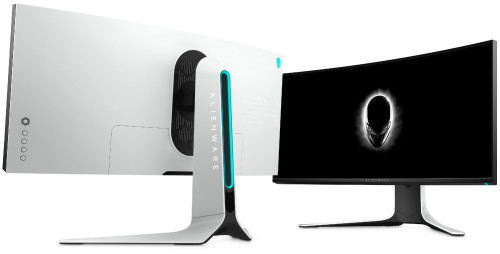
Dell released another 34" Ultrawide with design more in line with their recent products line up.
The AW3420DW carries MSRP of USD $1.5k  rclxub.gif

user posted image
*
Will be interesting to see the pricing of this model in Malaysia.
The current online/retail price AW3418DW is going for RM 4,429 at the moment.
teng_08
post Sep 16 2019, 02:28 PM

Enthusiast
*****
Senior Member
978 posts

Joined: Dec 2008


QUOTE(DWExia @ Sep 16 2019, 12:02 AM)
Anyone knows how much for fix the screen panel for x34

user posted image
*
Ouch, what happened??
teng_08
post Sep 16 2019, 04:11 PM

Enthusiast
*****
Senior Member
978 posts

Joined: Dec 2008


QUOTE(DWExia @ Sep 16 2019, 02:52 PM)
Nothing happened. I didnt knock or hit it. I turned on the power and that just happened
*
Is it still under warranty?


Change to:
| Lo-Fi Version
0.1351sec    0.57    7 queries    GZIP Disabled
Time is now: 8th December 2025 - 03:01 PM