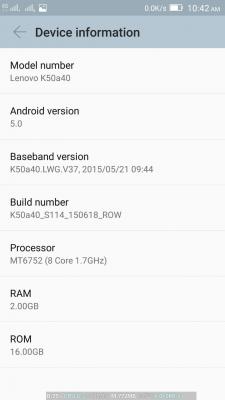
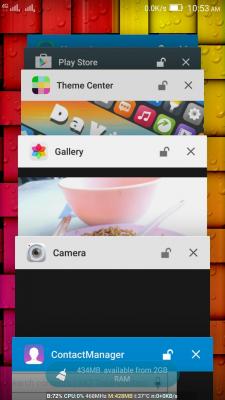
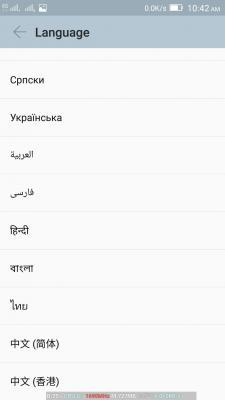
QUOTE(mulut99 @ Jul 12 2015, 09:26 PM)
Can u share the steps how to flash it? I tried just now but fail, reinstall back china rom. Have to do all the phone setting and apps all over again 

failed at which part ?Lenovo K3 Note | Official Thread, AKA A7000+ in Malaysia
|
|
 Jul 12 2015, 10:40 PM Jul 12 2015, 10:40 PM
|
 
Senior Member
4,494 posts Joined: Oct 2013 
|
QUOTE(mulut99 @ Jul 12 2015, 09:26 PM) Can u share the steps how to flash it? I tried just now but fail, reinstall back china rom. Have to do all the phone setting and apps all over again failed at which part ? |
|
|
|
|
|
Jul 12 2015, 10:42 PM
|

Senior Member
926 posts Joined: Oct 2005 From: Johor&Penang  
|
Can AP set install the ROM from ROW version?
Does the modem compatible? |
|
|
Jul 12 2015, 10:54 PM
|

Senior Member
571 posts Joined: Oct 2005
|
it is the same procedure as sitescope mention before. here are the steps in brief:
PART A - preparation 1. install & verify all the required drivers. can refer here 2. get the rom & extract the .7z file. download the rom here 3. get spftool and extract the zip file. download spftool here 4. optional - backup app via titanium backup and/or do a backup in recovery. save to external sd card PART B - flashing 1. open spftool. go to option > download > da dl all with checksum > check all the 2 boxes (i have no idea what is this) 2. click scatter loading > select MT6752_Android_scatter.txt from \K50a40_S112_150610_ROW\target_bin\ 3. click download 4. switch off phone. remove sim & sd card 5. connect phone to pc. spftool will start flashing 6. flashing successful when the green circle pops up 7. disconnect phone. switch on the phone and complete the initial set up & update if you have no intention to root, enjoy the new rom! PART C - rooting 1. get twrp recovery and extract the .rar file. download here 2. get supersu .zip file, save to phone. download here 3. open spftool. click scatter loading > select MT6752_Android_scatter.txt from \K3_Note_TWRP\ 4. click download 5. switch off phone. remove sim & sd card 6. connect phone to pc. spftool will start flashing 7. flashing successful when the green circle pops up 8. disconnect phone. DO NOT POWER ON. enter recovery (vol up + vol down + power) 9. install supersu .zip file 10. reboot system and verify supersu app is properly installed PART D - restore 1. if you are still reading, i don't think you understand why you need root... 2. install titanium backup and ehem*lucky patcher*ehem and you know the drill, or perhaps you might want to restore data from recovery so that's it. let me know if i miss anything This post has been edited by uan: Jul 12 2015, 11:00 PM |
|
|
Jul 12 2015, 11:17 PM
Show posts by this member only | IPv6 | Post
#524
|

Senior Member
5,258 posts Joined: Jan 2003 From: At Home
|
QUOTE(uan @ Jul 12 2015, 10:54 PM) it is the same procedure as sitescope mention before. here are the steps in brief: Thanks a lot PART A - preparation 1. install & verify all the required drivers. can refer here 2. get the rom & extract the .7z file. download the rom here 3. get spftool and extract the zip file. download spftool here 4. optional - backup app via titanium backup and/or do a backup in recovery. save to external sd card PART B - flashing 1. open spftool. go to option > download > da dl all with checksum > check all the 2 boxes (i have no idea what is this) 2. click scatter loading > select MT6752_Android_scatter.txt from \K50a40_S112_150610_ROW\target_bin\ 3. click download 4. switch off phone. remove sim & sd card 5. connect phone to pc. spftool will start flashing 6. flashing successful when the green circle pops up 7. disconnect phone. switch on the phone and complete the initial set up & update if you have no intention to root, enjoy the new rom! PART C - rooting 1. get twrp recovery and extract the .rar file. download here 2. get supersu .zip file, save to phone. download here 3. open spftool. click scatter loading > select MT6752_Android_scatter.txt from \K3_Note_TWRP\ 4. click download 5. switch off phone. remove sim & sd card 6. connect phone to pc. spftool will start flashing 7. flashing successful when the green circle pops up 8. disconnect phone. DO NOT POWER ON. enter recovery (vol up + vol down + power) 9. install supersu .zip file 10. reboot system and verify supersu app is properly installed PART D - restore 1. if you are still reading, i don't think you understand why you need root... 2. install titanium backup and ehem*lucky patcher*ehem and you know the drill, or perhaps you might want to restore data from recovery so that's it. let me know if i miss anything  . Will try it out soon. . Will try it out soon.Can TS please post time on 1st page? Tq. |
|
|
Jul 13 2015, 12:20 AM
Show posts by this member only | IPv6 | Post
#525
|
|
Senior Member
5,258 posts Joined: Jan 2003 From: At Home
|
» Click to show Spoiler - click again to hide... « Thanks again for the steps. 100% works for me. Support multi langugues. No more chinese words. This post has been edited by mulut99: Jul 13 2015, 12:23 AM |
|
|
Jul 13 2015, 12:29 AM
|
|
Senior Member
571 posts Joined: Oct 2005
|
nice to know it works for you. oh did you do the ####682# code (change region)? the phone will restart with welcome screen default to bm. i'm not sure how this impact the phone.
|
|
|
|
|
|
Jul 13 2015, 12:54 AM
Show posts by this member only | IPv6 | Post
#527
|
|
Senior Member
5,258 posts Joined: Jan 2003 From: At Home
|
QUOTE(uan @ Jul 13 2015, 12:29 AM) nice to know it works for you. oh did you do the ####682# code (change region)? the phone will restart with welcome screen default to bm. i'm not sure how this impact the phone. Yup, just did it, the device will update again. I think u are right, is region setting. Now my K3N is Malaysia set already  Double tap ON screen still available but double tap OFF screen dont have. I cant find the setting Good news is Whatsapp notification led is working and same to other apps also. This post has been edited by mulut99: Jul 13 2015, 01:04 AM |
|
|
Jul 13 2015, 05:22 AM
|
|
Senior Member
4,494 posts Joined: Oct 2013
|
QUOTE(mulut99 @ Jul 13 2015, 12:54 AM) Yup, just did it, the device will update again. I think u are right, is region setting. Now my K3N is Malaysia set already How about +6 numbers ? Contact able to recognize ? Double tap ON screen still available but double tap OFF screen dont have. I cant find the setting Good news is Whatsapp notification led is working and same to other apps also. |
|
|
Jul 13 2015, 05:23 AM
|
|
Senior Member
4,494 posts Joined: Oct 2013
|
QUOTE(one_guy @ Jul 12 2015, 10:42 PM) Can AP set install the ROM from ROW version? Yes...Does the modem compatible? Btw, there's no ORI frm lenovo msia set as of to date. All are AP. |
|
|
Jul 13 2015, 09:40 AM
Show posts by this member only | IPv6 | Post
#530
|
|
Senior Member
5,258 posts Joined: Jan 2003 From: At Home
|
QUOTE(sitescope @ Jul 13 2015, 05:22 AM) How about +6 numbers ? Contact able to recognize ? No issue.QUOTE(sitescope @ Jul 13 2015, 05:23 AM) Yes... Yup, malaysia set is all AP set. And this indian rom works like Original Malaysia rom like other phones like Samsung, Xiaomi etc...Btw, there's no ORI frm lenovo msia set as of to date. All are AP. This post has been edited by mulut99: Jul 13 2015, 09:40 AM |
|
|
Jul 13 2015, 10:17 AM
|
|
Junior Member
232 posts Joined: Oct 2012 
|
QUOTE(miloy2k @ Jul 12 2015, 04:33 PM) international and local supplier afaik. If battery is ur concern, go for p70 since be getting it foc, dun care much ap or ori. hehe.. p70 got bigger battery vs k3 note 3k battery. using foc zen2 550ml currently.. 3k just cun2 5 to 6 hours sot on 4g@3g mode. still using my note 2 plus zerolemon as main phone..  http://smartphones.specout.com/compare/281...-Lenovo-K3-Note http://www.smartprix.com/mobiles/lenovo_k3...110121v4zl7.php |
|
|
Jul 13 2015, 10:58 AM
|

Senior Member
4,349 posts Joined: Sep 2005
|
QUOTE(supermomolvl2 @ Jul 13 2015, 10:17 AM) If battery is ur concern, go for p70 But still on KitKKathttp://smartphones.specout.com/compare/281...-Lenovo-K3-Note http://www.smartprix.com/mobiles/lenovo_k3...110121v4zl7.php |
|
|
Jul 13 2015, 11:13 AM
|
Junior Member
323 posts Joined: Jul 2005 From: Kuala Lumpur 
|
For me i will go for new model
|
|
|
|
|
|
Jul 13 2015, 12:42 PM
Show posts by this member only | IPv6 | Post
#534
|
|
Senior Member
5,258 posts Joined: Jan 2003 From: At Home
|
QUOTE(WhiteMouse @ Jul 13 2015, 11:13 AM) For me i will go for new model Agree, me also if buy new phone sure go for new model. |
|
|
Jul 13 2015, 03:05 PM
|
|
Senior Member
4,494 posts Joined: Oct 2013
|
QUOTE(surefire v LED @ Jul 13 2015, 10:58 AM) But still on KitKKat then go for k3note... |
|
|
Jul 13 2015, 03:06 PM
|
|
Senior Member
4,494 posts Joined: Oct 2013
|
QUOTE(mulut99 @ Jul 13 2015, 09:40 AM) No issue. good... strong reason to flash row rom tonight... |
|
|
Jul 13 2015, 03:39 PM
|

All Stars
15,773 posts Joined: Jan 2003 From: Capital Wasteland
|
QUOTE(supermomolvl2 @ Jul 13 2015, 10:17 AM) If battery is ur concern, go for p70 Noted Tq http://smartphones.specout.com/compare/281...-Lenovo-K3-Note http://www.smartprix.com/mobiles/lenovo_k3...110121v4zl7.php QUOTE(surefire v LED @ Jul 13 2015, 10:58 AM) But still on KitKKat Kit Kat still ok imo, then again lolipop have their own pro XD  QUOTE(mulut99 @ Jul 13 2015, 12:42 PM) Agree, me also if buy new phone sure go for new model. Noted, SOT on 3g or LTE mode any idea? 4-6 hours?  |
|
|
Jul 13 2015, 04:12 PM
Show posts by this member only | IPv6 | Post
#538
|
|
Senior Member
5,258 posts Joined: Jan 2003 From: At Home
|
QUOTE(miloy2k @ Jul 13 2015, 03:39 PM) Noted Tq K3 Note can do that...My K3N with 4G+Wifi can get 4 hours on China rom. Upgraded to India rom yesterday night.....SOT 2 hours and 50min....still got 45% battery left. And with light gaming also. Will keep testing it. Kit Kat still ok imo, then again lolipop have their own pro XD Noted, SOT on 3g or LTE mode any idea? 4-6 hours? This post has been edited by mulut99: Jul 13 2015, 04:15 PM |
|
|
Jul 13 2015, 04:26 PM
|
|
All Stars
15,773 posts Joined: Jan 2003 From: Capital Wasteland
|
QUOTE(mulut99 @ Jul 13 2015, 04:12 PM) K3 Note can do that...My K3N with 4G+Wifi can get 4 hours on China rom. Upgraded to India rom yesterday night.....SOT 2 hours and 50min....still got 45% battery left. And with light gaming also. Will keep testing it. Good, more less what I get with zen2 550ml (after root of coz) Thank you for sharing  |
|
|
Jul 13 2015, 08:53 PM
Show posts by this member only | IPv6 | Post
#540
|
|
Senior Member
5,258 posts Joined: Jan 2003 From: At Home
|
Here is a short review on this India Rom after use for 1 day
- Battery not much different with China rom - Camera v4.1....nice but slightly slower than China rom when snapping photo - Camera GUI improved - Secondary camera improved but no more age detection. » Click to show Spoiler - click again to hide... « - Double tap for off screen not available on this version. Only got double tap for on screen. - Not all apps can transfer to External SDCard. China rom can transfer all google apps to External SDCard. - For gaming........smooth but China rom slightly smoother - +60 no issue - Loaded with gapps and no 3 party apps on it. Original calendar also using google calendar. - Touchscreen sensitivity improved - Support multilanguage - Guess mode & Secure Zone [new feature] - If can get K3N Teanna edition back battery cover.....it can enable ceramic speaker mode. China rom also got this feature. - Notification panel looks better and more features on it. - Notification center no issue....china rom notification center buggy, got issue when set notification for apps on SDcard. - Auto run features improved - Notification Led is working on Whatsapp and other apps - Call/sms for sim1 and sim 2 can set as default.....no need to choose which sim card when want to make call or sms. Thats all i can remember Will add in if i found something........ This rom is awesome and the phone also awesome for price below RM600. » Click to show Spoiler - click again to hide... « P/S: Thanks to uan for the flashing steps This post has been edited by mulut99: Jul 13 2015, 11:57 PM |
| Change to: |  0.0232sec 0.0232sec
 0.92 0.92
 6 queries 6 queries
 GZIP Disabled GZIP Disabled
Time is now: 10th December 2025 - 02:59 PM |
 Quote
Quote