

Support for apps to run on an Mibox international version external storage or thumbdrive will only arrive when Android 7.0 is released
Xiaomi Mi Box User Club, let's talk mi box!
Xiaomi Mi Box User Club, let's talk mi box!
|
|
 Jan 13 2017, 06:30 PM Jan 13 2017, 06:30 PM
Return to original view | Post
#21
|
 
Senior Member
710 posts Joined: Aug 2009  
|
Support for apps to run on an Mibox international version external storage or thumbdrive will only arrive when Android 7.0 is released
|
|
|
|
|
|
Jan 15 2017, 05:06 PM
Return to original view | Post
#22
|
|
Senior Member
710 posts Joined: Aug 2009
|
QUOTE(kmrdeva @ Jan 13 2017, 07:23 PM) Sure ah. I can move most games to my USB storage already, now. You can, but it's still will take up space in internal space |
|
|
Jan 16 2017, 03:43 AM
Return to original view | Post
#23
|
|
Senior Member
710 posts Joined: Aug 2009
|
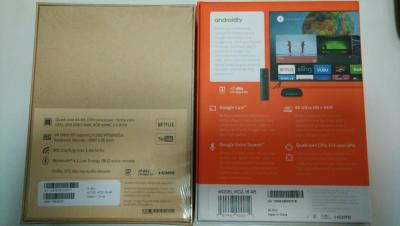
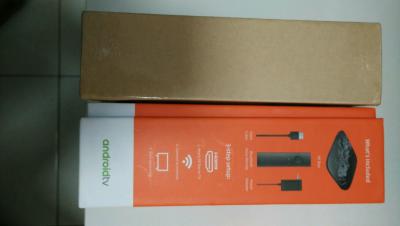
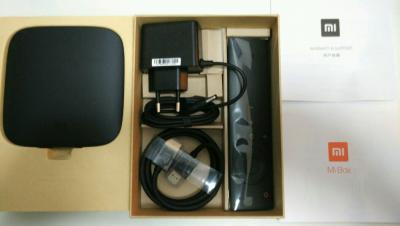
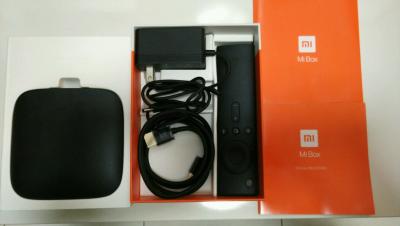
For those who wonder how different the packaging for the Mi Box with Android TV 6.0 is between the one released in the USA and from China. They both have the same model number mdz-16-ab. Functionality is the same, If the US version gets updated, so does the international version. And no, your regular mi box China interface cannot be converted to run Android TV. The international version also has playstore by default. If unsure, always check if the seller states that it runs ANDROID TV. There's a difference between android TV the operating system and Android box which most lesser known companies are offering.
For the photos below, the orange box is the unit sold in the US while the unit I received from China via AliExpress is in the plain brown box. Cheers Attached thumbnail(s) 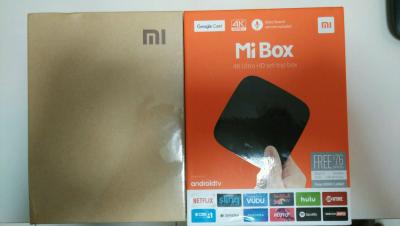



|
|
|
Jan 16 2017, 07:49 PM
Return to original view | Post
#24
|
|
Senior Member
710 posts Joined: Aug 2009
|
I got mine from Lelong, but this seller at Lazada also sells it at a lower price and no overseas shipping waiting period.
Air Mouse C120 This post has been edited by kucuboy: Jan 16 2017, 07:49 PM |
|
|
Jan 16 2017, 07:52 PM
Return to original view | Post
#25
|
|
Senior Member
710 posts Joined: Aug 2009
|
QUOTE(kmrdeva @ Jan 15 2017, 08:46 PM) I see. So far so good for me - i keep all my apps like Plex, Netflix, Al-Jazeera on the internal storage (3.8GB free from total of 5.1GB). I updated my Mi Box last night. Migrated Kotor to Thumbdrive but it keeps crashing 10-20mins during play. Gave up and redownloaded it. The format and use USB storage as internal storage is still problematic. Best hope is to wait for Android 7.0 update to solve it, hopefully once and for all.My 20 games are on the microSD card inside my USB hub cum card reader. |
|
|
Jan 16 2017, 08:21 PM
Return to original view | Post
#26
|
|
Senior Member
710 posts Joined: Aug 2009
|
Yep, its definitely good enough for me for the time being. There surely will be a 7.0 update because Xiaomi wont want to burn their reputation in the US. I also follow the Android TV subreddit. Learn quite a lot from there.
|
|
|
|
|
|
Jan 19 2017, 01:22 AM
Return to original view | Post
#27
|
|
Senior Member
710 posts Joined: Aug 2009
|
QUOTE(Deniece611 @ Jan 18 2017, 08:55 PM) Hi, may i know where did you buy the international version of mi box? I am looking for one but looks like sellers in Malaysia only selling the chinese version. Www.aliexpress.com |
|
|
Jan 19 2017, 01:45 PM
Return to original view | Post
#28
|
|
Senior Member
710 posts Joined: Aug 2009
|
QUOTE(zero721 @ Jan 19 2017, 01:34 PM) Aliexpress all third party seller right? Yep, read the user reviews and decide which is best |
|
|
Jan 21 2017, 01:45 PM
Return to original view | Post
#29
|
|
Senior Member
710 posts Joined: Aug 2009
|
QUOTE(Deniece611 @ Jan 19 2017, 05:12 PM) One last thing, are u able to receive china/taiwan/hong kong/Korean content in the international version one? If you managed to find the apk, sure. But it will not show on the main screen. You can easily get around this by installing HAL launcher and be able to access the app from there. OR you can access the settings> Apps > then select it from there.Thank you for the explanation! 😁 |
|
|
Jan 24 2017, 02:12 PM
Return to original view | Post
#30
|
|
Senior Member
710 posts Joined: Aug 2009
|
QUOTE(gwong @ Jan 24 2017, 09:37 AM) Bro, anyway to remove or add anything to the Mibox Recommended Apps from the main screen? Thanks. To improve your overall apps layout do the below step. Dont worry you can always re-enable it if it becomes beneficial in the future.Settings> Apps> System App> Disable Xiaomi Leanback Then go to Settings> Home Screen> Hide recommended apps (unselect the ones you dont want to appear when you do a voice search) |
|
|
Jan 30 2017, 06:20 PM
Return to original view | Post
#31
|
|
Senior Member
710 posts Joined: Aug 2009
|
The setup for the International Mi Box is a breeze. Just like when you first setup a new android phone. Accroding to a reddit thread, a new update (hopefully Nougat 7.0) is expected after CNY (a source from the Xiaomi Android TV team apparently).
|
|
|
Feb 5 2017, 01:36 PM
Return to original view | Post
#32
|
|
Senior Member
710 posts Joined: Aug 2009
|
QUOTE(zeeyen @ Feb 4 2017, 09:11 PM) In short, there is no software and functionality difference between the US (Orange Box) vs the International (Brown Box) versions, correct? Software is the biggest difference with the Chinese version and the international version. Can almost say night and day difference. If you want the closest android feeling on a Xiaomi device, International version is the way to go.PS - BTW, where to purchase the US (Orange Box) version? QUOTE(zuss @ Feb 5 2017, 01:48 AM) hi i am new at these android box.i want to buy Xiaomi Mi Box 4K with HDR 2016 international model.i have a special ip tv. can i watch it on mi box.i mean can i install ip tv applications from play store like ip tv player. It may not appear on the front page of Android TV launcher but (because it might not be in the Android TV playstore) but you can install an app called HALauncher and access it from within there. |
|
|
Feb 6 2017, 05:55 PM
Return to original view | Post
#33
|
|
Senior Member
710 posts Joined: Aug 2009
|
QUOTE(zuss @ Feb 5 2017, 07:35 PM) didyou test it at HALauncher or see app there.thx for the help It will work, if it can work on your android tablet or phone, for sure can work. You might need to either connect a wired/ wireless mouse or an airmouse to use it though. |
|
|
|
|
|
Mar 16 2017, 03:43 PM
Return to original view | Post
#34
|
|
Senior Member
710 posts Joined: Aug 2009
|
QUOTE(lleihuan @ Mar 11 2017, 11:56 AM) since you are into mibox- Good list, I hope you don't mind, I shared it in the Android TV reddit. Credited it to you. Cheers1-MDZ-15-AA and MDZ-16AA-do not buy because only 1gb ram and 4bg storage 2-MDZ-16-AB-(International version) 2gb ram/8gb storage/chipset-Amlogic S905X-H Quad core/chromecast ultra built-in/google playstore 3-MDZ-18-AA-(Xiaomi TV 3 Enhanced)2gb ram/8gb storage/Chipset- MT8693 Hexa 6 Core/no google playstore 4-MDZ-19-AA-(Xiaomi TV 3S)2gb ram/8gb storage/chipset-Amlogic S905X-H Quad core/no google playstore Item 3 and 4 are mainly for China only.of course there are already people selling here.I think the box is all in chinese. Depending on your requirement and budget.I choose item 2 because it has chomecast built-in and to let it work with my google home.And also google invested in MDZ-16AB. |
|
|
Mar 19 2017, 08:39 PM
Return to original view | Post
#35
|
|
Senior Member
710 posts Joined: Aug 2009
|
SPMC is more optimised on android and I'm not mistaken, SPMC alone can use the voice search feature with the new Mi Box (intl version).
|
|
|
Mar 22 2017, 02:45 PM
Return to original view | Post
#36
|
|
Senior Member
710 posts Joined: Aug 2009
|
QUOTE(lleihuan @ Mar 22 2017, 09:28 AM) Using USB 3.0 Hub with 64USB Flash Drive and 120mm fan. Walaowei! Mi Box on steroids. Why does yours get so hot that it needs that sort of extreme cooling method.I think mibox do not have the power to support the fan. Occasionally shutdown and wi-fi disconnect (daily stream 12 hours live tv) So used 5V dc supply to parallel support the fan and usb hub. picture is worth a thousand words [attachmentid=8623349] |
|
|
Mar 23 2017, 10:36 PM
Return to original view | Post
#37
|
|
Senior Member
710 posts Joined: Aug 2009
|
QUOTE(ktek @ Mar 23 2017, 10:08 PM) kodi become red tint. is that normal? nope. check your connections again. Maybe your unit is faulty. |
|
|
Mar 31 2017, 07:37 AM
Return to original view | Post
#38
|
|
Senior Member
710 posts Joined: Aug 2009
|
QUOTE(gwong @ Mar 30 2017, 09:04 AM) Hi, so sorry it's my mistake, infact AOTG ver 8.0.9 could not run on MiBox 3 Int'l Version after checking. Download an app called apkpure from its website of the same name. Its like a another version of the playstore, only without any sign in request or geographical restriction. i downloaded AOTG from there and if I want to update my app, I also do the same in apkpure.I got mixed up and confused coz it could run on my Nexus Player with Android TV 7.1.1. |
|
|
Apr 1 2017, 01:20 PM
Return to original view | Post
#39
|
|
Senior Member
710 posts Joined: Aug 2009
|
QUOTE(kucuboy @ Mar 31 2017, 07:37 AM) Download an app called apkpure from its website of the same name. Its like a another version of the playstore, only without any sign in request or geographical restriction. i downloaded AOTG from there and if I want to update my app, I also do the same in apkpure. Maybe need to download the latest version. Astro just released it as Astro Go - https://www.lowyat.net/2017/128334/astro-go-launch/ |
|
|
Apr 20 2017, 04:06 PM
Return to original view | Post
#40
|
|
Senior Member
710 posts Joined: Aug 2009
|
QUOTE(aceedburn @ Apr 19 2017, 10:36 PM) Tried already. Version 8.1.9 and the latest version 8.1.26 still deosnt' work. Please send us a screenshot of it working if anyone has. Its not working for me as well. Either I get "Unfortunately Astro Go has stopped" or an error -1 if trying to play something in the app. No idea how to troubleshoot it. Also using mi box international version.This post has been edited by kucuboy: Apr 20 2017, 04:07 PM |
| Change to: |  0.0519sec 0.0519sec
 1.09 1.09
 7 queries 7 queries
 GZIP Disabled GZIP Disabled
Time is now: 15th December 2025 - 01:11 PM |
 Quote
Quote