Welcome Guest ( Log In | Register )

Outline · [ Standard ] · Linear+

 Smart Home, Let's discuss

views
     
azbro
post Jul 25 2024, 01:03 PM

Look at all my stars!!
*******
Senior Member
4,403 posts

Joined: Jan 2007
From: Johor Bahru


QUOTE(alucard89 @ Jul 25 2024, 11:24 AM)
Not a problem, can just integrate to HA
That’s also a plug right, not the sonoff pow?
No issues using with your ac or water heater?
*
I'm using the round plug in type.
Actually I using it to control on/off for a light/buzzer linked to my autogate.
So when my autogate opens, lights and noise will come out. I'm actually not using it for high current appliances and it has a basic built in electricity monitor which I don't use this function at all.

You may need to try out 1 first.

Try using it with WiFi disconnected for an hour, does it still record the electricity? Cos sometimes for WiFi does cut off during to a number of reasons.
azbro
post Jul 26 2024, 11:58 AM

Look at all my stars!!
*******
Senior Member
4,403 posts

Joined: Jan 2007
From: Johor Bahru


QUOTE(ZeneticX @ Jul 26 2024, 01:31 AM)
1 year since moved in to my house, which is running full stock Tuya setup on Smart Life app connected to Google Home. Happy to report all components are still working fine so far.

1 x 4" smart panel with Zigbee hub
14 x Zigbee smart switches (by Moes)
3 x smart curtains (on wifi)
1x smart lock (on wifi)
1x CCTV (on wifi)

Only few things I'm not really happy about -

i) The smart lock doesn't record any exit events, only entry. So if you want to do some exit automation like switch off all the lights etc you have to figure out a workaround instead of relying on the lock. I just setup a tap-to-run automation and assign it as shortcut on the 4" panel. Or I just use Google Assistant.

ii) The CCTV doesn't reconnect to wifi if its disconnected from it. Lets say your wifi have issues or you just restarted your router, even if its up later the CCTV will remain disconnected. Have to force reboot it only will reconnect, and there's no way to reboot from the app

iii) Just realised this recently but I should've bought a standalone Zigbee hub instead of relying on the smart panel. If anything goes wrong its easier to replace compared to the smart panel. But so far still working fine... touch wood

That's all that I could think about. Haven't really dwell any deeper into the functionalities other than basic ones like scheduled turn on/off. Recently just added a temperature + humidity sensor and a scene switch. Thinking off getting some presence sensors to play around next maybe.

user posted image
*
For doors or locks or cabinets, just add a ZigBee door sensor.

WiFi dependent devices are really pain. When they disconnect, you need to off/on the switch. So for me, my lights usually disconnected. I use a WiFi switch for it. So I can on off remotely. Sicks right? But that's one way. Lucky my Sonoff ewelink CCTV reconnects back after disconnecting. But my WiFi lights when disconnected remains until someone on/off the switch. So I also add a WiFi switch for it.

Normally temp sensor is to trigger alarm, or fan / Aircon / dehumidifier. Or just to send you notifications. I use it at the kitchen at my mother's bed as she most of the time on it
Wanted to link to the fan and humidifier, but later.

Presence sensor need to play around with the positioning. The worst position is an open area. Some detects everything until many meters away. So I added a presence sensor and a camera event to combine detection before activating something. Or else everytime false.

Cheers


azbro
post Jul 26 2024, 03:13 PM

Look at all my stars!!
*******
Senior Member
4,403 posts

Joined: Jan 2007
From: Johor Bahru


QUOTE(PowerGadget @ Jul 26 2024, 02:21 PM)
Thanks for sharing, you rock! Really creative way of doing it. I going to source for the container and do it myself this weekend/
Would it be better if I seal it using silicone instead? Or black tape would do? Yours been how long in outdoor condition?

I read some comments on Reddit saying they just put below the gate without any protection, was totallly shock. Not gonna risk it.. haha…

Thanks in advanced!
*
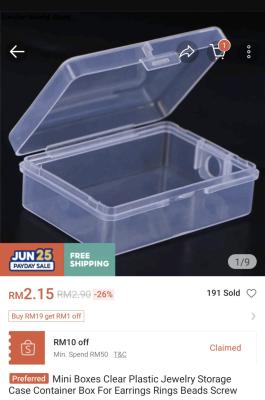
Here is the picture of the small box, but I dunno if it fits yours
Attached Image

I use black tape for both the devise and small box. No problem with rain.
Silicone I don't think will stick on the box material type.

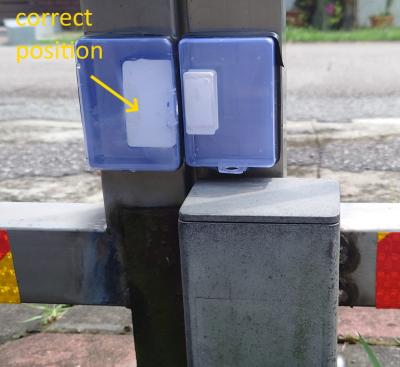
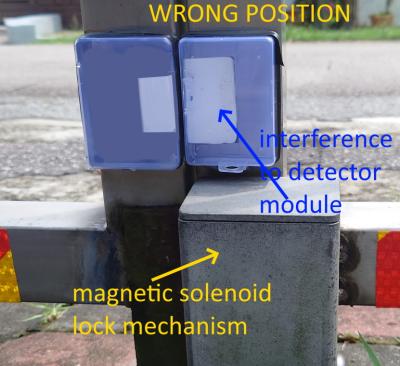
Make sure to align the magnet and detector inside the box.
Example, my gate when closed is not really align, so you can stick the device in the box in such a way both are align. Quite difficult to explain to you.

And take note on the position below.

Attached Image

Attached Image

Happy DIY and do it on a cool day. Later get headache due to the hot sun cos you will need to do some adjustments. Buy the 3M VHB tape to do all the sticking. And black electrical tape to seal the sides

This post has been edited by azbro: Jul 26 2024, 03:30 PM
azbro
post Jul 26 2024, 03:27 PM

Look at all my stars!!
*******
Senior Member
4,403 posts

Joined: Jan 2007
From: Johor Bahru


QUOTE(ZeneticX @ Jul 26 2024, 03:10 PM)
Problem with my CCTV is there's not even an on/off switch on it also, so everytime it disconnect I have to climb up to the plug itself to switch off power to force restart it sweat.gif but luckily so far only happen few times for the whole year, always due to router restart, otherwise the CCTV is stable and working fine
*
I'm not sure about other brands, but I think Tuya and Ewelink CCTV still far behind the more specialist CCTV brands which are rock solid. No such hassle and delay to review old footage and much more options on the camera.


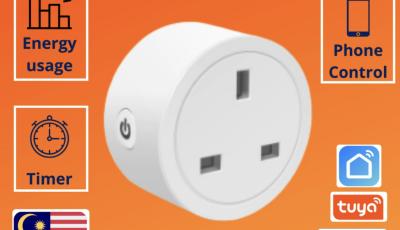
If you are using plug for the CCTV then it's much easier, can buy those cheapo WiFi plugs so can force start your CCTV remotely
Attached Image


azbro
post Jul 26 2024, 04:09 PM

Look at all my stars!!
*******
Senior Member
4,403 posts

Joined: Jan 2007
From: Johor Bahru


QUOTE(epicure @ Jul 26 2024, 03:41 PM)
I also use these plugs to reboot hubs, cctv power supplies etc. but i’ve had 3 tuya wifi plugs die on me already. When it fails, the relay keeps turning on and off and on and off non stop, like a reboot loop. Kinda iffy about it as it may rosak the device that is connected to the plug.

However, the zigbee plugs that i have have not failed as of yet. Probably will migrate all wifi plugs to zigbee plugs soon. Wifi devices are indeed a pain.
*
I agree 100% on this. So far ZigBee has never disconnected on me. But WiFi is like often. Whatever products that has ZigBee version, should get it instead of WiFi.
If wanna get WiFi better go for brand. My WiFi Sonoff lights so far no issue, but Woolley light like stupid like that, keeps disconnecting every few days.
azbro
post Jul 28 2024, 04:21 PM

Look at all my stars!!
*******
Senior Member
4,403 posts

Joined: Jan 2007
From: Johor Bahru


QUOTE(LostAndFound @ Jul 28 2024, 03:41 PM)
Hi all, newbie here to start asking questions - is there something to read up first so I don't re-ask basic things? Doing renovation/extension for sub-sale soon and want to plan out possibility of smart home (initially just on/off control for lighting and cooling). My basic reading so far is to use zigbee rather than wifi (zwave costlier), and it seems there's a few brands mentioned in recent pages (aqara? sonoff?) to investigate. The last time I looked into these things Tuya was the go-to, has that changed?
*
For me, if want to plan to renovate, all wall switches must have a neutral incoming. When future when you want to put a smart wall switches, no need those capacitor no neutral type.

And a wall plug socket for CCTV positions even for the outside, some may even use the ethernet for CCTV.

Those are the basics and priority in my opinion.

If you mention Aqara, then should get that brand.
azbro
post Jul 28 2024, 07:25 PM

Look at all my stars!!
*******
Senior Member
4,403 posts

Joined: Jan 2007
From: Johor Bahru


QUOTE(LostAndFound @ Jul 28 2024, 05:09 PM)
Should I prioritize wall + ethernet for CCTV or just POE?
*
I've never tried POE before. But you should get one to try it out.
azbro
post Jul 29 2024, 09:44 PM

Look at all my stars!!
*******
Senior Member
4,403 posts

Joined: Jan 2007
From: Johor Bahru


QUOTE(soonvee @ Jul 29 2024, 04:14 PM)
Hi, I am having some issues of pairing my smatrul zig bee switch into my smart life apps and it's seems can't discover the devices

Frist time encountered this issue as previously my other switch all ok or is there any limitations for pairing this ? Currently this is my 7th switch under the same ZigBee hub.

Anyone can help 😥

https://youtube.com/shorts/48XpdshA26s?si=KZpgkrasCspuWifp

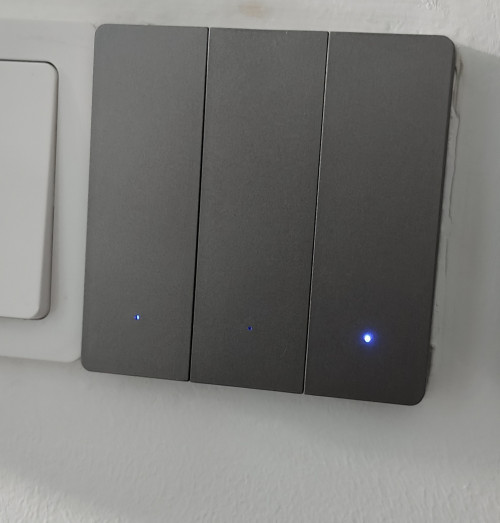
user posted image
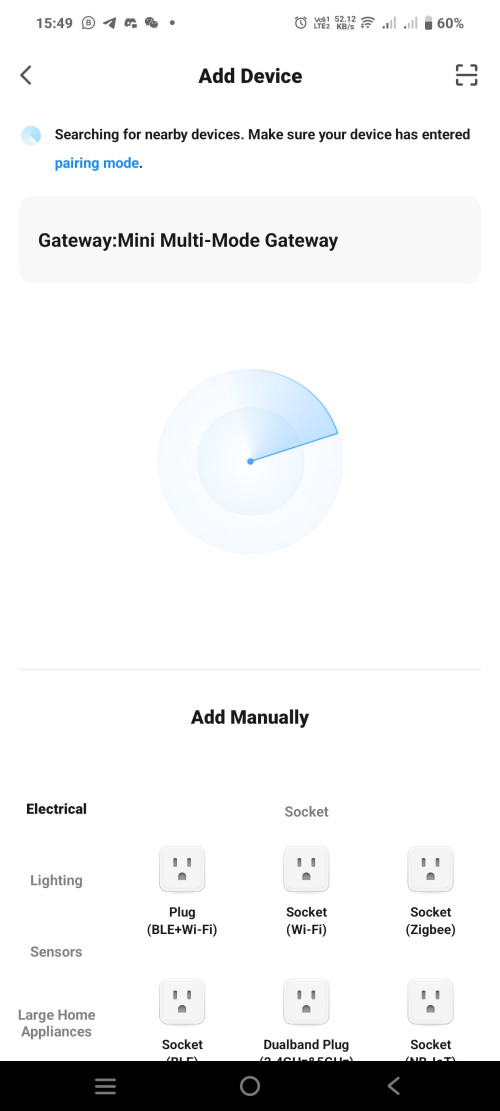
user posted image
*
This one you need to solve yourself.

Trust me, most of these items are OEM for another brand and requires a different method. So sometimes you cannot rely on YouTube. Try using adding device using WiFi if fail try Bluetooth or even ZigBee. You never know which one success.
If fails, try naming your handphone with same name and password as your router. And try.
azbro
post Jul 30 2024, 12:25 PM

Look at all my stars!!
*******
Senior Member
4,403 posts

Joined: Jan 2007
From: Johor Bahru


QUOTE(LostAndFound @ Jul 30 2024, 11:31 AM)
As I understand, POE requires either injector or the switch to support POE. But my (possibly outdated) understanding is also that POE has a slightly higher risk of non-standard components causing devices to fry/burn (because of the increased voltage supplied). If my entire network no POE then theoretically less risk for all the wired devices (but then would need power point for every camera).
Thanks this is helpful. I'm familiar with CCTV which support wifi, as I currently using cheap china device for that (unfortunately the data is cloud-based and calling home to China too, would prefer to move away from that). So for me is option 1 or option 2, I guess as long as aesthetics not an issue option 1 is the most flexible (plus can always be converted to POE later on if the wall socket is needed for something else). Though I think external camera exposed to some splashing from rain maybe POE is safer?
*
You think you know it all when using cheap WiFi China CCTV, until...
Those Tuya and Ewelink CCTV are seriously worst than those. Always disconnecting. And if you use if for scenes and automation, you will be seriously disappointed. It is so bad that I only wish they could add into their settings a "Disconnecting" options.

Anything External and waterproof also has it's connectors covered up.
azbro
post Aug 23 2024, 08:37 AM

Look at all my stars!!
*******
Senior Member
4,403 posts

Joined: Jan 2007
From: Johor Bahru


Hi, anyone install Ewelink apps on Android car player?

I don't mean Android Auto link, that one can only do manual scenes.

But I mean in the Android car player itself, so can view the full version. After I install the screen like only have the top part, cannot scroll down, so cannot input the username and password.

This post has been edited by azbro: Aug 23 2024, 08:38 AM
azbro
post Sep 10 2024, 09:15 AM

Look at all my stars!!
*******
Senior Member
4,403 posts

Joined: Jan 2007
From: Johor Bahru


Hi, any WiFi 2.4Ghz router to recommend for smart home?

Extended range and at least 60 connections.

I try best to use ZigBee stuff instead of WiFi, but things just keep adding up. All those CCTV also using 2.4Ghz. my current router I think gonna max out soon as stuff gets disconnected many times

My house currently using 300mbps Unifi DIR X3060Z.

Any router to recommend to bridge to to my current router?

Thank you
azbro
post Sep 10 2024, 04:33 PM

Look at all my stars!!
*******
Senior Member
4,403 posts

Joined: Jan 2007
From: Johor Bahru


QUOTE(ntw @ Sep 10 2024, 01:28 PM)
TPlink Omada, can have multiple SSID to separate your smart home devices
*
Seriously, I read the specs and can only understand a quarter of it
What is this thang?! Will look into YouTube for it's review, anyway, interesting knowledge for me. Thank you


QUOTE(dest9116 @ Sep 10 2024, 04:09 PM)
If keep disconnected definitely router problem. Those router provided by tm for free usually very low quality and low powered (range). If you need wifi 6 then can consider tplink ax73 or Asus tuf 4200 or Asus rog routers depending on your budget.

If you need wifi 6E then can consider tplink AXE75

If you just need normal wifi, then consider tenda ac18

I'm currently using tenda ac18 with over 60+ connections also, never disconnect once.
*
Thank you so much for this info.

Salute

This post has been edited by azbro: Sep 10 2024, 05:48 PM
azbro
post Sep 11 2024, 09:36 AM

Look at all my stars!!
*******
Senior Member
4,403 posts

Joined: Jan 2007
From: Johor Bahru


QUOTE(Oltromen Ripot @ Sep 10 2024, 08:48 PM)
I have same problem like you. 70 odd permanent IoT devices tenggelam timbul at their own convenience, not at my convenience. Maxis' Huawei LG8245X-10 mesh.
Difficult to manage since we're not staying at the property every day.

I found that if i have only 1 SSID on the mesh, and all IoT connect to that, they will come and go. I find that about 20 devices per SSID seems to be working to make them stay online, thus I had 4 SSID on the same mesh.

--

I switched to TP-Link Omada.
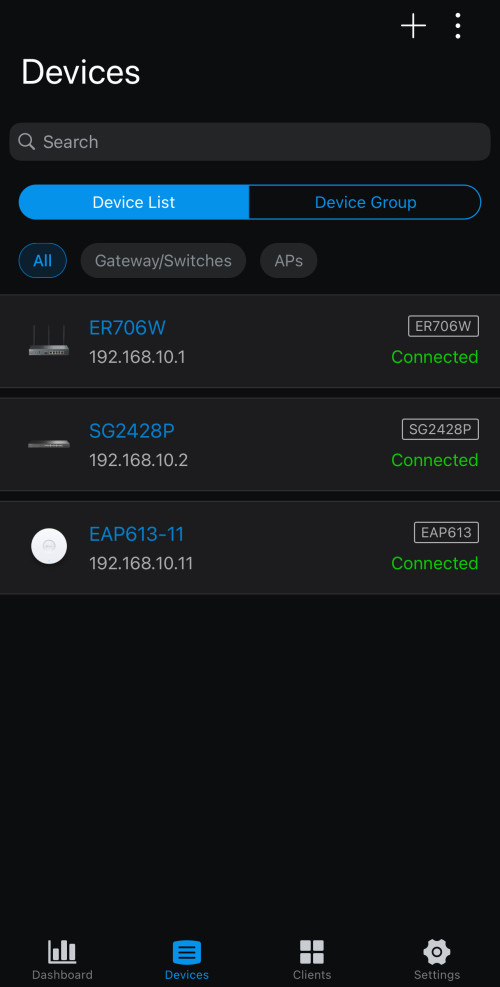
I bought ER706W gateway and EAP613.
I was surprised that when I initially installed just 1 EAP613, it immediately took over 4 IoT-related SSID and 1 CCTV SSID without breaking a sweat. All devices connected and online, 24/7.
I have also moved all the IoT devices back to only 1 SSID.

It made the 4 previously-configured Maxis'  a bad preschool joke!

I resolved to expand further on Omada. Replaced the root LG8245X-10 with ER706W. Bought a 24-port PoE managed switch and moved all my wired CCTV and devices to it as well. Now my network is split into VLANs for Security, Automation, and for interactive users. All managed from central and accesible from web and app.

The only beef is, it takes 5-10 minutes for network to be usable if reboot the Omada gateway. But other than that, no complain.

Caution:

Access Points of Omada are wired-only backbone.
But they are VLAN-capable.
Each AP have limit to the number of SSID they can deploy; and each SSID can have their own VLAN, thus separating traffic and priority right at the AP.
EAP613 can deploy maximum 8x SSID on 2.4GHz and another 8x SSID on 5GHz; that means you can have between 1 VLAN to 16 VLANs delivered on wireless.
Depending on model, they come with choice of PoE or power adapter; no difference to deploying wired CCTV.

user posted image
*
Firstly thank you for the feedback, I might to study more on this tplink omada. It's kind of interested of the capabilities.

azbro
post Sep 12 2024, 08:35 PM

Look at all my stars!!
*******
Senior Member
4,403 posts

Joined: Jan 2007
From: Johor Bahru


So meaning to say, layman's terms

If I have let's say 40 devices, including a dozen CCTV.
All having good signal coverage.

Creating a mesh will not help at all in improving the device stability. Right?

Or, is it better to doing it as an access point rather than Mesh. Mainly to stability.

I'm asking cos about to buy a same router (used) and the one that came with the Unifi package (X3060Z)

Or better to buy an old router like Tenda AC18 (AC2100) that is able to connect to 50 devices and create it as an Access Point

Thanks in advance


azbro
post Sep 21 2024, 11:36 PM

Look at all my stars!!
*******
Senior Member
4,403 posts

Joined: Jan 2007
From: Johor Bahru


QUOTE(lucaswjk @ Sep 21 2024, 11:17 PM)
i tried PIR sensor and microwave sensor in bathroom before.
but never at the same time. (note: not smart IoT)

it not really reliable, the light and exhaust fan got turn off when showering or when take dump.
this is not the main issue, the issue were the quality issue...
one of my bathroom almost burned down.

after that i hv to unplugged all...
*
What brand was that? Shocked!!
azbro
post Oct 1 2024, 03:31 PM

Look at all my stars!!
*******
Senior Member
4,403 posts

Joined: Jan 2007
From: Johor Bahru


QUOTE(epicure @ Oct 1 2024, 02:01 PM)
Hey guys been kinda quiet in this thread recently. I do have a couple of questions for those who are using door locks, preferrably tuya ones.

1. Are the Wifi ones reliable? Do they drop off wifi connection?
2. Whats the power consumption like for wifi door locks ? I.e. how often do you need to change the batteries?
3. Wifi door locks under Tuya (for the long term), will they work well into the future? meaning no cloud block if tuya decides to drop support?
4. should i go zigbee? is the power consumption very much improved ? (besides response time, for remote locking and notifications)

Lastly, the mortise must match up to the current lockset right? If i do change the dimensions, means i need to bore and drill to suit the new mortise and strikeplate?

Im looking to upgrade my parent’s current manual door lock to a smart doorlock. Am considering wifi, but if the change of batteries is too often, i may consider zigbee.

Thanks in advance!
*
1) Never ever get WiFi sensor. Battery drain in 3 months.
Also, some say ZigBee response is faster.
But some people do mix ZigBee and WiFi sensors so that if one system fails, another will still work.

2)Door locks I have no idea

3)no idea

4)ZigBee best, I'm trying to change all my devices to ZigBee, even lights. WiFi also good but have limitations like depends on the router. Telco routers cannot handle many connections, always go offline. Further more, CCTV will also using the same WiFi 2.4.

Most important is to have Rock Solid connections.
You will seldom get that with that Telco supplied Routers.
For the battery, do some homework with the reviews.

And get a locksmith to do up your doors if you are not confident with it . I call electrician to wire up my house, add spotlights, add neutral wire to switches and install CCTV. Cos a lot, but that's that.

good luck


azbro
post Oct 16 2024, 10:06 AM

Look at all my stars!!
*******
Senior Member
4,403 posts

Joined: Jan 2007
From: Johor Bahru


QUOTE(whycanot323 @ Oct 10 2024, 11:31 PM)
hi, want to start a home assistant smart house, any good link for class 101? if possible straight 101 article with zigbee/manner
*
Never tried it, maybe in future, so far ewelink is enough for me.
Beginner level

But linking CCTV to ewelink cannot do except with some camera only, that also always disconnected. So cannot use for triggering scenes as not consistent connections.

Tapo does it better integration with it's brand sensors, but limited stuff. Don't even have wall switches.

So far not interested in linking to Google home etc, cos experience it as a spy device. Not touching it.


azbro
post Oct 16 2024, 10:14 AM

Look at all my stars!!
*******
Senior Member
4,403 posts

Joined: Jan 2007
From: Johor Bahru


QUOTE(epicure @ Oct 16 2024, 09:15 AM)
Got my zigbee lock installed. To be honest, im very satisfied with it.

Now all members have their individual fingerprints, passcodes and cards.
All entries are logged
installation was a breeze, took less than 20 minutes
it never goes offline, as the hub is nearby
remote un-lock works well

will monitor the battery usage , see how long these four AA batteries will last
*
Great, I only use lithium energizer battery for my sensors. But some members using rechargables. For coin type battery, all Panasonic.

Before installing any battery, I make it a practice to extend or compress battery contact area, especially with coin type battery. Cos many time encounter lose connection after some time.

Anyway, I'm not sure what type of ZigBee Hub you are using, once my house it hanged. Now I install a WiFi Wall Plug for the power adapter. So I am able to restart the hub remotely.

This post has been edited by azbro: Oct 16 2024, 10:45 AM
azbro
post Oct 18 2024, 10:16 AM

Look at all my stars!!
*******
Senior Member
4,403 posts

Joined: Jan 2007
From: Johor Bahru


QUOTE(whycanot323 @ Oct 17 2024, 11:24 PM)
okay, now i am more clearer to start for HA in my new house reno. continue my questions:

3) ok, i confused with alexa echo earlier. now i know it is also a brain not speaker interface.
so if i want to build a fully offline brain.
what speaker can you recommend? echo will be overpriced if i am not using it online mode, right?

4) i am not apple user, so big no to homekit.
i am using Samsung handphone for the past decades.
so i need to focus on what interface or plateform? can you name it so i can read it or google it?

5) why you mention thread is not any better than zigbee?
can you explain more? again im a newbie and open to learn
of course, to help ppl around after i success build my 1st smart home

6) stupid ques: im stay in condo, let say neighbour got HA also with zigbee, can neigbour add my zigbee switches to their HA and control them?
*
3) Offline for Google home/ Alexa? Better don't use.
Not everyone connects to this devices. Not everyone wants to Hello Google each time want to open light. Some people are just OK with the basics smart home apps without ever linking to Google Home/Alexa/Apple Home

4) I'm not so advance, but each manufacturer also has their own smart home products. But Home Assistant is an app by itself, downloadable in play and app store. It has ability to combine other apps in it to create a integration.

5) Dunno about thread, I use ewelink ZigBee and WiFi devices so far. But that apps also can link thread and matter into it, as long as get the ewelink hub that can link with it.
But maybe for you can go for Tuya in the beginning stages

6) impossible, unless they physically reset your device.
Or, maybe you are sharing with them with the sharing function.
Seriously pairing some of these devices are so difficult, what more hijacking it. Most if not all devices can only pair with 1 user, the rest are shared.

I think maybe you should try the basics first like Tuya, ewelink, aqara etc then only go to HA. You will understand more.and as members point out, most information are available online. But you need to search for it.
Can't blame you, I myself having a hard time understanding all this.
And it only scratch the surface, in-depth is more complex.

Don't let that discouraged you. Doing up a smart home is very interesting.

This post has been edited by azbro: Oct 18 2024, 11:33 AM

azbro
post Oct 31 2024, 06:28 PM

Look at all my stars!!
*******
Senior Member
4,403 posts

Joined: Jan 2007
From: Johor Bahru


QUOTE(ZeneticX @ Oct 31 2024, 05:53 PM)
the issue suddenly dissappear after 2 days lol

i still dont know which part is the problem, whether the switch, light or wiring

was planning to swap out the smart switch to a normal switch to test but the issue was gone suddenly
*
Time to get a spare switch, or firstly, since yours is single line, change the capacitor first. It's cheap2.

3 Pages < 1 2 3 >Top
 

Change to:
| Lo-Fi Version
0.0436sec    1.19    7 queries    GZIP Disabled
Time is now: 10th December 2025 - 02:21 PM