Welcome Guest ( Log In | Register )

3 Pages  1 2 3 >Bottom

Outline · [ Standard ] · Linear+

 The Official Maxis FTTH Thread | v5, Maxis Home Fibre Internet, from RM89

views
     
westlife
post Nov 17 2016, 04:14 PM

10k Club
********
All Stars
14,283 posts

Joined: Jan 2011
QUOTE(gkweng @ Nov 15 2016, 11:22 PM)
New package just launched on today. 30Mbps @ RM179, not much of different compare with UniFi.

http://www.maxis.com.my/en/personal/intern...xisonehome.html
*
actually poorer plan as it does not come with hypptv.
westlife
post Nov 17 2016, 04:15 PM

10k Club
********
All Stars
14,283 posts

Joined: Jan 2011
actually what is the difference in terms of the maxis one home vs the fibre optic plans for maxis?
westlife
post Nov 17 2016, 04:51 PM

10k Club
********
All Stars
14,283 posts

Joined: Jan 2011
QUOTE(jusbella @ Nov 17 2016, 04:20 PM)
Maxis ONE plan, then their fiber plan changed to same name lo.
*
is it?

it seem like there is difference.

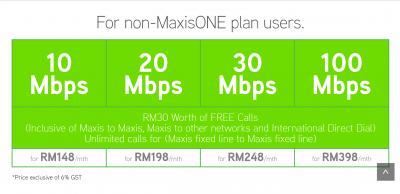
because normal fibre plan cheapest rm128 if u are maxis one member.

then the maxis one home is rm139 minimum starting price.


Attached thumbnail(s)
Attached Image Attached Image
westlife
post Nov 17 2016, 05:49 PM

10k Club
********
All Stars
14,283 posts

Joined: Jan 2011
QUOTE(jusbella @ Nov 17 2016, 05:47 PM)
Yes, tat 128 is for maxis one plan user only.

Normal user RM148.

So new plan RM138 is for Maxis One plan and NON Maxis one plan user also can get it. No more RM30 worth free call.
*
ic. so there is still rm128 plan now? i just ported to maxis one 98 although it is still under processing.

thought of applying the rm128 plan for my parents as their usage is low and the cost of this plan is cheaper.
westlife
post Nov 17 2016, 07:54 PM

10k Club
********
All Stars
14,283 posts

Joined: Jan 2011
QUOTE(maxisinternet @ Nov 17 2016, 07:30 PM)
Regrettably, RM128 is no longer available.
The 10Mbps plan now is RM139 for both MaxisOne Plan and Non MaxisOne Plan subscribers.
*
wah. then totally not competitive plan at all.

might as well go for unifi 30Mbps plan.
westlife
post Nov 19 2016, 01:18 PM

10k Club
********
All Stars
14,283 posts

Joined: Jan 2011
QUOTE(zzzhhhzzz @ Nov 17 2016, 10:26 PM)
i juat contacted maxis through their facebook page..rm128 plan for maxis one user is still.available
*
serious?
westlife
post May 10 2017, 04:53 PM

10k Club
********
All Stars
14,283 posts

Joined: Jan 2011
QUOTE(jep @ May 4 2017, 01:51 PM)
Got an offer through call to upgrade to 20Mbps for RM159...seems not worth it hmmm
*
Unifi rm179 I got 50Mbps.
westlife
post Nov 24 2018, 11:59 AM

10k Club
********
All Stars
14,283 posts

Joined: Jan 2011
Anyone switched from TM unifi to maxis broadband recently? Mind share your experience in porting over?

This post has been edited by westlife: Nov 24 2018, 12:01 PM
westlife
post Nov 24 2018, 12:03 PM

10k Club
********
All Stars
14,283 posts

Joined: Jan 2011
QUOTE(Yoooo @ Nov 20 2018, 12:01 AM)
I have went to terminated the Maxis Fibre Broadband yesterday.

My contract already over 2years. But the Maxis Officer still insisted me to return the TG784nV3 Router else I will be getting penalty charge. I thought after contract the router should be mine.
According to the officer, she said actually after 24 months contract, the user can request Maxis to replace the router if it is faulty.
*
Unifi users are better. Just need to return BTU. Can keep the wifi router, setup box and dect phone.
westlife
post Nov 24 2018, 12:41 PM

10k Club
********
All Stars
14,283 posts

Joined: Jan 2011
QUOTE(attw @ Oct 7 2018, 12:51 PM)
Day 5 after moving from unifi to maxis. Discovered that some downloads (particularly bigger files above 500MB) using download accelerators are a little unstable with maxis, compared to unifi previously. Still monitoring to see if this is a real problem, but it's not a big deal yet at this point.
*
Bro, mind to share what is yr experience in terms of the process you had gone thru to switch from unifi to maxis since now there is a 1-Month notice period to give to TM before termination. Importantly for area with no more ports for fibr, how to ensure the switch from unifi to maxis without losing the existing port.

Besides, how is ur experience with maxis? is it ok comparing to unifi? which plan you sign up? thanks.
westlife
post Nov 24 2018, 12:41 PM

10k Club
********
All Stars
14,283 posts

Joined: Jan 2011
QUOTE(attw @ Oct 7 2018, 12:51 PM)
Day 5 after moving from unifi to maxis. Discovered that some downloads (particularly bigger files above 500MB) using download accelerators are a little unstable with maxis, compared to unifi previously. Still monitoring to see if this is a real problem, but it's not a big deal yet at this point.
*
Bro, mind to share what is yr experience in terms of the process you had gone thru to switch from unifi to maxis since now there is a 1-Month notice period to give to TM before termination. Importantly for area with no more ports for fibr, how to ensure the switch from unifi to maxis without losing the existing port.

Besides, how is ur experience with maxis? is it ok comparing to unifi? which plan you sign up? what mode of BTU and wifi router they give you? thanks.

This post has been edited by westlife: Nov 24 2018, 12:42 PM
westlife
post Nov 24 2018, 03:13 PM

10k Club
********
All Stars
14,283 posts

Joined: Jan 2011
QUOTE(attw @ Nov 24 2018, 03:07 PM)
Hi bro, you can check my switching experience here.

I’m on the 129 plan from maxis and so far, everything’s good, except I still experience download cutoffs at times using Firefox, I didn’t have the issue with unifi, so I’m thinking the maxis line isn’t as stable. However it’s not crucial for me and the savings is worth it for me.

If you’re on unifi and just looking for a cheaper plan, you can go to a TM Point and ask to change to the 100Mbps plan at RM129. I think that’s a better option.
*
thanks bro, I read backward in this thread and saw your post on your experience on the switching from unifi to maxis broadband. It is very detailed and helpful.

I am actually helping my parents to switch to maxis rm89 30Mbps as the speed is more than enough for them. They are on unifi 500Mbps (turboed in august) at rm179.

So with the switch is worthy for them as in long run they can save a lot.


westlife
post Nov 24 2018, 03:45 PM

10k Club
********
All Stars
14,283 posts

Joined: Jan 2011
QUOTE(attw @ Nov 24 2018, 03:31 PM)
Oh, if it’s for your parents then no issues. 30Mbps is good enough thumbup.gif
*
yeah. Correct. Even to me 30Mbps is more than enough not to mention them hahaha.
westlife
post Nov 24 2018, 04:22 PM

10k Club
********
All Stars
14,283 posts

Joined: Jan 2011
QUOTE(attw @ Nov 24 2018, 04:06 PM)
Ya, true. I honestly didn’t feel any difference when they upgraded me from 30Mbps to 50Mbps back then. But the difference between 30Mbps and 100Mbps is noticeable though laugh.gif
*
Actually I first sign up the rm179 30Mbps plan 2 years back, in between they upgrade to 50Mbps then offer me rm10 to upgrade to 100Mbps with ultimate pack for unifi tv and STD20 600mins free calls and eventually will be upgraded to 800Mbps after turbo upgrade. But before the turbo upgrade, I had decided to switch to the current rm129 100Mbps plan to save rm60 monthly since I totally never watch the unifi tv at all and I am the only one to use the broadband at home.

Good thing is that the rm129 100Mbps comes with STD20 which I have usage of it since I do not have any plan activated on my Hotlink but just the 365 validity so it is useful for me to make any local calls such as to call banks etc.

However, still a bit regret not to take the 30Mbps rm89 + rm10 unlimited fixed line and mobile calls though for maxis. Since I can really save to the max that I can.

Seriously from 30Mbps to 50Mbps to now 100Mbps. I can say most of the time I do not utilise the speed. So 30Mbps is more than enough. Of course if can get full speed, direct http download the 100Mbps vs 30Mbps sure got difference but prob is my laptop is on 24x7 so 30Mbps is more than enough even it is slower by a bit but given the speed even big files that more than GB can download within minutes so no significant difference.

Even the torrent download nowadays due to lack of seeds and peers, I can hardy get more than 3MB/s for all the downloads at the same time too.

So really feel underuse. Some more downgrade plan to 100Mbps for unifi no new equipment given, while I switch to 30Mbps rm89 + rm10 unlimited calls I can get one free wifi router and dect phone. Really a bit regret but no choice need to stuck for 2 more years then maybe switch to a better deal at that time again.

But if choose between unifi 100Mbps at rm129 now vs maxis broadband 100Mbps rm129 I will choose unifi though since the download and upload speeds are all the same, plus other add-ons also comparable. Personally have no prob with unifi ever since I use it. Never try maxis broadband before though but the rm89 30Mbps is really value for money.

This post has been edited by westlife: Nov 24 2018, 04:26 PM
westlife
post Nov 24 2018, 08:21 PM

10k Club
********
All Stars
14,283 posts

Joined: Jan 2011
QUOTE(sitescope @ Nov 24 2018, 08:07 PM)
Me downgrade to 30mbps too but reason i choose maxis coz of upload speed
*
yeah best plan now for the money paid for. one can try out the 30Mbps to see if it meets the needs and can always upgrade to higher plan if necessary later.

Yeah I also like symmetric speed. Somehow symmetric speed the user experience is better.
westlife
post Nov 25 2018, 09:34 AM

10k Club
********
All Stars
14,283 posts

Joined: Jan 2011
QUOTE(attw @ Nov 25 2018, 09:14 AM)
Ya, worse case scenario if maxis screws me over, I’d just endure them for 24 months then switch back to unifi after that smile.gif
*
yeah. same. need to endure another 24 months before I can switch to Maxis if I want to. Hope by then the price plan is even cheaper at rm89 with faster speed.

but one thing good for maxis is the penalty is rm500 still at any time of early termination.

Tm is evil which now one needs to pay remaining months subscription fee if terminate. meaning no one can terminate it early since need to pay in full for 2 years subscription no matter how.
westlife
post Nov 25 2018, 11:12 AM

10k Club
********
All Stars
14,283 posts

Joined: Jan 2011
QUOTE(attw @ Nov 25 2018, 10:49 AM)
Ya, that’s true, their penalty is not too bad. So if TM does launch a RM89 for 100Mbps then can switch laugh.gif
*
yeah. indeed. 😜

Hoping for more good deals to come. One good thing now for both maxis and TM is that they allow downgrade of plans for existing customers, with renewal of contracts for 2 years.

at least those who is still paying crazy price of rm329 for 100Mbps can downgrade still. haha.

Attached Image


This post has been edited by westlife: Nov 25 2018, 11:37 AM
westlife
post Nov 28 2018, 08:40 AM

10k Club
********
All Stars
14,283 posts

Joined: Jan 2011
QUOTE(aeiou228 @ Nov 27 2018, 09:26 PM)
My plan is 100mbps and router is TP link Archer C5v.
My 2.4G can only manage 40+mbps and 5.0G can go above 80+mbps speed.
Router is located at ground floor living area. 5G signal at upper floor is very weak thus  my devices auto switch to stronger 2.4G signal but at reduced speed. Do you think mesh router can help to improve 5G signal at upper floor so that my connection speed can hit around 80+mbps ?
*
If your house is multi-storey, mesh wifi should help. One of the best wifi solution to ensure best coverage.

Alternatively, home plug is another possible option but of course the performance has no fight as compared to mesh since it is transmitting data using electricity.
westlife
post Dec 1 2018, 02:48 PM

10k Club
********
All Stars
14,283 posts

Joined: Jan 2011
Looks like maxis broadband has really many problems in terms of stability of connections. Almost now and then there are posts related to connection prob while unifi has very little or almost zero posts related to connectivity. Seems like need to really think twice to switch to maxis.
westlife
post Dec 1 2018, 06:22 PM

10k Club
********
All Stars
14,283 posts

Joined: Jan 2011
QUOTE(khainiz94 @ Dec 1 2018, 05:35 PM)
The connection on Maxis is no problem but the problem is the router.
Mine so far is okay but sometimes the connection drop suddenly for no reason.
Now try to use back my old trusty RT-N65U and stability seems better.
*
Then this is really bad. From what I remember they seems to give out similar stock wifi router as tm rite except that the look of wifi router is customised for maxis.

it is a wrong move for them to install a wifi router with known problems to new subscribers as stock routers. If got problems, customers sure will call, they need more $$ and time to have enough customer service officers to handle it, at the same time, if on site support needed. It will be even worse.

I have been unifi users for quite sometime, I can say that I have yet to encounter major issues with the connection. My wifi router is on 24x7 and never even need to reboot once to resolve any connection issues unless I am doing a configuration change to the router.

Maybe need to really reconsider to ask my parents to change to maxis. As they are IT-savvy, if there is problem with the connection, it will be hard for them to troubleshoot by themselves. Some solution recommended such as changing the lease time for DCHP etc. It will be too difficult for them. And it may be the case that they always bug me for connectivity issues every now and then, I will be jailat hahaha. tongue.gif

unless what I can do is, if the maxis stock router really has problem, I get them to use back the tm unifi stock TP-link archer c5v2 wifi router. It is a awesome wifi router that has not been given a single problem for them for 2 years now since they have unifi installed. Only two occocians which one time they accidentally off the wifi of the router, but I managed to turn it on remotely for them. One more time is recently the power adapter of the wifi router spoiled, end up they used the hypptv setup box one to replace it.

So far so good for unifi in terms of stability and speed.

This post has been edited by westlife: Dec 1 2018, 06:33 PM

3 Pages  1 2 3 >Top
 

Change to:
| Lo-Fi Version
0.2946sec    0.93    7 queries    GZIP Disabled
Time is now: 11th December 2025 - 02:09 AM