Welcome Guest ( Log In | Register )

Outline · [ Standard ] · Linear+

 The Official Maxis FTTH Thread | v5, Maxis Home Fibre Internet, from RM89

views
     
westlife
post Dec 1 2018, 06:36 PM

10k Club
********
All Stars
14,296 posts

Joined: Jan 2011
QUOTE(G K Lai @ Nov 29 2018, 08:30 PM)
Hi all,

I just got Maxis installed at home.

I got the Archer C5v v1 router with the firmware v1.0_180316, it is very old firmware compare to what I read here.
But I can't find where to update the firmware, so I'll just keep it this way for the time being.

May I know where and how to change the default DNS to Google DNS?
I tried many sub-menu but still was unable to find a place to change DNS.
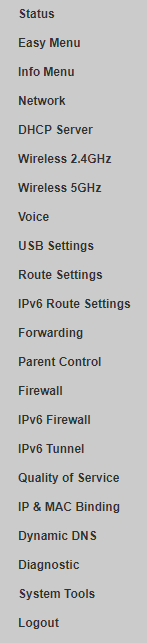
Attached below are the left navigation pane, wish someone could help.  icon_question.gif
user posted image
*
Change it at the dhcp server, for your dhcp clients, set Google DNS servers as DNS servers client setting, with this, all your machines that is connected to maxis wifi router will not use what is set for the gateway.
westlife
post Dec 1 2018, 07:50 PM

10k Club
********
All Stars
14,296 posts

Joined: Jan 2011
QUOTE(khainiz94 @ Dec 1 2018, 06:58 PM)
Yep I agree with you. It does will cause them more trouble than it should. But for me, if not because of One Prime, I did not even consider Maxis Fibre at all. But well I do hope they will solve the router issue ASAP. And I do read a lot of comments from the FB page and it seems most problems due come from the TPLink C5v router. They need to fix this or many people will run away sooner or later.
*
Yeah hope that they fix it soon. It is a shame to have a bang for the bucks plan but the service cannot make it.

Really too many negative feedback on maxis that makes it difficult to be confident ok maxis broadband.

For their mobile service, it is certainly top among all telcos but cannot understand why fixed line broadband so jialat.
westlife
post Dec 1 2018, 08:45 PM

10k Club
********
All Stars
14,296 posts

Joined: Jan 2011
QUOTE(skymade @ Dec 1 2018, 08:21 PM)
I might be one of the exception, having switch from Unifi to Maxis Fiber for nearly 4 years+ and never had problem so far, only the recent fiber network down cause of TM's infra and that's the only time i reported to Maxis, other than forgot to pay the bill once. smile.gif

It was my bad dream when using Unifi long time ago, with frequent downtime, disconnect, snail speed and etc your named it. Frustration leading me to switch to Maxis once the 2 years contract end.

No regret switched to Maxis and satisfied customer.  icon_rolleyes.gif
P/S: I am always using a 3rd party router instead of the given ISP provided router.
*
I think maybe the fact that you are not using the stock router made a difference?

becos normal case, I dun find there is a need to change the router. Most stock router is actually good. If one needs a better coverage, home plug, mesh wifi maybe a better bet.
westlife
post Dec 1 2018, 09:40 PM

10k Club
********
All Stars
14,296 posts

Joined: Jan 2011
QUOTE(skymade @ Dec 1 2018, 09:37 PM)
I was using a Buffalo and Asus during the Unifi time, and it still gave me problems.  bangwall.gif

I wasn't said Maxis is best or Unifi is bad. There is no right or wrong between them, these problem could due to many factors which out of our scopes, only ISP will know it.
Who know could be TM sabotage Maxis since Maxis utilize on TM backbone? But I would believe that there are some SLA agreement signed between Maxis & TM, thus TM must meet the SLA for Maxis customer....

Go for TIME if possible, a smaller scale infra compare to TM and Maxis. Unfortunately, i stay in landed property.

P/S: Play CS:GO with few friends stay in JB Melaka, KK & etc. Sometimes they do complaint on Unifi latency (> 100ms). Most of the time, mine on Maxis steadily at < 30ms.
*
Good to hear ‘some’ positive experience for maxis broadband as it has more complaints than compliments for maxis. From this thread alone, the facts of Ella this.
westlife
post Dec 2 2018, 01:25 PM

10k Club
********
All Stars
14,296 posts

Joined: Jan 2011
QUOTE(sitescope @ Dec 2 2018, 12:41 PM)
I use tplink rm70 router load with openwrt
Put a fan at bottom n no restart for 6mths
Fuhhh thousand better than c5v

I dun use 5g coz my speed 30mbps only
And 5g coverage short
*
still prefer to use 5GHz whenever possible for the best experience. nod.gif

QUOTE(khainiz94 @ Dec 2 2018, 12:12 PM)
Maxis one is C5V.
A specific model just for service providers like Maxis.
Where TM one is sold everywhere in computer shops.
But I do saw in the TM installer van it seems they are providing a DLink router.
*
three antennas, it is better than the old unifi TP-link Archer C5v2 with only two antennas.

coverage should be better.

I am not into Dlink products. I had bad experience on it.
The rubbish bin one also is known to have problem such as coveraga, a lot of security flaws as well.

This post has been edited by westlife: Dec 2 2018, 01:30 PM
westlife
post Dec 4 2018, 09:04 AM

10k Club
********
All Stars
14,296 posts

Joined: Jan 2011
decided to hold on the plan to switch to maxis 30Mbps rm38 plan.

will go to TM point to check out the unlisted cheap plan to switch to.
westlife
post Dec 10 2018, 06:53 PM

10k Club
********
All Stars
14,296 posts

Joined: Jan 2011
QUOTE(joeboto @ Dec 10 2018, 11:30 AM)
my bro using unifi 800mbps turbo, while im using maxis 100mbps. both are still within contract. bro in sg buloh, me in port klang. is it possible to change our lines without fee or minimal fee possible?
*
unifi can transfer name with small charge, contract will be not be renewed and u can just continue with the existing contract.

maxis transfer is more troublesome becos new owner will need to bear a fresh new contract again for 2 years and it is not to continue the remaining contract like unifi.

but either way also still need to do migration of service from one address to another. Unifi is free but Maxis may have charges.
westlife
post Dec 10 2018, 10:41 PM

10k Club
********
All Stars
14,296 posts

Joined: Jan 2011
QUOTE(joeboto @ Dec 10 2018, 10:21 PM)
thanks for the info.

asked on maxis live chat but they said my bro area doesnt have maxis coverage (kononnya lah, since bro said maxis did called him long time ago asking if wanna change from unifi to maxis).
well, will ask again using unifi live chat later.
*
maxis got coverage or not, on their website can check also.
westlife
post Jul 2 2019, 04:42 PM

10k Club
********
All Stars
14,296 posts

Joined: Jan 2011
QUOTE(imahappyklown @ Jun 22 2019, 11:23 PM)
Hey, can anyone advise please.

I've been on the Maxis 30mbps plan since 2017 and I've been paying about 169 a month.

I just noticed that the 30mbps plan is a mere 87 ringgit now.

When I called them up and ask what my current internet plan was, the customer service guy actually laughed when he saw what I was paying for my plan.

I asked him would I get any backdated rebate for all the while I paid and he said no. Just said that I could stick with my plan and they'll lower the rate.

I kinda feel cheated since I've never received a call about the plan.

Any luck I can get anything out of this?

Thanks.
*
i think u just need to read the news more often. tongue.gif
westlife
post Nov 12 2019, 08:40 AM

10k Club
********
All Stars
14,296 posts

Joined: Jan 2011
For home, can sign the package that comes with SIM card as a backup to home broadband package?
westlife
post Jul 30 2020, 12:01 PM

10k Club
********
All Stars
14,296 posts

Joined: Jan 2011
QUOTE(Rei7 @ Jul 30 2020, 10:44 AM)
The throttling at night is the reason to not go for Maxis. Their mobile data also the same. Night time je throttle the speed kaw kaw. Only good to use in the day.
*
very weird, normally throttling should be done during day time rite? why throttle at night?
westlife
post Jul 30 2020, 12:01 PM

10k Club
********
All Stars
14,296 posts

Joined: Jan 2011
can maxis fibre request for public ip? is it giving private ip by default?
westlife
post Jul 30 2020, 12:19 PM

10k Club
********
All Stars
14,296 posts

Joined: Jan 2011
QUOTE(YoungMan @ Jul 30 2020, 12:14 PM)
Yes, given private ip by default. You may call customer service to request public ip.
*
thanks for the info.

any throttling issues at nite like what some mentioned above?

can do torrents with good speed?
westlife
post Jul 30 2020, 12:57 PM

10k Club
********
All Stars
14,296 posts

Joined: Jan 2011
QUOTE(YoungMan @ Jul 30 2020, 12:31 PM)
Sorry I can't test for throttling at night. It's office line. But a short test of torrenting seems to be good. Note this is a newly installed line.
*
i see. no prob. thanks for the info.

QUOTE(jusbella @ Jul 30 2020, 12:50 PM)
Day time everyone going out.

Night time everyone in home consume bandwidth.
*
ok. but they dun throttle the whole night rite? like after 12am most should have gone for sleep, i dun think they throttle until beyond that rite?

even the nite peak hour is probably from 8pm to 11pm mostly? other than that i dun think most will be using internet so much even they are at home. some may not even be back home by 8pm after work as they may be having dinner outside etc.
westlife
post Oct 2 2021, 11:45 PM

10k Club
********
All Stars
14,296 posts

Joined: Jan 2011
QUOTE(hafiez @ Sep 29 2021, 01:35 PM)
300mbps, manage to get around 170-220 only

laugh.gif
*
so jialat??
westlife
post Apr 3 2022, 11:35 PM

10k Club
********
All Stars
14,296 posts

Joined: Jan 2011
any promo for existing unifi customer to switch to maxis fibre broadband?
westlife
post Jul 9 2022, 12:25 PM

10k Club
********
All Stars
14,296 posts

Joined: Jan 2011
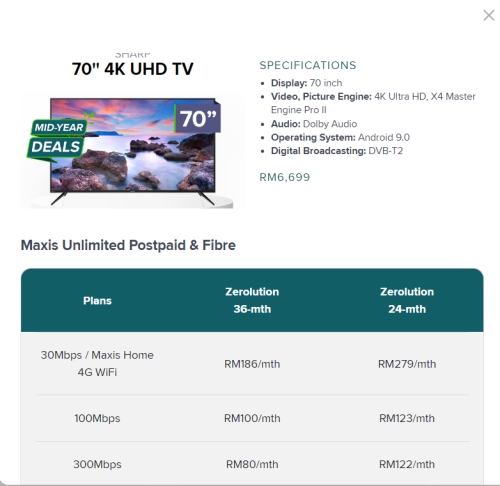
are these deals worthy?

user posted image
user posted image
westlife
post Jul 9 2022, 04:46 PM

10k Club
********
All Stars
14,296 posts

Joined: Jan 2011
QUOTE(Oltromen Ripot @ Jul 9 2022, 04:10 PM)
I took the up 70" Sharp AndroidTV on 36mth Zerolution. Waiting delivery ETA next weekend. Also waiting for 2 mesh routers to be delivered as well.

The Samsung ones are SmartTV on Tizen, not acceptable if Samsung stops supporting.

Was on 100Mbps RM129. Have existing rebates from sign up promotion, but Centre staff said still eligible to continue after upgrade speed plan.

If remain 100Mbps RM129, Zerolution RM100. Projected damage = +RM100/mth

If upgrade to 300Mbps RM149, Zerolution RM80. Projected damage = +RM100/mth

If upgrade to 500Mbps RM219, Zerolution RM21. Projected damage = +RM111/mth

So I upgraded to 500Mbps. No brainer to get more Mbps for similar +damage. 36mth is not big deal as this is fibre, bukan nak tukar-tukar pun, especially the alternatives will end up still on same HSBB.
*
All these items come with 36 months payment?

Then the fibre plan contract is how long? 2 years or 3 years?
westlife
post Jul 9 2022, 05:38 PM

10k Club
********
All Stars
14,296 posts

Joined: Jan 2011
QUOTE(Oltromen Ripot @ Jul 9 2022, 05:26 PM)
TV (maxis's RRP) ≈ RM6700

If consider only the installment,
(RM21 * 36mth) = RM756.

If account together with the damage of having to upgrade from 100Mbps to 500Mbps
(((RM219 - RM129) + RM21) * 36mth) = (RM111 * 36mth) = RM3996

Even if stacked with SST 6%, that's still lower than if deducting RM6700 cash right away, or, if to acquire through other installment methods.

Also, I was also planning to go to 500Mbps later to match my other unifi 500Mbps line. Previously only went for 100Mbps (i) because there was promo for existing mobile customer, (ii) to acquire a fibre port.

(later found that i'm 2nd in a 10-port black DB box on pole. *phew*)
*
rm6700 vs rm756 + rm3996 = rm4752?

given that u are also enjoying the faster speed (500Mbps) vs 100Mbps, i supposed it is a good deal still?

besides, where does it mention about this 36 months thingy? never see that.

after 36 months, can keep the tv or need to return?
westlife
post Jul 9 2022, 05:45 PM

10k Club
********
All Stars
14,296 posts

Joined: Jan 2011
saw it now... so this zerolution thingy can keep the device after 3 years?

user posted image

3 Pages < 1 2 3 >Top
 

Change to:
| Lo-Fi Version
0.0385sec    0.43    7 queries    GZIP Disabled
Time is now: 14th December 2025 - 11:38 AM