

QUOTE(mhhee @ Mar 9 2020, 08:08 AM)
Archer c5v
Ya. The setting at the reboot section.

I see, my router(not archer c5V) is still stuck at a firmware released back in 2015(based on the copyright info) Ya. The setting at the reboot section.


The Official Maxis FTTH Thread | v5, Maxis Home Fibre Internet, from RM89
|
|
 Mar 9 2020, 08:49 AM Mar 9 2020, 08:49 AM
Return to original view | IPv6 | Post
#21
|
 
Senior Member
2,517 posts Joined: Mar 2016 
|
QUOTE(mhhee @ Mar 9 2020, 08:08 AM) Archer c5v I see, my router(not archer c5V) is still stuck at a firmware released back in 2015(based on the copyright info) Ya. The setting at the reboot section. |
|
|
|
|
|
Mar 15 2020, 03:53 PM
Return to original view | IPv6 | Post
#22
|
|
Senior Member
2,517 posts Joined: Mar 2016
|
QUOTE(keropla88 @ Mar 15 2020, 01:33 AM) anyone know why i cant change the max idle time for the c5v model ? it will keep on disconnect after 15min for every online games Try changing you max idle time to 0 [attachmentid=10448816] Maybe it’s the router issue due to bad firmware This post has been edited by yongtjunkit: Mar 15 2020, 11:29 PM |
|
|
Mar 24 2020, 10:34 AM
Return to original view | IPv6 | Post
#23
|
|
Senior Member
2,517 posts Joined: Mar 2016
|
QUOTE(numbertwo @ Mar 24 2020, 10:10 AM) Tks.. is Ac18 plug n play ? QUOTE(sitescope @ Mar 24 2020, 10:23 AM) Yup but dun upg the firmware You’ll need to have your PPPOE username and password ready and make sure to select/key in the correct vlanUnless u wanna use custom firmware This post has been edited by yongtjunkit: Mar 24 2020, 10:35 AM |
|
|
Apr 2 2020, 06:54 PM
Return to original view | IPv6 | Post
#24
|
|
Senior Member
2,517 posts Joined: Mar 2016
|
QUOTE(sitescope @ Apr 1 2020, 10:02 PM) Disable 5ghz That solution doesn't work for subscriber with 100mbps and above.... 2.4ghz has better range but slower than 5ghz and also 2.4ghz will not reach 100mbps not to mention that it's congestedChg 2.4ghz band to 6 A better solution is to replace their router with one from this guide https://forum.lowyat.net/topic/4658096 This post has been edited by yongtjunkit: Apr 2 2020, 06:55 PM |
|
|
Apr 3 2020, 08:51 PM
Return to original view | IPv6 | Post
#25
|
|
Senior Member
2,517 posts Joined: Mar 2016
|
Anyone here having issue with their internet speed not being fast?
 This post has been edited by yongtjunkit: Apr 3 2020, 08:51 PM |
|
|
Apr 6 2020, 03:53 PM
Return to original view | IPv6 | Post
#26
|
|
Senior Member
2,517 posts Joined: Mar 2016
|
QUOTE(hown @ Apr 6 2020, 01:06 AM) i dont think this reason is acceptable for providing subpar services. why there is no such issue with tm/time? QUOTE(ronnie @ Apr 6 2020, 09:11 AM) You are welcome to switch to your preferred ISP after your contract ends. but it's part of the mcmc requirements, therefore you should report to mcmc instead to take further action if CS doesn't want to resolve the issue.... but make sure to use speedtest.net and also ping google.com in cmd to verify that you have high ping They provide 30/100/500/800 Mbps ... latency is not part of the SLA.  source: https://www.mcmc.gov.my/skmmgovmy/media/Gen...Report-2019.pdf btw My internet speed went to around 15 Mbps a few days ago with no network activity(subscribed to 30 Mbps), wanted to complain but it went back to normal by itself This post has been edited by yongtjunkit: Apr 6 2020, 04:00 PM |
|
|
|
|
|
Apr 13 2020, 12:39 PM
Return to original view | IPv6 | Post
#27
|
|
Senior Member
2,517 posts Joined: Mar 2016
|
QUOTE(joshhd @ Apr 13 2020, 12:28 PM) Maxis: Unifi Air coverage is very limited though...based on the unifi air coverage pageTM: *legs are shaking* Nvm. We got Unifi Air  Actually what about those houses that already have fiber installed? They should just provide a guide instead of this ( configured before sending it to the customers ) This post has been edited by yongtjunkit: Apr 13 2020, 01:06 PM |
|
|
Apr 15 2020, 04:49 PM
Return to original view | IPv6 | Post
#28
|
|
Senior Member
2,517 posts Joined: Mar 2016
|
QUOTE(miss comet @ Apr 15 2020, 11:39 AM) Anyone interested to upgrade "free" 100Mbps, hehe... for the 1st month only... if 100mbps for rm89 the ofc yes...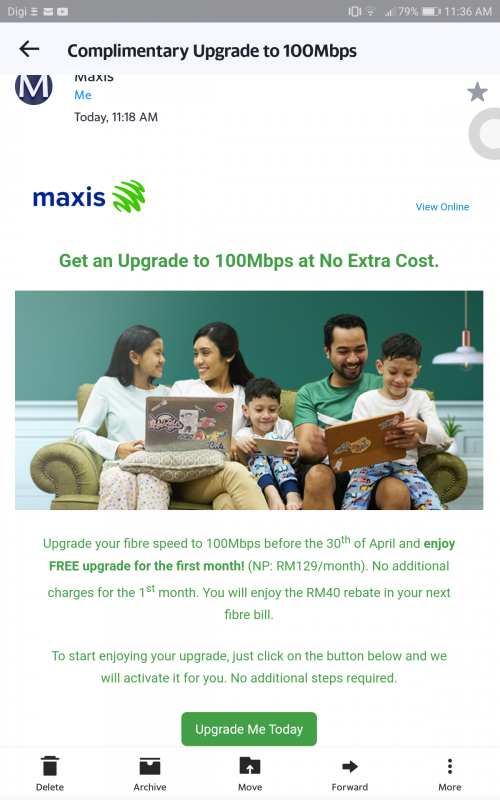 interesting... upgrade and downgrade don't need contract(unless need to change router) joshHD, for Astro IPTV/astro&broadband, any upgrade(to the speed) will require a contract right also what about switching from Astro internet plan to maxis plans? |
|
|
Apr 16 2020, 08:02 AM
Return to original view | IPv6 | Post
#29
|
|
Senior Member
2,517 posts Joined: Mar 2016
|
QUOTE(joshhd @ Apr 15 2020, 09:40 PM) Astro Broadband/Astro IPTV and Maxis Fibre works separately in terms of its billing system and stuff, so as you switch in between the two services, contract of 24 months will definitely restarted. What about upgrading plan in astro IPTV/Astro & broadband? Usually if you switch from Maxis Fibre to Astro Broadband while you still have remaining 24 months contract on your Maxis Fibre, Maxis will just your penalty and let you switch to Astro Broadband with a new 24 months contract. But if you want to switch from Astro Broadband/Astro IPTV to Maxis Fibre while still have remaining contract, can also, pay prorated penalty only mah.  Then once you're on Maxis Fibre again, 24 months contract will restart on them. any upgrade in Astro will restart your contract? |
|
|
Apr 16 2020, 09:01 AM
Return to original view | IPv6 | Post
#30
|
|
Senior Member
2,517 posts Joined: Mar 2016
|
QUOTE(joshhd @ Apr 16 2020, 08:54 AM) If upgrade, I think won't restart contract. 😅, it seems like "here at Astro, we would like to welcome you with great deals, great saving with some well-hidden Maxis also same. If downgrade speed on Maxis Fibre, contract period won't be affected. But... If downgrade speed on Astro Broadband, if still got remaining contract, prorated penalty. So up to you lo, is it worth it to enjoy some tens of ringgit savings per month, in exchange for such contract terms and also uncertainty of after sales support.  " "Looks like I'm going to stick to Astro IPTV 30 Mbps for now then(no way to move up or down already).... Any move will incur 24 months contract, to switch from astro I guess just call Astro to transfer to maxis? This post has been edited by yongtjunkit: Apr 16 2020, 09:05 AM |
|
|
Apr 16 2020, 07:05 PM
Return to original view | IPv6 | Post
#31
|
|
Senior Member
2,517 posts Joined: Mar 2016
|
QUOTE(iz1011 @ Apr 16 2020, 05:09 PM) Hi guys, Tp link Archer C5V with maxis custom firmware on itJust wanted to know what router does Maxis provide to their customer? |
|
|
Apr 20 2020, 06:42 AM
Return to original view | IPv6 | Post
#32
|
|
Senior Member
2,517 posts Joined: Mar 2016
|
QUOTE(silrave @ Apr 19 2020, 09:08 PM) oh Yup, the one on the modem is for unifi, so maxis have to use router for VOIPso they not like unifi phone line on modem the phone line is on router ? |
|
|
Apr 20 2020, 03:13 PM
Return to original view | IPv6 | Post
#33
|
|
Senior Member
2,517 posts Joined: Mar 2016
|
QUOTE(silrave @ Apr 20 2020, 02:46 PM) if like that means need to use maxis router you can, plug in the maxis router to lan port 3 on the asus router to use the voip functioncant use asus router liao gg This post has been edited by yongtjunkit: Apr 20 2020, 03:13 PM |
|
|
|
|
|
Apr 20 2020, 06:21 PM
Return to original view | IPv6 | Post
#34
|
|
Senior Member
2,517 posts Joined: Mar 2016
|
QUOTE(FourIsVeryHot @ Apr 20 2020, 06:01 PM) I read that there is issues setting dns on maxis router. you may start here https://forum.lowyat.net/topic/4658096Thinking of buying my own. any recomendations? need to be able to set the phone line also I've heard that maxis router have their DNS hardcoded into their router so means you'll need to set it from the client-side when you are using maxis router for VOIP refer to this guide for Asus router This post has been edited by yongtjunkit: Apr 20 2020, 06:21 PM |
|
|
Apr 20 2020, 06:26 PM
Return to original view | IPv6 | Post
#35
|
|
Senior Member
2,517 posts Joined: Mar 2016
|
QUOTE(silrave @ Apr 20 2020, 06:21 PM) but how about the phone line ? yup, so means modem --> Asus router --> Maxis router(lan port 3 for VOiP)i though u guys previously mention phone line is plug at router? You should watch the video embedded into the post This post has been edited by yongtjunkit: Apr 20 2020, 06:26 PM |
|
|
Apr 20 2020, 07:11 PM
Return to original view | IPv6 | Post
#36
|
|
Senior Member
2,517 posts Joined: Mar 2016
|
QUOTE(FourIsVeryHot @ Apr 20 2020, 07:03 PM) means after my new router, still need lan cable from new router to go into maxis router for phone? yup |
|
|
Apr 22 2020, 06:32 PM
Return to original view | IPv6 | Post
#37
|
|
Senior Member
2,517 posts Joined: Mar 2016
|
QUOTE(64bit @ Apr 22 2020, 03:33 PM) Not able to access twitter, all microsoft websites. no issues on my side According to Maxis web chat: Thank you for waiting, im sorry upon checking there's an issue ongoing where unable to connect to twitter, webex and few more apps under fibre connection, our technical team are currently working on it, will notify once the issue resolve ya. Please accept our sincere apologies   This post has been edited by yongtjunkit: Apr 22 2020, 06:38 PM |
|
|
Apr 22 2020, 08:03 PM
Return to original view | IPv6 | Post
#38
|
|
Senior Member
2,517 posts Joined: Mar 2016
|
QUOTE(jusbella @ Apr 22 2020, 07:57 PM) Yours using maxis standalone or tm backbone? Maxis stand-alone |
|
|
Apr 24 2020, 05:51 PM
Return to original view | IPv6 | Post
#39
|
|
Senior Member
2,517 posts Joined: Mar 2016
|
QUOTE(Candy12 @ Apr 24 2020, 11:18 AM) TM modem is free, it's on leased you need to return it when you terminate your line in future. You don't need to renew your contract because it's supposed to be replaced free of charge to cater for higher speed plans. Maxis may say that you must use the Maxis router as it's the only one supported and saying that any 3rd party router other than maxis is not supported ( at least what Astro IPTV CS said Only issue is during MCO if you're not in green area, TM cannot replace it for you. Router you can always purchase your own from online shopping sites. I don't see why they are asking him to renew his contract.   ) - Astro IPTV CS and Maxis CS may tell different info so you'll need to check with maxis ) - Astro IPTV CS and Maxis CS may tell different info so you'll need to check with maxis In reality, Maxis router is just aimed at the trash bin( at least for power user) QUOTE(syk @ Apr 24 2020, 11:35 AM) Old router with single band wifi limited to speed of 30M++, so new router is required for speed upgrade. Yup and their older router ethernet ports are 100mbps ( only one of the 4 ports are gigabit) + trash performance at least for the Maxis Technicolor TG784n v3New router = New contract QUOTE(sitescope @ Apr 24 2020, 11:44 AM) Meaning after 1 mth they also took new router frm u Nope, refer to quote belowAnd give back your old router ? QUOTE(joshhd @ Apr 16 2020, 08:54 AM) If upgrade, I think won't restart contract. This post has been edited by yongtjunkit: Apr 24 2020, 05:56 PMMaxis also same. If downgrade speed on Maxis Fibre, contract period won't be affected. But... If downgrade speed on Astro Broadband, if still got remaining contract, prorated penalty. So up to you lo, is it worth it to enjoy some tens of ringgit savings per month, in exchange for such contract terms and also uncertainty of after sales support. |
|
|
Apr 25 2020, 05:10 PM
Return to original view | IPv6 | Post
#40
|
|
Senior Member
2,517 posts Joined: Mar 2016
|
QUOTE(Candy12 @ Apr 25 2020, 04:01 PM) The Technicolor router you're referring to is not distributed by Maxis Home Fibre to their customers. It's for Astro Broadband for connecting with their Astro set-top boxes(STB). Yes, it's crappier than the Aminia MA-131 or TP-Link C5V but the Technicolor router is the only working router that is compatible with the Astro Broadband IPTV tv boxes. They're only supplied to Astro Broadband subscribers now which is not relevant to this thread. Actually Astro IPTV supports up to 100 mbps only( and the technicolor router doesn’t support this speed) This Technicolor router has no 5GHz WiFi band and this is the reason why ASTRO IPTV Broadband is only offered upto 30M in many areas in this country due to this shortcoming. Astro and broadband goes all the way to 800mbps I do see maxis customer having that router too as well(must be old maxis fiber customer) This post has been edited by yongtjunkit: Apr 25 2020, 05:14 PM |
| Change to: |  0.1645sec 0.1645sec
 0.44 0.44
 7 queries 7 queries
 GZIP Disabled GZIP Disabled
Time is now: 24th December 2025 - 11:07 AM |
 Quote
Quote