Welcome Guest ( Log In | Register )

4 Pages < 1 2 3 4 >Bottom

Outline · [ Standard ] · Linear+

 The Official Maxis FTTH Thread | v5, Maxis Home Fibre Internet, from RM89

views
     
TSronnie
post Nov 26 2018, 08:34 AM

Not enough stars
*********
All Stars
21,315 posts

Joined: Jan 2003
From: Kuala Lumpur


QUOTE(khainiz94 @ Nov 21 2018, 05:27 PM)
Finally I have registered for Maxis One Prime 98.
Maxis One Plan 98 + Maxis One Share 48 + Maxis Home Fibre 30 Mbps.
The unlimited data I got on the spot on my mobile data but Maxis Fibre need to wait for appointment.
*
What's the cost monthly ?
Total = 98+48+89 ?
TSronnie
post Jan 14 2019, 11:06 PM

Not enough stars
*********
All Stars
21,315 posts

Joined: Jan 2003
From: Kuala Lumpur


QUOTE(Kilohertz @ Jan 14 2019, 07:04 PM)
Been told by maxis they auto upgrade my acc to 100mbps for RM129, if would like to remain at 30mbps.. it's RM89 but need to notify them, question is whether worth to upgrade or not.
*
If you no much use for 100Mbps... stay with 30Mbps. Cos once you upgrade, you cannot downgrade package within contract period.

TSronnie
post Jan 25 2019, 01:32 PM

Not enough stars
*********
All Stars
21,315 posts

Joined: Jan 2003
From: Kuala Lumpur


QUOTE(ps007 @ Jan 24 2019, 05:54 PM)
Hi,

Need help here.

Recently changed from unifi to maxis.
Current maxis running on Exisiting unifi modem and maxis wifi router.

Previously bought 5meters cat 5E cable to extend between modem and unifi wifi router, no issue.

But now using the same cable (tried another spare 5meters cat 5E = same result), not working on maxis wifi router, the globe/internet LED will never turn on.

Tested again connect to unifi wifi router, the WAN/internet LED is on.

Temporary workaround, connect modem and maxis wifi router with one of the 1 meter cat 5E cables, it works.
Tested with different 1 meter cable that works for LAN but again not working on WAN (modem <-> wifi router)

Anyone encounter same issue before?
*
You should use a straight-through network cable to connect to the WAN port of the Maxis WiFi router, right ?
The port on the UniFi ONT (not called modem) for Maxis is not the same as UniFi
TSronnie
post Nov 18 2019, 07:52 AM

Not enough stars
*********
All Stars
21,315 posts

Joined: Jan 2003
From: Kuala Lumpur


If we register via Maxis website, how soon will the installer come to do installation ?
I've existing Maxis Fibre account, can they combine into a single bill/account ?
TSronnie
post Dec 5 2019, 10:25 AM

Not enough stars
*********
All Stars
21,315 posts

Joined: Jan 2003
From: Kuala Lumpur


Anybody tried Hotlink Flex Home Fibre At RM99 per month ?
TSronnie
post Dec 20 2019, 10:52 PM

Not enough stars
*********
All Stars
21,315 posts

Joined: Jan 2003
From: Kuala Lumpur


What's the maximum limit of fibre length laid before we are charged extra ?
TSronnie
post Dec 21 2019, 08:12 PM

Not enough stars
*********
All Stars
21,315 posts

Joined: Jan 2003
From: Kuala Lumpur


QUOTE(aeiou228 @ Dec 21 2019, 07:03 PM)
Never shy to ask installer to give extra length (if still within 100m) just in case you need to relocate the modem to different places within your house.
*
It's 100m from the FDU box (on that phone pole). That's good enough smile.gif
TSronnie
post Mar 4 2020, 10:57 AM

Not enough stars
*********
All Stars
21,315 posts

Joined: Jan 2003
From: Kuala Lumpur


QUOTE(Steve Lum @ Mar 4 2020, 03:19 AM)
Hey guys, the maxis fibre plan that I have is 100mbps but I am only getting 30mbps from speedtest or 3mb/s in downloads. Is this normal?  hmm.gif
*
Better call Maxis CS for clarification.
TSronnie
post Mar 21 2020, 09:06 PM

Not enough stars
*********
All Stars
21,315 posts

Joined: Jan 2003
From: Kuala Lumpur


QUOTE(mawardi @ Mar 21 2020, 02:40 PM)
Does anyone experience speed cap on p2p on Maxis Fibre? Weird to see my connection cannot go higher than 140 KB/s even the torrent has thousands of seeder and enough ratio.

This happened since MCO. Before that it was at maximum speed.
*
Same here/// capped at ~100-120 KB/s with thousand's of seeds
TSronnie
post Mar 22 2020, 02:21 PM

Not enough stars
*********
All Stars
21,315 posts

Joined: Jan 2003
From: Kuala Lumpur


QUOTE(mawardi @ Mar 22 2020, 01:57 PM)
Think the cap has been lifted. Normal speed now.
*
after complains in here hehehehe
TSronnie
post Mar 22 2020, 02:28 PM

Not enough stars
*********
All Stars
21,315 posts

Joined: Jan 2003
From: Kuala Lumpur


QUOTE(TschussFreund @ Mar 21 2020, 10:15 PM)
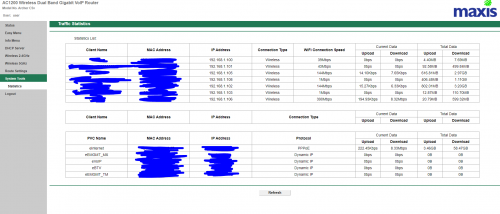
I need to block a MAC address from accessing my network, but my Maxis router (TPLink Archer C5v) doesn't allow such changes. In fact, it doesn't allow any changes AT ALL except for changes to the 2.4 and 5G connection password and SSID. Under 'system tools' is merely a display of various statistics. Is there any way I can do this? Image of the system tools interface attached below.

user posted image
*
Have you tried to use the admin account ?
TSronnie
post Apr 5 2020, 10:18 PM

Not enough stars
*********
All Stars
21,315 posts

Joined: Jan 2003
From: Kuala Lumpur


QUOTE(hown @ Apr 5 2020, 01:13 PM)
packet loss and spiking at night when playing dota2, affected time ~ 7pm to 11pm.
*
Everyone and everybody is #StayAtHome .. what do you expect ?
TSronnie
post Apr 6 2020, 09:11 AM

Not enough stars
*********
All Stars
21,315 posts

Joined: Jan 2003
From: Kuala Lumpur


QUOTE(hown @ Apr 6 2020, 01:06 AM)
i dont think this reason is acceptable for providing subpar services. why there is no such issue with tm/time?
*
You are welcome to switch to your preferred ISP after your contract ends.
They provide 30/100/500/800 Mbps ... latency is not part of the SLA.
TSronnie
post Apr 7 2020, 11:34 PM

Not enough stars
*********
All Stars
21,315 posts

Joined: Jan 2003
From: Kuala Lumpur


QUOTE(calvin1688 @ Apr 7 2020, 10:04 AM)
Dear Expert,
I want to know whats going on with my home wifi.
My problem happen since 3 days ago & the problem still hapening.Problem : during surfing my wifi signal will suddenly missing & come back.Later the router hanging.
Everytime when happend i had to reboot the router.
Last time this problem occur because of tm modem los red light blinking that causes such problem but this time the tm modem los red light are not blinking.I also replaced the lan cable

I'm using 3rd party router & all the while ok but this 3 days makes me headache.

Any solution for me that can solve this issue?

Thanks in advance
*
Probably bad router... over used during MCO ?
Try to use the Maxis original router ?
TSronnie
post Apr 10 2020, 09:54 AM

Not enough stars
*********
All Stars
21,315 posts

Joined: Jan 2003
From: Kuala Lumpur


QUOTE(Takashi1978 @ Apr 10 2020, 08:43 AM)
DO NOT switch to Maxis, i did so frm Unifi 100mbps to Maxis 300mbps.

Whole bunch of mess that happen even for the install.

Then my speed is no better than Unifi.

Worst is the constant disconnect and reconnect again!

Bloody regret.
*
Do share your area which Maxis is poor service of Fibre
TSronnie
post Apr 10 2020, 10:53 AM

Not enough stars
*********
All Stars
21,315 posts

Joined: Jan 2003
From: Kuala Lumpur


QUOTE(numbertwo @ Apr 10 2020, 10:46 AM)
Constant connect-disconnect is happening almost to all subscribers if you read the comments here.. not area specific.
*
Fortunately... not me wor.... biggrin.gif tongue.gif
Don't be so generalise your opinion.
TSronnie
post May 22 2020, 04:12 PM

Not enough stars
*********
All Stars
21,315 posts

Joined: Jan 2003
From: Kuala Lumpur


Do we need a Public IP address to use Dynamic DNS with Maxis Fibre ?
TSronnie
post May 30 2020, 02:23 AM

Not enough stars
*********
All Stars
21,315 posts

Joined: Jan 2003
From: Kuala Lumpur


QUOTE(DaTaPcHousE @ May 29 2020, 10:55 AM)
Anyone just install the maxis recently?
wonder if the new installation will include the FWS(fiber wall socket) or not....
*
What's a Fiber wall socket ?
They just connect fiber cable from the telephone pole to your TM BTU modem only.
TSronnie
post Aug 10 2020, 12:14 AM

Not enough stars
*********
All Stars
21,315 posts

Joined: Jan 2003
From: Kuala Lumpur


My torrents works fine during the night... 10pm to past midnight still full speed.
TSronnie
post Aug 13 2020, 10:47 PM

Not enough stars
*********
All Stars
21,315 posts

Joined: Jan 2003
From: Kuala Lumpur


QUOTE(sitescope @ Aug 13 2020, 09:13 PM)
If 30mbps just disable 5ghz like what i did
2.4ghz more enough to cater that speed
*
Don't need to disable 5GHz, just connect to 2.4GHz SSID as 2.4GHz has further range compared to 5GHz.

4 Pages < 1 2 3 4 >Top
 

Change to:
| Lo-Fi Version
0.2328sec    0.38    7 queries    GZIP Disabled
Time is now: 16th December 2025 - 12:01 AM