Welcome Guest ( Log In | Register )

Outline · [ Standard ] · Linear+

 The Official Maxis FTTH Thread | v5, Maxis Home Fibre Internet, from RM89

views
     
SUSpetpenyubobo
post Apr 28 2024, 03:29 PM

Regular
******
Senior Member
1,030 posts

Joined: Jan 2022

QUOTE(Quanta @ Apr 26 2024, 04:57 PM)
Surprising TM come without Maxpert. TM replace this and all are ok.

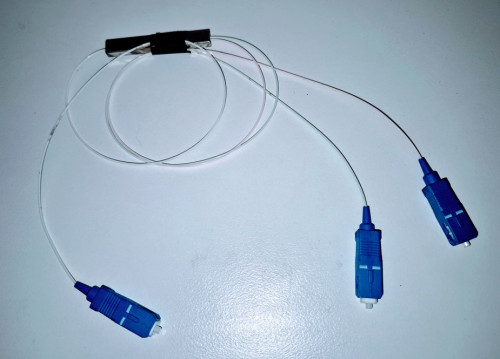
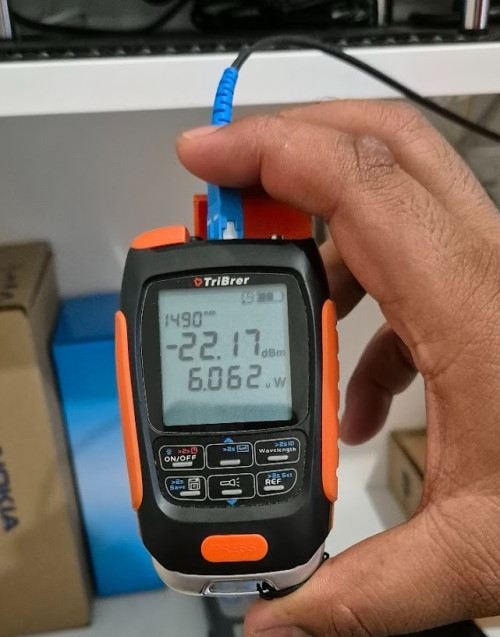
Damn, I got a port that shared with other neighbour. So my optical power is around 21-22dBm. No wonder my downstairs neighbour is at the perfect 18dBm
user posted image

user posted image
*
This is not good practice, instead of being fair and giving the rest equal distribution of optical power, they're splitting Non Unifi reserved ports to other ISP users?

laugh.gif

I'm displeased not with the R&R issues in this country but even Non-Unifi port users not get splitted ports?

22.17dBM quite risky there. Given Malaysian extreme humid weather and bad maintenance practices, in a year or 2 your signal level will degrade soon enough.

Once 23-34dBm, at the borderline level you'll start experiencing frequent line disconnects and stability issues.

The ideal signal level is 18-19dBm.Anything above I don't suggest going for gigabit plans in future.
SUSpetpenyubobo
post Apr 28 2024, 03:33 PM

Regular
******
Senior Member
1,030 posts

Joined: Jan 2022

QUOTE(Xange @ Apr 27 2024, 05:47 PM)
user posted image
*
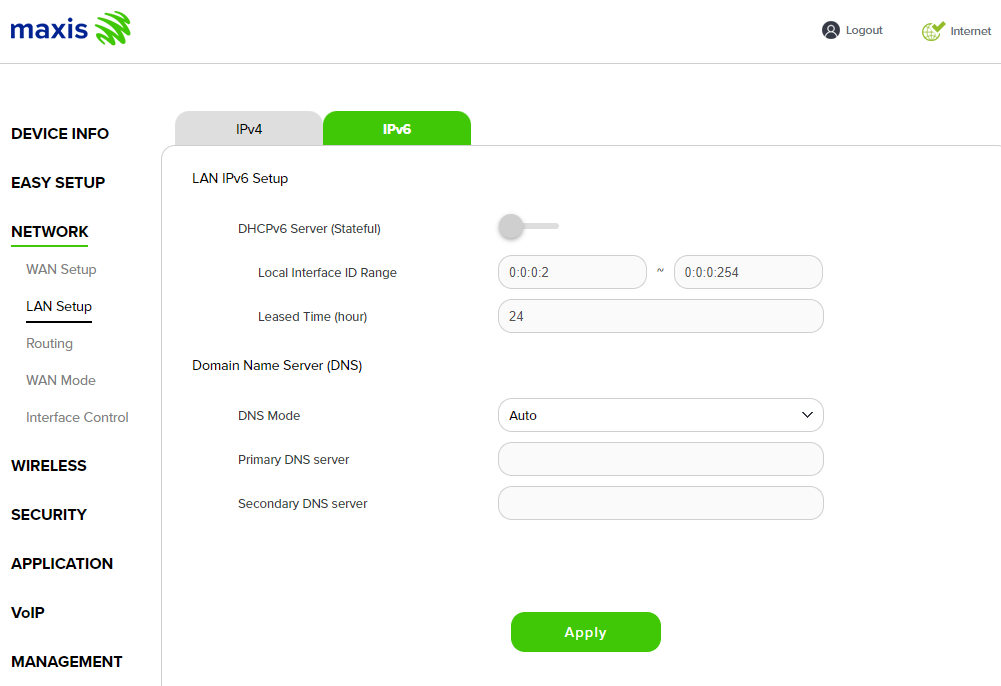
You never turn on your DHCPv6 server how are you going to obtain an IPv6 address with your clients and get your packets routed?
SUSpetpenyubobo
post Apr 28 2024, 06:46 PM

Regular
******
Senior Member
1,030 posts

Joined: Jan 2022

EDIT

This post has been edited by petpenyubobo: Apr 28 2024, 06:52 PM
SUSpetpenyubobo
post Apr 28 2024, 06:50 PM

Regular
******
Senior Member
1,030 posts

Joined: Jan 2022

QUOTE(Quanta @ Apr 28 2024, 05:12 PM)
maybe should I move to Unifi to remove the port splitting?
*
Not guaranteed that they'll reassign you another dedicated port if you move to Unifi now that they've already given you one with a BTU(ONT modem) resolving your case with a 2:1 splitter for a Non-Unifi assigned port.

The team will just come swap your router with a Unifi one.

Until the problem re-arise and complaints are made and escalated in future they won't be touching anything considering if your area has high demand and there are no longer any spare vacant ports.

I was previously a Maxis Fibre user before for over 6 years. Made the brave move to finally invest in a modem and cut my cords since I'm a light user and don't spend time at home.

No longer tied to contracts and I've lessen my monthly bills. Previously I was on 30M Fibre paying extra every month for public IP. Now I spend almost half and enjoying speeds more than 10X before.

Malaysian fibre internet which is outdated was recently shaken by 5G just like many other developed markets such as US, Japan and HK.

Avoid the monopoly player in your housing garden which is purposely manipulating the ports supply and avoid contracts if I were you.

The ageing HSBB GPON network is almost approaching its 20 years lifespan already.

We're due for a 2nd generation FTTH network in few years time.
SUSpetpenyubobo
post Apr 28 2024, 07:53 PM

Regular
******
Senior Member
1,030 posts

Joined: Jan 2022

QUOTE(YoungMan @ Apr 28 2024, 07:44 PM)
Well, it's already a known thing that other providers riding on the infra being treated second class. From speed capped, port splitting, slow tech responses etc. They jaga their own customer first.
That is probably one of the way, move to Unifi and subscribe higher package that they have to assign you a dedicated port. But if your housing taman port full, then no.
*
Nope, by still insisting to use that monopolized network is akin to bending over and accepting the whip of their monopolistic practices.

You're not going to pressure them to change their practices but instead keep supporting their ways.

There shouldn't be ports limitation when your network was planned well initially. Splitters are on the cheap now. It's well known to be made up to create that scarcity to force users to subscribe to their own brand ISP with unfair advantage.

How can a wholesale provider competes directly in the same business as the rest of its retail providers(RSPs/ISPs) that rent port from them. It's a disaster recipe.

Thank DNB for waking up and not to follow the same failed footsteps as TM.
SUSpetpenyubobo
post Apr 30 2024, 05:55 PM

Regular
******
Senior Member
1,030 posts

Joined: Jan 2022

QUOTE(Xange @ Apr 29 2024, 11:42 PM)

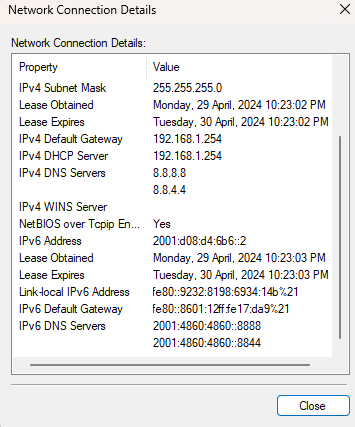
And btw, if dhcpv6 is disabled as you said, i'm not suppose to get any ipv6 address as seen in the screenshot right? correct me if i'm wrong.

user posted image

*
You've managed to obtain an IPv6 from Maxis. It's just your LAN routing now.
IPv6 WAN is already up.

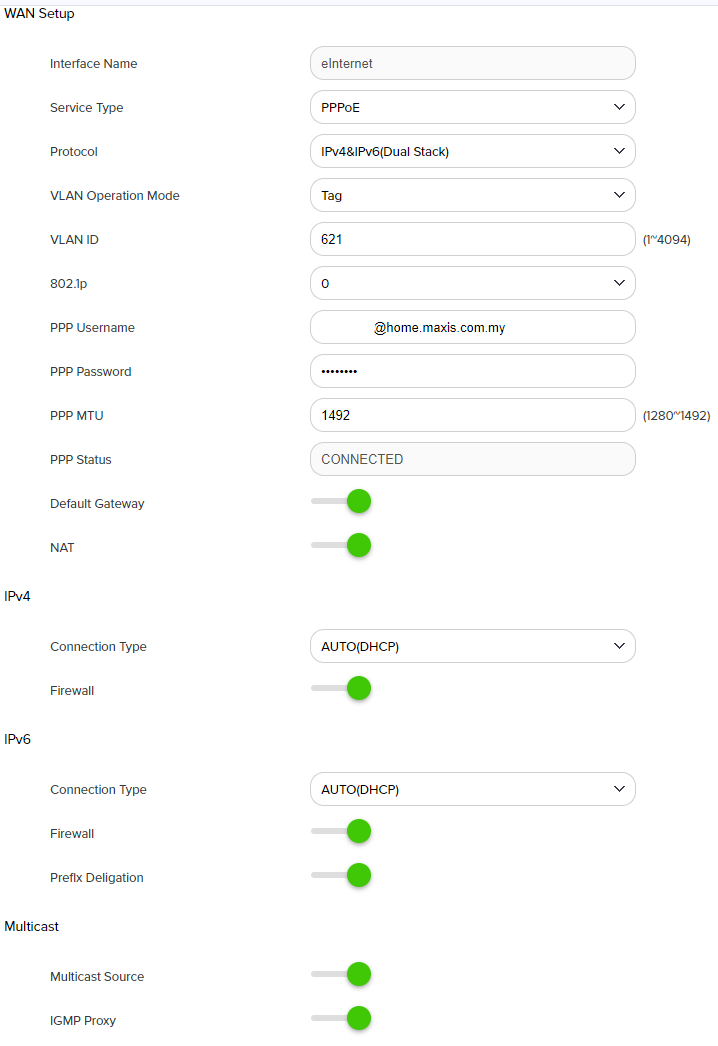
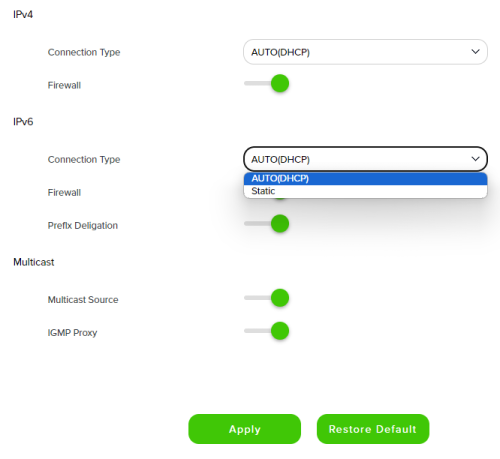
On this screen:

user posted image

For IPv6, are there any options besides Auto(DHCP)? No other options such as SLAAC/Native? Leave prefix delegation ON.
Try disabling the IPv6 firewall when troubleshooting and in your network adapter settings for IPv6 on your PC, try to set your IP address and DNS as auto assign instead of using static?


SUSpetpenyubobo
post Apr 30 2024, 08:21 PM

Regular
******
Senior Member
1,030 posts

Joined: Jan 2022

QUOTE(Xange @ Apr 30 2024, 07:32 PM)
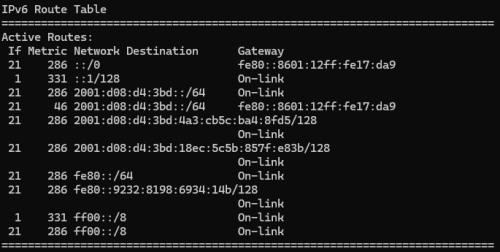
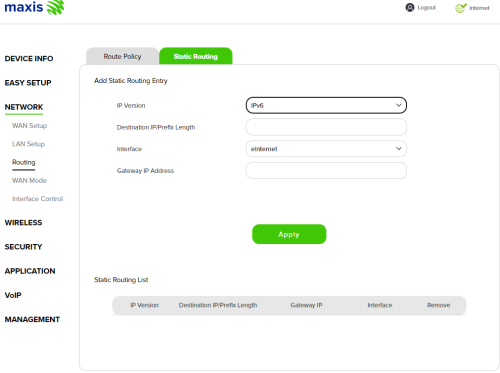
for ipv6 routing, i had checked at powershell with route print -6 and obtain below result

user posted image

the 1st line's gateway ip is the indeed my router's ipv6 local address so i believe the routing in my pc is correct, btw, the same issue also happen on my other 2 pc as well so the routing at pc should not be an issue here. and the routing in router i believe its not something i should modify (well, by default it is empty)

user posted image

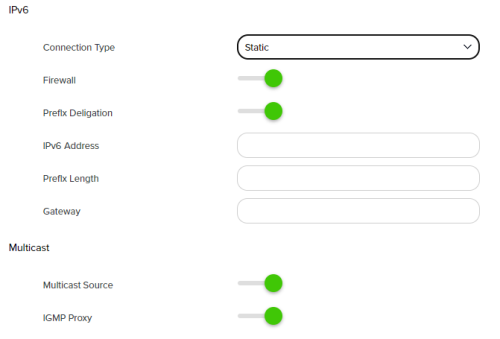
to answer your second question, yeah, the wan option there, in ipv6 section the option i have are only 2, either dhcp or static. no other choice, the old maxis router does have 3, which includes slaac. this latest kaon router provides very limited option for me. last night i tried disable firewall and test too remain same result no ipv6 internet access.

user posted image

this is how it looks like if i select static

user posted image
*
Perhaps you can try tinkering with static IP on your computer by manually assigning an IPv6 prefix to your computer's network adapter?

Maintain IPv6 Auto(DHCP) with firewall turned off, but manually assign a fixed unique IPv6 with the same prefix assigned dynamically by Maxis to your network adapter?

Prefix length 64
SUSpetpenyubobo
post Jul 23 2025, 03:25 PM

Regular
******
Senior Member
1,030 posts

Joined: Jan 2022

QUOTE(fruitie @ Jul 23 2025, 02:19 PM)
No, I don't. They only give me a Nokia modem and a Huawei router. How to get this USB 4G backup modem?
*
Need to subscribe to Maxis Postpaid plan and pair both your Postpaid line and Maxis Home Fibre before they issue you that USB 4G modem last time.

But need to be careful in future if you want to port out your mobile number or fibre line even if you have no contract you must request to debundle both lines before they allow port out.

Key here is Maxis Family Plan Bundle.
SUSpetpenyubobo
post Jul 23 2025, 03:47 PM

Regular
******
Senior Member
1,030 posts

Joined: Jan 2022

QUOTE(fruitie @ Jul 23 2025, 03:31 PM)
Oh no wonder. I don't have a postpaid plan with Maxis, only this Maxis Fiber.

The next thing I plan to do when I go back to my place is to change my Asus router to Maxis Huawei router. Then, I change the SSID and password to be the same as my Asus router, so that I don't need to setup all my IoT devices again. This will work right? In this case, I can verify if it is a router issue or Maxis issue, then Maxis has no more reason not to help me troubleshoot.
*
Not worth it actually both Maxis Postpaid (cheapest) + Home Fibre Plan Bundle together it's almost RM200 with VAT.

Since your Postpaid is already made unlimited, no lost for Maxis to issue you an extra unlimited data backup SIM that is tied to the 4G dongle.

RM200 might as well subscribe an unlimited prepaid plan or the cheapest fibre plan out there at roughly almost half the price. RM89 + RM50

Of if you need just the data sim consider XOX, TuneTalk, DiGi Prepaid SIM plans which are just under RM65 depending on needs and modem friendly.


Change to:
| Lo-Fi Version
0.0287sec    0.51    7 queries    GZIP Disabled
Time is now: 3rd December 2025 - 10:10 AM