Welcome Guest ( Log In | Register )

Bump Topic Topic Closed RSS Feed
10 Pages « < 6 7 8 9 10 >Bottom

Outline · [ Standard ] · Linear+

Unifi Official TM UniFi High Speed Broadband Thread V20, ( -_・) ︻デ═一▸ Maxis & Time

views
     
christina1
post Jul 11 2015, 12:32 PM

Never stop learning, because life never stops teaching.
*******
Senior Member
2,104 posts

Joined: Sep 2008
QUOTE(Xefron @ Jul 11 2015, 12:14 AM)
the most fortunate is people with existing VIP 5 / VIP 10 and VIP 20 without any hypptv packages.once the upgrade option is open in self care portal,u are paying less with free iptv.the downside is slower upload speed.
*
The question how many mbps is enough for a home user than downloads a lot of movies,tv series ..30mbps or 50mbps?
christina1
post Jul 11 2015, 03:14 PM

Never stop learning, because life never stops teaching.
*******
Senior Member
2,104 posts

Joined: Sep 2008
QUOTE(Icehart @ Jul 11 2015, 03:08 PM)
Personally I would suggest 30mbps as I am a 20Mbps user currently but I don't have anything to download these days.  laugh.gif
*
Ok still deciding which one to go for 30mbps or 50mbps.....Because I download a lot of Movies and Tv series from torrent which is around 20-30GB a day...
christina1
post Jul 11 2015, 03:18 PM

Never stop learning, because life never stops teaching.
*******
Senior Member
2,104 posts

Joined: Sep 2008
QUOTE(Icehart @ Jul 11 2015, 03:16 PM)
If you are the anxious type of users who need to watch it tonight after adding torrent in the afternoon then 50Mbps.
If you can wait until tomorrow, then save some money for the snacks and get 30Mbps.

Although a RM 50 difference would not buy you very much snacks these days.  laugh.gif
*
Ok...you also plan to upgrade to 50Mbps soon?

To watch 4K video on youtube you need at least 50mbps.
christina1
post Jul 11 2015, 11:41 PM

Never stop learning, because life never stops teaching.
*******
Senior Member
2,104 posts

Joined: Sep 2008
QUOTE(Moogle Stiltzkin @ Jul 11 2015, 11:31 PM)
depends.... i consider myself heavy downloader. this is just an example of the kind of monthly bandwidth usage for a heavy downloader *cough  brows.gif

user posted image
downloading something like say 4gb on a 10mbps can take like roughly an hour or so. If you want to download faster than that for that sort of filesize then 30-50mbps can net you i'd say roughly under 20 or 30 minutes.
As for streaming is a different matter.

e.g. netflix there is a bottle neck, which is why 20-25 mbps is recommended for 4k streaming, otherwise you will get stutter. stutter is bad for streaming .... makes it less enjoyable if your show is pausing every now and then  sweat.gif

for 1080p  10mbps should be fine.
5mbps is like bare minimum for just average internet, mostly get this if you only browse the web and little else. you also pay the less compared to other broadband packages.

10mbps works fine for everyone. this is what i use too. malaysian broadband is overpriced, so this at least is slightly bearable even if other countries can get much higher mbps for the same price ..... but what to do  cry.gif

20mbps for netflix 4k. or if you want to download stuff faster, or even for increased upload speed.

30 and 50mbps download is very good. no quota either. only downside is the 5mbps, which in most cases isn't an issue for people that mostly download. if your a regular streamer, you may want to just stick with 10 or 20mbps for now doh.gif

100mbps time has a quota ...... which i heard reverts to 10mbps once reached, and only resets back to 100mbps at the end of the month. If you look at the sample bandwidth usage, it just goes to show how a heavy download can easily surpass the monthly quota  rolleyes.gif

maxis 100mbps i don't think has a quota. but is damn expensive. and i haven't seen yet any reviews what the performance and latency is like. i never really hear any good things about maxis broadband  rolleyes.gif
theres a chart here what youtube recommends in terms of mbps for smooth streaming on youtube for what resolution content
https://support.google.com/youtube/answer/1722171?hl=en
for netflix i'm pretty sure they said somewhere between 20-25mbps. i think they use some sort of compression for their streaming service.

https://help.netflix.com/en/node/306
PS: fcc in america raised the definition of broadband to 25mbps download to qualify
http://www.extremetech.com/mobile/198583-f...rman-mocks-isps

compared to Malaysia
and people wonder why i am so skeptical about our country's broadband management  rolleyes.gif
*
OK cool good explanation...How to used this Tomato Firmware and where can I download?

christina1
post Jul 12 2015, 07:08 AM

Never stop learning, because life never stops teaching.
*******
Senior Member
2,104 posts

Joined: Sep 2008
QUOTE(Moogle Stiltzkin @ Jul 11 2015, 11:54 PM)
tomato is a custom router firmware, kinda like dd-wrt. the difference is tomato is simplified and easier to use compared to dd-wrt. also it has better bandwidth qos management.
there are few variants of tomato. i use shibby's cause he has the latest fixes, updates and features. This is a list of routers he supports with his firmware.
http://tomato.groov.pl/?page_id=69

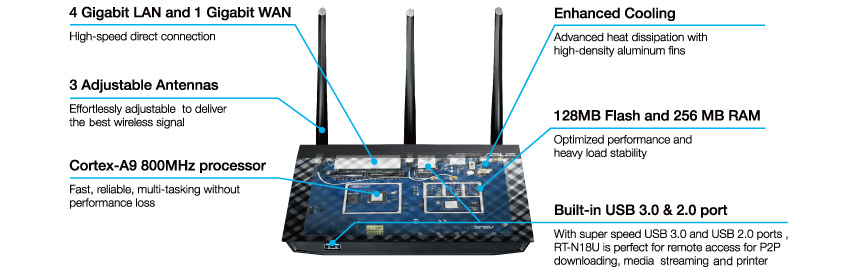
the most highest end router he supports is the r7000 nighthawkor a Asus RT-AC68U, but those costs roughly rm700+ So a more cheaper but performance router he also supports is a Asus RT-AC56U. Or even cheaper there is a Asus RT-N18U for around rm400 ish
Asus RT-N18U - really nice router
Looks like RT-N66U, has CPU/RAM/NAND/USB3.0 like RT-AC68U but is single-band wireless router like RT-N16. What is it? Asus RT-N18U
user posted image

http://www.linksysinfo.org/index.php?threa...e-router.70178/
this is the latest shibby changelog
http://tomato.groov.pl/?page_id=78
Also i'm using a custom GUI for his firmware. you can browse it from this site
http://tomatothemebase.eu/?author=1
Why i also like using tomato shibby, i can keep an accurate log for my monthly banwidth usage. i can also monitor my download and upload speed, more accurately compared to speedtest. So if ever my broadband is below 70%, i have proof that this is the case, because my router keeps a log which is automatically saved to my QNAP Nas  smile.gif
oh and compared to ddwrt, tomato has a graphical overlay like below. so don't know why people still use dd-wrt these days  rolleyes.gif  maybe they didn't look what else was available lel.

user posted image
*
Thanks for the info really appreciate it....Is it straight forward to setup Tomato firmware?

Looks like you download a lot and ur pc is switch on 24X7....Thinking will be upgrading to 50mbps since the upload speed is 10mbps.
christina1
post Jul 12 2015, 02:13 PM

Never stop learning, because life never stops teaching.
*******
Senior Member
2,104 posts

Joined: Sep 2008
QUOTE(Moogle Stiltzkin @ Jul 12 2015, 01:05 PM)
i use 2 NAS

6x2tb 5x1tb raid5 icon_idea.gif

can easily run out of space. waiting for 4tb or 6tb drives to get cheaper  sweat.gif

The only reliable brand i'd get is hsgt, but those helium drives are too pricey. seagate is better than last time, but honestly based on the failure rates, i don't trust them  rclxub.gif
upgrade tomato firmware is easy....

you install your default router firmware, do a factory reset. then upgrade firmware pointing to the shibby tomato firmware. once done, go to the shibby settings and do factory reset. NVRAM clear make sure this is on (for a clean reinstall).

Now you can start setup :] things you'd normall do, you can change the router lan ip range. also change the default router lan ip to a custom to obfuscate from hackers trying commonly used ips. then again if you don't enable remote router admin access, probably really needed imho.

then you can do portforwarding.

change dns to use googledns.

and alternatively you can setup QOS for bandwidth management. read the guides on how to :]
*
okok thanks...so deciding to upgrade to 50mbps now?
christina1
post Jul 12 2015, 02:27 PM

Never stop learning, because life never stops teaching.
*******
Senior Member
2,104 posts

Joined: Sep 2008
QUOTE(Moogle Stiltzkin @ Jul 12 2015, 02:22 PM)
if 50mbps download with 5mbps upload with unlimited quota (aka no policy to throttle to to any monthly bandwidth cap) for that price. then yeah get it. i doubt you do any streaming activity on twitch to warrant a higher upload ?

heck even 30mbps is good :] for an even cheaper price. get whichever fits better into your budget.

theres the hypptv package included (no choice here). i think for custom router there is an issue to get iptv working. so if you don't mind that, then get it :] (wish they offered the speeds without the iptv bundle but sadly can't. guess they want to justify the increase costs.... lel...)
*
I only stream live radio station and youtube...thinking of going for Unifi 50mbps since upload speed is 10mbps...
christina1
post Jul 12 2015, 04:49 PM

Never stop learning, because life never stops teaching.
*******
Senior Member
2,104 posts

Joined: Sep 2008
QUOTE(Moogle Stiltzkin @ Jul 12 2015, 04:45 PM)
qos implementation is different for brands and firmware used.

usually the reviews at smallnetworkbuilder talk about qos implementation, you will sometimes not some shortcomings.....

tomato qos is famous for having an extensive qos that is quite capable  smile.gif
*
There is no other software that we can know how much I have downloaded for the month?
christina1
post Jul 13 2015, 09:20 PM

Never stop learning, because life never stops teaching.
*******
Senior Member
2,104 posts

Joined: Sep 2008
QUOTE(EroS @ Jul 13 2015, 08:10 PM)
Yup. Received it as well. Promo valid till August 31st.
*
That means how much u pay with GST for 30mbps ?
christina1
post Jul 14 2015, 08:38 AM

Never stop learning, because life never stops teaching.
*******
Senior Member
2,104 posts

Joined: Sep 2008
QUOTE(vez @ Jul 13 2015, 10:20 PM)
210 for 30MB include free local call is a good deal biggrin.gif
*
Yeah its a good deal...but I prefer take 50MB if Unifi offer me a good deal.
christina1
post Jul 14 2015, 09:24 AM

Never stop learning, because life never stops teaching.
*******
Senior Member
2,104 posts

Joined: Sep 2008
QUOTE(angel-girl @ Jul 14 2015, 09:08 AM)
i just renew my contract with 50mbps and just got to know they capped the upload speed to 10mbps only ...aiks...
*
How is the download speed for 50MB ?
christina1
post Jul 14 2015, 09:39 AM

Never stop learning, because life never stops teaching.
*******
Senior Member
2,104 posts

Joined: Sep 2008
QUOTE(Moogle Stiltzkin @ Jul 14 2015, 09:33 AM)
here's a chart
http://www.uswitch.com/broadband/guides/br...download_times/
a 10gb bluray @ 50mbps = 26m 40s download time.

@10mbps it would be roughly around 2h 47m ish. 
if i were to play 1 game of storm of heroes, after my game is done, i'd have finish downloading the movie to go watch  laugh.gif
so thats the difference  smile.gif
if you do get 50mbps, make sure to test with an actual torrent, as well as speedtest to international servers e.g. US and europe to see your download speed. Local malaysia download doesn't mean much when most of the content is usually on US or european locations.
*
Thanks a lot for the info...
christina1
post Jul 14 2015, 03:32 PM

Never stop learning, because life never stops teaching.
*******
Senior Member
2,104 posts

Joined: Sep 2008
QUOTE(Moogle Stiltzkin @ Jul 14 2015, 01:16 PM)
ah ty for the info. starting to see the picture now.

the 20mbps people got screwed over due to the nagging to upgrade to 20mbps, only to later find out 30mbps and 50mbps came out  laugh.gif

doubt the same will happen for 30mbps. new package, doubt they'll change the price or suddenly got 100mbps for cheaper price  hmm.gif

only thing i suspect is 5/10 and maybe even 20 may get a price reduction by august. but who knows, maybe not  rolleyes.gif
*
Go for 50MB u wont regret it since you are heavy user downloading a lot of Bluray movies...smile.gif)

This post has been edited by christina1: Jul 14 2015, 03:38 PM
christina1
post Jul 14 2015, 05:44 PM

Never stop learning, because life never stops teaching.
*******
Senior Member
2,104 posts

Joined: Sep 2008
Who is using 50MB here and please care to share their experience ..Hows the speed and service for Unifi 50MB terms of downloading etc torrent ?
christina1
post Jul 14 2015, 07:25 PM

Never stop learning, because life never stops teaching.
*******
Senior Member
2,104 posts

Joined: Sep 2008
QUOTE(Icehart @ Jul 14 2015, 07:20 PM)
Now the 50Mbps for RM 219 is a good deal. I will patiently wait until September.
*
Confirm launching in September for 50MB ? RM 219 is a good deal.
christina1
post Jul 14 2015, 08:14 PM

Never stop learning, because life never stops teaching.
*******
Senior Member
2,104 posts

Joined: Sep 2008
QUOTE(Moogle Stiltzkin @ Jul 14 2015, 07:49 PM)
guess i wait then. rm 219 for 50mbps i'll bite doh.gif

penalty if get now and later try downgrade isn't it .... sneaky sneaky X_X:
PS: this was one of the emails i received. there no mention of a 50mbps package.

user posted image
http://www.lowyat.net/2015/07/is-tm-finall...nifi-customers/
they always spam me to upgrade  rolleyes.gif
anyway my point is, email price 199.....  the september launch price 169 ...... VERY SNEAKY tmnut. try get me locked into 199, when only 2 months later will be 169 ! fuckers almost got conned  vmad.gif
*
Where u got the info 50MB gonna be RM219 in September 2015 ?
christina1
post Jul 14 2015, 08:16 PM

Never stop learning, because life never stops teaching.
*******
Senior Member
2,104 posts

Joined: Sep 2008
QUOTE(pakji @ Jul 14 2015, 06:03 PM)
someone told
my friend wanted he don't need HyppTV and don't need free calls
*
No need to change ur Unifi phone number also?
christina1
post Jul 14 2015, 10:03 PM

Never stop learning, because life never stops teaching.
*******
Senior Member
2,104 posts

Joined: Sep 2008
Got feedback from friend working with TM who use 30 & 50 mbps, really slow the download speed, better take VIP20 instead.
christina1
post Jul 15 2015, 06:07 PM

Never stop learning, because life never stops teaching.
*******
Senior Member
2,104 posts

Joined: Sep 2008
QUOTE(OKLY @ Jul 15 2015, 05:20 PM)
Quite big difference, so far YouTube buffers really quickly for 1080p and improves download time on torrent by a lot, I think I might need a bigger hard disk now. sweat.gif

The process was fast, I went to TMPoint to submit my request for upgrade, was told it will be done within 24 hours but the moment I came home (10 minutes drive back home) it was already at 30mbps.
*
What tm needs to upgrade? Do they require you to terminate current package? Plus ur Unifi fix line number need to be changed?
christina1
post Jul 15 2015, 06:36 PM

Never stop learning, because life never stops teaching.
*******
Senior Member
2,104 posts

Joined: Sep 2008
QUOTE(OKLY @ Jul 15 2015, 06:15 PM)
Everything done at the backend in their system only. No termination required but they will lock you up with another 24 months contract, UniFi phone and account number will be the same.
*
You upgrade from 10 to 30mb? I need to go personally TMpoint to upgrade?

10 Pages « < 6 7 8 9 10 >Top
Topic ClosedOptions
 

Change to:
| Lo-Fi Version
0.0259sec    0.32    7 queries    GZIP Disabled
Time is now: 12th December 2025 - 03:19 PM