Taken frm MyPDACafe.com ... better put it on 1st page. Make sure u have any registery editor ready in ur mini (ie PHM Registery Editor)
Install directory to your storage/storage card.To install your application/program to storage memory or storage card memory. Whenever you are about to install, there will one screen appear to ask you where to install the program. But not to forget to change it back the default value to 0 after the installation or u might encounter weird situation when you want to change your today screen and etc..
HKEY_LOCAL_MACHINE\Software\Apps\Microsoft Application Installer
Default: 0
Changed: 1Fast graphic but consume memoryIt can fasten and smoothen your OS graphic movement, but it will eat some of your program memory, not that much. You also can change it to 32768 instead of 16384 for greater result.
HKEY_LOCAL_MACHINE\System\GDI\GLYPHCACHE
Default: 8192
Changed: 16384
To hide screen rotate icon
There is a small PDA icon at your bottom right corner of your screen to change ur screen orientation from patriot to landscape and other way round. For me, its unnecessary, so you can hide it.
HKEY_LOCAL_MACHINE\Service\ScreenRotate
ShowIcon value change to 0
Default: 1
Changed: 0To turn off flashing LEDs and VibrationIt will turn off the blinking green/red/orange LED and the vibration mode. Some people will irritate by the blinking, especially when you're driving and sleep at night.
HKEY_LOCAL_MACHINE\Drivers\Builtin\AllLEDMgr
Default: 1
Changed: 0Enable camera frame rate displayCamera frame rate will appear on the screen when u're using the camera
HKEY_LOCAL_MACHINE\SOFTWARE\HTC\CAMERA\AppDefSettings\General
Default: 0
Changed: 1
OR
Camera PatchTo set ur ringstones to run from Storage Card
Place all your downloaded ringtones from internal memory to storage card. Usefull for our small/ciput Mini memory.
HKEY_CURRENT_USER\ControlPanel\SoundCategories\Ring\Directory registry key
Default value: "\Windows\Rings\"
Change it to: "\Storage Card\<your preferred directory>\" (Note that "\" at the end is extremely important!!!)
Place those ringtones into \Storage Card\<your preferred directory>\Enable hidden editor function in AlbumThis opens the additional hidden function in the ALBUM, allows u to edit ur photo, brightness, contrast, crop, etc. Album (opens Editor menu):
HKEY_LOCAL_MACHINE/SOFTWARE/HTC/Album/Disable Editor
Disable value changed to: 0O2mini Camera Settings ConfigurationEnhance you picture taken quality. It will remove your camera snow effect
HKEY_LOCAL_MACHINE/SOFTWARE/HTC/Camera/AppDefSettings/General
Set
Contrast: 5
Brightness: 6
Saturation: 3 or 4 (recommended by Doc)
Hue: 5
Sharpness: 3
Unlimited 3gp Recording for mms settingsThis will allow you to take unlimited recording time
HKEY_LOCAL_MACHINE \ SOFTWARE\HTC\camera\AppDefSettings\P3
DWord Value called "EnableLimit", change it from 1 to 0.Disabling "Message Sent" notification bubbleFor those who hates the "Message Sent" notification after sending an SMS, this is the steps to remove the bubble notification...this is the STEP by STEP method to do it in case some of you guys dont get it right...
1. First, you will need to download a Registry Editor to help you do it...
2. using the Registry Editor, navigate to: HKEY_LOCAL_MACHINE\SOFTWARE\Microsoft\Inbox
3. Next, click on Inbox (make sure the Inbox is highlighted) and select Edit, New Key
4. Name the New Key as "Settings"
5. Click on "Settings" (make sure the Settings is highlighted) and select Edit, New String Value
6. On "Value name:", key in SMSNoSentMsg and in "Value data", key in 1
7. Soft reset your device and test it with one SMS, and you will notice that the SMS Sent bubble is being disabled
Audio TweakAudio Tweak enhances the speaker performance of the O2 Mini (some devices have this set to a lesser priority and by using this you get better sound, if your device is already set to a high level you have no need for this)
HKEY_LOCAL_MACHINE\Drivers\BuiltIn\WaveDev\Priority256
Default: 110
Changed to: 80Disable start menu animationThis tweaking will eliminate the list of menu "drop-down animation" if u tab on Start/Flag icon.
HKEY_LOCAL_MACHINE\SYSTEM\GWE\Menu\
AniType value change from 6 to 0.Looping Ringtones DelayRing tone has a standard 3 seconds delay before repeating. You can set the delay from 0 second to how many second that you want.
HKEY_CURRENT_USER\ControlPanel\Sounds\RingTone0
Change 'Script' from 'av0pw3r' to 'av0pr' and you'll get 0 sec delay.
OR change it to
av0pw1r = wait for 1 sec
av0pw2r = wait for 2 secand so on...
Plus..heres the code
a - stands for display
r - repeat/replay the script again
c - sets the volume C50, c150, c100
f - means flash .. f1 flash for 1 second and f0 stands for flash continuously
p -means play ringtone
v- vibrate then incorporate with number to state how many seconds it will vibrate example. v3 vibrate for 3seconds or v0 for continous
w - stands for wait or pause then specify how many seconds like w3(wait for 3 seconds)
heres the example
Flash - af1w60f0
Ring - apw3r
Ring Once - ap
Increasing Ring - c50apw3c150r
Vibrate Then Ring - v3w3apw3r
Vibrate - av3w3r
Short Vibrate - av1w3r
Vibrate Long Then Ring - v3w3v3w3apw3r
Vibrate And Ring - av0pw3r
Increasing Ring And Vibrate - c50apv3w3c150r
Fast Vibrate And Flash - af1v1w1f0r
Vibrate and Ring Continously without pausing - av0pr
SMS Notification On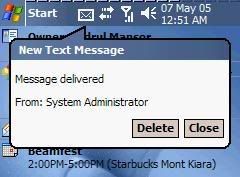
This is different with message notification send, this will confirm you when message already recieve by receiver
[HKEY_CURRENT_USER\Software\Microsoft\Inbox\Settings]
SMSDeliveryNotify = dword:00000001 ->0 if off
How to:
Create new Dword value name SMSDeliveryNotify
with decimal value data 1
Watch for capital letter
Changing the Message Sent Notification MessageChange the default "MessageSent". Example "Pesan sudah di kirim"
[c\SOFTWARE\Microsoft\Inbox\Svc\SMS]
Change the Value "MessageSent" to whatever you like.
Change the default input methodTo change your input method, keyboard, letter recognizer, block recognizer as ur default, even you soft reset ur mini.
NOTE:
*for English ROM
*cannot set transcriber and Phatware Calligrapher with this trick.
HKEY_CURRENT_USER\ControlPanel\Sip
Change the "DefaultIm" value for:
To set keyboard as default SIP, change the "DefaultIm to
{42429667-ae04-11d0-a4f8-00aa00a749b9}
To set Character Recognizer as default SIP, change the "DefaultIm to
{42429690-ae04-11d0-a4f8-00aa00a749b9}
To set Block Recognizer as default SIP, change the "DefaultIm to
{42429691-ae04-11d0-a4f8-00aa00a749b9}
*change only the bold number will do. The rest are totally the same.
To set WordLogic as default SIP, change the "DefaultIm to
{4345EA53-B8A5-4E24-A14A-F7C34DD78077}
*No WordLogic in Xda O2 mini.
To Get The AM/PM on The Top Bar
HKEY_LOCAL_MACHINE\nls\overrides
1. Creat new String value with Name = S1159 & Data = Am
2. Creat new String value with name = S2359 & data = Pm
3. Creat new String value with name = STFmt & data = h:mm tM
- capital letters and small letters must be followed exactly or it may cause hard resets!
- you will get capital "AM/PM" on the top bar eventhough the registry data value above was entered as "Am/Pm"
Change The Date on The Top Bar HKEY_LOCAL_MACHINE\nls\overrides
Look for String value SSDte (short date) and change the value data, some example of date formats i have used below:
- "7 May 05, Friday" by changing the String value SSDte data = d MMMM yy, dddd
- "07/05/2005, Fri" by changing String value SSDte data = dd/MM/yyyy, ddd
To include both time and date in taskbar1) Go to HKEY_LOCAL_MACHINE\SOFTWARE\Microsoft\Shell\
2) Create a binary value named "TBOpt" and set its value to "13 00 00 00".
3) Soft-reset
Note: If u ever get bored of the date display, rid it by deleting the TBOpt key.
Phase 2: IF U NEED THE CHANGE THE DATE FORMAT:
i) Just go to Settings>Regional Settings>Date>Short Date
ii) Choose "dd-MMMM-yy" or whichever format u prefer.
iii) Click "ok".
Clear Type on LandscapeDisplayYou'll get clear type font in landscape mode.
HKEY_LOCAL_MACHINE\System\GDI\ClearTypeSetting
1. Change value data of OffOnRotation from 1 to 0
2. Soft reset
Setting Cleartype Text in PIEHKEY_LOCAL_MACHINE\SOFTWARE\Microsoft\Windows\CurrentVersion\Internet Settings
"ClearTypeText"<- Set 1 to Enable Cleartype in PIE, 0 to Disable
Setting ClearType Text in Pocket PC Optionally, you can go to START>SETTINGS>SYSTEMS>SCREEN>CLEARTYPE
HKEY_LOCAL_MACHINE\System\GDI
Create a Subkey then Name it "CLEARTYPE"
Settings Screen Text SizeOptionally, you can go to START>SETTINGS>SYSTEMS>SCREEN>TEXT SIZE
HKEY_LOCAL_MACHINE\ControlPanel\Stylus\96DPI
"CurFont"= change to the ff value ..
dword:00000258 -> Smallest
dword:000002BC -> Smaller
dword:00000320 -> Normal/Default
dword:000003E8 -> Larger
dword:0000044C -> Largest
NOTES
Please soft-reset everytime you change the value to see the effect.
OR
u can juz use
This Fella 
-------------------------------------------------------
vCard
Send contact as bussines card via SMS
SMS me oneThis post has been edited by cruzzmz: Oct 1 2006, 04:28 AM 

 Sep 30 2006, 01:50 PM


 Quote
Quote
 ... save some memory ... but try doing the below





 ) any good stuff that i should install to make it work better / cooler plus what do i need to tweak it for me to really be able to fully utilise this machine? Any help would be greatly appreciated.....
 oh thanks , gonna try later.....


 .
.




 0.0432sec
 1.77
1.77
 6 queries
 GZIP Disabled