Outline ·
[ Standard ] ·
Linear+
Xiaomi Mi3 Official Thread V12, Strictly on technical discussion ONLY!
|
andrekua2
|
 Jul 18 2014, 09:52 AM Jul 18 2014, 09:52 AM
|

|
Damage has been done, so stop asking why there are twins now.
Focus on the phone related discussion now, be it MIUI, hardware or sales related question. However for delivery enquiry, please refer back to Xiaomi.
|
|
|
|
|
|
andrekua2
|
Jul 18 2014, 10:36 AM
|
|
|
QUOTE(off_shore @ Jul 18 2014, 10:24 AM) I dislike the stock browser. It always force closes! Do you guys have any idea how to disable it as 'default' and uses chrome instead? There isn't any 'default' setting in the app info  I prefer stock browser and it hardly crashes. Anyway, back to your question, goto Setting>Apps and you will find a "Default app settings"... Can change the browser there... |
|
|
|
|
|
andrekua2
|
Jul 18 2014, 10:11 PM
|
|
|
QUOTE(loneboy62 @ Jul 18 2014, 04:12 PM) No Network and Reset has encountered many times a day, this is due to the switch over network between 2G and 3G the signal cannot locate fast, but it should not make you hand too. And usually with Call, it should not be no network as you have activated the network, it should lets you use until disconnected. QUOTE(jeremy05 @ Jul 18 2014, 04:21 PM) I really don't know how this is happen, but this few days, everyday happen... people call me, my phone ring 1 seconds, then phone show miss call, then no network, if good luck, the signal will back after few seconds, if no luck, phone turn black, no respond, have to force restart...  see tonight after update latest dev rom, see got improve or not... I tried both stable and Dev ROM and both also causing this issue. I suspect the modem was not compatible. I just switch back yesterday and confirm MY ROM don't exhibit this problem. Anyway to flash MY modem? |
|
|
|
|
|
andrekua2
|
Jul 18 2014, 10:20 PM
|
|
|
QUOTE(jeremy05 @ Jul 18 2014, 10:15 PM) but not everyone have this problems...  But most (if not all) of Maxis users with China ROM are affected. http://en.miui.com/thread-23744-1-1.html |
|
|
|
|
|
andrekua2
|
Jul 21 2014, 07:59 PM
|
|
|
Google Camera still FC when using HDR although it did save the pic.
Will monitor the network loss issue. I dont think they fixed Whatsapp as what I read in MIUI forum. Its not mentioned in the changelogs.
|
|
|
|
|
|
andrekua2
|
Jul 21 2014, 08:00 PM
|
|
|
QUOTE(mulut99 @ Jul 21 2014, 07:50 PM) Anyone try stock camera on this KitKat rom? Picture quality good? Still rubbish. |
|
|
|
|
|
andrekua2
|
Jul 21 2014, 08:04 PM
|
|
|
QUOTE(jack3218 @ Jul 21 2014, 08:01 PM) hei my signal is disconnect whenever i make call or receive call updated to kit kat today Im scared to hear this really... I did the downgrade last week just because of this issue with China ROM. |
|
|
|
|
|
andrekua2
|
Jul 21 2014, 08:19 PM
|
|
|
QUOTE(andrekua2 @ Jul 21 2014, 08:04 PM) Im scared to hear this really... I did the downgrade last week just because of this issue with China ROM. Looks like worse nightmare. Just to confirm that I have encounter network issues with this update. I haven't received any calls yet, but all my calls to my wife phone were terminated after one ring saying didn't connect. My wife iPhone shows 5 miss calls. I feel like banging my head already. |
|
|
|
|
|
andrekua2
|
Jul 21 2014, 08:40 PM
|
|
|
QUOTE(jack3218 @ Jul 21 2014, 08:33 PM) Btw forget to mention I using maxis.. Same problem here. Maxis user too. It seem to affect 3G only. If on 2G, calls are not affected. If using 3G, calls are all terminated but still shows miss calls on recipient's phone. There were once where it even hang and restart. |
|
|
|
|
|
andrekua2
|
Jul 21 2014, 09:24 PM
|
|
|
QUOTE(andrekua2 @ Jul 21 2014, 08:40 PM) Same problem here. Maxis user too. It seem to affect 3G only. If on 2G, calls are not affected. If using 3G, calls are all terminated but still shows miss calls on recipient's phone. There were once where it even hang and restart. I think can confirm is modem issue. I tried copy HLOS image from v14 and flash the whole OTA again. True enough it didnt disconnect calls even when on 3G. However, since its not compatible, there were no sound going through the calls. I even tried copying modem image only but after flashing, it cant detect network (possibly corrupted modem image). Sigh... |
|
|
|
|
|
andrekua2
|
Jul 21 2014, 10:33 PM
|
|
|
QUOTE(jeremy05 @ Jul 21 2014, 09:45 PM) Me 2, i suspect is maxis 3g setting problems, because last time umobile also have call drop on asus zenfone5, my friend one of the user, later asus told is umobile network setting... i menas the maxis have to adjust the 3g setting on their site, our site no need to do anything... Just now, I change to 3G only and no matter what I did later on, calls have no problem going through. I thought maybe I blame wrongly. So I decided to restart and straightaway calls were not getting through again. It is really strange. Now even when I set to 3G only, it will still disconnect. Off Data also disconnect. Change to 2G only, all I get is GPRS. Strange.... |
|
|
|
|
|
andrekua2
|
Jul 22 2014, 12:38 AM
|
|
|
I'm so lazy to start over again. I just whip out my old Note 2 and have a break away from all these headache.
Actually the new modem improved 3G speed quite alot. However it's definitely done at the expense of call reception.
|
|
|
|
|
|
andrekua2
|
Jul 22 2014, 08:44 AM
|
|
|
QUOTE(apache_utara @ Jul 22 2014, 08:23 AM) High possibility different modem drivers being used for each country. Try flashing other ROMs and see if problem persists. You guys tried it outdoors with data on & still problem? No. I already check the image for the modem. Its been the same for China ROM and now even Malaysia ROM, ever since KitKat. Totally cant make any calls now. The 3G speed is awesome though, clocking the highest 1.5MB/s (not sure the speedometer at notification bar is accurate or not). |
|
|
|
|
|
andrekua2
|
Jul 22 2014, 08:47 AM
|
|
|
QUOTE(jolokia @ Jul 22 2014, 08:40 AM) No lah ! 1.) Only Maxis user is complaining, Umobile no problem, Digi & Celcom so far no info (maybe user can shared). 2.) If really firmware problem then all Telco should faced the same, now seem only Maxis. 3.) Just need to Go to maps - menu - setting - google location setting - tap Access to my location. (i think the update off the function by default). Somehow i feel Mi3 user is the most panic among all the thread in lyn..  Sikit sikit bising sampai diding runtuh  worst still most complaint due to own ignorance, got problem try find solution not crying  & kicking like baby.. If you got nothing to share on this, might as well STFU, instead of making ignorant statement. |
|
|
|
|
|
andrekua2
|
Jul 22 2014, 09:37 AM
|
|
|
QUOTE(Max2006 @ Jul 22 2014, 09:31 AM) Read from the miui forum, this new update is a GLOBAL version update. So it's not specially for either Philipine, Malaysia or Singapore. It's for the whole world outside of China (the China users have their own kitkat stable update version). I wonder if there's a new stable kitkat version specially for malaysia in the future, which similar to the previous version v14. If there is, then I think we better wait for it. Because apparently, everyone is getting different result from the latest Global update. Some are better, some are worse. Frankly speaking, I am quite fed up with this Miui's act. They suppose to continue to work on the Malaysia rom and release stable kitkat version based on that. Instead, they are releasing the Global version for the whole world, which may sound very convenient, but this also mean that problems are bound to be happened. Where are our Malaysian Miui team? Aren't they suppose to work on this? I wonder if we really have a MIUI team here. I thought all the while, only a translation team. MIUI team in China will release one ROM for China and one more for rest of the world, no? |
|
|
|
|
|
andrekua2
|
Jul 22 2014, 10:54 AM
|
|
|
Talking with the Chat Support is pain in the ass. They are not updated. Still insist on V14 as being the latest rom without any update. Luckily I screenshot the downloading process and then still have the file in downloaded rom folder. Update : Vomit blood talking to CS. Keep denying OTA updates. Already show screenshot. This is truly a sub RM1K phone.  This post has been edited by andrekua2: Jul 22 2014, 11:01 AM This post has been edited by andrekua2: Jul 22 2014, 11:01 AM |
|
|
|
|
|
andrekua2
|
Jul 22 2014, 04:45 PM
|
|
|
QUOTE(Cavino @ Jul 22 2014, 04:40 PM) 1K price !!!! I tot would be at least RM1200 or slightly above. Damn regret getting the 3rd MI3 if that is the pricing here. Plus RM100 for SIRIM and then plus shipping already ~RM1.3K' Mi3 still good... |
|
|
|
|
|
andrekua2
|
Jul 22 2014, 05:01 PM
|
|
|
QUOTE(jeremy05 @ Jul 22 2014, 04:59 PM) Mi4 change a lot in design + camera big upgrade!! spec only little upgrade only Software need lots of work. Now no mood to use Mi3. |
|
|
|
|
|
andrekua2
|
Jul 22 2014, 06:29 PM
|
|
|
QUOTE(apuneneh @ Jul 22 2014, 06:23 PM) walaoweiiii..... someone called me and my phone just ringed twice and the network lost again... The beauty of Kitkat and Maxis. Downgrade guide here... http://en.miui.com/thread-21325-1-1.htmlStarting the painful process for me as well... |
|
|
|
|
|
andrekua2
|
Jul 22 2014, 06:50 PM
|
|
|
When I told my clients that you cant reach me by phone today... he did this Attached thumbnail(s)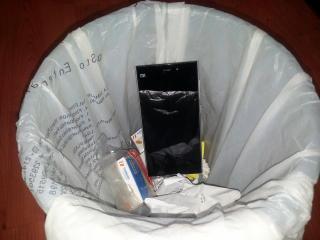
|
|
|
|
|



 Quote
Quote

 0.0505sec
 0.31
0.31
 7 queries
 GZIP Disabled